
Why AI Agents Forget Everything, and How Long-Term Memory Fixes It
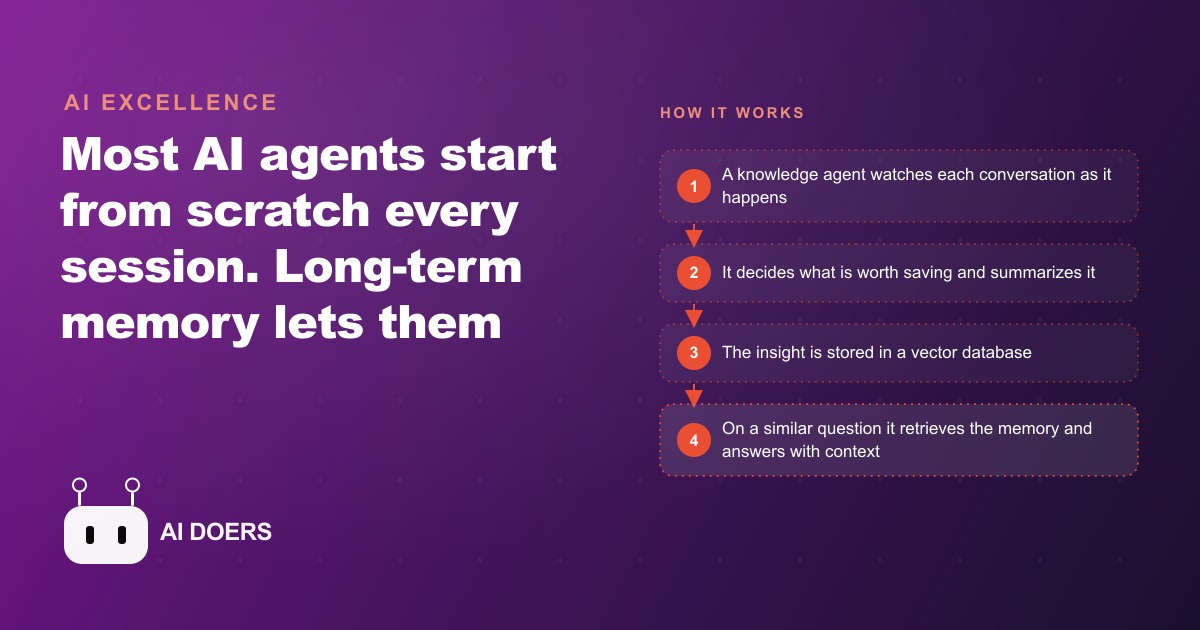
Most AI agents are stateless, so every session starts cold with no memory of past conversations. Adding a knowledge agent that saves the right facts to a vector database and retrieves them later, like a RAG pipeline, lets an agent remember preferences, follow learned procedures, and improve over time.

Decide what is worth remembering before you write a line of code
Every AI agent starts from the same blank slate. It has no memory of yesterday's conversation, no record of what the customer said last month, and no knowledge of the procedure that worked the last time a problem like this came up. You can repeat the same information every time and work around this by starting each conversation with a detailed context block, but that approach has a ceiling. The agent's useful context window fills up with re-establishing what it already should have known, leaving less room for the actual work.
I am Madhuranjan Kumar, and this piece is a step-by-step playbook for one specific outcome: an agent that retains useful information between sessions, remembers customer preferences and learned procedures, and gets incrementally more useful over time without any manual effort from your team.
Before any code is written, the most important decision is the one most teams skip: deciding exactly what categories of information are worth saving. Not all information from a conversation has long-term value. Most messages contain nothing that would change how the agent behaves in a future conversation. Filtering aggressively at the decision layer keeps the memory store clean and makes retrieval accurate. A bloated vector database full of irrelevant facts returns noise on every search, which degrades answer quality rather than improving it.
The categories worth saving, for most business applications, are four in number. Preferences: things the customer or user has stated they want or do not want, like appointment times, communication style, or product types. Confirmed facts: specific details that are unlikely to change, like their insurance plan, their service tier, or the version of a product they use. Learned procedures: answers to questions that required human escalation, captured so the same question can be handled automatically in future. Escalation answers: the specific text of what a knowledgeable person said when the agent could not answer, stored verbatim so the next response is based on the expert's actual words rather than a paraphrase.
Defining these categories before you build anything shapes every decision that follows. The knowledge agent needs to know which category any piece of information belongs to. The vector database schema reflects these categories. The retrieval logic uses them to filter results. Starting with clarity on what you are saving prevents the most common failure mode in memory systems, which is a database full of miscellaneous text that retrieval cannot distinguish from what is actually useful.
Add the knowledge agent that watches and judges
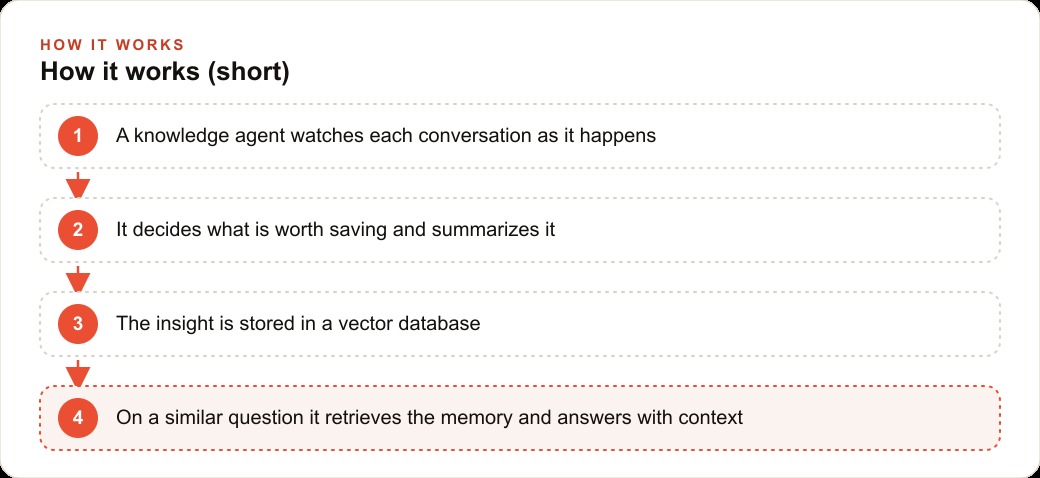
With the categories defined, the next step is building the knowledge agent. This is a second AI instance running alongside your main agent, with one narrow job: read each conversation as it happens and decide whether anything is worth saving.
The knowledge agent does not participate in the conversation with the customer. The customer only sees the main agent's responses. The knowledge agent observes everything and applies the category definitions you established in the first step. When a customer mentions they prefer email over phone contact, the knowledge agent recognizes that as a preference worth saving, summarizes it as a clean fact, and queues it for storage. When a customer asks what the return window is and the main agent answers correctly, the knowledge agent decides that is a standard policy answer and does not save it. When a human escalates and provides a specific answer to an unusual question, the knowledge agent captures that answer verbatim under learned procedures.
The quality of the knowledge agent's judgment is the rate-limiting factor for the whole system. An agent that saves too much fills the memory store with noise. An agent that saves too little leaves gaps that force repeat escalations. Getting this judgment right requires a clear prompt that explains the four categories and gives examples of what belongs in each one and what does not. The first week of operation will surface cases the original prompt did not anticipate, and you will update the knowledge agent's instructions based on what you see in the memory store. That is expected and normal.
One practical design choice is to run the knowledge agent asynchronously after each conversation closes, rather than in real time during it. Running it in real time adds latency to every message exchange and is usually unnecessary, because the memory from today's conversation is most useful starting tomorrow. Batch the knowledge agent runs nightly or after each session closes. This keeps the main agent's response time fast and makes the memory updates systematic and reviewable.
A clean way to think about the knowledge agent's role: it is the part of the system that turns each conversation from a transaction into a lesson. The main agent handles the transaction. The knowledge agent extracts the lesson, decides whether it is worth keeping, and files it. Neither agent tries to do the other's job.
Wire the vector database and the save step
The knowledge agent decides what to save. The vector database is where the save happens. A vector database stores information as numerical embeddings that capture the meaning of text, not just its keywords, so a search for "patient prefers morning appointments" can retrieve a stored memory that says "early slots preferred" because the meanings are similar even though the exact words differ.
Chroma is the right starting point for most implementations because it runs locally, costs nothing, and handles millions of entries without strain on normal business volumes. For teams that want to run the memory system on a cloud server without managing the database themselves, Pinecone has a free tier adequate for small-to-medium business applications.
The save step takes the knowledge agent's output, a clean summary of one fact in one of your four categories, and writes it to the vector database with three pieces of metadata: the category it belongs to, the customer or user it is about, and the timestamp. The category metadata enables filtered retrieval later, so a search for preferences on a specific customer does not return all the learned procedures as well. The customer identifier links each memory to the right person. The timestamp is used to prioritize recent memories over older ones when both are relevant.
The embedding model converts the text summary into the numerical representation the database stores. A fast, inexpensive embedding model works well for this because you are embedding short factual summaries, not long documents. The cost of embedding a sentence-length summary is a fraction of a cent, making the running cost of a memory system for a business handling hundreds of customers per week negligible.
The save step also needs a duplicate check before it writes. If the knowledge agent wants to save a preference that already exists in the database for this customer, it should trigger the update path rather than writing a second entry. Two entries with the same category and customer identifier create a retrieval ambiguity that is hard to resolve later.
Build retrieval that appends past context to the right questions
Saving memories is half the system. Retrieval is how those memories affect the agent's behavior in a new conversation. Without retrieval, the memories exist in the database but never influence any response, which makes the whole system pointless.
The retrieval step works like this: when a customer sends a message, the system runs a vector search against the memory database using that message as the query. The search returns the three to five most semantically relevant stored memories for that customer. Those memories are appended to the top of the prompt that goes to the main agent, framed as background context the agent should take into account. The agent answers the customer's question with that context already present, without needing to ask for information the database already holds.
The framing matters. The appended memories should be formatted clearly so the agent understands they are established facts, not things to verify. A format that works consistently: "Past context: This customer prefers email contact. Their insurance plan is Plan X. They have two children who sometimes accompany them to appointments." The main agent reads this as a briefing and incorporates it naturally into the response.
The retrieval step should be scoped to the specific customer whenever possible. Retrieving memories from the whole database and finding the ones most similar to the current question returns noise when different customers have similar questions about different topics. A filtered search that first narrows to the current customer's memories and then ranks by similarity produces much cleaner results, because all the retrieved memories are guaranteed to be relevant to the person asking.
When the retrieval returns multiple memories in the same category, use the most recent one. A customer's preferences change over time, and the memory system should reflect the current state of what is known about them, not an average of everything they have ever said.
Gate the heavy steps so every message does not pay the full cost
A naive implementation runs a vector search on every single incoming message. For most messages, that search returns nothing useful because the message is a simple question the agent can answer from its training without any stored context. Running a full embedding and vector search for a message like "what are your hours?" wastes money and adds latency for no benefit.
The fix is a cheap, fast gating model that decides upfront whether retrieval is worth running. Send the incoming message to a small, fast model and ask it to classify the message: does this ask about something that could be informed by past context about this specific customer? If the answer is no, skip retrieval entirely and route the message straight to the main agent. If the answer is yes, run the vector search and append the results before sending to the main agent.
The gating model adds a few milliseconds to each request and costs a fraction of what the main model costs per message. For a business handling 1,000 messages per month, gating retrieval to only the messages that actually need it might reduce retrieval operations from 1,000 to 200 or 300. That cuts database costs by 70 to 80 percent while not affecting response quality at all, because the 700 messages that were gated out genuinely had no relevant stored context to retrieve.
The same gating logic applies to the save step. The knowledge agent does not need to evaluate every single message for possible saving. Gate the knowledge agent to run only on messages that contain the kind of information worth saving, which in most conversations is none at all. Most exchanges are task completions, not context-building moments. Let the gate catch both the save and retrieve decisions, and the system stays fast and affordable at scale.
Build the update path so facts stay current, not stale
A memory system that only writes and never updates is dangerous. Facts change. A customer switches insurance plans. A business changes its pricing. A team member learns a new escalation answer that supersedes the old one. A system that accumulates new entries on top of stale ones will eventually serve the agent two conflicting facts on the same topic, and the agent will pick one based on relevance ranking rather than accuracy.
The update step is structurally different from the save step. When the knowledge agent identifies a new fact that belongs to a category already in the memory store for this customer, it should update the existing entry rather than add a new one. The mechanism is: search for an existing memory in the same category for the same customer, compare it to the new fact, and if they conflict, overwrite the old entry with the new one and record the update timestamp.
This requires the knowledge agent to check before it saves, not just save unconditionally. The check adds a small overhead but is essential for maintaining memory accuracy over time. A memory that was correct three months ago but has since been superseded is worse than no memory at all, because it produces a confidently wrong answer that looks like a retrieval success.
Build the update logic from the start, not as an afterthought. Adding it later means going back through a database that may already have conflicting entries and resolving them by hand, which is tedious and error-prone. Starting with an update-aware save step means the database stays clean from day one.
In clinical and financial contexts, the update step is not optional. When a patient switches insurance from one plan to another, the stored plan detail must be overwritten before the next interaction, because quoting wrong coverage information creates a billing dispute that costs far more to resolve than the few seconds the update requires. Build the update path with the same care as the initial save, and test it explicitly before launch.
Design a graceful fallback for gaps
Even a well-built memory system has gaps. A customer asks about a preference the agent has never captured. A question comes in about a procedure that has never been escalated. The vector search returns no results because no relevant memory exists for this customer on this topic.
The failure mode to avoid is the agent confabulating an answer based on similar memories from other customers, or constructing a plausible-sounding response from its training data that does not reflect this customer's specific situation. That behavior looks like a retrieval success on the surface but produces incorrect personalization, which is worse than no personalization.
The correct fallback is a response that is honest about the gap and uses the gap as a memory-building opportunity. The agent says it does not have a record of the customer's preference on this point, asks the customer to share it, and uses the answer to populate a new memory entry. The customer provides information once, and from that point forward the agent knows it. That loop is how the memory system grows from what the team loaded initially to a rich database that reflects each customer's actual history.
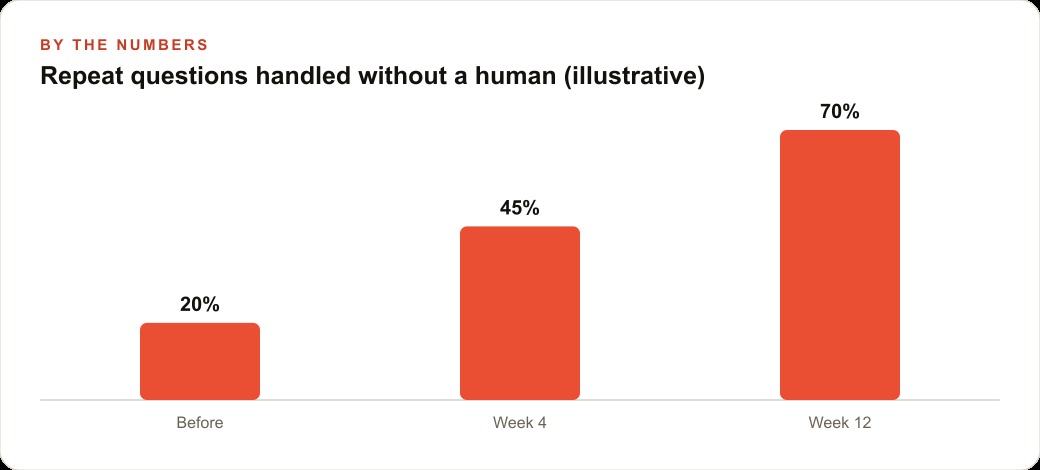
For procedures and escalation answers, the fallback is to escalate to a human exactly as the agent would have before the memory system existed. The knowledge agent then captures the human's answer and stores it so the same question is handled automatically next time. Over the first few months of operation, the share of repeat questions that require human escalation drops steadily, because the knowledge agent is capturing every escalation answer and turning it into a stored procedure the main agent can retrieve directly.
Design the fallback message with care. "I do not have a record of your preference for this, could you remind me?" is clean and honest. It does not make the customer feel like the system forgot something; it invites them to contribute something the system will actually remember this time.
A dental practice at 800 active patients
For a dental practice managing 800 active patients, long-term memory turns a forgetful front-desk chatbot into an assistant that functions like a seasoned staff member who has been there for years.
The categories the practice stores are: appointment preferences, insurance plan details, anxiety notes, and confirmed contact methods. When a patient texts to reschedule a cleaning, the agent searches the memory store for that patient's preferences and finds they always prefer early morning slots and have noted anxiety about drilling procedures. The agent offers 8 am or 9 am options and opens with reassuring language about the cleaning being a simple, non-invasive visit. The patient gets a reply that feels personalized without any staff member pulling up a file.
A practice with 800 active patients might receive 40 to 60 incoming messages per week. If the knowledge agent's analysis suggests that 30 percent of those involve something worth capturing or updating, that is 12 to 18 memory operations per week that happen automatically. Over a year, the practice accumulates roughly 600 to 900 stored facts about its active patients, covering the preferences and details that make every future interaction smoother.
The escalation-to-memory loop is where the savings compound most clearly. When a patient asks about a specific post-extraction rinsing protocol and the main agent does not have that procedure stored, it escalates to the dental hygienist. The hygienist replies. The knowledge agent captures the reply verbatim under learned procedures. The next patient who asks the same question, whether at noon on a Tuesday or at 11 pm on a Saturday, gets the hygienist's actual answer delivered instantly. Over six months of operation, the share of after-hours messages that require staff response drops from nearly all of them to a small fraction of the unusual cases.
The update step is essential in a clinical context. When a patient switches insurance from one plan to another, the stored plan detail must be overwritten before the next interaction, because quoting wrong coverage information to a patient creates a billing dispute that costs far more to resolve than the few seconds the update requires. The knowledge agent identifies the plan change from the patient's message and overwrites the insurance entry in the same pass that processes the conversation.
The concrete time return breaks down like this. At 12 to 18 front-desk interactions per week recovered from memory, each averaging three minutes of staff time, the practice returns 36 to 54 minutes of weekly front-desk availability to tasks that require human judgment: difficult conversations, insurance disputes, scheduling conflicts, clinical questions that need a clinician's voice. That is not a dramatic transformation in week one, but over a year it is the equivalent of reclaiming roughly 30 hours of front-desk time that would otherwise have gone to answering the same questions repeatedly.
The system also improves passively. Every week that passes, the knowledge agent captures more learned procedures, more patient preferences, and more escalation answers. The agent that handles a patient interaction in month six is drawing from a much richer database than the one that handled the same patient's question in month one. The investment in the setup compounds without requiring additional configuration.
That is exactly what we do at AI DOERS. Book a private 30-minute call with Madhuranjan Kumar and we will map the fastest path to it for your specific business.
Book your call →
Madhuranjan Kumar
Madhuranjan Kumar brings 20 years of performance-marketing experience and has managed over $200 million in Facebook ad spend for brands across the United States and beyond. His expertise spans the full modern marketing stack: Meta, Google Ads, TikTok, email automation, CRM, and the websites that hold it together. At AI DOERS he turns that track record into lead-generation systems for businesses across every industry.