
What MCP Actually Is, and Why Every AI Builder Should Learn It
MCP is an open standard from Anthropic that connects any AI agent to any tool or data source through one shared interface, the way USB connects any device to any computer. Here is what it is, how it works, and what it unlocks for a real business.

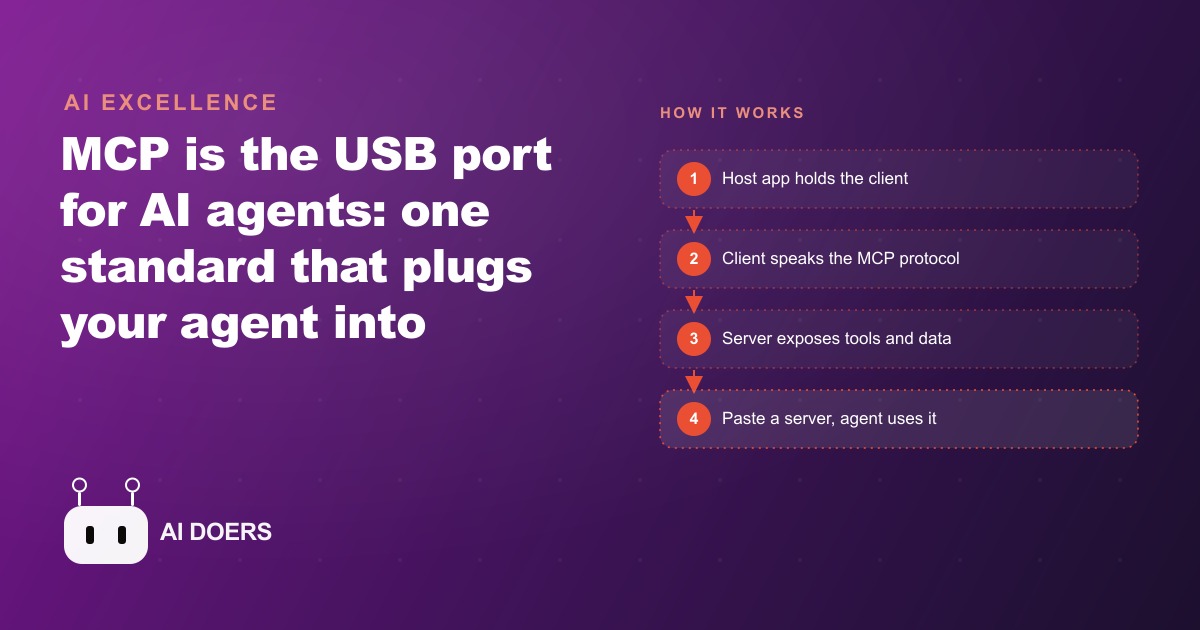
In the months after it launched, the number of ready-made MCP servers blew past 20,000. That single fact tells you almost everything about why builders keep calling MCP a game changer. I am Madhuranjan Kumar, and I want to lay out what MCP actually is in plain terms, because the name, Model Context Protocol, makes it sound heavier than it is. Underneath the jargon is one of the simplest, most consequential ideas in AI right now. Here are the things worth understanding, each one a piece of the picture.
1. MCP is a USB port for AI agents
The cleanest way to picture MCP is a USB port. Before USB, connecting a microphone, a webcam, and a printer to a computer meant different cables, different adapters, and custom software for each device. After USB, you plug in and it works. MCP, an open standard from Anthropic, does exactly that for AI agents. It is one shared way for any agent to connect to any tool or data source, so the connection works the same every time. That standardization is the whole innovation. The connector is unglamorous, and the fact that it is unglamorous and universal is precisely what makes it powerful.
2. It kills the custom-integration mess
To feel why this matters, picture what came before. Say you wanted a scheduling agent that could touch your calendar, your email, a video-call tool, and a booking system. Each of those has its own API with its own quirks, so you had to write separate, hand-built integration code for every single one. That is slow to build, brittle to maintain, and it breaks the moment one of those APIs changes underneath you. MCP replaces all of that with a shared interface. Instead of four bespoke integrations that each rot over time, you connect four servers that all speak the same protocol. The integration work stops being a custom project and becomes a config you paste in.
3. Over 20,000 servers already exist, and anyone can add more
The reason the ecosystem exploded is that a standard invites contribution. Once the connector was fixed, anyone could write a server, publish it, and let everyone else use it as a plug-and-play tool. Within months the count crossed 20,000. This is the classic pattern of any successful standard: the connector becomes common, and the things that plug into it multiply on their own, faster than any single company could ever build them. For you, it means the tool you want to connect has very likely already been built by someone else, sitting there ready to grab.
4. Using a server is copy and paste, not coding
The actual usage is almost anticlimactic, which is the point. You find a server for the capability you want, copy its config into your agent app, and start asking the agent to do the thing. In the demonstration, a stock-data server let the agent pull ten years of coffee prices and plot them with no glue code at all. Grab the server, paste the config into a host like Claude Code, ask your question. There is no integration to write, no API keys to wire by hand into custom code, no maintenance to own. That gap, between writing an integration and pasting a config, is the entire value proposition in one motion.
5. Host, client, server: the three parts to keep straight
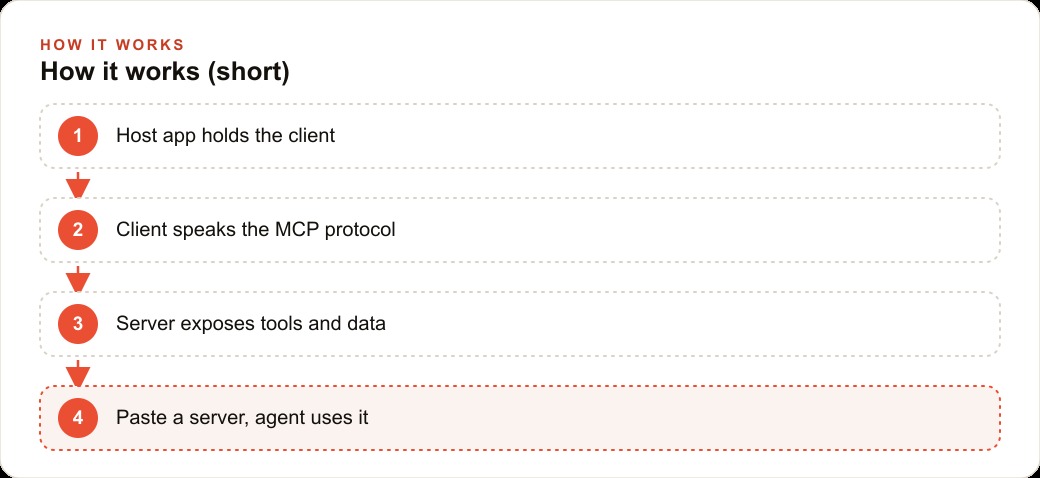
There are exactly three pieces, and confusing them is where people get stuck. Madhuranjan Kumar is the LLM application that wants tools, like Claude Desktop, an IDE, or an automation platform such as n8n. The client lives inside Madhuranjan Kumar and speaks the MCP protocol to hold the connection open. The server is the lightweight program that exposes the actual capabilities. Madhuranjan Kumar houses the client, and the client talks to the server. Keeping this straight is not academic. When something breaks, you immediately know which of the three layers to inspect instead of guessing, and that alone saves hours of debugging.
6. A server exposes three things, not one
Most people think a server only offers actions, and they miss two-thirds of what it can do. A server can expose tools, which are the actions an agent takes, like sending an email or running a calculation. It can expose resources, which are read-only data the agent can query but not change, such as logs, files, or customer records. And it can expose prompt templates, pre-written blueprints so a person just fills in the specifics instead of doing their own prompt engineering. Understanding all three is what separates someone who bolts a couple of actions onto an agent from someone who builds an assistant that reads, acts, and guides.
7. Resources are read-only, and that safety is a feature
The read-only nature of resources deserves its own spotlight, because it solves a real fear. When you want an agent to read your history without any risk of altering it, resources are the answer. Files, logs, database records, saved notes, all exposed as things the agent can pull for analysis but can never accidentally change. For any business holding sensitive records, this boundary is not a limitation, it is a safety guarantee built into the design. The agent can reference a client's history to inform a decision while being structurally incapable of editing that history. That distinction between what an agent can read and what it can change is exactly the kind of control that a trustworthy CRM and website stack is built around.
8. Prompt templates remove the prompt-engineering burden
The third capability quietly solves the biggest adoption problem in most companies: non-technical staff do not want to learn how to phrase a request. Prompt templates fix that. A builder bakes an expert prompt into the server, and the user just fills in the specifics. Instead of guessing how to word a request and getting an uneven result, the person selects a template and provides a name or a date, and the careful wording is already handled. This is what makes an agent usable by the front desk rather than only by the person who built it, and it is the difference between a tool that gets adopted and one that gathers dust.
9. Local versus remote transports, and why streamable HTTP won
There are two ways a client and server talk, and it is worth knowing which is which. Local servers run on your own machine and log over standard out, which is simple and private. Remote servers communicate over HTTP, and among the HTTP options, streamable HTTP is now preferred because it supports both kinds of connection. It handles stateful sessions, where the server remembers your context across calls, and stateless requests, where each call stands completely alone. You do not need to memorize the internals, but knowing that remote servers can either remember or forget, by design, helps you pick the right one for a job that needs continuity versus one that does not.
10. You can build your own, no-code or with code
Building a server is not reserved for engineers. In an automation platform like n8n, you drag in a server trigger, attach a tool such as Gmail and a calculator, activate the workflow, and copy the production URL into any host like Claude Desktop. That is a working server with no code at all. When you need more than actions, specifically resources and prompt templates that the no-code path cannot provide, you move to code in a language like Python. The demonstration showed a Python server for Google Sheets that listed spreadsheets, read columns, and ran an analysis straight from a built-in template. So the on-ramp is gentle: start no-code for simple tools, graduate to code when you want the full three-capability server.
A worked example: an MCP-connected med spa
Let me make all of this concrete with one business. Picture a med spa whose front desk juggles a booking system, an email tool, a shared calendar, and a customer records sheet. The staff lose real time hopping between all four, and every handoff is a chance to drop something. Here is how I would set it up with MCP instead of custom code.
I would put an AI agent in Madhuranjan Kumar app and connect each of those tools through an MCP server, so the whole stack speaks one protocol. The booking and email tools would be exposed as tools, so the agent can actually book an appointment and send a confirmation. The client history and treatment notes would be exposed as resources, strictly read-only, so the agent can pull a returning client's record to inform a recommendation but can never accidentally alter a medical note. And I would ship prompt templates for the common jobs, like drafting a follow-up message after a specific treatment, so the receptionist just fills in the client name and the template handles the careful wording. The result is one assistant that spans every tool the spa already uses, assembled from off-the-shelf servers rather than weeks of bespoke integration, with the read-only boundary keeping sensitive records safe by design.
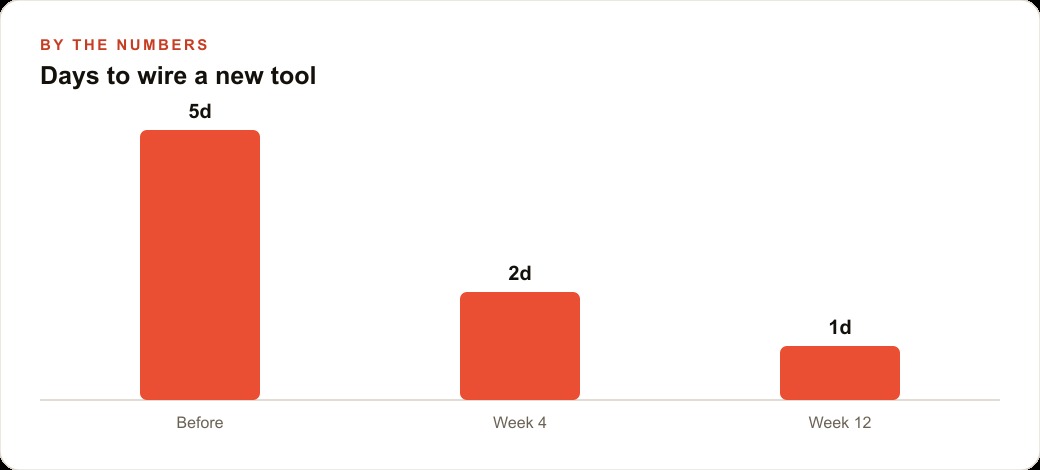
Now consider the illustrative payoff on the one metric that hurts most: the time to wire up a new tool. Under the old custom-integration approach, adding a new system to the agent might take on the order of five days of building and testing. With MCP and a ready-made server, that first new connection might drop to around two days, mostly configuration and checking. By the time the team has done it a few times and knows the pattern, a further tool might take roughly a single day. Those numbers are illustrative rather than measured, but they capture the real trajectory: the integration cost falls steeply because you are pasting configs instead of writing and maintaining code. That reclaimed time is time the spa can put back into serving clients, or into the Facebook and Instagram ad campaigns that keep the appointment book full.
Why a standard beats a better integration every time
There is a temptation to look at MCP and think a well-written custom integration would be just as good, maybe better, because it is tailored to your exact setup. For a single tool, on a single day, that is sometimes true. Over any real span of time, it is not, and the reason is the same reason USB beat the pile of proprietary cables it replaced. A bespoke integration is only as durable as your willingness to maintain it. When the underlying API changes, and it will, the custom code breaks and someone has to fix it. Multiply that across every tool an agent touches and you have a standing maintenance tax that never goes away.
A standard moves that burden off your desk. When a tool ships an MCP server, the person maintaining it against API changes is usually the tool's own team or the community, not you. You paste a config and inherit their upkeep. That is the quiet superpower of standardizing the connector: the work of keeping connections alive gets distributed across the whole ecosystem instead of piling onto whoever wrote the original glue. It is also why the server count could explode into the tens of thousands so quickly. Nobody had to coordinate. Each team built the one server they cared about, published it, and every host could use all of them at once. A better one-off integration is a sandcastle. A standard is a foundation, and for anything you plan to run longer than a weekend, the foundation wins.
Where to start this week
The practical takeaway is short. Stop writing custom glue code. Pick a ready-made server for a tool you already use and paste its config into your host. Map your setup as host, client, and server so you always know which piece to debug. Favor servers that ship prompt templates so your team can skip the prompt engineering entirely. Pay a little attention to transport, choosing local for private on-machine tools and streamable HTTP remote for anything that needs to remember context. Then, when you are ready, build your first server in a no-code platform and graduate to code only when you want resources and templates too.
MCP is worth learning whether you run a clinic, a shop, a brokerage, or a service business, because it turns integration from a project into a paste. The knowledge you build wiring these connections also compounds into everything adjacent, from a smarter internal knowledge base that feeds SEO and organic search to an agent that finally spans your whole toolset. You can learn this and wire it up yourself, and honestly every builder should. If you would rather have your tools connected and your agent shipped for you so it simply works across your business, that is exactly the kind of build I take on.
That is exactly what we do at AI DOERS. Book a private 30-minute call with Madhuranjan Kumar and we will map the fastest path to it for your specific business.
Book your call →
Madhuranjan Kumar
Madhuranjan Kumar brings 20 years of performance-marketing experience and has managed over $200 million in Facebook ad spend for brands across the United States and beyond. His expertise spans the full modern marketing stack: Meta, Google Ads, TikTok, email automation, CRM, and the websites that hold it together. At AI DOERS he turns that track record into lead-generation systems for businesses across every industry.