
How to Use Midjourney to Create On-Brand Visuals for Your Business in 2026
Midjourney makes stunning images in minutes, and style reference codes let you keep them all looking like one brand. Here is the simple workflow and how I would use it for a business.

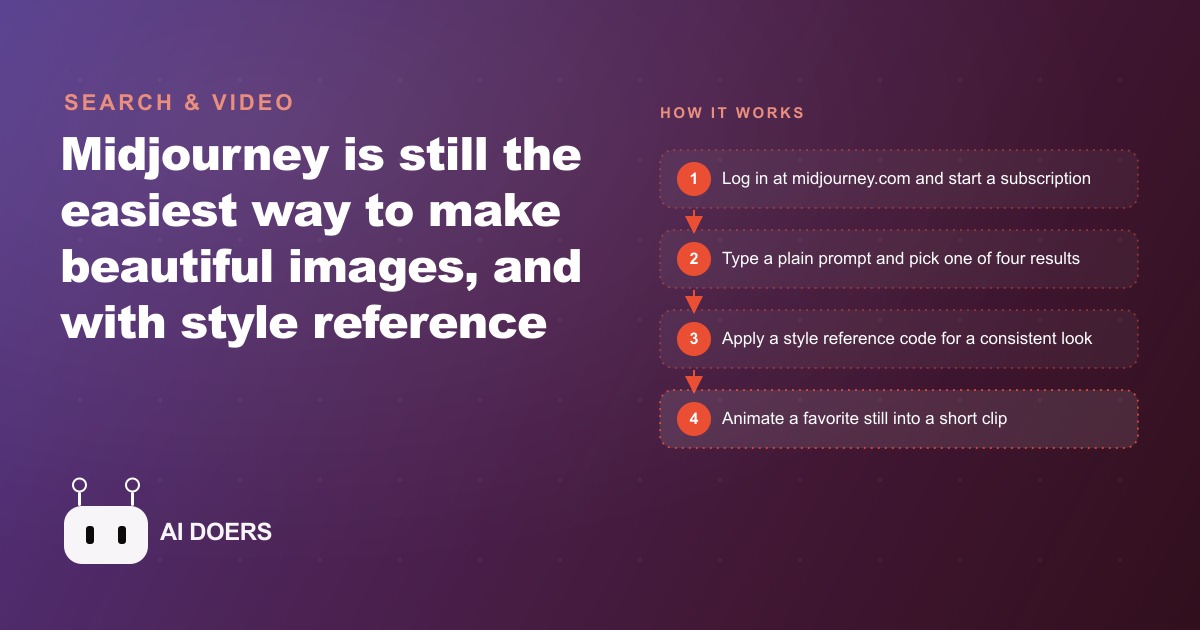
A polished visual set that used to cost a photographer and a full day can now come out of an afternoon and a browser tab. Midjourney is still the easiest way to make genuinely beautiful images, and in 2026 the feature that turns it from a toy into a business tool is the style reference code, which keeps every image looking like it belongs to one brand.
I am Madhuranjan Kumar, and this is the exact playbook I would follow to build an on brand visual library from scratch. Follow the stages in order. Each one builds on the last, and by the end you have a repeatable system rather than a folder of pretty but mismatched pictures.
Stage 1: Set up the three things you actually need
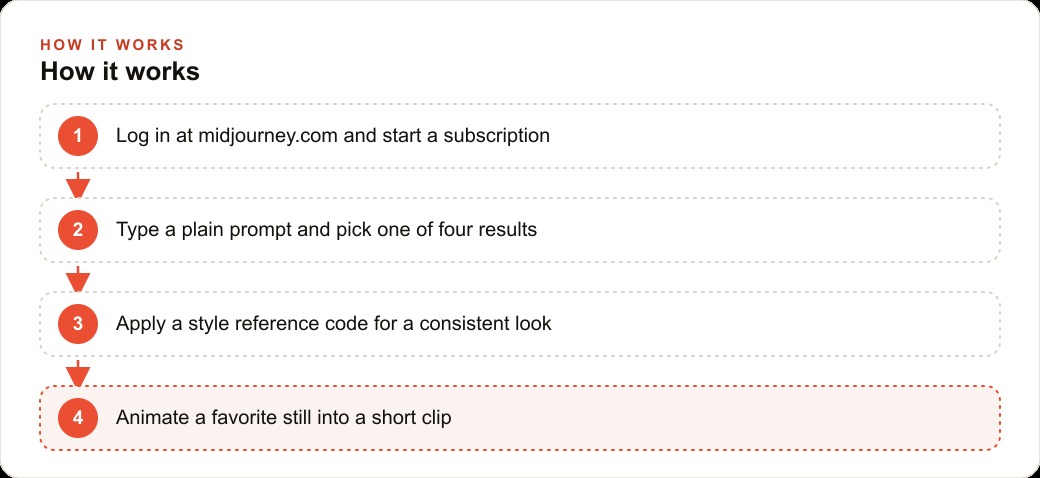
Do not overthink the setup. You need exactly three things: a Midjourney account, a paid subscription, and the web app at midjourney.com in your browser. You can create the account by logging in with a Google account. There is still a Discord version floating around, but the website now has every feature and is far simpler, so ignore Discord entirely and work on the web. Getting this stage right is mostly about not wandering into the old, confusing interface. Log in on the web, start a subscription, and you are ready. This whole stage takes about five minutes.
Stage 2: Learn how prompting behaves before you chase your brand look
Resist the urge to nail your brand style on the first prompt. Spend the first twenty minutes just generating to feel how the tool responds. Type a plain description at the top, something as simple as a cup of coffee on a wooden table, and Midjourney returns four versions. If you like one, click it to create variations. If you do not, send a new prompt and start over. This stage is deliberately low stakes. You are building intuition for how much detail a prompt needs, how it interprets words, and how the four options tend to differ. Every hour you spend here makes the later stages faster, because you stop fighting the tool and start directing it.
Stage 3: Shape the output with settings before you generate
The look is controlled before you hit generate, not after. Switch the orientation to portrait if you are making content for phones. Turn variety up or down depending on whether you want the four results to explore widely or stay close to your description. Small setting changes produce very different results, so treat this stage as tuning. The goal is to get the four returned options landing near what you imagined, so you are choosing between good candidates rather than fighting bad ones. Once you find settings that suit the kind of imagery your business needs, note them, because you will reuse them constantly.
Stage 4: Lock in a style reference code, the stage that matters most
This is the stage that turns Midjourney into a brand tool, so do not skip it. A style reference code, often called a sref, locks a specific look across every image you generate. Go to the explore tab, switch to the styles panel, and browse the different looks. When you find one that matches your brand's feel, warm and cozy, clean and editorial, bold and saturated, whatever fits, copy its style code. From then on, you paste that same code into every prompt. The latte, the storefront, the product shot, and the seasonal graphic all come back sharing the exact same mood, lighting, and color feel.
This is the entire difference between a feed that looks like a real brand and one that looks like random stock images stitched together. Save that style code somewhere you will not lose it, because it becomes your brand's visual signature. If you only take one stage from this playbook, take this one. Consistency, not individual image quality, is what makes visuals read as professional.
Stage 5: Batch your generation by theme
Now produce in a disciplined way instead of one image at a time. Decide the themes your business posts about most, then generate a coordinated set for each in one sitting, always carrying your locked style code. For a launch, that might mean a poster for the window, a header for the website, and a banner for the email, all in one session so they visibly belong together. Batching by theme is faster and, more importantly, it keeps a campaign unified, because everything in a batch inherits the same settings and style. Pick the best of each set of four as you go, and keep a running folder of your strongest results.
Stage 6: Animate your best stills into short clips
Squeeze extra value out of the images you already love. When you land on a strong still, turn it into a short video. Click the image, choose the animate option, and pick a low motion preset to bring it gently to life. Right clicking any image is the fastest way to reach those options. A slow drift over a fresh coffee pour or steam rising from a cup becomes a few second clip that is perfect for stories and reels, and it comes straight from an image you already made. This stage costs almost no extra effort and roughly doubles the usable output of every batch.
Stage 7: Handle rights and privacy before you publish
Close the loop with two practical checks, because ignoring them can bite you. First, your images are public by default unless you use stealth mode, which is only available on a higher plan. If you are generating concepts for an unannounced product or anything sensitive, upgrade for stealth before you start. Second, while you own commercial rights to what you make, large businesses need a higher tier for full commercial rights, so check the terms against your own revenue and situation. These are not reasons to avoid the tool. They are simply the fine print you settle once, up front, so nothing surprises you later.
Writing prompts that sound like your brand, not like everyone else's
The style code controls the visual mood, but the prompt controls the subject, and a business that writes lazy prompts still ends up with generic imagery no code can rescue. The habit that fixes this is to describe the specific thing your customers see, not a stock version of it. A prompt like coffee cup is a stock photo waiting to happen. A prompt like a flat white in a matte black ceramic cup on a reclaimed oak counter, morning light from the left, a blurred plant in the background carries the details that make an image feel like your place rather than any place.
I keep a short list of the concrete nouns that define a brand and fold them into every prompt: the actual materials, the real light, the recurring props, the color of the walls. For a coffee shop, that might be reclaimed oak, matte ceramics, hanging plants, and warm morning light. Those recurring anchors, paired with the locked style code, are what make a feed look designed instead of assembled. The prompt supplies the subject and the specifics, the style code supplies the consistent treatment, and together they produce images a regular customer would recognize as yours.
Iterate deliberately rather than randomly. When a result is close but not right, change one thing at a time, the light, then the framing, then a prop, so you learn what each word actually does. Save the prompts that land, because a working prompt is reusable intellectual property for your brand. Over a few weeks you build a small library of proven prompt formulas, one per content type, and generating a fresh on brand image drops from a creative struggle to a two minute task. That library, not any single image, is the real asset you are building.
A weekly rhythm that keeps the library alive
A visual system only pays off if it becomes a routine rather than a heroic one time effort. The rhythm I would set is simple. Once a week, sit down for one focused session, generate a themed batch carrying the locked style code, pick the best of each set of four, and animate one or two standouts into short clips. That single session produces enough imagery to cover the week's posts, a website refresh, and any ad creative, all sharing the same look.
Keep everything in one organized folder, sorted by theme, so nothing gets regenerated unnecessarily and the best results are always a click away. When a seasonal moment approaches, a menu change, a holiday, a promotion, run one larger coordinated batch so every channel launches with matching visuals on the same day. The discipline is what turns a fun tool into a dependable brand asset. Owners who treat Midjourney as an occasional novelty get scattered, mismatched results. Owners who give it a weekly slot build a growing, consistent library that makes the whole business look more established than its size, and it costs an hour a week rather than a photographer's day rate every time a fresh image is needed.
A coffee shop, worked end to end with illustrative numbers
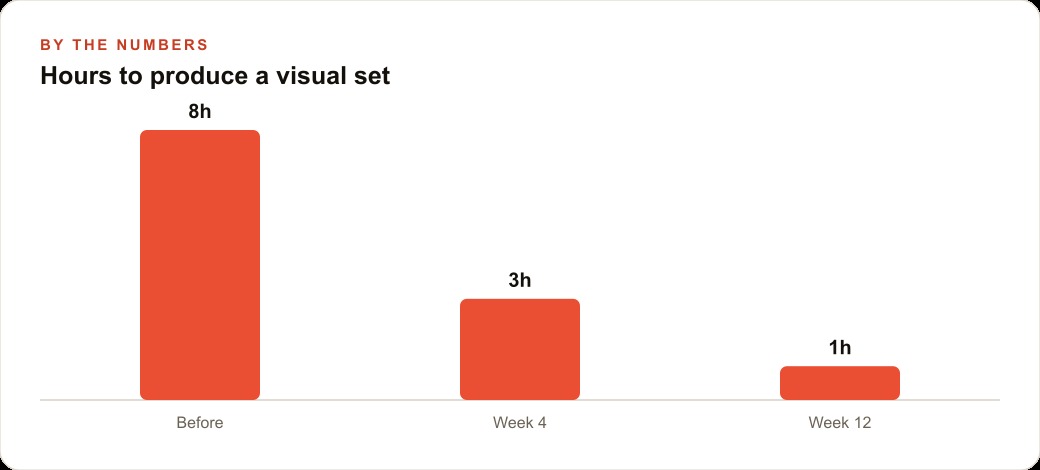
Let me run the whole playbook through one business so the stages connect. Picture a coffee shop that currently pays for occasional photography and cobbles the rest of its social feed from mismatched stock, spending maybe eight hours a month wrangling visuals that never quite match.
Working the stages in order, the owner writes prompts for the things the shop posts about most, the morning latte, a pastry on the counter, the cozy corner seating, and a seasonal drink. Then the key stage: they open the styles panel, pick one warm, inviting style that matches the shop's vibe, and copy its style reference code. From that point every prompt carries the same code, so the latte, the pastry, and the seating shots all share the exact mood and color. For a fall menu launch they generate a coordinated set in one sitting, window poster, website header, and email banner, all unified by the style code. They animate the strongest pour into a short clip for reels. What used to take eight hours of scattered effort now takes about one focused afternoon, and the result actually looks like a single brand.
That cohesive library does more than fill a feed. The same on brand images become scroll stopping creative when the shop puts a little budget behind Facebook and Instagram ad campaigns, and a consistent look raises the click through rate because the ad matches the brand people already recognize. Those images also dress up the website and menu pages, which quietly supports SEO and organic search since a polished, image rich page tends to hold visitors longer. And any promotion that drives sign ups or orders lands in the CRM and website stack where follow up can turn a first visit into a regular.
Start by subscribing and spending twenty minutes just generating to get a feel for how prompts behave. Then do the one thing that matters most, lock in a style, and save that code where you will not lose it. Generate in batches by theme, pick the best of each four, and animate the standouts. Keep the two practical notes in mind, images are public unless you use stealth mode, and large businesses need a higher tier for full commercial rights.
The honest part is that the tool is easy, but choosing the right style and writing prompts that truly match your brand takes some taste and iteration, and that is the part that separates a professional looking feed from a generic one. You can absolutely learn this yourself with a weekend of practice using the stages above. Or, if you would rather hand off building a locked brand style and a ready to post visual set, that is the kind of work I do for clients so the look is dialed in and consistent from the start.
That is exactly what we do at AI DOERS. Book a private 30-minute call with Madhuranjan Kumar and we will map the fastest path to it for your specific business.
Book your call →
Madhuranjan Kumar
Madhuranjan Kumar brings 20 years of performance-marketing experience and has managed over $200 million in Facebook ad spend for brands across the United States and beyond. His expertise spans the full modern marketing stack: Meta, Google Ads, TikTok, email automation, CRM, and the websites that hold it together. At AI DOERS he turns that track record into lead-generation systems for businesses across every industry.