
The Simple Onboarding Automation That Sold for $2,600
A four-flow customer onboarding system, built in about two hours with AI in only one step, sold for $2,600 because the client was buying an outcome instead of code. Here is how the same idea works for a real local business.

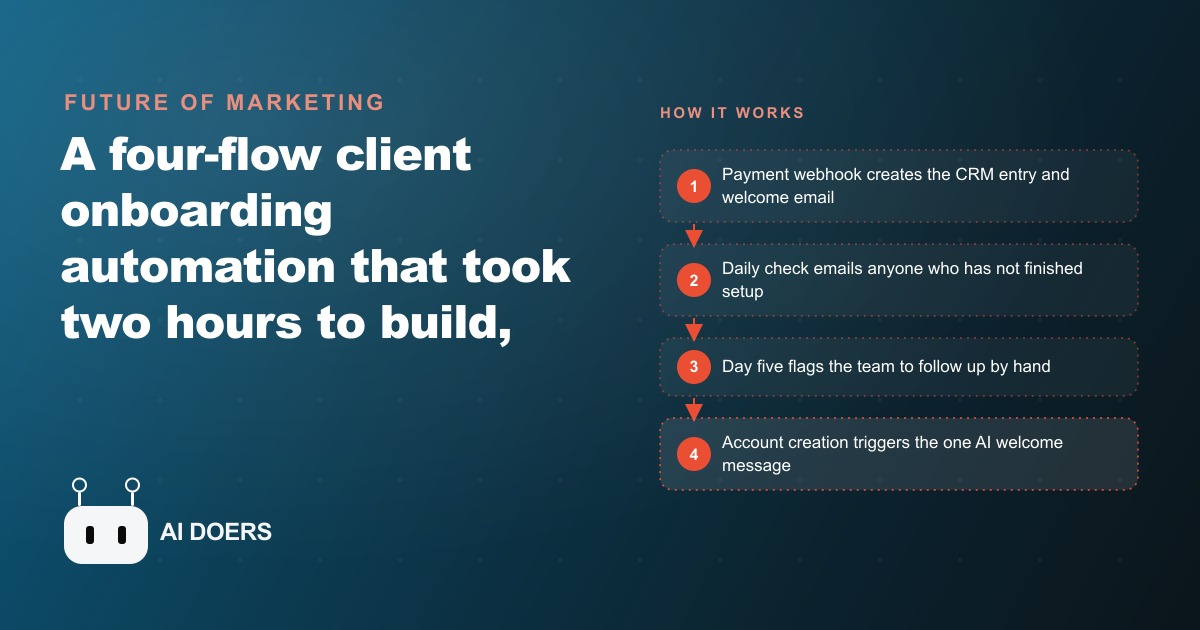
A four-flow customer onboarding system, built in roughly two hours with AI touching only one of those four flows, sold for $2,600. I am Madhuranjan Kumar, and the reason that number holds up under scrutiny is not that the builder was clever about code. It is that the builder was clear about what the client was actually buying. The client was not buying nodes on a workflow diagram. They were buying the certainty of never having to chase a new customer through onboarding by hand again. That reframe, from technology to outcome, is what makes the price sensible and what every service business should understand before building anything like this.
Wireframe the outcome before you write a single node
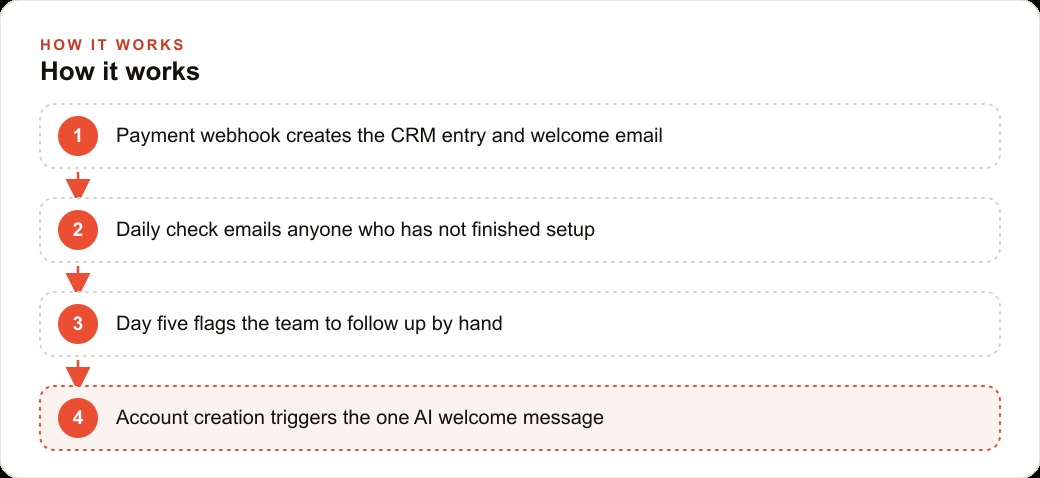
The whole system started as a four-box sketch shared with the client before any tool was opened. Box one: payment triggers welcome. Box two: daily check catches anyone stuck. Box three: escalation reaches a human at day five. Box four: account creation triggers a personalized note. That is the entire system described in one sentence per flow.
The reason this matters is not that sketching is a ritual. It is that agreeing on the outcome before building means you spend the build time executing a shared decision rather than making design choices mid-flow that require re-explanation later. The client sees four boxes, understands immediately what will happen when someone pays and then stalls, and approves the whole architecture in ten minutes. From that moment, every flow has a clear job description and you know you are done when each job is filled.
This is the step that most people skip. They open the automation tool first, start dragging nodes, and end up with a working system that the client only partially understands. The result is scope creep, change requests, and a client who feels they need to keep asking what it does. The wireframe removes all of that. The client co-designed the outcome before it was built, so the delivery confirms what they expected rather than surprising them.
Build the payment trigger and CRM row first
Flow one fires the moment a payment lands. The practical implementation is a webhook from the payment processor that hits the automation when a new transaction completes. The webhook carries the customer's details, and the first flow uses them to do three things in sequence: send a welcome email with a link to create an account, post an internal notification so the team sees the new customer, and write a row in the CRM with the customer's name, email, and a status tag of account creation.
The status tag is the most important element in the whole system, and it is worth understanding why. Every subsequent flow reads that tag to decide whether a person still needs attention. If the tag says account creation, they have paid but never set up. If it says follow up sent, they got a reminder. If it says human notified, the team has been asked to call. If it says account created, they are fully onboarded. The status column is the dashboard nobody has to maintain because the flows maintain it automatically.
This is also where a clean CRM and website integration determines how much the system can actually do. A payment processor webhook that writes cleanly to a CRM with the right field structure means the rest of the system works reliably. A payment processor that just sends an email notification means you are building extra translation steps that add fragility. Spend time on the CRM row before anything else, because every other flow depends on reading from it correctly.
The welcome email in this flow is straightforward and does not need to be clever. Its job is to set expectations, not to be memorable. What time should the customer expect to hear back? What exactly should they do next? Where do they go to create their account? Those three questions, answered clearly and immediately after payment, are worth more than any amount of warm copywriting.
Stack the daily status checks that keep anyone from slipping
Flow two runs on a schedule, typically once each morning. It reads the CRM, finds every contact whose status is still account creation, checks whether their follow-up date is today or past, and if so sends a reminder email and updates the status to follow up sent. That is the entire flow. No AI, no complexity, one condition check and two actions.
The reason this flow works so reliably is that it is rule-based and therefore almost impossible to break quietly. An AI-powered reminder system could drift in tone, misread a field, or make a judgment call that seems reasonable to the model but is wrong for the business. A rule-based check either runs correctly or it does not, and if it does not, the error is immediately visible. For something as operationally important as catching every customer who stalled, reliability matters more than cleverness.
Flow three runs on the same daily schedule but looks for a different condition: contacts who have been tagged follow up sent for more than two days without moving to account created. When it finds one, it posts a direct message to the team on the internal channel and updates the status to human notified. The team member who sees that message calls the customer. Nothing automated replaces that call, because by that point the silence from the customer probably means something worth a human conversation, whether it is a technical issue, a doubt, or a simple case of a busy week.
The escalation path is what separates a genuinely reliable onboarding system from one that just looks good in a demo. Every system has customers who do not respond to automated messages. The question is whether the business finds out about them on day five or never. Flows two and three together guarantee they find out on day five, every time, without anyone reviewing a spreadsheet.
Save AI for exactly one job, then price on what the system saves
Flow four is where AI enters the picture, and the choice to use it in exactly one place is the architectural decision that makes the whole system trustworthy. When a new customer finishes creating their account and fills in a few fields like their business name and goals, the AI reads those fields and writes a warm, personalized welcome email. Not a template with their name dropped in, but a paragraph that references what they actually told you about their goals and what they might get out of the service.
That personalization at the exact moment of account creation, while the customer is still paying attention and curious, lands very differently than a follow-up email a week later that could have been sent to anyone. The AI makes one email better. The rule-based flows handle everything else.
Limiting AI to this one job is what kept the build fast and the system robust. Every hour spent debugging an AI step that occasionally misreads a customer's intent is an hour that could have been spent on the next client. Narrow the AI's responsibility to the place where its output is most visible and most valuable, and let clear rules handle everything else.
Pricing the system is simpler than most people make it. Add up the staff time currently spent on onboarding tasks each week, multiply by fifty-two, and that is the annual cost of the problem. A system that eliminates most of that cost is worth a fraction of the annual savings to the client, and a fraction of many years of savings is often more than the quote you are afraid to send. The $2,600 price on this specific build reflects not hours of development but years of repeatable relief from a task that was previously eating staff attention every week. The client was not buying code. They were buying peace of mind and the certainty that no new customer would ever slip through a gap again.
Understanding the outcome framing also helps position this work naturally alongside other client investments. A business already spending on Facebook and Instagram ads to bring in new customers has an obvious interest in making sure those customers onboard correctly, because a customer who pays and then stalls is an ad spend that did not convert. The onboarding system closes the loop on the acquisition investment, and that framing is often what makes the conversation easy.
You can build a system like this yourself with a few days of focused effort and a modern automation tool. If you would rather have a clean, tested onboarding flow built and handed over so you can review the finished result and start using it immediately, that is the kind of work an expert can deliver in a short engagement. ## The numbers behind a typical build
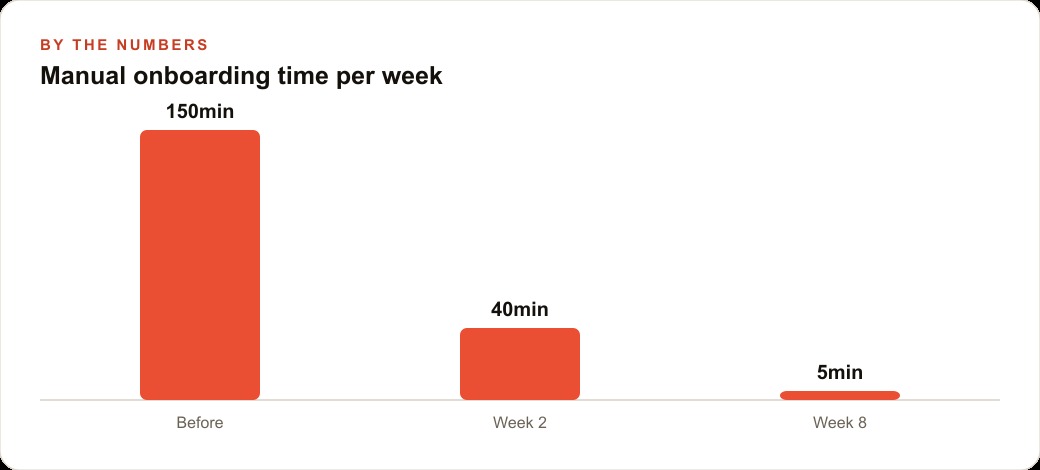
The financial case for a system like this is most clearly visible when you run the math on what manual onboarding actually costs in staff time. A realistic example: a software company with 40 new customers per month, each requiring a welcome email, a Slack notification, a CRM entry, one or two follow-up reminders, and a final personalized account-creation message. At five minutes per customer for the welcome and notification, three minutes each for the follow-up reminders when needed, and eight minutes for the personalized account-creation message, the total manual time per customer is roughly 20 minutes when everything runs smoothly and a customer completes onboarding without prompting.
When customers stall, add an average of 15 minutes across the customer base to track who is stuck and either send reminders manually or escalate to a call. With 40 new customers per month, the realistic manual overhead is 600 minutes per month at minimum, about ten hours of someone's working time, spent almost entirely on repetitive tasks with no judgment required.
A four-flow automation like the one described earlier reduces that to the time required to handle genuine exceptions: customers who need a personal call because they have a specific problem, customers whose account setup hits a technical issue, or customers who have questions beyond the standard scope. In practice that is roughly 15 to 20 percent of new customers, or about eight per month. Each requiring real human attention. The remaining 80 percent move through the system without any manual touch after the initial payment webhook fires.
From ten hours per month to two hours per month is eight hours recovered on a recurring basis. If the staff member handling onboarding earns $25 per hour, that eight hours has a direct cost value of $200 per month, or $2,400 per year. At that rate, a system that costs $2,600 to build has a payback period of thirteen months in pure labor savings, before accounting for the intangible value of customers who onboard correctly having a better first experience and being more likely to renew or refer.
For a higher-volume business or a business where onboarding stalls lead to cancellations, the return is faster. The business that loses two customers per month because they paid but never finished setup, where each customer represents $500 in annual recurring value, is losing $1,000 per month in preventable churn. An onboarding system that catches stalled customers on day five and escalates to a human call before they cancel has a revenue protection value that makes the build cost trivial by comparison.
The pricing principle that makes these conversations easy is to present the math rather than the technology. If the client can see that the system protects or recovers more than it costs within a year, the decision becomes obvious. The builder's job is to make that calculation visible and specific to the client's actual numbers, not to explain how webhooks and status tags work.
One final consideration: the automation that drives the most business value is almost never the most technically sophisticated one. It is the one that removes the friction from the action that has been getting deferred. For most service businesses, that is follow-up. The tool that ensures every customer who paid gets the right sequence of messages at the right time, without anyone having to remember to send them, is a more valuable automation than any reporting dashboard or analytics integration. Build the follow-up system first. Measure it for 30 days. Then consider what to build next.
That is exactly what we do at AI DOERS. Book a private 30-minute call with Madhuranjan Kumar and we will map the fastest path to it for your specific business.
Book your call →
Madhuranjan Kumar
Madhuranjan Kumar brings 20 years of performance-marketing experience and has managed over $200 million in Facebook ad spend for brands across the United States and beyond. His expertise spans the full modern marketing stack: Meta, Google Ads, TikTok, email automation, CRM, and the websites that hold it together. At AI DOERS he turns that track record into lead-generation systems for businesses across every industry.