
The New AI That Can Run Parts of Your Business for Months
The newest top model just edged out its biggest rival on coding, but the real story for owners is that it can now run a simulated business for hundreds of days and operate your apps for you. Here is what that means in practice.


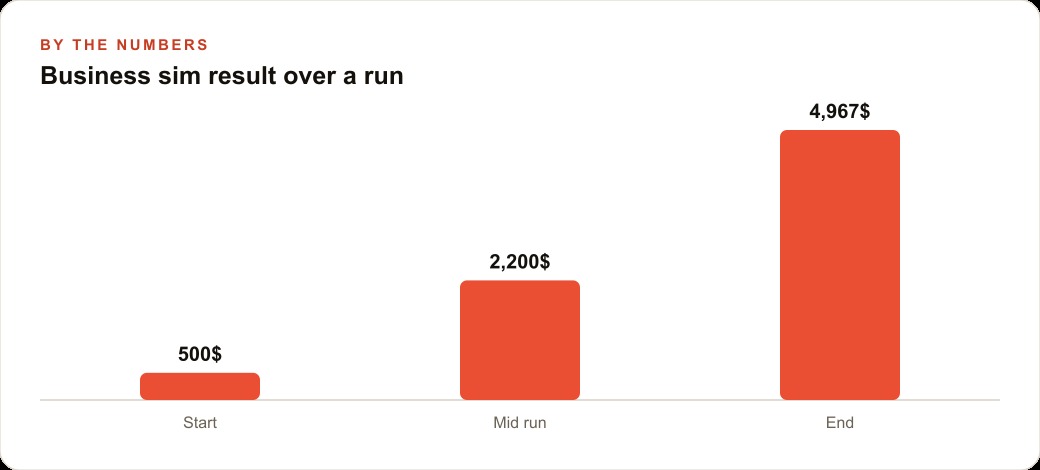
A new top-tier AI model turned five hundred dollars into nearly five thousand over the course of a multi-month business simulation, and the benchmark that produced that result tells owners something more useful than any coding score. I, Madhuranjan Kumar, spend a lot of time filtering AI announcements for the signal that actually changes how a business should operate, and the simulation result here is worth taking seriously because it measures something that benchmark tests almost never measure: whether the model stays coherent and productive across hundreds of sequential decisions without losing the thread of what it is supposed to be doing.
The coding benchmark is the number that gets the headline. The new model scored 80.9 on the main coding evaluation against 76.2 for the prior leader, which is a meaningful lead and which confirms a real technical advance. But coding benchmarks measure one-shot performance: given this problem, produce this answer. Real business work is not one-shot. It is a sequence of decisions, each one informed by the state left behind by all the decisions before it, sustained over days or weeks without a reset. A model that scores well on a quiz but loses coherence after a few hundred steps of a multi-day task is not useful for the kind of work most businesses actually need to automate. The simulation result is the one that should inform the buying decision for anyone considering putting this kind of model on a real repeating workflow.
Find the one task that repeats without variation every week
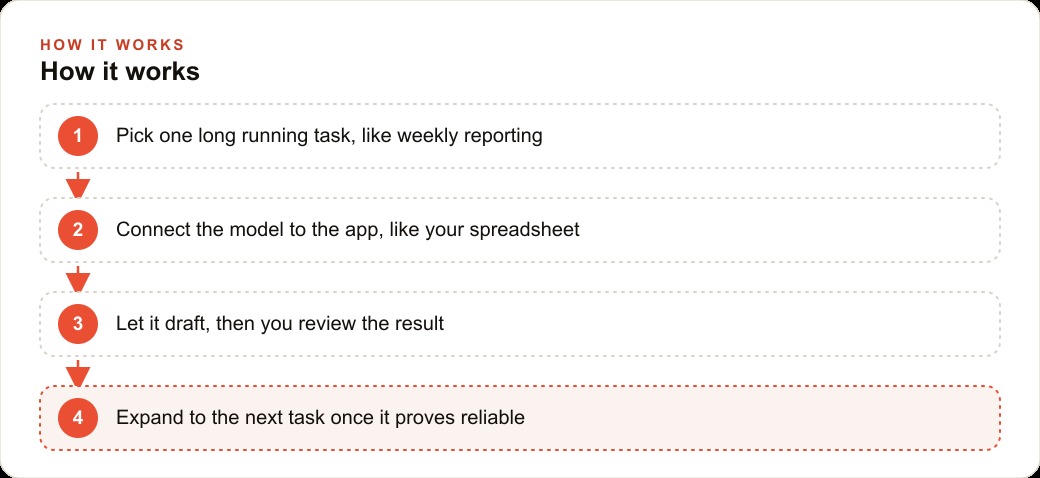
The first step in putting a long-horizon AI model to work is not choosing a model or configuring an integration. It is finding the right task. Most business workflows have at least one task that repeats without meaningful variation week after week: a report gets built from the same spreadsheet, a batch of messages gets drafted from the same input data, a set of invoices gets processed through the same sequence of steps. These are the tasks that should be first, not because they are the most valuable to automate but because they are the most verifiable. When a task repeats identically every week, you know exactly what a correct output looks like. That makes it straightforward to check whether the model is producing the right result before you trust it with anything more complex.
The simulation demonstrated why this approach matters. Running a small shop for hundreds of simulated days is a long-horizon task with a verifiable outcome: did the cash position grow, hold, or decline over time? The model that turned five hundred dollars into nearly five thousand was not guessing. It was making sequential decisions, stock level, pricing, what to source, when to reinvest, that compounded into a clear financial outcome. The same compounding logic applies to a repeating business workflow. A weekly report built correctly every week is not just a convenience. It is a compound return on a small initial investment of setup time.
When identifying the right first task, avoid tasks with high ambiguity or high stakes. A weekly revenue summary from a fixed spreadsheet is a good first task. Drafting a contract renewal proposal for a major client is not, because the output requires nuanced judgment that you cannot verify mechanically. The first task should be something where the model's output is either right or clearly wrong, where you as the reviewer can check it in five minutes or less, and where a wrong output has low consequences because you are reviewing it before it goes anywhere.
For a roofing contractor, the first task is typically the weekly jobs and materials summary: a clean one-page view of leads received, quotes sent, jobs won, and materials cost for the week, pulled from the spreadsheet where the estimator logs everything. For a dental practice, it might be the daily appointment status: confirmed slots, outstanding confirmations, gaps in the schedule. For a marketing agency, it might be the weekly campaign performance digest across all active clients, pulled from the dashboards where the numbers already live. The specific task is less important than the discipline of choosing one task and running it long enough to trust it before adding the next.
Connect the model to the data source it actually reads
The second stage is the integration, and the most important principle here is to connect the model to the data source your business actually uses rather than to a version of that data that was created for the AI. This distinction matters more than it might seem. A common pattern is to export data from the real system, clean it, reformat it, and pass the cleaned version to the model. That pattern works for one-time tasks but fails for repeating workflows because the manual cleaning step becomes a weekly burden that eventually gets skipped or done inconsistently.
The better approach is to connect the model directly to the format the data already exists in, and instruct the model to handle the messiness of real-world data rather than preprocessing it upstream. Real business spreadsheets have merged cells, inconsistent date formats, notes columns with free-form text, and occasional rows where someone entered data in an unexpected format. A model that can operate your actual spreadsheet, as the computer-use capability demonstrated in this release allows, handles that messiness as a natural part of the task rather than requiring a clean-room version of the data.
For a business running both Meta ads and Google Ads with results scattered across two different dashboards and a third spreadsheet tracking booked revenue, the integration stage is about connecting the model to all three sources rather than asking a person to manually consolidate them before the model reads them. The new capabilities in this release, including spreadsheet reading and browser operation, make that three-source integration more straightforward than it was previously. The model can open the dashboards, read the numbers, cross-reference them with the revenue spreadsheet, and produce a unified weekly read without any intermediate human consolidation step.
At this stage, also decide how much data to pass per session. Long-horizon models can stay coherent across many steps, but passing an entire year of daily transaction records into a single prompt is wasteful and unnecessary for most reporting tasks. Define the relevant time window for each task, typically the previous seven days for a weekly report, and pass only that window. This keeps the per-run cost predictable and prevents the model from producing analysis that is diluted by irrelevant historical context.
Build a review checkpoint so the output never runs unseen
The third stage is the one most likely to be skipped by owners who are excited about automation, and it is the stage that determines whether the tool remains trustworthy over months of use. Before any output from the model goes anywhere, a person reviews it. Not because the model is likely to produce something wrong, but because the review step is what keeps the owner aware of what the system is doing and catches the rare case where something does go wrong before it propagates downstream.
The business simulation result, five hundred dollars growing to nearly five thousand over hundreds of days, is compelling precisely because it describes a model that stayed on task and made consistently reasonable decisions over a long period without losing coherence. But even in that simulation, the decisions were being monitored and the outcome was being tracked. In a real business workflow, the review checkpoint is the equivalent of that monitoring. It is not a bottleneck. It is the mechanism that keeps the automation trustworthy over time.
For a weekly report workflow, the review checkpoint is simple: the model produces the report as a draft, it lands in a folder or a message the owner checks, the owner reads it in five minutes, and if it looks right, it gets shared or filed. If something looks off, the owner investigates before the report goes anywhere. That five-minute review is what separates a reliable automated workflow from one that produces a significant error three months in and nobody notices until the error has affected real decisions.
The review checkpoint also catches something that purely technical monitoring cannot: whether the output is still useful. A weekly report that was genuinely valuable in the first month of operation can gradually drift toward being a formality that nobody reads carefully anymore. The review step keeps the owner's attention on whether the output is actually informing decisions or whether the task has stopped being worth automating in its current form. That kind of drift is difficult to detect from the numbers but obvious to a person who reads the output each week with fresh eyes.
For businesses where the model is connected to a CRM and website stack and producing outputs that affect customer-facing communications or records, the review checkpoint is also a quality control layer for client experience. Draft messages reviewed before they are sent, report summaries reviewed before they are filed into client records, proposed schedule changes reviewed before they are applied, all of these benefit from human eyes before execution, regardless of how reliable the model has been in previous weeks.
Expand to the next task only after the first one proves reliable for four weeks
The final stage of the playbook is timing. Most owners who get a first automated workflow running correctly want to expand to the next one immediately. That instinct is understandable and usually counterproductive. Four weeks of reliable operation on the first task is the right threshold before adding the second, for several reasons.
Four weeks is long enough to see the first task run through different conditions: a week with unusually high volume, a week with incomplete input data, a week where something unexpected happened in the underlying data source. A workflow that handles those variations without producing a bad output has demonstrated something that a single successful run cannot: it is robust enough to be trusted rather than watched. Expanding to the second task before you have seen the first one handle variation means you are running two untested automations simultaneously rather than one tested one and one new one.
Four weeks also gives the business time to absorb the operational change. Owners and team members who see the first automated output land reliably for a month start using it differently than people who treat it as experimental. They build their week around the report being ready by a certain time. They start asking questions of the output rather than checking whether it exists. That change in how the output is used tells you that the workflow has earned real trust, which is the right moment to add the next one.
The cost picture supports the patient approach. The lab behind this model reaches top-tier results at a fraction of the spending of larger rivals, which keeps the per-run cost of a well-scoped workflow modest. A weekly reporting task that processes a reasonable data window might cost less than a dollar per run at current pricing. That cost structure makes it economically sensible to run one workflow reliably for a month before expanding, rather than rushing to automate ten workflows and discovering that three of them need significant rework. Iterating on a small number of trusted automations is cheaper and faster than troubleshooting a large number of hastily deployed ones.
For a contractor business managing bids, materials, and crew scheduling, the sequence might look like this. Week one through four: the weekly jobs summary runs reliably from the estimating spreadsheet, and the owner reads it every Monday morning before the week starts. Week five through eight: a second task is added, a draft of the materials order for confirmed jobs scheduled in the next two weeks, pulled from the same spreadsheet. Week nine through twelve: a third task is added, a weekly digest of outstanding quotes with the days since each quote was sent and a flag for any quote older than ten days that has not received a response.
By the end of three months, the contractor has three automated weekly outputs that replace what was previously several hours of manual data gathering and report building. Each was tested individually before the next was added. Each is reviewed before it goes anywhere. Each connects to SEO and organic search intelligence when the workflow includes monitoring local competitor activity or tracking which search terms are driving inbound inquiry volume that feeds the jobs pipeline.
The close competition between AI labs that the benchmark results reveal is good news for owners building on these tools. When several strong labs are trading the lead with close scores, no single provider can hold a monopoly on capability or price. That competition is what keeps capable tools available at prices that make sense for a small or mid-size business. The right response to a new top-tier model is not to switch immediately but to understand what the new capabilities make possible for the specific tasks your business needs to automate, and to add them to your workflow in the same patient, sequential order that makes any automation trustworthy over time.
That is exactly what we do at AI DOERS. Book a private 30-minute call with Madhuranjan Kumar and we will map the fastest path to it for your specific business.
Book your call →
Madhuranjan Kumar
Madhuranjan Kumar brings 20 years of performance-marketing experience and has managed over $200 million in Facebook ad spend for brands across the United States and beyond. His expertise spans the full modern marketing stack: Meta, Google Ads, TikTok, email automation, CRM, and the websites that hold it together. At AI DOERS he turns that track record into lead-generation systems for businesses across every industry.