
The Claude Code Features That Actually Change a Business Owner's Workday
Most coverage of Claude Code is written for engineers. Here is what it really does for a business that does not write software, and how I would use it to replace hours of manual work every week.

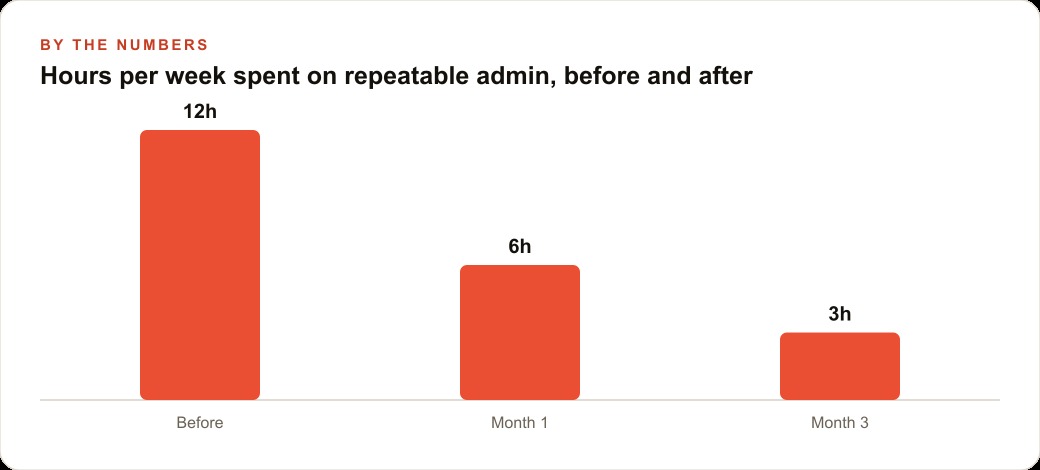
Most coverage of Claude Code is written for engineers, and the name alone is enough to send most business owners scrolling past it. That is a costly mistake, because the features that save the most time for a business have nothing to do with writing code and everything to do with running the same tasks the same way every week without thinking about them. Madhuranjan Kumar here -- I want to walk through a practical path to freeing five or more hours per week from repeatable admin work, starting in the next thirty days, using exactly those features.
The playbook has six stages. They are not simultaneous. Each one builds on the previous, and skipping ahead consistently produces worse results than the sequential path does.
Map the repeatable tasks in your week before you open a single tool
The first stage has nothing to do with Claude Code. It has to do with knowing your own week honestly.
Before touching any tool, spend thirty minutes writing down every task you complete more than once a month that follows a predictable pattern. Not one-off projects. Not judgment calls that depend on the specific situation that week. The tasks with stable inputs and a predictable, definable output: building the weekly report, drafting client update emails, preparing listing or product descriptions, reformatting a spreadsheet from one standard to another, writing a consistent category of document with different details each time.
Write each task down with three pieces of information: what the input looks like, what a finished output at your standard looks like, and roughly how long it takes from raw input to finished result. That list is your backlog. You are not going to automate everything on it at once. You are going to pick one task to start with, and you are going to stay on that one task until it is done well.
The right task to start with is not necessarily the one that takes the most time. It is the one where inconsistency is costing you the most. The weekly report that comes out differently depending on who ran it this week. The client email that varies in quality depending on how much bandwidth was left when it was written. The listing description that ranges from polished to rushed depending on the day's pressure. Inconsistency is where client trust erodes quietly over time, and it is the first thing a well-built workflow eliminates. Start there, not with the longest task on the list.
The businesses that get the most reliable returns from this process tend to be the ones that have already documented their processes, even informally. If you can describe the steps of a task clearly enough for someone else to follow, you have most of what is needed to describe it to Claude Code. If the steps are still fuzzy or change from run to run, the tool will surface that fuzziness rather than hiding it, and addressing the process clarity is often the more valuable first step.
Run the target task once with Claude Code, narrating every decision
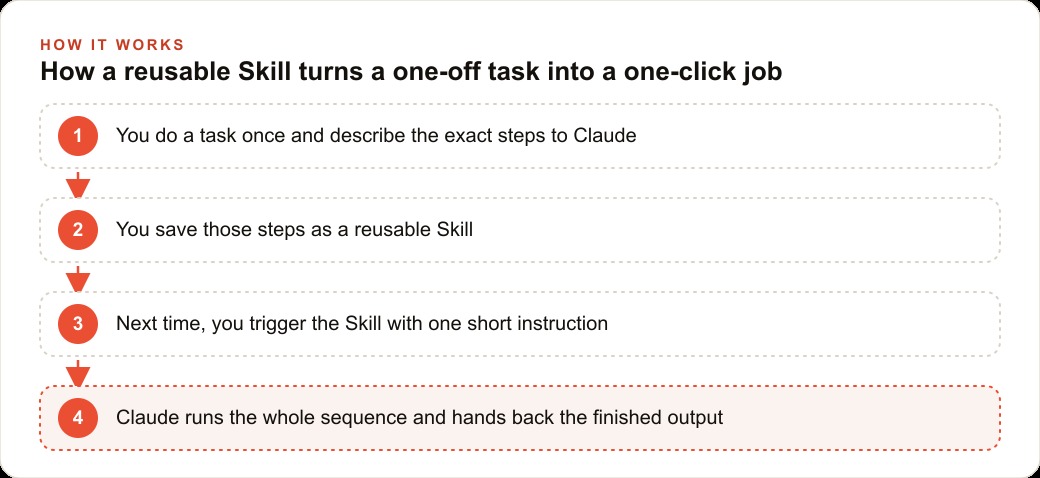
Once the target task is selected, the next stage is to complete it once with Claude Code while narrating what you are doing and why, as if you were walking a new employee through it for the first time.
Do not try to write a perfect prompt on the first run. Just work through the task conversationally and describe each decision as you make it. "I'm starting with the raw export from the accounting software." "I'm removing the duplicate rows first before anything else." "The output I want is three short paragraphs, not a table." Each narrated decision is a rule that will eventually live in the Skill and run automatically every subsequent time.
For a bookkeeper preparing a monthly client summary from transaction exports, the first run sounds like: "Start with the CSV exported from the accounting system. The summary should cover revenue, total expenses, and net result, with one sentence per line explaining whether each number moved up or down from last month and by how much. The tone is clear and factual, not conversational. The finished file goes into the client's folder named for the current month."
That single guided run-through does something far more valuable than producing the first output. It produces a complete, specific description of the task in your own words, grounded in how you actually make decisions, not how you think you do when asked abstractly. That description is the foundation of everything that follows. The quality of what gets automated is a direct function of how precisely the task was described in this stage.
Run the task this way two or three times with real data before moving to the next stage. By the third run, the description should be stable enough that a reasonable person reading it could reproduce the output without asking follow-up questions. That is the bar for moving forward.
Build a Project that holds the permanent context of the job
Claude Code's Project feature is the most underrated capability for business use, and it is the one that separates the experience of a recurring professional workflow from the experience of a general-purpose chatbot.
Most chatbots have no memory of previous conversations. Every session starts from zero. The first five to ten minutes of any work session go to re-explaining brand voice, output format standards, quality benchmarks, and whatever background context is not obvious from the raw input alone. That re-explanation is invisible overhead. It accumulates across dozens of sessions into a meaningful drain on time and attention that is easy to miss because each individual instance feels small.
A Project holds all of that permanently. Open the Project and the context of the job is already there: who the client is, what output looks like at your standard, how the format is structured, what counts as a good result versus a mediocre one, and where the output files are supposed to land. The first session and the fiftieth session start from the same level of context, and the fiftieth benefits from every refinement made since the first.
For the bookkeeper, the Project holds the roster of clients, the output format template with line-by-line formatting notes, the tone guidance with a specific example, the rules about what constitutes notable movement versus routine variance, and the folder paths where finished files belong. Every monthly run opens into that full context without a preamble, and the quality of the first output in each session reflects every correction accumulated across previous runs.
The discipline that makes this work over time is treating the Project like a living document rather than a set-it-and-forget-it configuration. Every time you correct an output, translate that correction into an updated rule or example in the Project context. A correction that stays only in your head disappears by the next session. A correction written into the Project is there permanently and does not need to be remembered. Over three months, a well-maintained Project accumulates the institutional knowledge of a trained junior employee, available to you the moment you open the tool.
Businesses that generate inbound leads through Google Ads and need consistent, fast follow-up copy also find Projects valuable for the content-generation side of that work: brief templates, audience segments, offer framing, tone per campaign. The Project holds the structure; each session fills in the current variables.
Turn the narrated steps into a saved Skill with a clear trigger phrase
The second feature that carries the most operational weight for business owners who do not write code is the Skill.
A Skill is a saved sequence of instructions that produces a finished output when you trigger it with a short phrase. Not a draft to edit, not a set of suggestions to review, the finished document, summary, email, or record written to the right place and ready to use. The trigger might be as simple as "Run November summary for [client name]." What executes behind that trigger is the full sequence: read the input, apply the format, check the month-over-month movement, write the output in the specified voice, and save it to the correct folder.
The difference between a Skill and a one-off prompt is consistency. A one-off prompt gives you a different output each time depending on how it was phrased on that particular day, which instructions you happened to include, and how much relevant context you provided from memory. A Skill gives you the same output structure every time, calibrated to your documented standard, because that standard lives in the saved instructions rather than in your memory.
The accumulation effect is where the real compounding happens. After two or three months of building one Skill per significant recurring task, you have a library of one-click jobs covering the parts of your week that used to consume the most tedious time. Each Skill in that library is a piece of your operational process that no longer requires a human to execute from scratch on a given Tuesday afternoon. The library grows in value each time you add a Skill or tighten an existing one, and the aggregate time return becomes visible as a block rather than as isolated individual savings.
For businesses running content marketing that feeds SEO and organic search, content production tasks, product description writing, blog outlines, and category page updates are often among the highest-value early Skill candidates, because the output format is highly repeatable, the volume can be significant, and quality inconsistency is immediately visible to the customer.
Hold the two-week validation window before you declare it production-ready
This is the stage where most business owners who see early promising results get ahead of themselves, and where the most value gets left on the table.
After the first successful Skill run produces a clean output, the temptation is to declare the Skill done and move attention to the next task. That is a mistake, because the first run almost always contains at least one edge case the initial instructions did not anticipate. The second run surfaces at least one more. The third run is where the output begins to look genuinely stable across the range of real inputs the task actually involves.
The two-week validation window means running the Skill on real work every time the task comes up naturally, reviewing every output carefully against your standard, and updating the instructions or the Project context whenever the output drifts. During this window, the Skill is not fully autonomous. Treat it like a capable new employee in their second week: worth watching, not yet worth trusting without review.
The signal that the Skill has passed the validation window is two or three consecutive outputs that need no corrections at all. Not minor corrections, not "this is almost right," no corrections. That is the threshold. Before reaching that threshold, the Skill has not earned unsupervised production status. Granting it prematurely means errors accumulate across multiple outputs before you catch the pattern.
What the validation window also does is complete the instruction set. Every correction during those two weeks is a rule that is now in the Skill and cannot cause the same error again. By the end of the window, the Skill has been tested against the edge cases the first session did not anticipate, and those edge cases are handled. The instruction set at the end of the validation window is meaningfully more robust than the instruction set that went in at the start.
Businesses managing client relationships through a CRM and website stack often build Skills that interact directly with that system, writing contact notes, formatting follow-up summaries, or preparing weekly account update reports. Getting those interactions right during the validation window means they run reliably at scale without requiring human review on each output.
Stack a second Skill only after the first runs without your attention
The businesses that extract the most value from Claude Code over a full year are not the ones that built the most Skills in the shortest time. They are the ones that built each Skill carefully and let it stabilise before adding the next one.
The most common failure pattern is starting the second Skill while the first is still requiring corrections. Attention is split between two developing workflows. Corrections stop flowing into either Skill's context on a consistent basis. Both end up in a state of partial reliability where each requires ongoing monitoring, and the net time return is smaller than it would have been if one had been taken to full reliability before the next was started.
The sequencing rule is simple: declare the first Skill done only when it has produced three consecutive outputs requiring no corrections. Then and only then open the backlog list and select the second task.
For a small property management operation, the right sequence might be: first Skill handles lease renewal reminder letters in the correct format for each property type; second Skill builds the weekly maintenance request summary from the open-ticket log; third Skill prepares the owner report from the maintenance summary and the rent-collection data. Each built to full reliability before the next is started.
By month three of that sequence, three tasks that previously consumed six to eight person-hours per month are complete in twenty to thirty minutes. The work did not change. The person doing it did not change. The process was described precisely enough to hand to a tool that runs it consistently, and the tool was validated carefully enough before expanding its scope.
The owners who get the clearest returns in thirty days are the ones who pick the right first task, describe it precisely, and hold the validation window without skipping ahead. If the process description is still fuzzy after the mapping stage, that fuzziness is the real first problem to solve, and solving it is valuable entirely on its own before any tool is involved. Whether you build this out yourself or bring in expert help to design the workflow, the path is the same: one stable Skill, validated fully, before the second one is opened.
That is exactly what we do at AI DOERS. Book a private 30-minute call with Madhuranjan Kumar and we will map the fastest path to it for your specific business.
Book your call →
Madhuranjan Kumar
Madhuranjan Kumar brings 20 years of performance-marketing experience and has managed over $200 million in Facebook ad spend for brands across the United States and beyond. His expertise spans the full modern marketing stack: Meta, Google Ads, TikTok, email automation, CRM, and the websites that hold it together. At AI DOERS he turns that track record into lead-generation systems for businesses across every industry.