
The Best AI Presentation Tool, Tested Against ChatGPT, Claude, And Google Slides
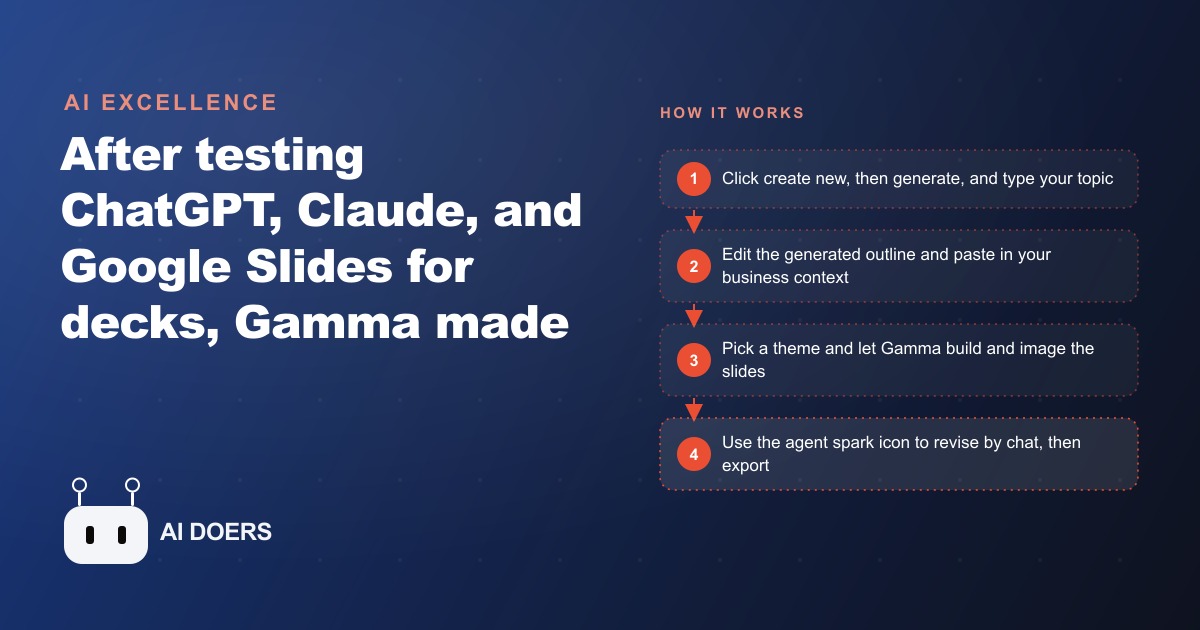
After building the same deck with every major AI, Gamma was the best by far: it starts from a template, writes the text, generates images, keeps everything editable and consistent, and lets you revise slides by chatting with an AI agent. It is free to start with just a browser, a Google account, and a topic.

A three-doctor chiropractic clinic was losing an evening a week to slide building, and nobody had noticed because it never showed up as a line item. This is the story of how that clinic went from spending roughly three hours on a single presentation to producing polished decks in under ten minutes, using an AI tool called Gamma, and what the numbers looked like at each stage. I am Madhuranjan Kumar, and I ran the tool comparison myself before recommending it, so let me walk you through the whole journey.
The bottleneck nobody had named
The clinic did not think it had a presentation problem. It thought it had a time problem, which is how these things usually hide. But when I actually mapped where the owner's after-hours time went, a pattern emerged. The clinic constantly needed presentations it never had time to make: a new-patient education deck explaining what an adjustment actually does, a corporate wellness pitch for local employers, and a simple slide series for community workshops. Each one meant opening a blank presentation tool, fighting with text boxes, hunting for images, and trying to keep the look consistent with the last deck, which nobody could remember the settings for.
The measured cost was about three hours per deck, and it landed on the owner because the owner was the only one who cared enough to make it look decent. Three hours is a full evening. Over a quarter, with a few decks each month, that is a real chunk of the owner's life spent dragging text boxes instead of seeing patients or resting. The problem was invisible precisely because it was spread thin across weeks.
There was a second, quieter cost too, and it turned out to matter more than the hours. Because every deck was built from scratch under time pressure, none of them looked like they came from the same practice. The new-patient handout used one set of colors, last year's employer pitch used another, and the workshop slides looked like a different clinic entirely. That inconsistency undercut the exact impression a healthcare business most wants to project, which is that it is organized, professional, and safe to trust with your body. Nobody on staff would have described this as a branding problem, but that is what it was, and it was costing the clinic credibility in every room where a deck appeared.
Choosing the tool by testing every option
Before I put the clinic on anything, I ran the test most owners only think about running. I built the same presentation with every major AI to find the genuinely best one. ChatGPT and Claude can both generate slides, and Google Slides has Gemini built in, so the field was crowded and every option had a credible pitch.
Side by side, the difference was night and day. Gamma produced decks that were editable, consistent over time, and looked like the clinic had hired an agency. The others tended to feel basic or rigid. Google Slides with Gemini could only edit one slide at a time, which is fine until you want a coherent deck. The ChatGPT and Claude decks looked serviceable but lacked real templates and precise editing control. Gamma won because it starts from a template, writes the text, and generates the images, all while keeping everything fully editable, so it was faster than Canva and smarter than a blank PowerPoint. It is also free to start, carrying only a small made-with-Gamma watermark on each slide, which meant the clinic could prove the value before spending a rupee.
I want to be fair about why the runners-up lost, because it explains what to look for if you run your own comparison. The general-purpose chat tools are excellent writers but weak designers. They will produce solid slide text and then present it in a layout that betrays its origin the moment a real audience sees it. Google Slides with Gemini has the opposite problem: the design foundation is there, but editing one slide at a time makes it painfully slow to shape a whole deck, and it fights you on consistency. Gamma sat in the gap the others left open, treating the deck as a designed artifact from the first second rather than as text that happens to be on slides. That is the specific quality a service business needs, because the deck is not the point. The impression it leaves is.
The first build: from three hours to thirty minutes
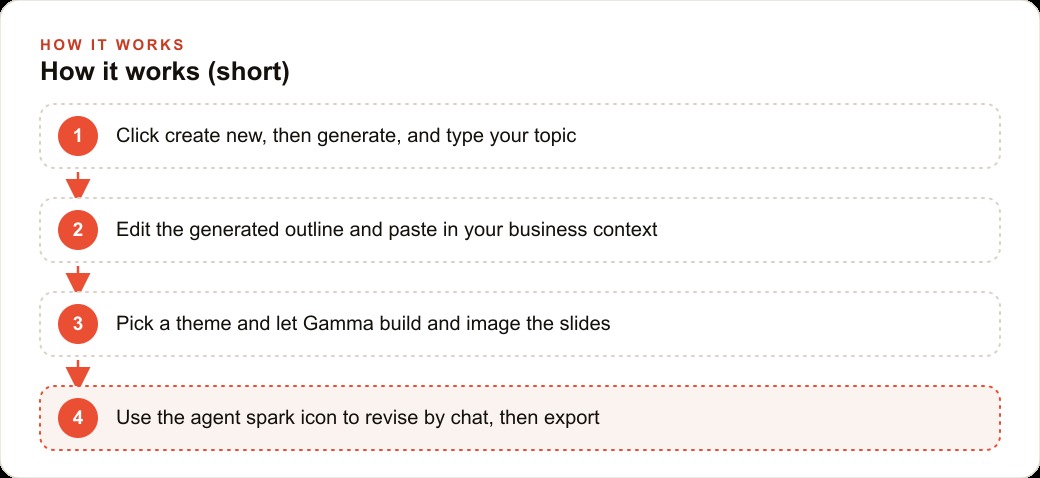
The first real deck was the new-patient education presentation, and this is where the numbers started to move. The setup was almost nothing. You need only three things: a browser like Chrome or Safari, a Google account to sign in, and a topic. From the dashboard the owner clicked create new, then generate, and typed a topic, understanding spinal health for new patients.
Here is the step that mattered most, and the one that separates a good result from a generic one. Before Gamma builds any slides, it generates an outline, and that outline is the moment to shape the whole deck. The owner pasted in a few paragraphs of real context first, the clinic's approach, the conditions it treats, and the calm tone it wants with nervous first-time patients, so the output would sound like the clinic rather than a stock template. Then the owner edited the outline itself: an opening on common back and neck complaints, a section on how adjustments work, one on what a first visit looks like, and a soft close on booking. The cards button set the slide count, and keeping early runs to about five cards made the first attempt quick to learn.
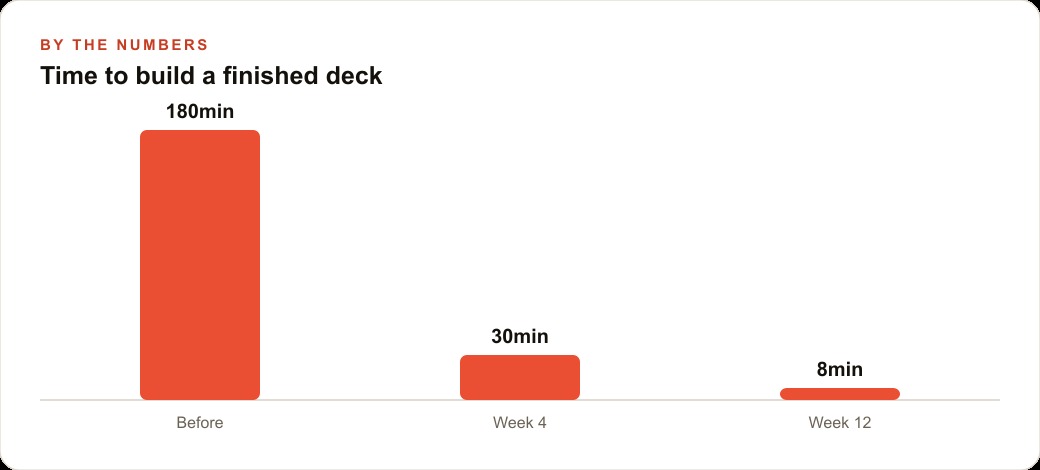
Below the outline came the look: the theme, how much text appears, the visual atmosphere, and even which AI model generates the images. The whole first deck, from topic to finished, took about thirty minutes instead of three hours. That is the drop from one hundred eighty minutes to thirty, and it happened on the very first attempt, before the clinic knew any of the shortcuts.
What struck the owner most was not the speed but the quality floor. Even the very first attempt, made by someone who had never touched the tool, came out looking coherent and professional rather than like a rushed draft. That is the difference between a tool that saves time by cutting corners and one that saves time by removing the parts a non-designer is bad at anyway. The clinic was not trading polish for speed. It was getting both at once, which is exactly why the first deck was enough to convince everyone to keep going.
The theme that made every future deck faster
The real compounding came from one decision on that first build: saving a brand theme. The owner set the clinic's colors and a calm, clinical image style, then saved it as the brand theme so every future deck would match without redoing the design. This is the quiet hero of the whole story, because consistency is exactly what small businesses struggle to keep, and here it became automatic.
The proof came a month later, when the front desk needed a corporate lunch-and-learn pitch for a local employer. Instead of starting over, the staff reused the saved theme, changed the topic, and let the tool build. Then they used the killer feature, the edit-with-AI agent, to refine it. You click the spark icon and chat your changes, telling it to make the tone more professional for a business audience, and it does the heavy lifting, then previews the result so you can accept it or revert. It feels like talking to a freelancer who somehow just makes it happen. That corporate deck took about eight minutes, because the theme was already built and the agent handled the wording.
What the numbers looked like over twelve weeks
The clinic's build time followed a clean curve as the staff got fluent. The very first deck took roughly one hundred eighty minutes, the same as the old manual way, because they were still learning the flow while doing real work. By week four, with the theme saved and the outline step understood, a typical deck took about thirty minutes. By week twelve, with the agent editing and reusable themes fully in hand, a finished deck took around eight minutes. That is not a one-time saving. It is a permanent change in the cost of a task the clinic performs constantly.
Let me put an honest, illustrative figure on it. If the owner used to spend three hours per deck and now spends about ten minutes on average across all deck types, and the clinic produces roughly four decks a month, that is close to eleven hours recovered every month. Those are hours that go back to seeing patients or, frankly, to going home. And because the decks now export cleanly to PDF, PowerPoint, or Google Slides straight from the share button, nothing is trapped inside the tool.
It is worth naming the mechanism behind that curve, because it is the part you can copy. The time did not drop because the staff got faster at fighting slides. It dropped because two things were front-loaded once and then reused forever: the brand theme, which removed all design decisions from every future build, and the habit of shaping the outline instead of the finished slides, which put the effort at the cheapest point in the process. Fixing an outline takes a minute. Fixing twenty built slides takes an afternoon. By moving their attention to the outline stage and letting the saved theme carry the design, the clinic turned a three-hour job into a ten-minute one without anyone becoming a designer. That is the whole lesson, and it transfers to any business that presents.
Where it fits into the clinic's wider growth
The decks did more than save time, and this is the part I care about most as someone who thinks in terms of pipeline rather than slides. The new-patient education deck became a lead nurture asset the clinic could send to anyone considering their first visit, which supported the results they were already getting from Facebook and Instagram ad campaigns by giving a warm prospect something reassuring to read. The corporate wellness pitch turned into a repeatable outreach tool that opened doors with local employers. A workshop deck, a referral-partner overview, and a patient handout all came off the same saved theme, so every touchpoint looked like it came from the same designer.
That consistency feeds the brand everywhere the clinic shows up, and the education content the tool made so cheap can be repurposed into the kind of material that strengthens SEO and organic search without extra work. The leads those decks help convert land in the CRM and website stack where follow up is already handled. The point is that the presentation was never really the deliverable. The deliverable was consistent, professional communication produced fast enough that the clinic could actually keep up with it.
How to run the same play for your own business
If you want to repeat this, do not start with a test topic. Start with one real deck you already need but keep putting off. Sign in with a Google account, click create new and generate, and type that actual presentation. Paste in a paragraph or two about your business so the output sounds like you, then spend your effort on the outline step rather than the finished slides, because shaping the outline is far easier than fixing twenty built slides later. Pick a theme, save it as your brand theme so the next deck is consistent, and lean on the agent spark icon to refine wording by chat instead of dragging text boxes. Keep early runs to about five cards so you learn the flow quickly, then scale up once you trust it.
You can absolutely do this yourself, and I would start with your most-used deck this week. If you would rather have someone set up your brand theme, write the prompts that capture your business voice, and build out a reusable set of decks so your team just edits and exports, that is the kind of work I do for clients, and you can bring me in to handle it.
That is exactly what we do at AI DOERS. Book a private 30-minute call with Madhuranjan Kumar and we will map the fastest path to it for your specific business.
Book your call →
Madhuranjan Kumar
Madhuranjan Kumar brings 20 years of performance-marketing experience and has managed over $200 million in Facebook ad spend for brands across the United States and beyond. His expertise spans the full modern marketing stack: Meta, Google Ads, TikTok, email automation, CRM, and the websites that hold it together. At AI DOERS he turns that track record into lead-generation systems for businesses across every industry.