
How a Terminal AI Coding Agent Builds Apps From a Single Prompt
A terminal-based AI coding agent can build real software from plain instructions. Here are the lessons that make it work and how a florist could use it.

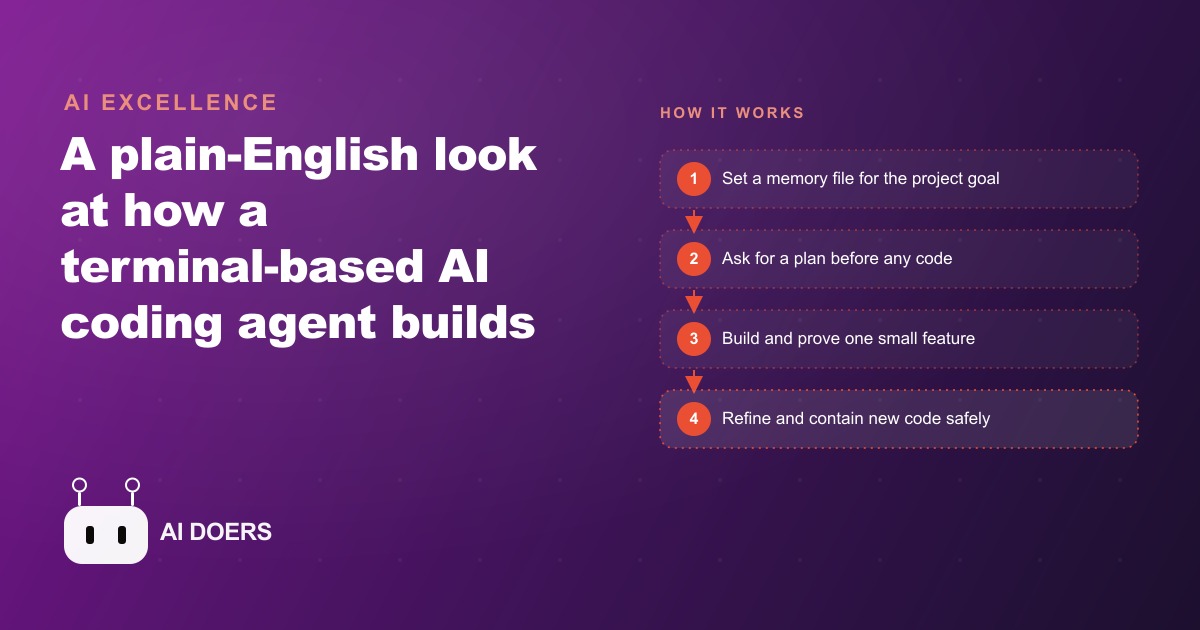
Someone built working software from scratch in two hours without touching a single line of code by hand. That sentence describes something that is happening right now in practice, not a demo projection or a vendor claim, and the more instructive question is not whether it happened but which habits made it succeed and which mistakes nearly derailed it. I, Madhuranjan Kumar, have been watching how builders work alongside terminal AI coding agents, and the pattern that keeps appearing is consistent: the people who get clean results are not necessarily the ones who chose the right tool. They are the ones who learned how to pace the collaboration so the agent stays focused on one task at a time and wrong turns get caught before they compound into expensive rebuilds.
A terminal AI coding agent is an assistant that lives in the command line and writes, reads, and edits code files on your machine when you grant it permission. Unlike the popular AI editors that work inside a graphical interface, the terminal version is more minimal but also more direct. You describe what you want in plain language, the agent proposes a plan, you review it, and it starts building. The file it touches, the commands it runs, the errors it encounters and resolves are all visible in the same terminal window where you started the conversation. There is nothing hidden and nothing abstracted away from you, which turns out to matter a great deal when things go wrong, as they inevitably do in any real build.
The session that produced the result in two hours was ambitious. The stated goal was a small working clone of a site that itself builds websites. That sounds circular because it is, but the point was never the specific product. It was to run the agent on a genuinely complex, multi-step project under time pressure and see which habits produced progress and which ones stalled it. What came back from that experiment is a set of practices that hold across almost any build, simple or complex, whether the end product is a landing page, a booking tool, a data-processing script, or a full customer-facing application.
What the two-hour build actually demonstrated
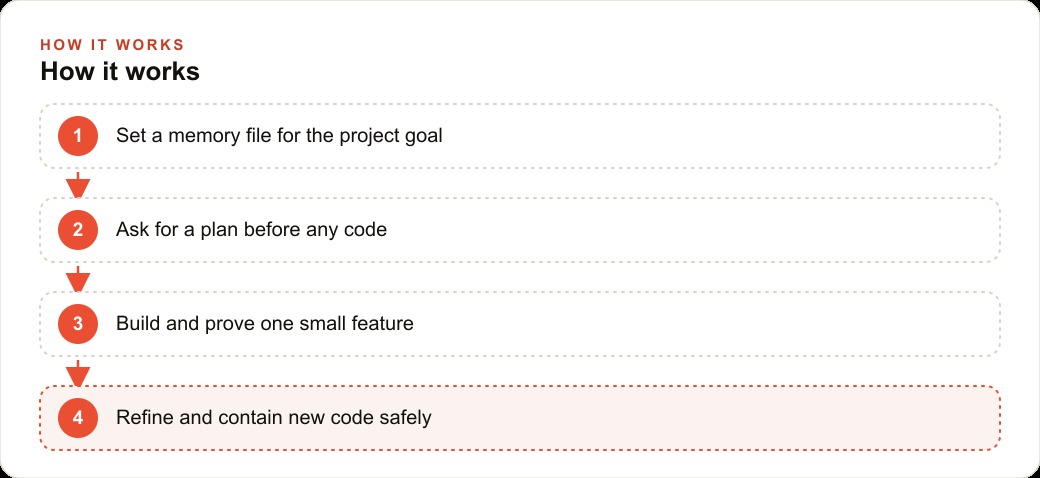
The first thing the session demonstrated is that a project memory file is not optional on anything more than a trivial build. A memory file is a plain text document that travels with every prompt and tells the agent what you are building, what decisions have already been made, and what rules apply to this project. Without it, every new prompt requires re-explaining the context, and the agent drifts toward whatever its defaults are rather than staying aligned with your specific goal. With it, the agent opens every session already knowing the project, the technology choices, and the boundaries. The overhead of writing the memory file is paid back in full on the second prompt.
The second thing demonstrated is that plan mode is not a slow-down, it is a safeguard. Before the agent wrote any code, it was asked to propose the steps it intended to take. That plan was reviewed and adjusted before the first file was touched. The reason this matters is that an AI agent working on a multi-step task can move quickly in exactly the wrong direction if the direction is not confirmed upfront. Catching a wrong assumption in the plan takes thirty seconds. Catching it after three hours of code has been written on top of that assumption takes much longer and is significantly more demoralizing.
The third lesson is the most counterintuitive for anyone who has not worked this way before. The fastest path to a complete build is to slow down at the start and prove one small thing works before building anything else. In this session, the first task was a single function: take a text prompt and produce an output. Not a full application. Not a styled interface. One function. Once that function worked on a real input, everything else was built on top of a proven foundation. The instinct to get everything working at once is natural, and it is almost always slower than the approach of proving the core and expanding from there.
Fourth, the session confirmed the value of giving the agent real documentation when it uses a library or tool incorrectly. AI models trained months ago know older patterns for tools that have since changed. When the agent in this session made a mistake using a recently updated tool, the fix was not to rephrase the request. The fix was to paste the current official documentation into the conversation and tell the agent to read it carefully before trying again. The error cleared immediately. This is a habit worth building early, because the alternative is watching the agent confidently repeat the same wrong pattern across multiple attempts while you wonder what is happening.
The habits that separated a working prototype from a pile of broken attempts
The session was not clean. There were failed attempts. There were errors that needed to be pasted back into the conversation so the agent could fix the code it had written. There were moments where the agent reached for a solution that was technically correct but architecturally wrong for this specific project. What separated the session that ended with working software from a session that might have ended with a folder of broken files is a set of practices that any owner can adopt without any technical background.
The first practice is scoping. Every prompt in the successful session described exactly one task at a time, even when the larger goal was being kept in view. This is genuinely difficult at first because the temptation is to describe everything you want the finished product to do and let the agent figure out the sequence. That approach tends to produce code that technically addresses the full description but is structurally fragile because the agent had to make too many sequence decisions on its own. Giving one clearly bounded task per prompt, while keeping the larger goal visible in the memory file, produces a build where each piece can be tested before the next one is added.
The second practice is sandboxing. Any new code the agent writes should run in an isolated environment before it touches your main project. A sandbox is just a contained space where the code can fail safely. In the session, new capabilities were tested inside a separate environment before they were integrated. This single habit prevents a common frustration: an agent generates code that runs correctly in isolation but breaks something existing when it is added to the live project. Testing in a sandbox first means that the integration is the last step rather than a source of unexpected problems.
The third practice is pace management. The fastest-moving sessions are not the ones where the most prompts per minute are submitted. They are the ones where each piece of output is checked before the next prompt goes in. This creates a natural rhythm: describe the task, review the plan, let it build, test the result, confirm it works, then describe the next task. That rhythm feels slower than just typing continuously, but it produces a usable result at the end of the session instead of a collection of connected pieces that mostly work.
The practices above matter for owners who want to build something using these tools themselves. But they also reveal something about how to think about AI-assisted building as a category, whether you are doing it yourself or working with someone who is. The bottleneck is rarely the AI's capability. It is almost always the quality and pacing of the direction the agent receives. Owners who frame this work as a collaboration where their job is to give precise, sequential direction get dramatically better results than owners who frame it as delegation where the AI handles everything and the owner reviews a finished product.
For a flower shop wanting a seasonal order page, the approach plays out the same way regardless of scale. Write a memory file that describes the goal: a one-page form where a customer picks a bouquet size, a color theme, and a delivery date, then submits an order. Ask the agent for a plan before it writes anything. Build and test the order form first, before any styling or photography is added. When the form works on a real test input, add the styling. When the styling is right, add the image gallery. If the agent uses a payment or email tool incorrectly, paste in the current documentation for that tool and ask it to start again from the documented example.
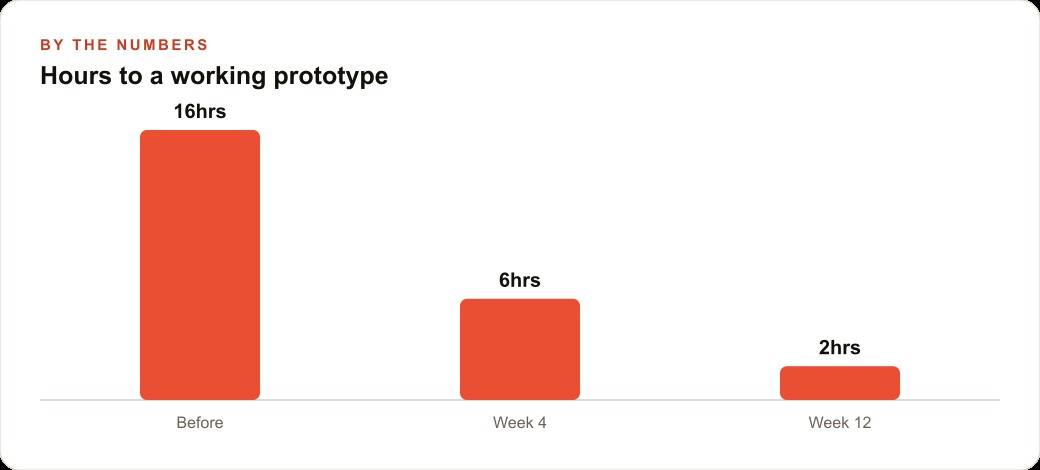
The chart above shows the illustrative pattern: the hours required to reach a working prototype drop sharply as the workflow becomes more disciplined, not because the tool gets better but because the person directing it gets better at sequencing and scoping the work. By week twelve of using this approach consistently, a build that once took a full weekend takes an afternoon. That compression is not coming from the AI working faster. It is coming from the human in the loop making fewer wrong turns and catching the ones that do happen earlier in the process.
Owners who want to use Meta ads or Google Ads to drive traffic to a landing page or a booking tool they built themselves using this approach are in a position that was not practically available two years ago. The barrier between having an idea for a digital tool and having a working version of that tool has dropped to a few focused hours and a willingness to learn the pacing habits described above. That is a meaningful shift for any business that has been waiting on technical resources to build something that the marketing strategy needs.
The deeper lesson from the two-hour build is not that AI coding agents are magic. It is that they change where the skill lives. You do not need to know how to write code. You need to know how to break a goal into a sequence of small, testable pieces and how to review the output of each piece honestly before moving to the next one. Those skills transfer from every other kind of project management you have ever done. The tool is new. The discipline of breaking work into verified pieces and catching wrong turns early is as old as building anything.
For owners who want a specific internal tool built correctly rather than learning the process themselves, the same approach applies when working with someone who handles the agent direction. The owner's job is to describe one clear task at a time, review each result before the next task is added, and push back when the output does not match what the business actually needs. Owners who engage that way get tools that fit their business. Owners who hand over a broad description and wait for a finished product tend to get something technically complete that solves a slightly different problem than the one they had.
The software built in that two-hour session was rough at the edges. The early screens were plain. A few attempts failed before the working version appeared. But a working version did appear, and it appeared because the person directing the agent understood that the real work is the pacing, the sequencing, and the habit of testing each piece before the next one begins. Everything else in AI-assisted building follows from that understanding, and that understanding is available to anyone willing to work this way.
For businesses connecting a custom-built tool to their broader CRM and website stack, the same habits that produce good output from a terminal coding agent produce good integrations with existing systems. The discipline of one task at a time, a plan reviewed before execution, and a test before the next addition applies whether the agent is writing a standalone app or wiring a new feature into a live customer-facing system. The tool is different. The patience and sequencing are identical.
That is exactly what we do at AI DOERS. Book a private 30-minute call with Madhuranjan Kumar and we will map the fastest path to it for your specific business.
Book your call →
Madhuranjan Kumar
Madhuranjan Kumar brings 20 years of performance-marketing experience and has managed over $200 million in Facebook ad spend for brands across the United States and beyond. His expertise spans the full modern marketing stack: Meta, Google Ads, TikTok, email automation, CRM, and the websites that hold it together. At AI DOERS he turns that track record into lead-generation systems for businesses across every industry.