
Ten NotebookLM Tips Most People Never Use
The biggest wins in NotebookLM are not uploading PDFs. They are letting it find and vet sources, querying one source at a time, reusing your best answers, and spinning up audio and video overviews for any audience.

Google quietly folded NotebookLM into Gemini and shipped a run of features that change what the tool is for, and almost nobody is using them. I am Madhuranjan Kumar, and I have leaned on NotebookLM for close to three years, long enough to say confidently that the thing most people do with it, dropping in a PDF and asking a question, is a rounding error next to what it can now do. The recent updates turned it from a document reader into a research team you can run from a laptop. Here is what actually changed and how a business should use it.
The headline change: notebooks now live inside Gemini
The most structural update is where NotebookLM lives. Google now lets you build notebooks directly inside Gemini, under a new Notebooks section, so a notebook behaves like a project with its own files. You add sources and chat without leaving Gemini at all. That sounds like plumbing, but it matters, because it moves your curated, source-grounded workspace into the same place you already do everything else, which is exactly where an integration earns its keep.
The reason this is the lead and not a footnote is that it signals the direction. NotebookLM is no longer a standalone curiosity. It is becoming a native part of the assistant people use daily, and native tools get used while separate ones get forgotten. If you have ignored NotebookLM because it was one more tab to remember, this update removes that excuse, and it hints that the grounded, source-only way of working is being pulled into the mainstream rather than left as a niche feature.
The feature that flips the workflow: let it find and vet the sources
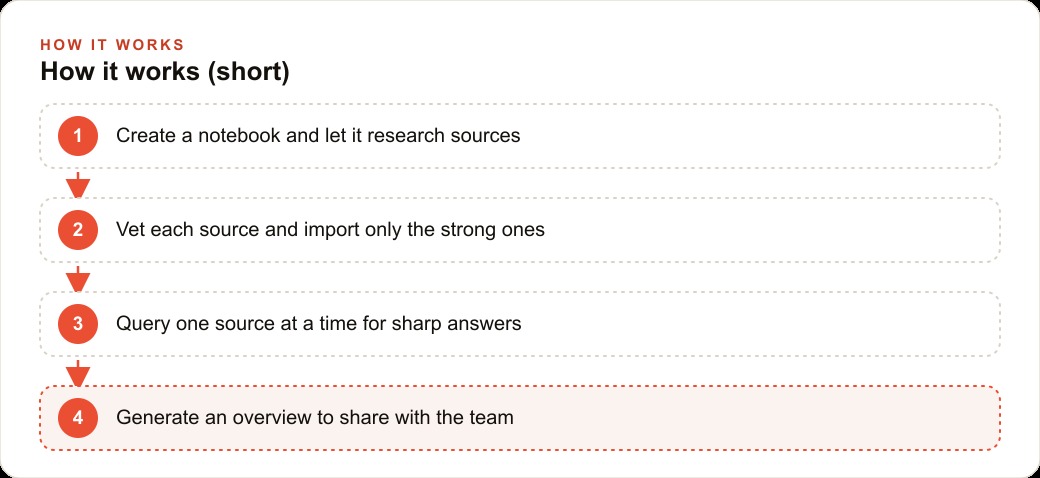
For most of its life, NotebookLM started with your uploads. The important shift is that it no longer has to. You can ask NotebookLM to find sources for you. Fast research pulls roughly ten sources in seconds. Deep research produces a longer, more thorough report over a few minutes. That inverts the whole workflow, from you feeding it documents to it proposing them, and it removes the single biggest bit of friction that kept people from starting.
But the part that actually separates NotebookLM from a normal chatbot is what comes next, and it is the single most underused move in the tool. You vet the sources before they go in. You open each suggested source, throw out the weak ones, a stray forum thread, an off-topic blog, and import only the seven or so that genuinely fit your topic. A generic chatbot swallows whatever it finds and you never see the raw material. Here you are the editor, and every answer the notebook gives afterward is grounded only in sources you approved. That is why its output is trustworthy in a way an open-web chatbot's is not. The control over what goes in is the whole point, and it is what makes the answers safe to act on.
What grounding actually buys you
It is worth being precise about why the source-only design is the feature that matters most, because it is easy to wave past as a technicality. A normal chatbot answers from everything it has ever absorbed, which means it can be fluent, confident, and wrong, and you have no way to see where a claim came from. For casual questions that is fine. For anything a business acts on, a code requirement, a warranty term, a contract clause, a pricing rule, that uncertainty is disqualifying. NotebookLM removes it by construction. Because it only answers from the sources you imported and vetted, every answer traces back to a document you chose, and you can click into the passage it drew from. That traceability is what makes the output usable in situations where being wrong has consequences. It turns the tool from something you check against reality into something you can reasonably trust, which is a completely different relationship. The recent updates make the tool more powerful, but this older property, answers grounded strictly in vetted sources, is still the reason it belongs in a business at all, and every new feature is more valuable precisely because it sits on that trustworthy base.
The quiet power moves most people never touch
Beyond finding and vetting, there is a set of smaller features that deliver most of the day-to-day value, and hardly anyone uses them.
Talk to a single source. Unselect everything, then select just one source and ask your question. You get a faster, sharper answer than querying a notebook stuffed with a hundred sources, because the model is not diluting its attention across everything. When you need a precise answer from one specific manual or contract, this is the move.
Reuse your best answers. When a chat answer is strong, save it as a note, then convert that note into a source. Now your future questions can reference your own best earlier work, and the notebook compounds over time instead of starting fresh each session. This is how a notebook gets smarter the more you use it.
Turn sources into visuals. NotebookLM Studio creates charts, diagrams, and infographics from one source or the whole notebook. Pick a style, set the detail level, and download something you can share. And when a topic feels scattered, skip chat entirely and click mind map for a visual overview of how your sources connect, downloadable as a shareable image.
The outputs people actually rave about
Then there are the features that make people evangelists. Audio Overview generates a two-host AI podcast from your sources, and interactive mode turns it into a tutor: you interrupt mid-episode, ask for a 20-second version, and the hosts answer and continue. From one notebook you can generate several audio overviews for different audiences and languages, one for complete beginners, one in a debate format, another in Spanish, side by side. Video Overview goes further, with explainer and brief modes free and a cinematic mode on paid plans, and you can describe extra customization before generating. Finally you can override the auto-generated summary with your own, add a cover, define your chat style, and share the notebook by email, link, or public access.
The reason these matter for a business is that they let you repackage the same trusted knowledge for different people without redoing the research. The field crew gets a podcast, the client gets a video, the team gets an infographic, all from one vetted notebook. You do the research once and hand it to everyone in the format that fits how they actually consume information.
Why this release matters for any business drowning in documents
Step back from the feature list and the significance is simple. Every business drowns in documents, manuals, codes, policies, contracts, warranties, training guides, past quotes, and until now that written knowledge sat in folders nobody had time to read. NotebookLM turns that pile into an answer engine that only responds from sources you trust. That combination, grounded answers plus the ability to repackage them as audio, video, and visuals, lets a small team behave like it has a research department.
This is the practical read on the update. It is not that NotebookLM got a few new buttons. It is that a small business can now build a private, trustworthy knowledge base and put it in front of staff and customers in whatever format fits, in minutes rather than weeks. That is a real shift in what a two-person team can do, and it lands at exactly the moment when the alternative, an open-web chatbot that might invent an answer, is too risky to rely on for anything that touches a customer or a code requirement.
A plumbing company turns scattered paperwork into one answer engine
Let me ground it in a business that would never call itself a heavy software user: a plumbing company. Its knowledge is scattered across install manuals, service guides, local code sections, warranty terms, and a filing cabinet of past quotes, and every one of those gets re-read from scratch by whoever needs it, usually while a customer waits.
Here is how I would set this up. I would build one notebook and load the install and service manuals for every water heater, pump, and fixture line the company carries, plus the local plumbing code sections the crew keeps getting tripped up by, plus their own standard pricing sheet. When a tech is on site and unsure how to bleed a specific tankless unit, they query just that one manual as a single source and get a precise answer in seconds, instead of scrolling a 90-page PDF on a phone in a customer's basement.
For the office, I would let NotebookLM research the latest code changes on backflow prevention, vet the sources, and keep only the official ones, then save the clean summary as a note and promote it to a source so it becomes permanent reference. For customer education, a short Video Overview on why a sump pump fails becomes a link the company texts to homeowners. For new-hire training, an Audio Overview of the company's install standards lets an apprentice learn in the van between jobs. One notebook, and the company stops re-answering the same questions forever.
The knowledge base does not just serve the crew, it feeds growth. The homeowner-education videos and explainers become content that supports SEO and organic search, so the company gets found when someone nearby searches for a failing water heater. The same clear explanations make sharper creative for Facebook and Instagram ad campaigns that fill slow weeks. And the inquiries all of it generates land in the CRM and website stack where follow-up automation books the job before a competitor calls back. The plumbing company that builds this out-serves the one still flipping through binders, and it does so without hiring a single new person.
The mistake to avoid with all of this
One caution keeps this honest, because the finding-sources feature can be misused in a way that quietly undoes the whole benefit. If you let NotebookLM pull ten sources and import all of them without looking, you have rebuilt a normal chatbot and thrown away the one advantage that made NotebookLM worth using. The finding is only half the feature. The vetting is the other half, and it is the half people skip because it takes a few minutes of actually opening each source and judging it. Do not skip it. A notebook is exactly as trustworthy as the weakest source you let into it, so a single stray forum post or an outdated blog can poison answers you were counting on to be reliable. Treat the import step the way a good editor treats submissions: default to no, keep only what clearly earns its place, and you will end up with a knowledge base whose answers you can hand to a customer or a new hire without a second thought. The tool gives you the power to be lazy here, and being lazy is the one way to waste it.
The move to make with this update
If this release lands for you, do not just bookmark it. Create one focused notebook this week, feed it your best sources, and pick two output features to start. Open NotebookLM, or the Notebooks section inside Gemini, create a notebook, and either upload your core documents or let it research and pull sources for you. Vet hard, keep only what fits, and import. Practice talking to a single source so you feel how much sharper the answers get. Save your strongest answers as notes and convert them into sources so the notebook improves over time. Then generate one Audio Overview and one infographic so you see the range, override the auto summary with your own, and share it by link.
This is very doable on your own, and the free plan is generous enough to prove the value before you spend anything. If you would rather have the whole knowledge base built, vetted, and wired into your daily workflow without spending your evenings on it, that is the kind of setup I do for clients, and you can bring me in to handle it.
That is exactly what we do at AI DOERS. Book a private 30-minute call with Madhuranjan Kumar and we will map the fastest path to it for your specific business.
Book your call →
Madhuranjan Kumar
Madhuranjan Kumar brings 20 years of performance-marketing experience and has managed over $200 million in Facebook ad spend for brands across the United States and beyond. His expertise spans the full modern marketing stack: Meta, Google Ads, TikTok, email automation, CRM, and the websites that hold it together. At AI DOERS he turns that track record into lead-generation systems for businesses across every industry.