
How to Use Self Learning Browser Automation in Claude Code for Real Work
Claude Code can control a browser, learn from its own screenshots, and take over the repetitive web tasks that no clean API covers.


An AI agent just taught itself to beat a world record, and the same trick can run your admin
The demo that made the rounds this week showed an AI agent learning to play a game by trial and error until it beat a world-record score. I am Madhuranjan Kumar, and the game is not the story. The story is that Claude Code can now open a real browser, take a screenshot, judge what it sees, correct itself, and try again, which is the exact loop that mastered the game. Point that loop at the repetitive web work your team does by hand and you have a self-improving worker for the tasks that no clean software connection ever covered.
What actually changed
For years, automating a website meant one of two painful paths. Either the site offered an official connection you could program against, which most do not, or you wrote brittle scripts that broke the moment a button moved. The new capability skips both. The agent drives a real browser the way a person does, looking at the page with vision and clicking based on what it sees rather than on a fixed script. That removes the dependency on any official integration. If you can click it, the agent can work it.
The learning loop is what makes this more than a fancy macro. The agent runs an attempt, captures a screenshot, reasons about what went wrong, adjusts its approach, and tries again, improving with each pass. In the demo, that loop took a simple bot from missing every jump to hitting the exact target score, then to crushing the game past a record. The lesson worth stealing is not the game. It is that a system which corrects itself from its own screenshots can master a repetitive web chore the same way.
Why this matters now for real businesses
The timing matters because the long tail of annoying web work has always resisted automation. Traditional tools choke on pages that change, on logins with no official connection, and on the little visual quirks that a human handles without thinking. A vision-driven agent adapts the way a person adapts, so the fiddly chores that were never worth a developer's time finally become automatable. That is a large category. Any office where staff spend hours copying and pasting between websites is sitting on work an agent can absorb.
It also matters because you no longer need an engineer to set it up. You ask Claude Code, in plan mode, to make itself capable of browser control. It researches the best method, installs what it needs, and gets ready to drive pages on its own. You guide the goal and it handles the technical wiring. That lowered barrier is the real news. The capability existed in rough form before, but the setup was the wall. Now the tool sets itself up.
Who this changes things for
The businesses that gain the most are the ones drowning in web work with no official connection to lean on. A real estate office pulling listing details from portals, a shop checking competitor prices across a dozen sites, an accounting firm downloading reports from a vendor login, a recruiter collecting candidate details from job boards. All of that is clicking through pages by hand, hour after hour. A self-correcting browser agent takes it over and runs it on a schedule, and because it can drive several tabs at once, work that used to be serial happens in parallel.
The other group that gains is small teams with no room to hire for admin. When the owner or one overloaded employee absorbs all the repetitive clicking, an agent that learns the screens and then runs unattended gives that tiny team some of the leverage a much larger company gets from a back office.
A concrete move: an online fitness coach
Let me make it real with one business. Picture an online coach juggling client check-ins across a workout app, a separate booking page, and a spreadsheet, plus a steady trickle of leads arriving through web forms that need a fast reply. Say the coach spends about ten hours a week on this shuffling. At a value of 50 dollars an hour of coaching time lost, that is roughly 500 dollars a week of capacity vanishing into tab switching, or about 2,000 dollars a month.
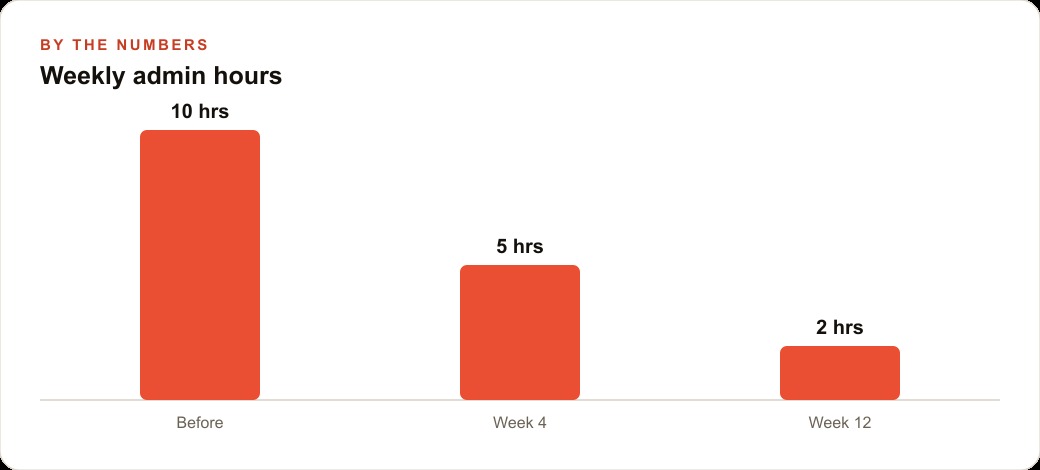
Here is how I would set it up. First, I would have the agent log into the workout platform each morning, pull each client's completed sessions and weight numbers, and drop them into the coach's tracking sheet, no official connection required because it simply reads the pages. Then I would have it scan the booking page for new consultations and add them to the calendar. For new leads from the website form, the agent opens the contact tool and sends a warm first message so no inquiry sits cold, and those leads flow into the CRM and website stack where follow-up automation keeps the conversation going. Each task runs as a saved script, so the agent starts from a method that already works instead of relearning the screens every day. If that admin load drops from ten hours a week to two over the first three months, the coach reclaims eight hours, which is eight more paid sessions or simply eight hours of life back.
Where the loop fits the rest of the stack
A browser agent is strongest when it feeds the systems you already run rather than living off on its own. The leads it replies to should land where your marketing already tracks them, so the same follow-up that greets a warm inquiry from your Facebook and Instagram ad campaigns greets the ones the agent catches from a web form. The data it pulls each morning should sit in the same sheets your reporting reads. When the agent is one worker inside a connected setup, its output compounds. When it is a clever island, it just makes another silo.
How to be smart about it
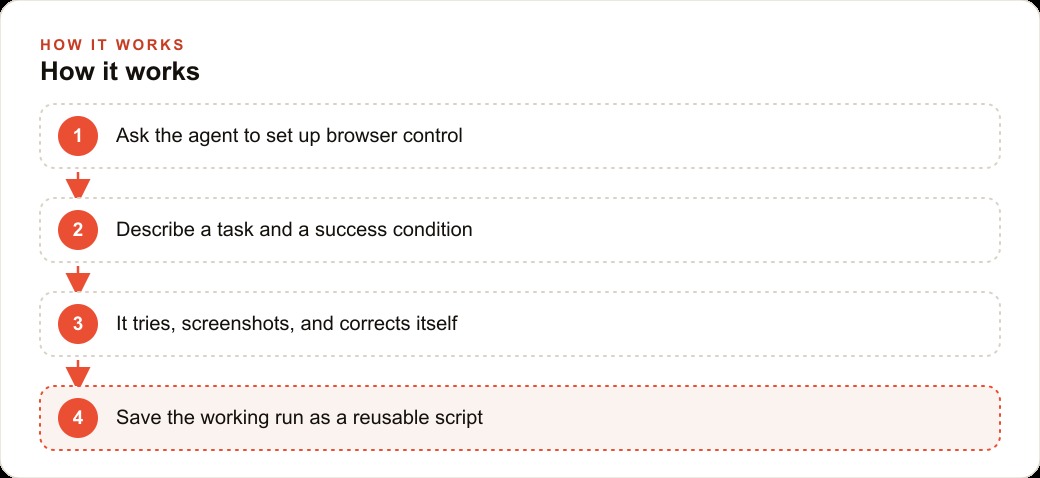
The honest caution is that a self-correcting agent is powerful but not blindly trustworthy. Start with one narrow task and a clear success condition, like log into this site, pull these numbers, and put them in this sheet. Let the agent run, screenshot, and correct itself until it succeeds, exactly as it did learning the game. Watch the first several runs before you let it work unsupervised. When it lands on an approach that works, save that as a script or a skill so future runs are fast and reliable, then add the next task one at a time. Over a few weeks you build a small fleet of proven automations rather than one fragile mega-script.
The pieces are simple to list. Open the editor, install browser control, sign in with a paid plan, and open a fresh folder. In plan mode, tell the agent you want it to use the browser, ask it to research and install what it needs, and let it set itself up. Then describe a real task, let it learn the screen through a few try-and-correct rounds, and save the winning run.
The risks worth naming before you hand over the keys
A self-correcting browser agent is powerful, and power on a real account deserves respect. The honest risks are worth saying out loud so you build around them rather than into them. First, the agent acts with whatever permissions you give it, so start it on read-only tasks, pulling and reading data, before you ever let it write, submit, or send. Second, websites change, and an agent that adapted yesterday can still stumble on a redesign today, which is why saved scripts should be checked periodically rather than trusted forever. Third, anything the agent does on a customer-facing channel, like sending that warm first reply, should pass a human review until you have watched it behave correctly dozens of times.
None of these are reasons to avoid the tool. They are reasons to introduce it in stages. The businesses that get burned are the ones that skip straight to unsupervised writing on a live account. The ones that win start narrow, watch closely, and widen the scope only as trust is earned. Treat the agent like a promising new hire, not a finished system, and the risk stays small while the payoff compounds.
A first week that will not break anything
If you want a concrete on-ramp, here is a week that gets you real value without exposing anything important. On day one, set up browser control in plan mode and let the agent introduce itself by doing something trivial and reversible, like opening a page and reading a number back to you. On day two, give it one read-only pull, such as logging into a portal and copying a table into a sheet, and watch every screenshot. On day three, let it repeat that pull on its own and save the working run as a script. Midweek, add a second read-only task and confirm it can juggle two saved scripts without confusion.
Only toward the end of the week, once you trust the reading, would I let it draft anything that leaves the building, and even then behind a human approval step. By the following Monday you have two or three proven automations running the boring pulls that used to eat your mornings, a saved library you can extend, and a clear feel for where the agent is reliable and where it still needs a chaperone. That is a realistic pace, and it is how the ten hours a week the coach was losing start turning back into billable time. The same staged rollout applies whether you are a coach, an agency, or a five-person office. Start where a mistake costs nothing, and let the agent earn every new responsibility.
Why the saved-script library is the compounding asset
The single feature that turns this from a neat trick into a durable advantage is saving winning runs as scripts. Every time the agent works out a reliable way through a task, you store that method, and the next run starts from a proven approach instead of relearning the screen from scratch. Over weeks, that library grows into a small collection of dependable automations, each one a chore that used to sit on a person's desk. The value compounds, because the second script takes less effort than the first, and by the tenth you have a genuine back office of routines running quietly in the background.
This is also what makes the approach resilient. When a site changes and one script stumbles, you fix that single routine while the rest keep working, rather than watching one brittle mega-automation collapse entirely. A library of small, focused, self-correcting scripts is far more robust than a single sprawling one, and it is far easier to reason about when something goes wrong. The lesson from the record-breaking demo holds here too. The strength was never one perfect attempt. It was the loop that kept improving, and a saved-script library is that loop turned into a lasting asset your business owns.
The parallel-tabs capability is worth one more sentence of respect, because it quietly multiplies everything above. The agent can drive several browser tabs at once, so work that was strictly serial, one login, one pull, one form at a time, becomes simultaneous. A morning routine that once ran for an hour because each step waited on the last can collapse into a few minutes when the agent works three tabs in parallel. For a business with volume, that difference is not cosmetic. It is the gap between an automation that keeps up with the day and one that falls behind it, and it is another reason the boring web work is the first thing to leave your plate once the loop is set up and proven.
The bottom line
The world-record game was a headline, but the durable takeaway is quieter and more useful. An agent that learns from its own screenshots can take over the web chores that no official connection ever reached, and it can now set itself up with your guidance instead of a developer's. That is a genuine shift in what a small team can automate this quarter. You can build it yourself by following the steps above, or you can bring in an expert to set up the browser automation and harden the scripts so they run cleanly without supervision. Either way, the boring clicking is the part that leaves your week first.
That is exactly what we do at AI DOERS. Book a private 30-minute call with Madhuranjan Kumar and we will map the fastest path to it for your specific business.
Book your call →
Madhuranjan Kumar
Madhuranjan Kumar brings 20 years of performance-marketing experience and has managed over $200 million in Facebook ad spend for brands across the United States and beyond. His expertise spans the full modern marketing stack: Meta, Google Ads, TikTok, email automation, CRM, and the websites that hold it together. At AI DOERS he turns that track record into lead-generation systems for businesses across every industry.