
Self-Healing Workflows: Let Claude Code Fix Your Automations Automatically
By bridging a failing workflow to Claude Code, errors trigger an automatic diagnosis and fix, then a clear notification. Here is how the system works and a worked example for a physical therapy clinic.

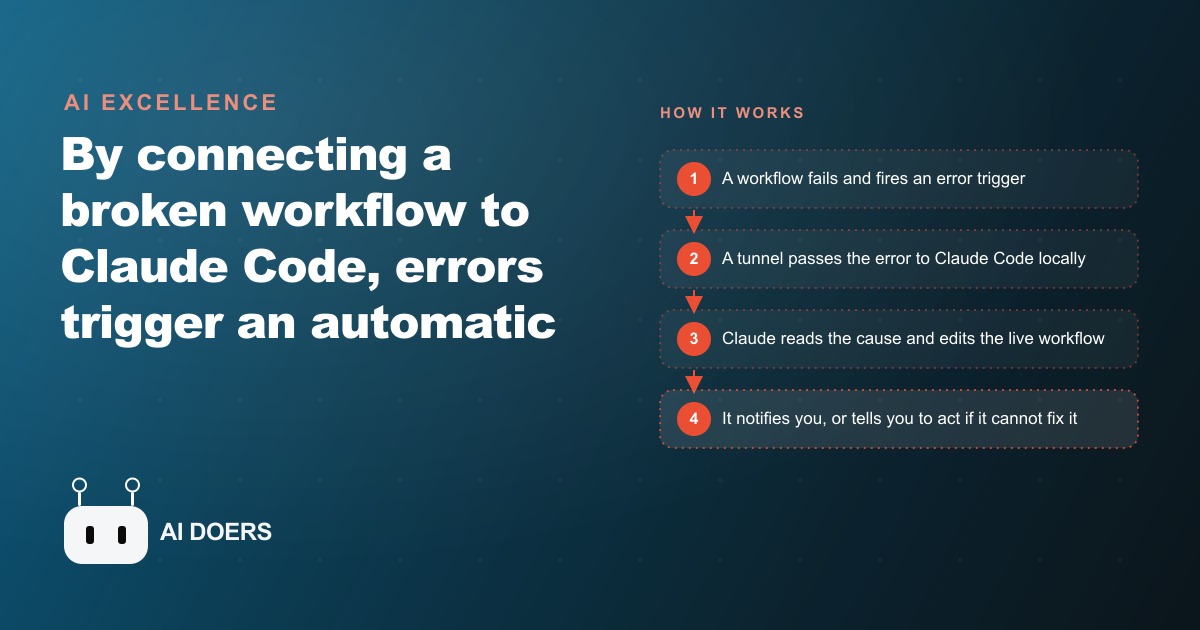
A new pattern is spreading fast among people who build automations, and it flips a tired chore on its head. Instead of a broken workflow sitting dead until a human notices and hand patches it, the workflow now hands its own error to an AI coding agent that reads the failure, edits the live automation, and reruns it, often before anyone knows anything went wrong. I am Madhuranjan Kumar, and I want to walk through what just changed, why it matters, and the exact move to make if you run automations that quietly hold your business together.
Broken automations now repair themselves before you wake up
The idea is simple to say and slightly wild to watch. You take a workflow that failed, you connect it to a coding agent, and the agent does the fixing. Not a suggestion. Not a ticket in a queue. An actual edit to the automation that broke, followed by a rerun that succeeds.
Here is the demo that made it click for me. A workflow that processes incoming orders has a deliberate bug planted in it. On the next run it fails at a validation step. Within seconds a message lands in my task tool telling me the workflow errored, naming the node that broke and the exact error text. Meanwhile the agent has already gone digging. It finds that the real culprit sits upstream, a node that bundled every order into one item instead of passing each order through on its own. It rewrites that node so the orders flow individually, and when the workflow runs again it clears the validation step cleanly. I never opened the editor. That is the shift. The thing that used to eat an evening now resolves itself and leaves a note explaining what happened.
The quiet breakthrough is direction of access, not intelligence
People assume the hard part is the AI being smart enough to debug. It is not. Coding agents have been good at reading errors and writing fixes for a while. The part that was missing, and the part this pattern solves, is plumbing. A cloud hosted workflow tool lives on the public internet, so an agent can reach it, look up a workflow, and edit it. But the agent itself usually runs locally, on a laptop or a small server sitting behind a locked door. The cloud workflow has no way to reach back and wake it up.
Think of it as a locked house. The agent can walk out and knock on the workflow's front door any time, because that address is public. The workflow cannot knock back, because it does not know the agent's address and could not get through the door anyway. A tunnel is what hands the workflow the address and a key to knock. Once that tunnel exists, the whole loop closes and the automation can summon its own repair technician on demand. That unglamorous bit of connectivity is the real news here, because it is what turns a clever demo into something that runs unattended.
The loop is a short story with four beats
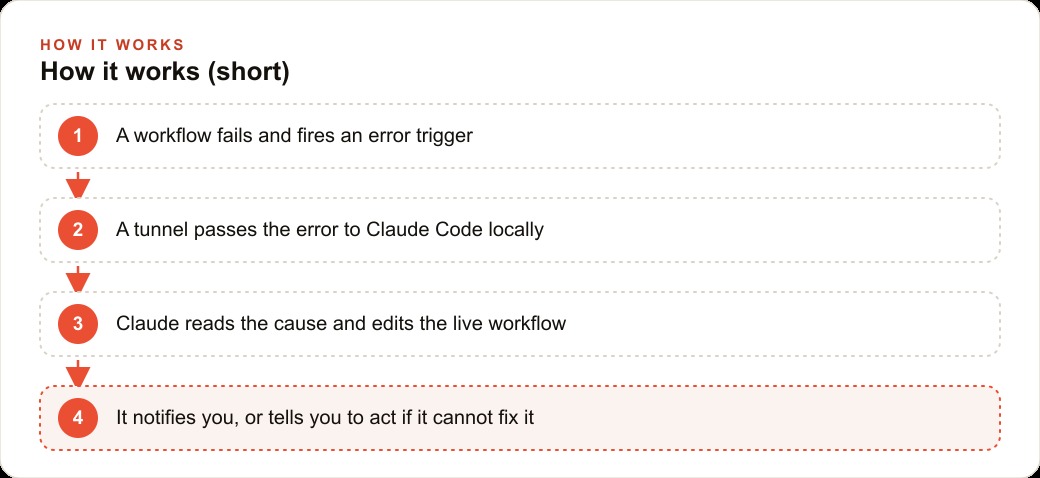
Strip away the jargon and the mechanism reads like a tiny narrative. A node in your main workflow fails. That failure fires a separate error workflow whose only job is to react to breakage. The error workflow sends the failure details through the tunnel, which reaches the terminal where the agent lives and wakes it up. The agent now has the error messages and a pointer to the workflow that needs help. It looks the workflow up, reads the run data, studies the nodes and the expressions it is allowed to use, and then implements the fix directly in the live automation instead of describing one. Finally it sends a notification, in my case a message in a task tool, though it could just as easily be an email or a row appended to a sheet.
What separates a lucky guess from a dependable repair is the context you feed the agent. Connect it to your workflow environment and hand it a set of skills, meaning real documentation on how the nodes behave, how expressions are written, how to validate data, and the common patterns your automations follow. With that grounding the agent stops improvising and starts fixing the way a seasoned builder would. Starve it of context and you get confident nonsense. Feed it well and the fixes hold.
It is honest about the wall it cannot climb
The most reassuring thing about this pattern is how clearly it draws its own boundary. The agent handles logic, code, and data problems with ease. Missing values, nulls where a number was expected, the wrong data type, an empty array that a later step assumed would be full, a typo in an expression, a genuine bug in a code node. All of that is squarely in its lane.
What it cannot do is invent a credential. If an API key expired or a paid service went down, no amount of clever editing conjures a new key out of thin air. That could have been a fatal flaw, but the design turns it into a strength. Instead of failing silently, the agent sends a different kind of message: user action required, here is exactly what broke, here is the credential to renew, here are the steps. You never get the worst outcome, which is a workflow that quietly stopped working while everyone assumed it was fine. You either get a fix or you get a precise instruction. There is no silent failure and no guessing.
Small teams are the real winners here
Big companies have people whose job is to babysit pipelines. A solo operator or a lean team does not, and that is exactly who this pattern rescues. Once an automation has been live for a week or two, it will eventually break for some small, boring reason, and the damage comes from nobody noticing for hours. A self-healing setup means the automation covers for you while you are asleep, on a call, or on vacation. The bridge runs all the time, so a 2am failure gets handled at 2am.
This fits almost any operation that leans on background automations. An online store pushing orders into fulfillment, an agency moving leads between tools, a clinic syncing intake forms, a service business sending reminders. Anywhere a stalled workflow means missed work or a missed customer, the payoff is immediate. And the value is not only the automatic repair. It is the notification either way. When it fixes something you learn what broke and what changed, so you actually understand your own system better over time. When it cannot, you learn precisely how to fix it yourself. For the same reason a clean CRM and website stack keeps a small team from dropping leads between tools, a self-healing layer keeps the automations underneath that stack from failing in the dark.
This changes what an automation actually is
Step back and the deeper shift comes into focus. For years an automation was a fragile artifact. You built it, it worked on the day you tested it, and from that moment it slowly drifted toward failure as the world around it changed. A field got renamed upstream. A partner started sending dates in a different format. A once reliable feed began returning empty arrays on quiet days. Every one of those small drifts was a landmine, and the only defense was a human noticing and reacting. That made automations feel less like machines and more like plants that needed constant watering.
Adding a repair agent changes the category of the thing. An automation stops being a static script that either works or breaks and becomes a system with a recovery reflex. It can absorb a class of failures that used to be fatal, log what it did, and carry on. That does not make it invincible, and it should not make you lazy about design, but it raises the floor dramatically. The worst common outcome, a silent break discovered days later, largely disappears. What remains is a spectrum of events that are either fixed automatically or escalated with clear instructions. When you know that floor exists, you build more ambitiously, because a small bug no longer means a blown weekend.
There is also a compounding effect worth naming. Every time the agent fixes something and logs it, you accumulate a record of how your automations actually fail in the wild. Over a few months that log becomes a map of your weak points, and you can harden the fragile nodes on purpose. The self-healing layer does not just patch failures, it teaches you where your system is thin. That feedback loop is the kind of quiet advantage that separates an operation that limps along from one that gets steadily more reliable.
A worked example: a physical therapy clinic that never gets blindsided
Let me make this concrete with illustrative numbers. Picture a physical therapy clinic running three automations. New patient intake forms flow into the records system, appointment reminders go out the day before, and a weekly report summarizes visits. Each of the three gets an error workflow attached, so any failure has a place to go and a way to reach the agent.
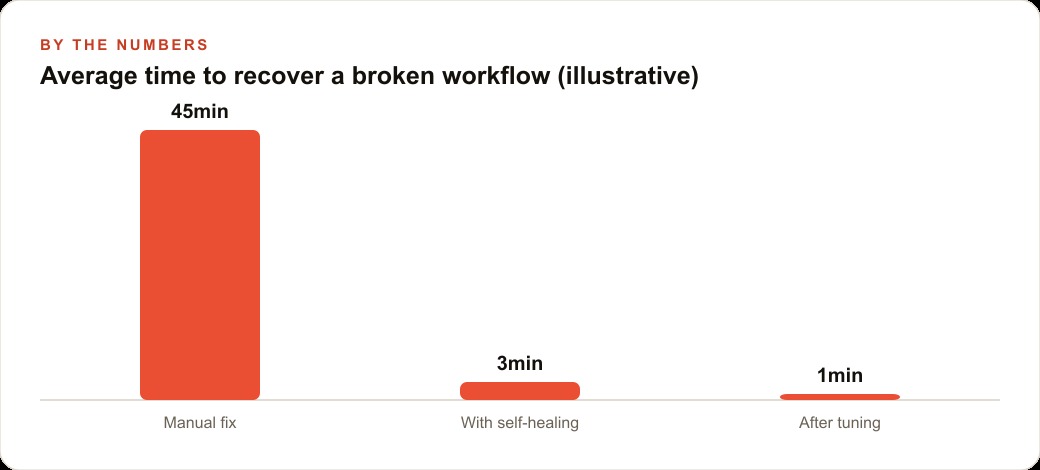
Suppose the intake automation breaks because a form field arrived empty and a downstream step expected a value. Classic data problem. Before this setup, that break might sit unnoticed from a Friday evening until Monday morning, and by then a dozen intake records are missing. Say the clinic historically averaged 45 minutes of staff time to notice, diagnose, and hand patch a break like this, and it happened roughly twice a month. That is about 90 minutes a month of skilled front desk time spent on debugging instead of patients. With self-healing wired in, the agent reads the error, finds the node that mishandled the missing field, and edits it so an empty entry no longer crashes the run. Recovery drops to roughly 3 minutes of unattended machine time, and after a little tuning of the skills you feed it, closer to 1 minute. The front desk simply receives a note saying the intake workflow failed and was already fixed, with a link to review.
Now suppose the reminder workflow fails because the messaging service credential expired. The agent cannot mint a new key, so it does not pretend to. It sends the other kind of message: user action required, here is the credential to renew and the steps to do it. A staff member spends 5 minutes renewing the key instead of an afternoon discovering that a week of reminders never sent and appointments were missed. Across a year, the difference between silent failures and this loop is the gap between a clinic that loses hours of labor and a slow trickle of no-show revenue, and one where breakage is a quiet, logged, mostly self resolving event. The numbers are illustrative, but the shape of the win is real: staff time returns to patients, and failures stop turning into surprises.
The concrete move: wire the loop, then feed it context
If you want this running, the path is short and you can build a first version in well under an hour. Start by attaching an error workflow to each automation you actually care about, so every failure has somewhere to go. Then build the bridge. Run the coding agent locally, expose it with a tunnel so your cloud workflow can knock on its door, and have the error workflow send the failure details through that tunnel. If you happen to run your workflow tool locally rather than in the cloud, this gets even simpler, because you may not need the tunnel at all.
Next, and this is the step people skip, supercharge the agent with context. Connect it to your workflow environment and give it the relevant skills and documentation so its fixes are grounded, not guessed. Then decide how you want to hear about it, whether that is a task tool, an email, or a log, and test the whole thing by deliberately breaking a workflow to confirm the loop runs end to end. The best way to plan it is to brainstorm the design with the agent itself in a planning mode and refine as you go.
The same instinct that makes an automation heal itself is the instinct behind every system we build for clients, whether that is the tracking behind Facebook and Instagram ad campaigns or the pages behind SEO and organic search. If you would rather have the bridge, the permissions, and the notifications wired up correctly so your automations quietly repair themselves instead of failing at the worst possible moment, that is exactly the kind of quiet, load bearing system worth handing to an expert to set up cleanly.
That is exactly what we do at AI DOERS. Book a private 30-minute call with Madhuranjan Kumar and we will map the fastest path to it for your specific business.
Book your call →
Madhuranjan Kumar
Madhuranjan Kumar brings 20 years of performance-marketing experience and has managed over $200 million in Facebook ad spend for brands across the United States and beyond. His expertise spans the full modern marketing stack: Meta, Google Ads, TikTok, email automation, CRM, and the websites that hold it together. At AI DOERS he turns that track record into lead-generation systems for businesses across every industry.