
Safely Migrate Hundreds of Automations Between Accounts
Moving hundreds of workflows from one account to another is risky without tracking. This method logs everything to a spreadsheet, marks each as processed, and loops them over one at a time so nothing is lost or duplicated.

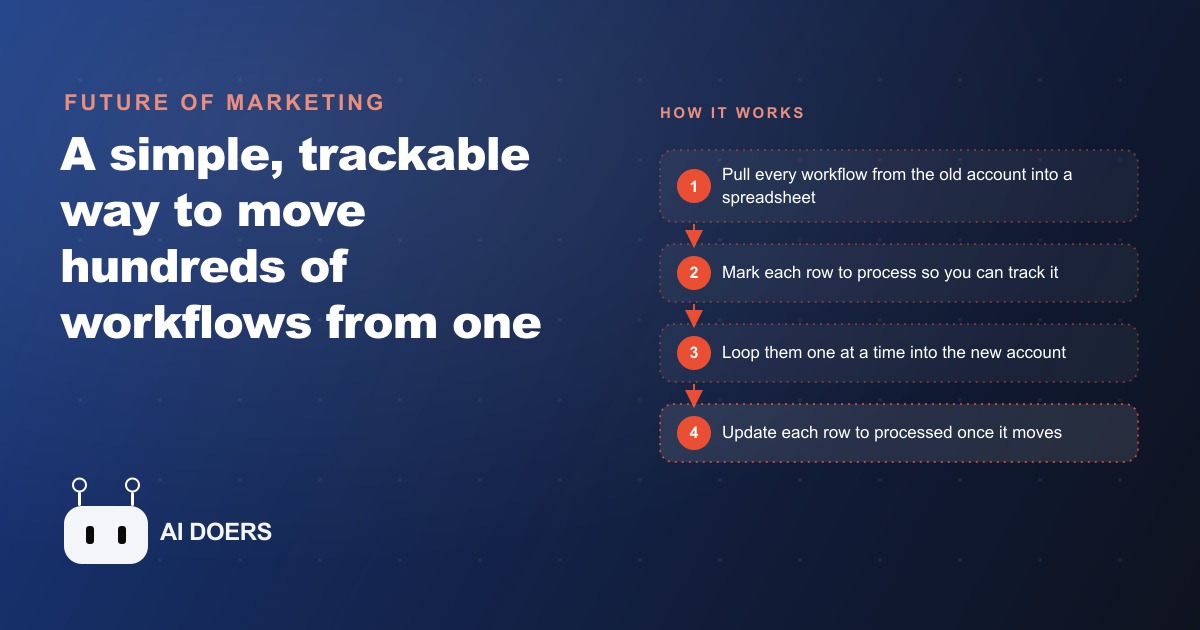
Everyone frames moving hundreds of automations between accounts as a transfer problem. It is not. It is a bookkeeping problem wearing a transfer's clothes, and once you see that, the whole thing stops being scary. The real work is not shuttling workflows from an old account to a new one. It is keeping an honest, external record of what has moved and what has not, so that nothing gets lost and nothing gets copied twice. I am Madhuranjan Kumar, and I want to take this one idea apart from an angle most guides skip, because the principle underneath it is worth far more than the specific migration it solves.
The ledger is the real product, not the migration
The most important object in a safe migration is not the workflows. It is the spreadsheet. Before a single automation moves, every workflow gets written to its own row, recording an identifier, a name, and a status. That spreadsheet is the safety net, the memory, and the source of truth all at once. The migration itself is almost incidental. What you are really building is a ledger that knows the state of every item at every moment, and the actual copying is just something that happens while the ledger watches.
This is why the whole system can be built from only three kinds of building blocks and still stay calm at scale. You pull workflows out of the old account, you log them, and you push them into the new account, marking each one off as you go. Three moves. The reason it does not collapse under the weight of five hundred items is that the complexity was never in the moving. It was in the remembering, and the spreadsheet does the remembering for you. Take the ledger away and you are left trying to hold the state of hundreds of items in your head, which is exactly how things get lost.
Two passes, joined at the spreadsheet
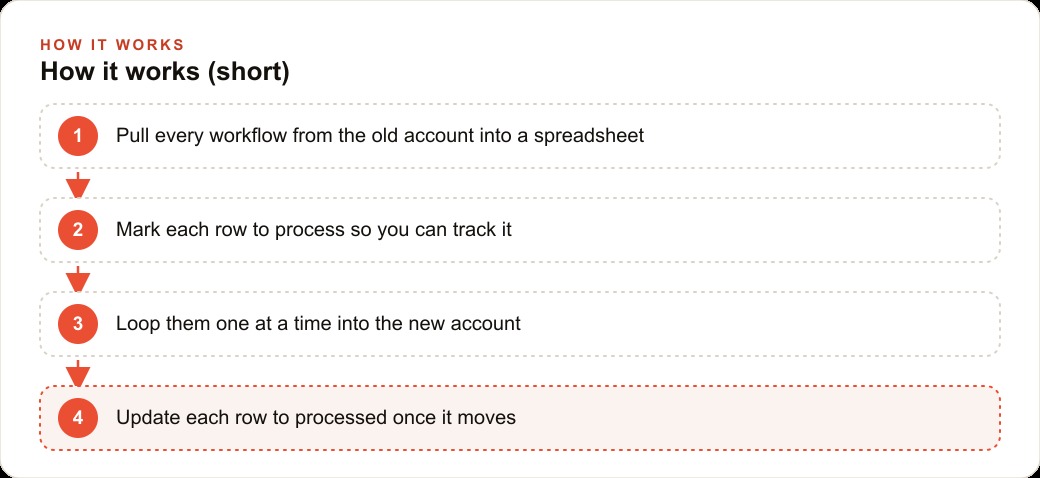
Look closely and the process is two distinct passes connected by that ledger. The first pass is pure inventory. You connect to the old account, pull in all of its workflows, and write each one to a row with its identifier, its name, and a status set to a value that means waiting, something like to-process. You have not moved anything yet. You have only taken attendance. Each workflow is a dense block of structured data, the names, the nodes, the settings, and the connections that make it run, so writing it down externally means you always hold a copy and a checklist even before the risky part begins.
The second pass is the move, and it reads the ledger back with a single crucial filter: only pull the rows whose status still says waiting. That one rule is the entire safety mechanism. For each workflow still waiting, you look it up by its identifier to get its full makeup, create it in the new account, and then, the instant it lands, flip that row's status to processed. Because the next read only ever grabs waiting rows, a processed workflow can never be pulled again. The two passes are not really separate operations. They are the same loop viewed from two sides, and the spreadsheet is the hinge.
Why a status column beats trusting your memory
It is worth dwelling on why the status column matters so much, because it is the piece people are tempted to skip. Without it, the only record of what has moved lives in your head or in a mental note that says I think I got up to around number three hundred. That is not a record, it is a guess, and guesses are where duplicates and gaps come from. The status column replaces memory with a fact written down. Marked as waiting, it will be processed. Marked as processed, it will be skipped. There is no ambiguity and nothing to remember, which means there is nothing to forget.
This is the same discipline that makes a good CRM and website stack trustworthy, where every lead carries a status that decides what happens to it next, so nobody gets contacted twice and nobody falls through. The pattern is identical. State lives on the record, not in the operator, and the operation simply acts on whatever the record says. Once you internalize that, you start seeing it everywhere in reliable systems, because it is the difference between a process that survives interruption and one that shatters at the first hiccup.
Idempotency, explained without the jargon
There is a formal word for what this design achieves: idempotency. It means you can run the same operation more than once and get the same result, with no harm done. The reason that word matters here is that big migrations get interrupted. A connection drops, a machine crashes, someone closes a laptop at the wrong moment. In a naive transfer, an interruption is a disaster, because you have no idea how far you got, and re-running risks copying everything a second time on top of the first.
The ledger makes the whole operation idempotent almost for free. If it crashes halfway, you have lost nothing, because the spreadsheet shows exactly which rows are still waiting and which are already processed. You simply run it again. It picks up the waiting rows and ignores the rest, and the end state is identical to what you would have gotten with no interruption at all. That is the quiet superpower of tracking state externally: a crash stops being an emergency and becomes a pause. To keep the blast radius small in the first place, the move runs through a loop that handles one workflow at a time, so if a single item misbehaves, it affects that one item and not the whole batch.
Why one at a time is safer than moving the whole batch
There is a temptation, once a method works on a test of five, to open the throttle and fire all five hundred at once. Resist it. The loop that handles one workflow at a time is doing something subtle and valuable: it keeps the blast radius of any single failure down to a single item. If workflow number two hundred and thirteen happens to contain something malformed, a one-at-a-time loop fails on that one row, marks the rest correctly, and lets you inspect the single culprit. A batch approach that tries to move everything in one shot can take the whole run down and leave you unsure which items actually landed, which is precisely the confusion the ledger exists to prevent.
This is the same reason careful operators throttle any bulk operation, from sending a large email campaign to updating thousands of records in a CRM and website stack. Speed is not the scarce resource here. Certainty is. A migration that runs slightly slower but tells you exactly what happened to every single item is worth far more than a fast one that leaves you guessing. The one-at-a-time loop trades a little wall-clock time for total clarity, and in a system holding a business's live automations, that trade is always the right one to make.
The two-key handshake at the boundary
Connecting the two accounts takes a pair of access keys, one generated in the source account and one in the destination, with the same flow pointing at both ends. It is a small detail, but it captures something true about migrations: you are always standing on a boundary between two systems, holding a credential for each side. The old key reads. The new key writes. The ledger sits in the middle, neutral, belonging to neither account, which is precisely why it can be trusted to referee the whole thing. If the ledger lived inside either account, an interruption on that side could take your record down with it. Keeping it external is not an accident, it is the reason the safety holds.
What crosses the boundary, and what refuses to
The last facet, and the one that surprises people, is that not everything comes along. The structural parts of each workflow transfer cleanly: the names, the nodes, the settings, and even the visual notes. But the connective tissue to the outside world does not. Logins and stored credentials do not transfer. Users do not transfer. Run history does not transfer. These have to be reset by hand in the new account.
This is not a flaw, it is a correct security boundary. Credentials are secrets tied to the account that holds them, and a system that happily copied your logins to a new account would be a system you should not trust. So the honest expectation to set is this: the migration moves the machinery, and you reconnect the power afterward. Knowing that in advance turns a nasty surprise into a planned final step. You budget ten minutes at the end to reconnect the booking tool, the email, the payment integration, and you are done. The workflows arrive intact. You just plug them back into the world by hand.
Seeing the whole thing in one concrete run
Let me ground all of this in one illustrative example. Picture a med spa that has built up a stack of automations over the years: appointment reminders, post-treatment follow-ups, review requests, membership renewals, and intake routing. It wants to move all of them from an expensive hosted account to a cheaper self-hosted one. First we generate an access key in each account. Then, instead of trusting the whole batch at once, we run a small test, limiting the pull to five workflows, to confirm everything connects and logs correctly. Testing on a handful before running hundreds is the cheapest way to catch a wiring mistake while it is still cheap to fix.
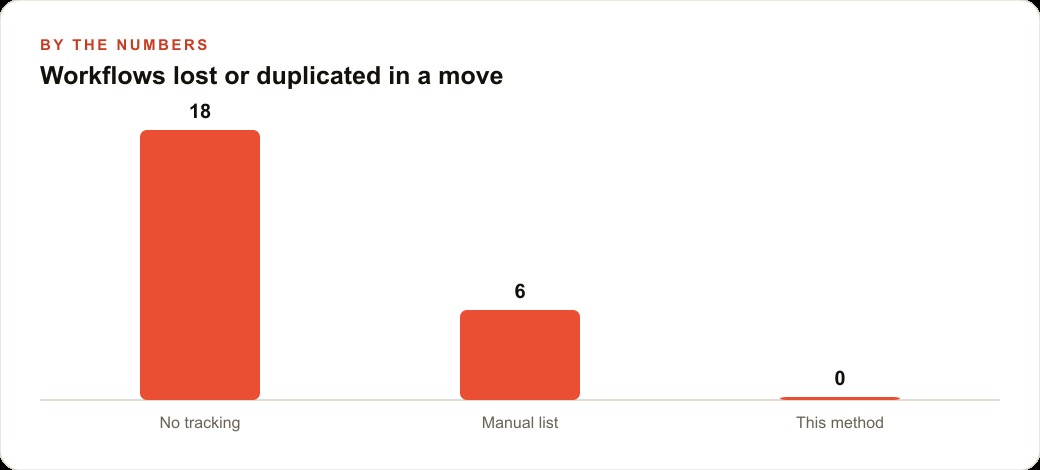
With the test clean, we pull all the spa's workflows into the spreadsheet, each row marked waiting with its name and identifier. The loop then works through them one at a time, recreating each in the new account and flipping its row to processed as it lands, so the reminders and follow-ups arrive with every setting and note intact. Imagine the connection drops after two hundred of five hundred. Nothing is lost. The ledger shows exactly which three hundred are still waiting, and re-running resumes precisely there, copying nothing twice. In a hand-tracked move you might expect eighteen workflows to end up lost or duplicated. With a rough manual list, maybe six. With this ledger-driven loop, zero. When the last row reads processed, the only work left is reconnecting the logins for the booking system and email, because credentials never travel. Those same automations, the review requests and post-treatment follow-ups, are what quietly support the spa's reputation in SEO and organic search, which is exactly why losing or duplicating one during the move would have real consequences. The spa lands on a leaner setup with every automation intact and no duplicates clogging the new account.
The pattern outlives the tool
One last thing is worth naming, because it is the reason this is worth learning rather than just copying. Nothing about this design is tied to a particular product. The ledger, the status column, the idempotent loop, the external source of truth that referees two systems, all of it is a general pattern for moving state safely between any two places. The same shape moves customer records between databases, product listings between stores, or subscribers between email platforms. Learn it once here, on automations, and you own a mental model that makes every future migration calmer, because you will already know the answer is always the same: build the ledger first, and let the move happen underneath it.
That is the whole idea taken apart: a migration is really a ledger with a status column, made idempotent so interruptions are harmless, refereed by an external record that belongs to neither side, with a clear-eyed understanding of what crosses the boundary and what you reconnect by hand. You can run this yourself with a little care and a test batch. And if you would rather have hundreds of workflows moved cleanly, tracked, and verified for you, so you never chase a lost automation or an accidental duplicate, you can hand it to an expert and simply confirm everything landed.
That is exactly what we do at AI DOERS. Book a private 30-minute call with Madhuranjan Kumar and we will map the fastest path to it for your specific business.
Book your call →
Madhuranjan Kumar
Madhuranjan Kumar brings 20 years of performance-marketing experience and has managed over $200 million in Facebook ad spend for brands across the United States and beyond. His expertise spans the full modern marketing stack: Meta, Google Ads, TikTok, email automation, CRM, and the websites that hold it together. At AI DOERS he turns that track record into lead-generation systems for businesses across every industry.