
How I Rebuilt a Cleaner Interface for My Software by Just Talking to It
Powerful tools often lose people at the interface. I used an AI agent to build a clean, branded front end on top of a coding tool without writing code, and the same approach lets any business reshape software around how it really works.

The interface in front of you is no longer fixed
Something quietly significant just became normal. You can now sit in front of a powerful piece of software, dislike how it looks and feels, and rebuild a cleaner interface on top of it by talking to an AI agent in plain language, without writing a single line of code. That is exactly what I did. I took a capable coding tool, and just by describing what I wanted to an AI agent, I built a simple custom interface on top of it that looks and feels the way I wanted, despite never having written code myself.
The specific tool I rebuilt is not the news. The news is the lesson underneath it. The interface in front of you is not a permanent constraint handed down by whoever made the software. It is now something you can reshape around the way you actually work. For years the deal was that you adapted to the tool. That deal just changed direction, and for any business sitting on software its team quietly dreads, the implications are larger than one person's experiment.
Why the surface, not the engine, is where software fails people
To see why this matters, you have to be honest about where most software actually breaks down. The engine underneath is usually strong. The database is fine, the logic works, the capability is real. What defeats people is the surface, the buttons, the labels, the cluttered layout that confuses the team and slows everyone down. A tool can be genuinely powerful and still go unused because the screen in front of it is intimidating.
That gap between a capable engine and an unfriendly surface is the exact thing this shift closes. When you can redesign the surface in plain language, the same engine suddenly becomes usable for everyone, not just the one person who memorized its quirks. Wrapping real power in a clean, simple interface is often the only thing standing between people and actually using what they already have. The engine was never the bottleneck. The interface was, and now the interface is something you can rewrite by describing it.
How the rebuild actually went, including where it broke
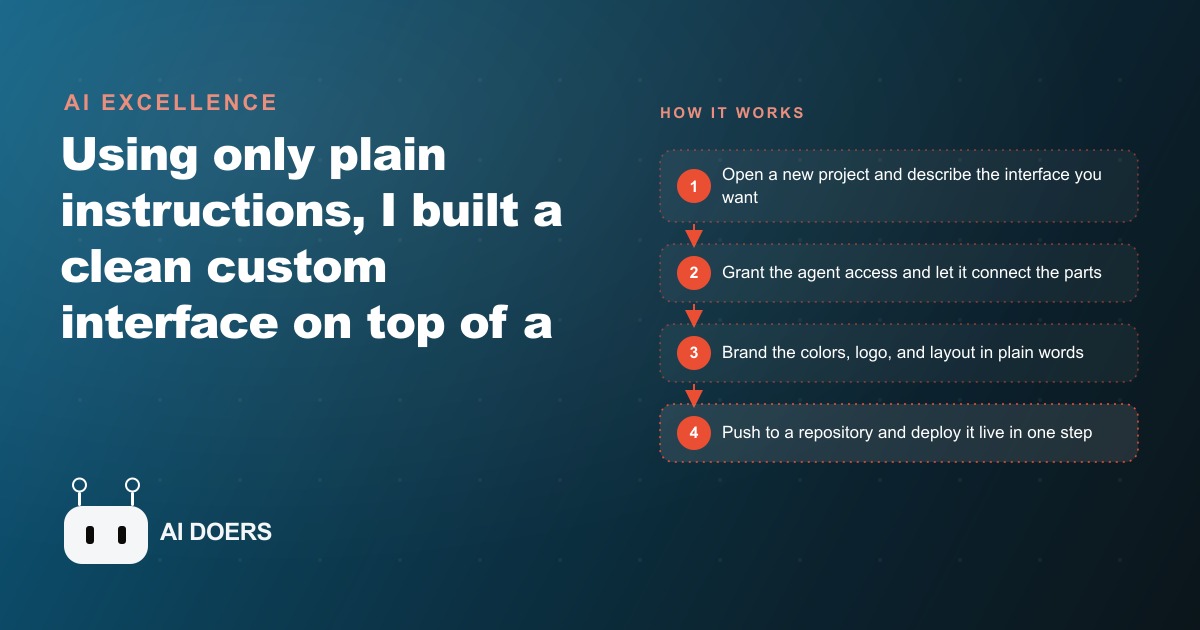
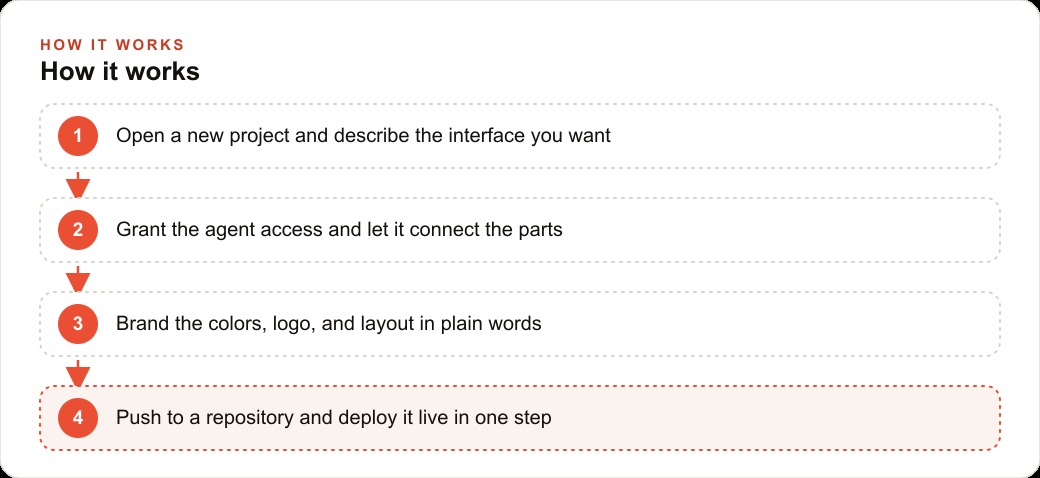
It is worth walking through how this played out honestly, because the smooth version is a lie and the real version is more useful. You open a new project and tell the agent what you are trying to build. It sets up the files and connects your new interface to the underlying engine. At one point the agent needed permission to control the screen, which you approve once, and from there it handles the plumbing between the parts. That approval-then-wire pattern is the whole setup, and it is genuinely quick.
Then it broke, the way real builds do. At first the tool worked only every other time, sending text to the wrong place. This is the moment that separates a demo from a workflow, and the resolution is the most important thing in this entire piece. I did not try to guess at the cause or poke at the code. I described the exact misbehavior in plain words, the precise symptom of what was going wrong, and the agent reasoned out a reliable fix by changing how it sent each action. That is the rhythm you actually live in. Clear symptoms in, working fix out. You do not debug. You report, precisely, and the agent debugs.
Once it ran, the branding was pure conversation. I asked for a specific header color, grid lines in the background, a logo, a tagline, and rounded input fields, and each change showed up live as it landed. I added a panel that stores every prompt I send and a save button next to it, each with a single instruction. Small quality-of-life features that used to require a developer became one sentence apiece. When it was ready, I asked the agent to push the project to a repository and deploy it to the internet, and it ran those steps in one go. The design got cleaner prompt by prompt, shaped by feedback rather than by hand-written styling.
What this changes for a business, not just a hobbyist
Here is the move to make once you internalize this. You do not have to build a whole product to benefit. If your team avoids a system because it is confusing, or you wish a tool had a simpler screen for one common task, you can wrap a clean front end around it and leave the engine untouched. Agencies, clinics, shops, and service companies all have at least one tool that staff dread, and a friendlier interface fixes the real bottleneck without the cost and risk of replacing the underlying system.
The concrete win is adoption. When the screen finally matches how people think about the job, training time drops and mistakes fall, because the tool stops fighting the user. That is not a cosmetic improvement. Software your team refuses to use returns nothing on what you paid for it, and every hour lost to a confusing screen is an hour billed to no one. Fixing the surface turns dead software back into a working asset. The same logic reaches your customer-facing systems too, because a cleaner front end on the CRM and website stack your staff actually touch means faster, more consistent handling of every lead that comes through the door.
A moving company, made concrete with numbers
Let me put this into one business. Picture a moving company whose dispatchers juggle a powerful scheduling and pricing system that is genuinely hard to use under pressure. The engine can price a job and assign a crew perfectly well. The screen just makes it painful, so quotes are slow and inconsistent, and the pain shows up worst at the exact moment a customer is waiting on the phone.
I would build a clean booking and quote screen that sits on top of that messy back office. I would describe a simple interface where a coordinator types the pickup and drop-off, the home size, and the date, and the tool turns that into a clear quote and a tentative crew assignment, all wired to the existing engine. I would grant the agent access, connect it to the underlying system, and fix the flaky moments by describing them precisely, the same way I ironed out my own build. Then I would brand it in plain words, the company colors in the header, the logo at the top, and a saved history of recent quotes so the team can reopen and reuse them. Finally I would push it live so the office and a second branch share the same clean screen. The trucks and crews do not change. The painful part, turning a request into an accurate quote fast, finally gets a tool that fits the work.
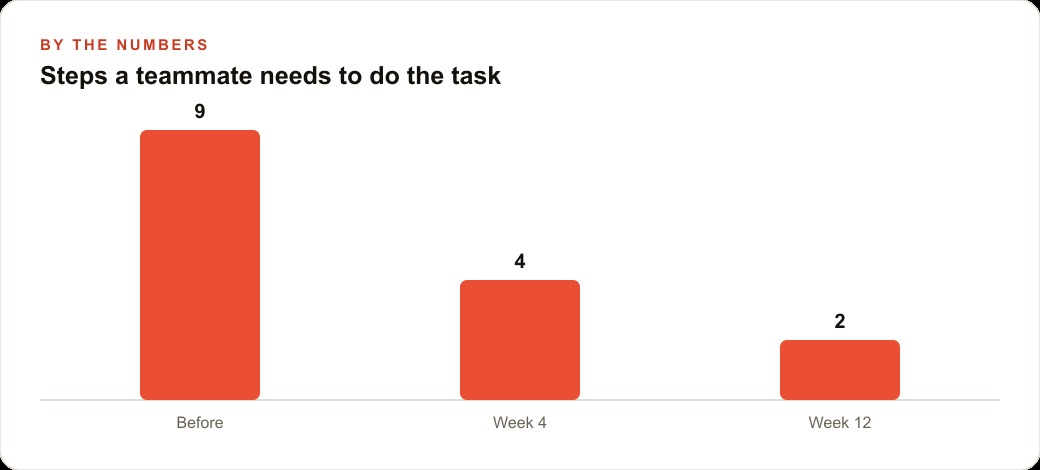
Now the illustrative numbers, because they show why this is a business decision and not a toy. Suppose producing a quote today takes nine fiddly steps across the ugly interface and a couple of minutes of hunting for the right fields. After the rebuild, the same quote is roughly four steps in the first week and two once the team settles in, and it drops from a couple of minutes to well under one. If the office produces forty quotes a day, shaving even ninety seconds off each is an hour of dispatcher time back every day, and the faster, cleaner quote is also the one that lands while the customer is still on the line. Speed on the first response is exactly where a service business wins the job, which is the same reason a fast reply to a lead from Facebook and Instagram ad campaigns converts better than a slow one. None of that required touching the engine. It required rewriting the surface.
Why this beats buying replacement software
The obvious alternative to a confusing tool is to rip it out and buy a different one, and this shift makes that look like the expensive overreaction it usually is. Replacing a core system means migrating data, retraining everyone, rebuilding the integrations you already rely on, and betting that the new tool's engine is actually better rather than just prettier. Most of the time the engine you have is fine. The screen is the problem. Rewriting the surface fixes the actual complaint at a fraction of the cost and risk, and it leaves the working parts of your operation untouched.
There is a subtler benefit too. When you build a thin, friendly front end on top of an engine you already know, you keep the option to change your mind. If the underlying system ever does need replacing, you have lost almost nothing, because the interface you wrapped around it was cheap to make and easy to redirect. Compare that to a full software migration, which is a one-way door you push through and then live with for years. A rebuilt surface is a reversible decision. A replaced system rarely is.
What actually changed, in plain terms
Step back from the specific build and name the shift precisely, because it is easy to undersell. For the entire history of business software, the relationship ran one direction. The vendor decided how the tool looked, and your team adapted to it. Training existed to close the gap between how people think and how the software was arranged. That gap was simply a cost you paid forever, in slow onboarding and daily friction and the quiet tax of people avoiding the system.
What changed is that the gap is now closeable in plain language, by you, in an afternoon. The vendor still builds the engine, but you get to build the surface that sits between your team and that engine, shaped around how your people actually think about the work. That is not a small convenience. It is a rebalancing of who controls the experience of using software, and the businesses that grasp it first will quietly pull ahead, because their teams will use the tools everyone else's teams avoid.
The real skill is knowing which screen to fix
I want to be clear about where the difficulty actually lives now, because it has moved. A focused owner can get a working first version of something like this up in an afternoon. The hard part is not the code, and it is not the deployment. The hard part is judgment, knowing which single screen to simplify, and describing the desired behavior clearly enough that the agent gets it right. That is where most people stall after the first exciting demo. They can make the agent do something, but they have not decided which something is worth doing, or they describe the problem vaguely and get a vague result.
So the way to start is narrow. Pick one screen, not a whole rebuild. Open a project, describe the single interface that would help most, and let the agent connect it to the tool you already run. Grant access when asked, test it on real work, and when something behaves oddly, describe the exact symptom rather than guessing at the cause. Then brand it, add the small conveniences like a history panel and a save button, and deploy it live in one step. That same content and interface discipline pays off beyond internal tools, because a clean, well-described front end is easier to extend later into the pages that feed SEO and organic search, where clarity of structure helps every reader, human or machine.
The bigger point stands on its own. The interface is no longer fixed, which means the excuse "our software is just hard to use" no longer holds. You can reshape the surface around how your business actually works, in plain language, this week. You can follow the do-it-yourself path above, or bring in someone who has built many of these interfaces to ship it, tune it to your systems, and hand it over already working. That is the kind of work I do for clients.
That is exactly what we do at AI DOERS. Book a private 30-minute call with Madhuranjan Kumar and we will map the fastest path to it for your specific business.
Book your call →
Madhuranjan Kumar
Madhuranjan Kumar brings 20 years of performance-marketing experience and has managed over $200 million in Facebook ad spend for brands across the United States and beyond. His expertise spans the full modern marketing stack: Meta, Google Ads, TikTok, email automation, CRM, and the websites that hold it together. At AI DOERS he turns that track record into lead-generation systems for businesses across every industry.