
Real-Time AI Voice and What It Means for Your Business
AI voice can now watch your screen and coach you through any task live. Here is what that unlocks, with a landscaping company as a worked example.

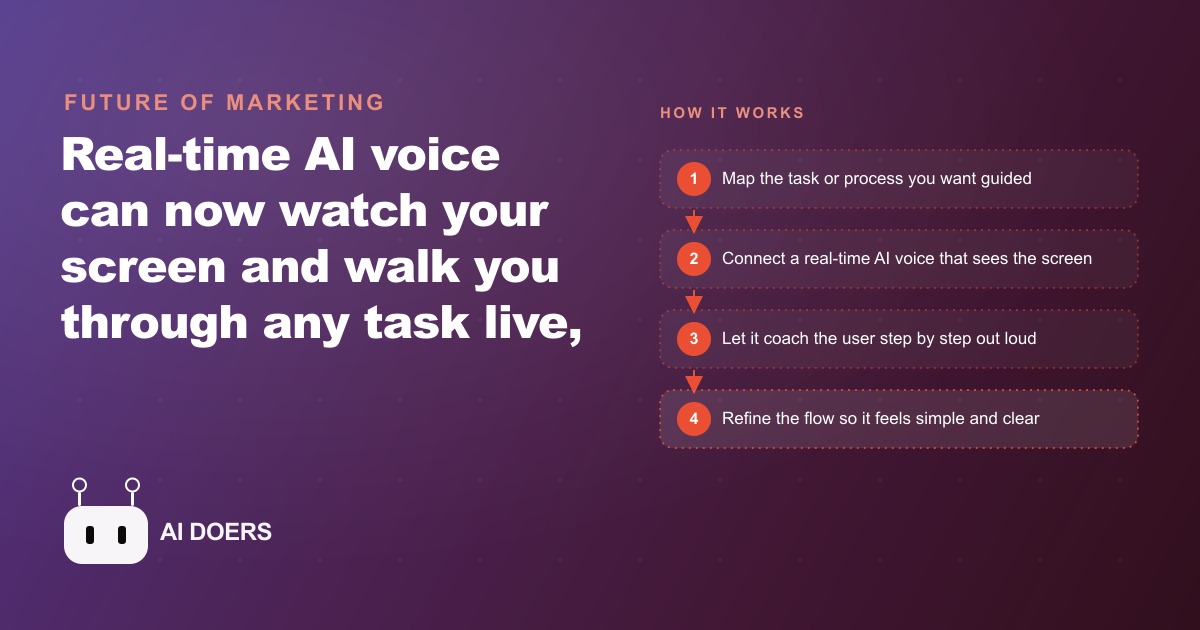
Real-time AI voice that can watch your screen and coach you through a task live is a different category of tool from the voice assistants that came before it, and the gap is large enough that it opens business applications that were simply not viable twelve months ago. I am Madhuranjan Kumar, and the shift worth paying attention to is not that the voice got smarter. It is that the latency dropped far enough to make the conversation feel like a conversation rather than a series of waits. That single change unlocks three business applications, training, customer support, and guided sales walkthroughs, that previously depended on having a patient human available at exactly the right moment.
Audio-to-audio is a fundamentally different technology from the voice assistants you already know
The voice assistants most people know work through a chain: your speech gets transcribed to text, the text goes to a language model, the model returns a text response, and that text gets converted back into speech. Each step adds time, and the compounded delay across four steps produces the characteristic pause-then-answer rhythm that makes those tools feel like search engines you talk to rather than colleagues you consult. The pause matters because it changes the cognitive mode. When a response arrives after a noticeable gap, you frame it as a lookup result. When a response arrives in the natural rhythm of conversation, you process it the same way you process what another person says.
True real-time voice cuts out the intermediate steps by processing your audio directly and responding in audio, without converting to text as an intermediate format. The architecture is fundamentally different, and the result is a back-and-forth that finally feels like talking to a person. That feeling is not cosmetic. When a coaching voice responds at conversational speed, the learner stays in the flow of the task instead of stopping, waiting, processing the answer as a lookup result, and then re-engaging with the task. The flow state is where learning and execution both happen fastest, and earlier voice assistants broke it constantly. The current generation sustains it.
For business purposes, this distinction matters most in contexts where the person using the voice guide is actively doing something at the same time. A new crew member learning to log a job in a scheduling app cannot pause and wait eight seconds between each instruction. The task falls apart while they wait. A response at conversational speed lets them keep their hands moving and their attention on the screen, which is exactly the condition under which procedural learning works best.
Screen awareness converts general advice into specific step-by-step instruction
Latency was the first barrier. Screen awareness is the second, and in some ways it is the more important one for practical business use. A voice guide that can hear you but cannot see what you are looking at can only give general instructions: click the save button, find the menu in the upper right corner. That level of guidance is only useful if the user already knows where those things are, which means it only helps people who are close to not needing help at all.
A voice guide that can see your screen points to the exact element. It says things like the button you want is the blue one in the lower right of the form, or scroll down one section and you will see the field labeled crew size. The difference is the difference between a written tutorial and someone sitting next to you. Written tutorials describe the general location of things. A person sitting next to you points. The pointing is what makes guidance actually useful for someone who is unfamiliar with the interface.
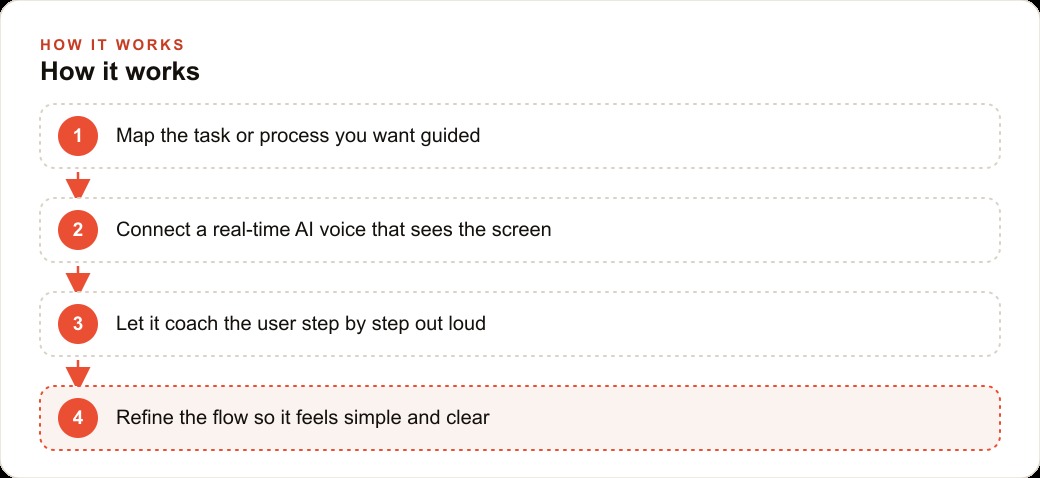
For a landscaping company training a new crew member on the job-logging app, the screen-awareness version of coaching delivers something that no generic tutorial can match. The new hire opens the app on their phone, shares their screen with the voice guide, and the guide walks them through exactly what to tap, exactly what to fill in, and exactly what the confirmation screen should look like before they move to the next step. A process that used to take an hour of the crew chief's time, walking next to the new hire and pointing at the phone, now takes fifteen minutes with the voice guide doing the pointing and the crew chief out on a job.
The specificity that screen awareness enables also means the guide is more useful for complex or irregular tasks, not just for simple linear flows. When a user runs into a situation the standard flow does not cover, the guide sees what they see and can adapt its instruction to the specific screen state rather than giving a generic fallback answer.
Infinite patience changes the economics of training more than most operators realize
The human version of every training interaction has an implicit cost that rarely gets accounted for. A trainer who explains the same step for the third time in a week is spending professional time doing a task that does not require professional judgment. The explanation of how to mark a job complete in the app is the same every time. The professional judgment of how to handle an unusual client situation is not. When a trainer spends time on the repetitive explanation, they are not spending it on the judgment-requiring work, and that substitution happens at the trainer's full labor rate.
A voice guide has no patience limit. It repeats a step as many times as the user needs, gives the same level of detail the tenth time as the first, and never signals irritation through tone or brevity when a question comes up for the second time. For new hires, especially those learning a workflow they have never encountered before, that patience removes a real friction that slows learning: the reluctance to ask the same question twice because the trainer's visible impatience makes it socially costly to do so. When the guide is a voice with infinite patience, users ask freely, and learning happens faster because the questions that were being suppressed finally get answered.
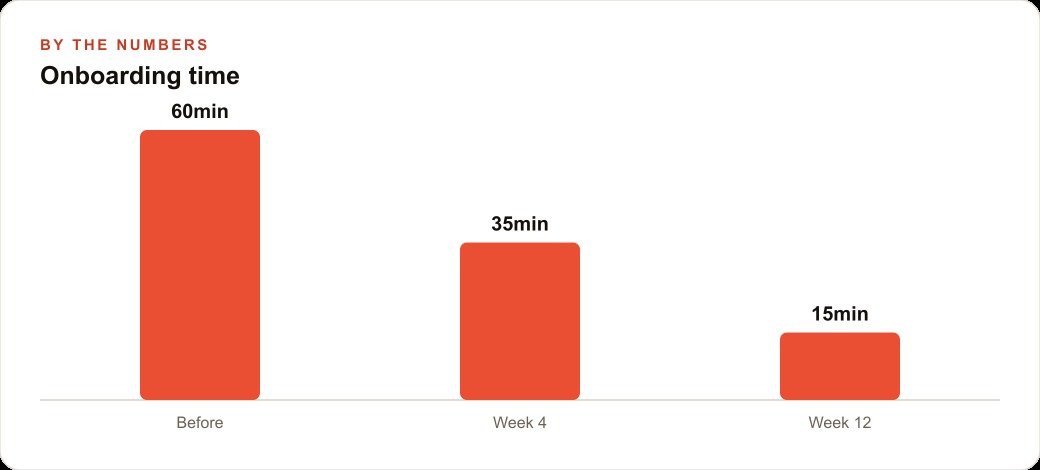
For a landscaping company, the arithmetic is direct. A new crew member takes on average sixty minutes of crew chief time to onboard to the scheduling and job-logging app. With a voice guide handling the screen-watched walkthrough, that drops to fifteen minutes with no crew chief involvement at all. For a company that hires six seasonal crew members each spring, that is four and a half hours of crew chief time recovered before the season's first job starts. Those hours go back to the work that actually requires experienced judgment on a real property.
The economics compound further when you factor in consistency. A human trainer is more thorough on Monday than on Friday afternoon, more patient with the fourth new hire than with the seventh, more detailed when they are not rushing to finish before a job starts. A voice guide gives the same training to every person on every day. The variability in onboarding quality that produces variability in early performance disappears, and the performance floor for new hires rises.
Usage data compounds into a map of where your process is unclear
The benefit that compounds most quietly over time is the data a voice guide generates about where people get stuck. Every session produces a record of which steps generated follow-up questions, which instructions had to be repeated, and where users paused or asked for clarification. Individually, each of those events is a small signal. Across a hundred sessions, the pattern is a precise diagnostic of the gaps in your training design, your app's interface, or your business process itself.
If the voice guide data shows that forty percent of new crew members ask for clarification at the step where they mark a job complete, the question is not why those particular crew members struggled. The question is what is unclear about that step for almost half of all users. The answer might be that the button label is ambiguous. It might be that the app requires a photo upload before the step can be completed and the requirement is not visible until you try to advance. It might be that the step sequence in the guide does not match the actual sequence in the current version of the app. All of those are fixable problems that you can only see clearly when you have data on where the friction actually lives.
For customer-facing applications, the same principle applies. A voice guide that walks homeowners through a quote request form generates data on which fields cause abandonment, which questions come up before users will proceed past a certain point, and which parts of the form create enough confusion that users exit entirely. That data is more precise than form completion rates alone, because it tells you not just that users abandoned but where in the process they abandoned and what question they had when they did. Addressing those specific friction points improves conversion on the form itself, which is a direct return on the time spent building and refining the guide.
For a business also running paid acquisition through Facebook and Instagram ad campaigns or managing lead flow through Google Ads, the point where a prospect interacts with the first conversion step is exactly where a voice guide generates the most actionable data. Understanding where prospects hesitate or abandon gives you a direct line to improving the conversion rate on traffic you are already paying for, without increasing the ad budget.
Three business applications, and why each one reduces a different kind of dependency
The three applications that fit real-time voice with screen awareness most naturally are staff onboarding, customer support, and guided sales walkthroughs. Each one reduces a different kind of dependency that currently limits the business.
Staff onboarding currently depends on a trainer being available at the right moment and delivering consistent quality regardless of how many hires are going through simultaneously. A voice guide removes the trainer dependency entirely for procedural content. The trainer's time gets reserved for the judgment-intensive elements of onboarding that genuinely need human expertise: the cultural context, the client relationship nuances, the exception cases that the standard workflow does not cover. The routine procedural walk-through, how to log a job, how to mark a checklist complete, how to upload photos in the right format, moves to the guide.
Customer support currently depends on a support agent being available when a customer gets stuck. An always-on voice guide removes the availability dependency for the class of support request that involves walking through a known process: completing a form, understanding an estimate, navigating an online booking flow. When those requests go to the voice guide, the support agent's availability gets reserved for the situations that require genuine problem-solving or relationship management. The support volume that can be handled scales without adding headcount, and the response time for the routine requests drops to zero.
Guided sales walkthroughs currently depend on a sales person being available and being consistent. A voice guide that walks a prospect through the details of a service, the components of an estimate, and the next step to book can deliver that walkthrough at any hour, with the same completeness every time. For a CRM and website stack that drives prospects to a self-service path, a voice guide at the key decision point can close the gap between a prospect who is interested and a prospect who books.
For the landscaping company, all three applications are live possibilities. The crew onboarding guide is the highest-immediate-value starting point given the seasonal hiring volume. The homeowner quoting guide is the highest-conversion-value starting point given that getting a prospect to submit a quote request is the most valuable action the website can drive. The support guide for recurring customer questions about scheduling changes and seasonal service timing is the highest-consistency-value starting point given that those questions are predictable and the answers are always the same.
Building one guide well and proving it on real users before moving to the next is the right order of operations. Each guide generates data that makes the next one more precisely designed from the start, and each one reduces a dependency that previously limited what the business could do at its current headcount.
That is exactly what we do at AI DOERS. Book a private 30-minute call with Madhuranjan Kumar and we will map the fastest path to it for your specific business.
Book your call →
Madhuranjan Kumar
Madhuranjan Kumar brings 20 years of performance-marketing experience and has managed over $200 million in Facebook ad spend for brands across the United States and beyond. His expertise spans the full modern marketing stack: Meta, Google Ads, TikTok, email automation, CRM, and the websites that hold it together. At AI DOERS he turns that track record into lead-generation systems for businesses across every industry.