
Practical AI: The Everyday Tasks Small Businesses Should Hand Off Today
A long list of real AI uses, narrowed to what saves a small business time, plus a worked example for a plumbing company.

Most small businesses are still using AI like a fancier Google search, typing a question and waiting for an answer. A recent roundup of more than 40 practical AI use cases across small business operations shows how far that understanding lags behind what these tools are already doing in real working environments today.
I am Madhuranjan Kumar, and what struck me about that list was not the length of it but the pattern running through it. The most valuable applications are not the creative ones. They are the operational ones: the tasks that are structured, repetitive, and time-consuming in a way that quietly drains the owner and the team every single week without producing anything that requires genuine human judgment. The businesses that get serious about AI are not the ones using it to generate blog posts. They are the ones using it to handle the steady administrative overhead that currently costs the owner two or three hours every day.
Here is what that roundup revealed, and what it means for a small business trying to figure out where to start.
The most valuable use cases are the ones that replace time, not creativity
The roundup covered a broad range of AI applications: furniture previewing from a room photo, product mockup generation, scam email detection, insurance document summarization, whiteboard transcription, database query writing, customer sentiment analysis, scheduled morning digests, and feasibility research on major purchases. The creative applications drew interest and generated the most demo-worthy output.
But they are not where the highest business value sits. The highest-value use cases in that roundup are the ones that eliminate a recurring time cost from someone's daily schedule. Scam email detection is not glamorous, but a business receiving 30 to 40 suspicious or ambiguous emails per week and spending 90 seconds evaluating each one is burning more than an hour per week on a task that AI handles in three seconds per message with better accuracy. Insurance document summarization is not exciting, but a service business that needs to understand coverage decisions for clients or for their own policies spends real hours per year reading dense fine print that AI distills into a plain-language summary in seconds.
The mental model for evaluating a use case is consistent. Value is proportional to how often the task occurs, multiplied by how much time it currently takes, multiplied by how reliably AI handles it. One-time tasks that save an hour each are interesting. Daily tasks that save 20 minutes each produce enormous compounding value across a year. Creative applications tend to score well on time saved per instance but are less frequent. Operational applications score well on frequency, and frequency is what creates cumulative value.
Document reading is the highest-ROI category for service businesses
Of all the categories in the roundup, document reading and summarization has the clearest return on investment for a service business, and it is the one most owners underestimate because documents feel like background work rather than core operations.
A service business handles documents constantly. Insurance policies. Warranty terms for products they install or service. Vendor contracts. Lease agreements for equipment. Compliance documentation for regulated services. Employment agreements. Every one of these represents a time cost when someone needs to understand what it says, find a specific clause, or explain it to a client or vendor. That time is currently paid by a person who could be doing something else.
The use case that illustrates this most concretely is insurance document summarization. A plumbing or electrical or HVAC contractor deals with coverage questions regularly. A client whose water heater was replaced wants to know if a parts failure is covered under the manufacturer warranty. Finding the relevant clause in a 40-page warranty document and explaining it in plain language takes real time. Feeding that document into an AI with a specific question takes 20 seconds and returns a plain-language answer the owner or office can communicate directly to the client.
The compounding version is a knowledge base of all the documents a service business regularly references: the insurance policies they sell, the warranty terms for the brands they work with, the manufacturer documentation for the equipment they install. When any of those documents needs to be referenced, the AI answers from its knowledge rather than requiring someone to open a PDF and search. The investment to build that knowledge base is a few hours. The return is faster, more accurate answers to client questions every single day going forward.
Three categories where AI handles the whole task, not just the draft
Most AI use cases in a business context follow the pattern of AI-produces-draft, human-reviews-and-finalizes. That is the right pattern for anything that requires judgment, carries your reputation, or involves nuance the AI cannot fully capture. But there are categories in the roundup where AI handles the complete task without meaningful human editing required, and identifying those is important for understanding where real time recovery is possible.
Scam detection is one. A suspicious email or text has objective signals: sender domain mismatches, urgency language designed to create panic, requests for payment methods no legitimate business uses, links that do not match the described destination. AI evaluates those signals and produces an accurate risk assessment without requiring the human to have cybersecurity expertise. The human's job is to see the verdict and act on it, not to evaluate the signals themselves.
Whiteboard and handwritten note transcription is another. A technician's job notes, a meeting whiteboard full of diagrams and bullet points, or a legal pad with scribbled action items from a client call can be photographed and sent to an AI with a simple instruction to produce a clean, organized typed version. The output requires a quick scan for accuracy but does not require editing or rethinking. The structure is correct, the information is captured, and what was 20 minutes of manual transcription is complete in two minutes.
Database query writing is the third. A business owner who wants to pull a specific report from their operational data but does not know SQL can describe what they want in plain English and get a working query back. The AI does not need to understand the business strategy to do this. It needs to translate a plain English description into syntactically correct SQL, and it does that reliably. The technical barrier to getting useful data out of a system drops to near zero.
The plumbing company test: how to pick your first three handoffs
A roundup of 40-plus use cases is useful for awareness but counterproductive if it produces decision paralysis. No business should try to implement 40 AI workflows simultaneously. The right approach is to pick three, prove them, and add the next set only after the first three are running without active involvement.
Three diagnostic questions identify the right starting points for any trade business.
First: what is the highest-frequency task that costs this business time every single week without fail? For a plumbing company, the candidates are usually incoming quote requests, customer follow-ups after completed jobs, and supplier email screening. The highest-frequency one goes first.
Second: what task produces the biggest bottleneck when the person who handles it is unavailable? For a plumbing office with one dispatcher or office manager, this is often scheduling and after-hours inquiry handling. When that person is sick, everything backs up. An AI that handles the initial triage of after-hours requests means the bottleneck is smaller and the response to customers is faster.
Third: what task generates the most re-work or errors? For many service businesses, this is job note conversion: turning what the tech wrote on a notepad into the format the customer management system needs. When notes are illegible or incomplete, office staff chase the tech for clarification. AI reading a photo of the notes and producing a structured record reduces that re-work substantially.
Pick the top answer to each of those three questions. Those are the first three handoffs. Prove them before going wider.
A plumbing company's after-hours automation: 11 hours of weekly time reclaimed
Here is what a concrete implementation looks like for a plumbing company piloting AI for one quarter across three of the use cases from the roundup.
The company runs 12 trucks and handles residential and light commercial work across a mid-sized metro area. Before any AI workflow, after-hours calls and messages were handled by whoever was on call, averaging roughly two hours of interruption across nights when calls came in, not counting the morning time to follow up and book those jobs into the scheduling system.
The first workflow: an AI that monitors the incoming text and email line from 6 p.m. to 8 a.m. Urgent requests such as active leaks or flooding get flagged immediately for human response. Non-urgent requests such as a customer noting that water pressure has been low for a week receive an automatic acknowledgment and a structured intake that collects address, problem description, and preferred contact time. The booking team processes those intakes in a morning batch rather than responding to each one as it arrives. After-hours interruptions to the on-call person dropped by approximately 70 percent. Time reclaimed per week: roughly six hours across the team.
The second workflow: job note conversion. Technicians photograph their handwritten job notes at the end of each job. An AI reads the photo and produces a structured summary for the customer record including the work performed, parts used, and any recommendations for future service. The office no longer spends time chasing technicians for clarification or deciphering handwriting. Time reclaimed per week: roughly three hours across the office staff.
The third workflow: quote follow-up. Customers who received a quote but have not responded within three business days receive an AI-drafted follow-up text asking if they have questions and confirming the quote is still available. A human reviews the draft before it sends. The consistency of follow-up improved because it happens automatically rather than only when someone remembers to check the open quote list. Time reclaimed per week: roughly two hours of mental overhead and tracking effort.
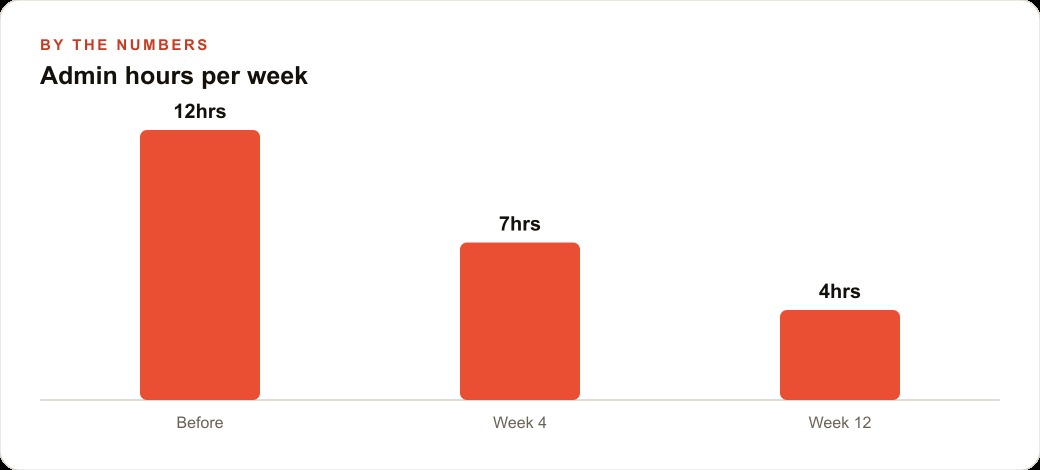
These are illustrative figures based on the scale of operations described and typical results for businesses at this stage of adoption. The exact numbers will vary based on call volume, note complexity, and how many open quotes are active at any given time. The total across these three workflows is approximately 11 hours per week of time recovered, equivalent to adding more than a quarter-time position without hiring anyone.
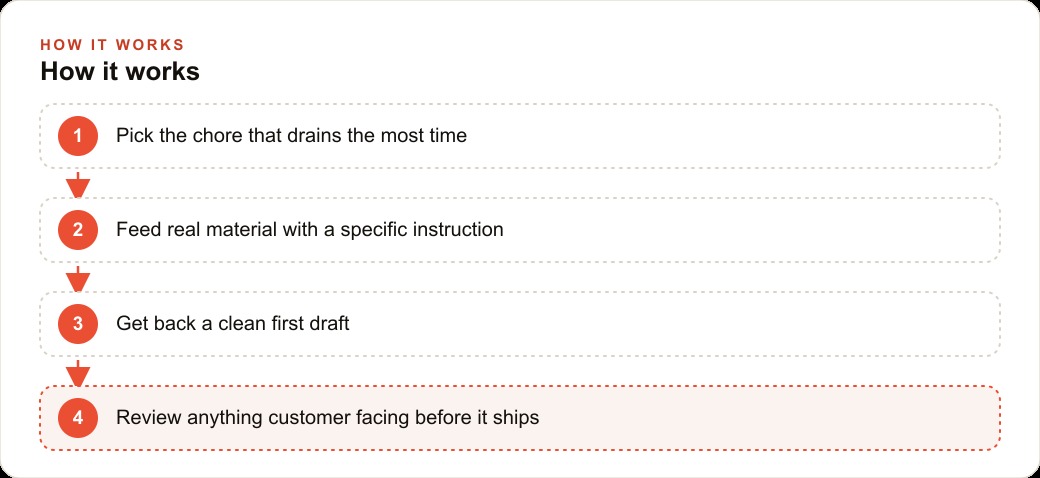
The broader point is that none of these three workflows require advanced technical skills or significant financial investment. They require picking the right three tasks, setting up the AI correctly for each one, and reviewing the outputs consistently in the first few weeks until the patterns are reliable. The 40-plus use cases in the roundup are a menu. These three are the right starting order for a plumbing company that wants measurable results within 30 days.
The businesses that move on this now are building a skill gap that compounds every month. The owner who has been using these tools daily for six months is dramatically faster and more precise at directing them than someone starting today. Getting into the practice on small tasks is how you build the intuition to use more powerful versions well as they arrive. That skill gap, quiet and invisible now, becomes a real operational advantage over the next two years.## One question to ask before you start
Before picking any workflow to automate, answer this question honestly: if the AI produced the output today, who in your business would actually use it? If the answer is unclear, the workflow is not ready to build. The most common reason AI workflows get abandoned is not that they failed to produce the output. It is that the output landed in a process nobody trusted, reviewed, or acted on.
Identify the person who will receive and review the AI output before you build anything. That person is your internal customer, and their willingness to review and correct the output in the first month is what determines whether the workflow becomes a lasting part of the operation or another experiment that gets mentioned and then ignored. Build the review step before you build the automation. The automation is easy to add once the review habit is established. The review habit is nearly impossible to add after the automation is already running.
That is exactly what we do at AI DOERS. Book a private 30-minute call with Madhuranjan Kumar and we will map the fastest path to it for your specific business.
Book your call →
Madhuranjan Kumar
Madhuranjan Kumar brings 20 years of performance-marketing experience and has managed over $200 million in Facebook ad spend for brands across the United States and beyond. His expertise spans the full modern marketing stack: Meta, Google Ads, TikTok, email automation, CRM, and the websites that hold it together. At AI DOERS he turns that track record into lead-generation systems for businesses across every industry.