
GPT-4o Image Generation vs. Midjourney, Flux, and Imagen: A Complete Benchmark Comparison
OpenAI's new image generator is available free and claims to be the best on the market. After running benchmark prompts across every major model, here is the honest comparison.

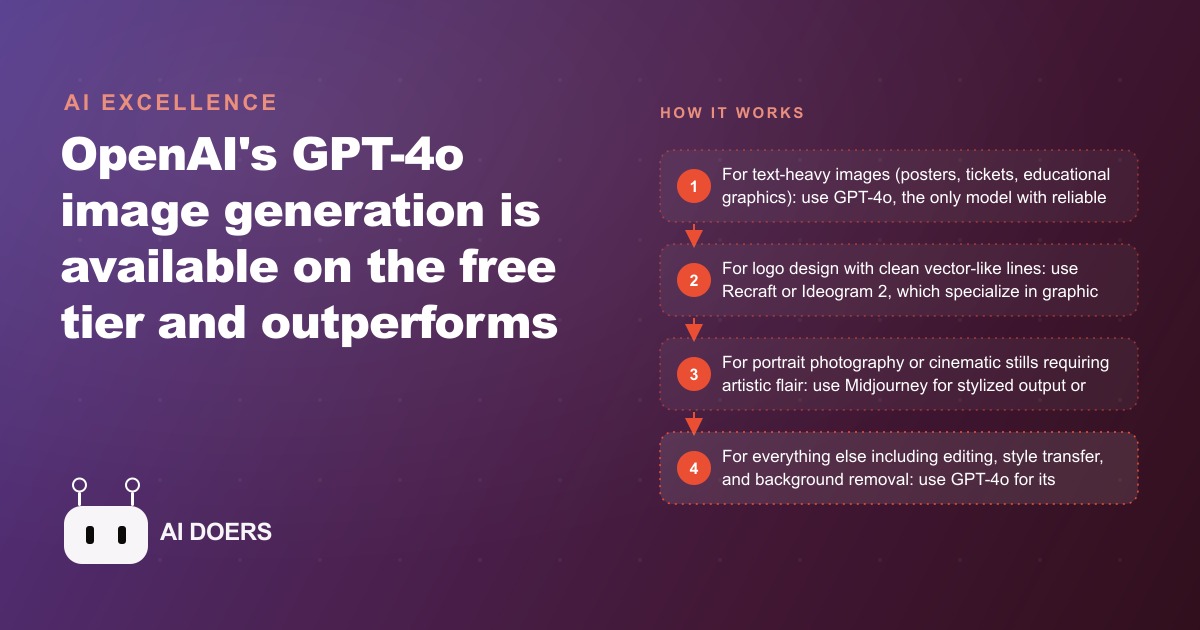
A dental practice with three dentists was posting one blurry phone photo a week, whenever the front-desk coordinator could steal a few minutes between patients. Twelve weeks later, that same practice was publishing three to four polished, text-accurate graphics a week, and the coordinator was spending about an hour on all of it instead of an afternoon. Nothing about the practice changed except one tool: OpenAI's GPT-4o image generation, which renders readable text inside an image reliably, something no image model could do before. I am Madhuranjan Kumar, and I want to walk through this practice's journey stage by stage, because it shows exactly how a capability that sounds like a novelty turns into recovered hours and better marketing for an ordinary local business.
Where the practice started
The starting point will sound familiar to anyone running a small local business. The practice wanted more social media engagement and some educational content for the waiting-room screens. What they had was irregular posting, phone photos, and the occasional stock image, all managed by the patient care coordinator in whatever time was left over between checking patients in, answering the phone, and handling insurance. Marketing was the last thing on a full plate, so it got the scraps of attention, and it showed. The content looked improvised because it was.
The real constraint was never ideas or willingness. It was that professional-looking visual content used to require either a graphic designer on retainer or hours in a design app fighting with stock elements, and the coordinator had neither the budget for the first nor the time for the second. Every good intention died at the production step. That is the bottleneck the new tool removed, and understanding why it removed it is the whole story.
Why this particular tool changed the equation
Before the walkthrough, it helps to understand what actually made GPT-4o different from every image generator that came before, because it is not raw prettiness. Two capabilities changed the equation for a business.
The first is text accuracy. Generating an image that contains readable, correctly spelled text beyond a few words had been essentially impossible for every prior tool. Posters with event details, tickets with multiple sections, educational graphics with paragraphs of explanation, all of them required a human designer to add the text afterward because the AI could not produce it reliably. GPT-4o changed this entirely. In testing it produced a full encyclopedia page with multiple paragraphs, correct spelling throughout, proper headings, and a realistic layout, and a concert ticket with the event name, date, venue, tier, seat number, barcode, and fine print, all correctly rendered. For any business whose visuals contain words, and that is most of them, this one capability is the difference between usable and useless.
The second is conversational editing. Every other generator makes you re-prompt from scratch when you want to change one thing. GPT-4o keeps the context of the running conversation, so you can say make the background a sunset or change the headline and receive an updated image that keeps everything else intact. That turns a frustrating slot-machine process into a real back-and-forth, and it is dramatically faster for iterating toward a specific result. The model rolled out to every tier, including a limited free tier, which is why a budget-conscious dental practice could even consider it.
Stage one: weekly educational content in forty seconds
The first thing the practice tackled was the recurring need for educational posts. The coordinator would type a prompt like this: create an educational infographic titled The Five Stages of a Cavity, with clear numbered stages from early enamel erosion to root infection, a clean clinical design in light blue and white, and a brief two-sentence description under each stage. The output was a professional-looking educational graphic with correctly rendered text throughout, every label and description spelled properly and laid out sensibly.
What previously would have required briefing a graphic designer, waiting a few days, and paying for the work, now took about forty seconds. The coordinator built a small rhythm around it: one educational graphic a week on a rotating set of topics patients actually ask about. Because the text renders accurately, these were not decorative filler. They were genuinely informative pieces that made the practice look like the authority it is, and they doubled as content the practice could reuse for SEO and organic search since the same explainer works on a blog post as well as a screen.
Stage two: adapting a proven ad instead of guessing
The second stage moved from education to promotion, and this is where the editing capability earned its keep. Rather than invent an ad from nothing, the coordinator uploaded an image of a well-performing ad from another dental practice and typed: recreate this ad layout for our practice, the headline should say New Patient Special, Complete Exam and X-Rays for ninety-nine dollars, use our brand colors of navy blue and gold, and include our practice name at the bottom. GPT-4o produced an adapted version of that proven layout with the correct text and the specified color scheme.
The logic here is worth spelling out, because it is the most immediately valuable use for most businesses. You are not copying someone else's offer, you are borrowing the structure of a format that already works in your category and filling it with your own brand and message. That is how you test new visual concepts quickly without a designer and without starting from a blank page every time. Those adapted creatives went straight into the practice's Facebook and Instagram ad campaigns, where being able to spin up and test a fresh variation in minutes rather than days is a direct advantage.
Stage three: a waiting-room library that builds authority
The third stage filled the waiting-room screens with a series of graphics explaining common procedures: a five-step illustrated guide to what a root canal actually involves, a comparison graphic showing why regular cleaning prevents major costs, and an annotated visual of which foods affect tooth sensitivity. Each one took a single prompt and produced a usable graphic, and each one quietly did marketing work by making the practice look thorough and trustworthy to every patient sitting in the chair waiting for their appointment.
This is the compounding part of the story. Once the coordinator had the workflow, the marginal cost of one more graphic was a prompt and forty seconds, so the library grew naturally. A patient who sees clear, professional education while they wait forms a different impression than one staring at a muted television, and that impression carries into whether they book the treatment plan and whether they refer a friend.
What the twelve weeks actually produced
Let me lay out the arc with illustrative numbers, meant to show the shape of the change rather than promise any exact result. At the start, the practice posted one to two inconsistent phone photos a week, and the coordinator spent three to four scattered hours a week producing them. By the fourth week, with the educational and ad workflows in place, output rose while time fell. By the twelfth week, the practice was consistently publishing three to four high-quality visual pieces a week, and the coordinator was spending roughly one hour a week on all of it. More content, better content, in a third of the time, produced by the person who was already there.
The cost side is almost trivial. The free tier includes image generation with a modest daily limit, enough for testing. The twenty-dollar-per-month Plus plan raises that limit and unlocks the full model, which is the right tier for a business producing four to ten images a week. For this practice, that twenty dollars a month replaced the need for a freelance designer on retainer for simple promotional content, and the recovered time for a stretched front-desk role was worth more than the dollar saving. All of it feeds back into the practice's CRM and website stack, where the same graphics support the site, the email newsletter, and the booking pages without any extra production.
The mistakes that would have derailed it
The practice succeeded partly because it avoided a few predictable traps, and they are worth naming so you can avoid them too. It did not try to use GPT-4o for its actual logo, because on clean logo lines and deliberate shading the model is noticeably weaker than tools that specialize in graphic design, so logo work belongs elsewhere. It did not expect the one-photo likeness feature to nail an exact face every time, using it for general lifestyle context rather than anything requiring precise facial accuracy. It did not expect instant generation at peak times, since the model can slow under heavy load, so anything time-sensitive got a little buffer. And it did not treat the first output as final. The first generation is usually eighty to ninety percent of the way there, and one or two conversational edits carry it the rest of the way, which is exactly what the editing capability is for.
How to start your own first session
If you want to walk this same path, start small and prove it to yourself. Open ChatGPT, make sure the model is set to GPT-4o, and run a simple test image to confirm the feature is active on your account. Then run the test that matters for a business: ask for a promotional graphic with a specific headline, date, and call to action, and check whether the text renders correctly compared to whatever you use today. Finally, try the adaptation workflow, since it tends to produce the most immediate value. Find a strong ad from your industry, upload it, and describe what to replace with your own brand and offer. That single session usually convinces people faster than any explanation.
Where each tool actually wins, so you stop overpaying
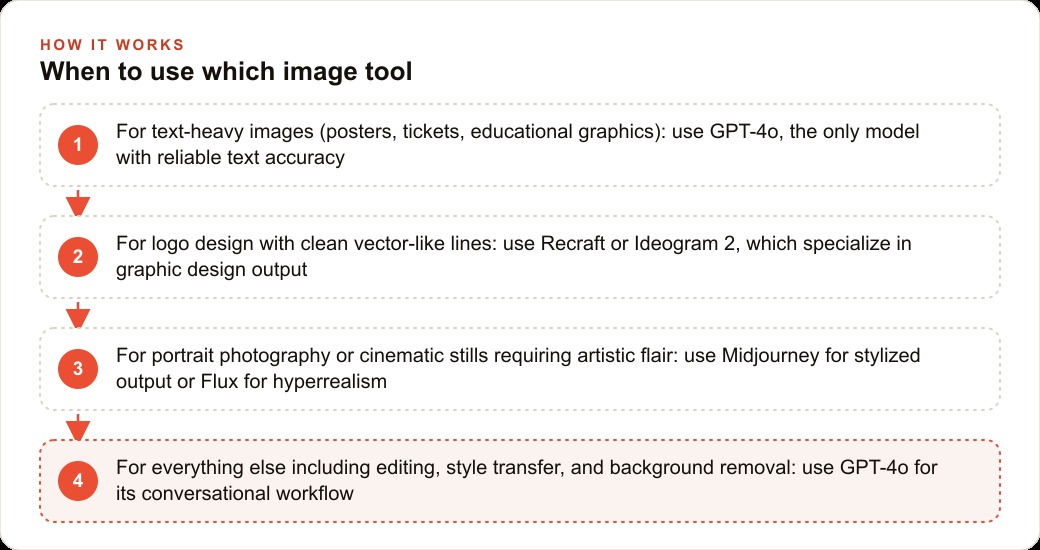
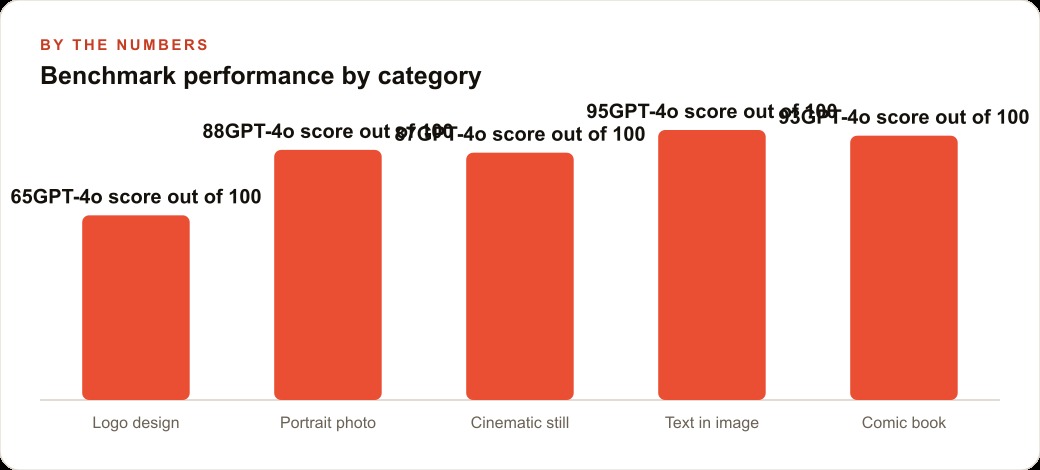
The dental practice succeeded partly because it used one tool for the right jobs instead of forcing it to do everything, and that matching is worth spelling out, because using the wrong tool is how businesses waste both money and hours. On raw benchmark scores across the categories that matter, GPT-4o is not uniformly best, and pretending it is leads to bad results. For text-heavy images such as posters, tickets, and educational graphics, it is the clear first choice, because it is the only model that renders long text reliably, and nothing else is close. For anything involving editing, style changes, or removing a background and saving a clean transparent file, it wins again on the strength of its conversational workflow, since you can refine by talking rather than re-prompting from scratch.
But there are two places to reach for something else, and knowing them saves you frustration. For a real logo with clean lines and deliberate shading, specialized graphic-design tools produce noticeably sharper marks, so logo work belongs there. And for the most demanding photographic or cinematic stills, the hyperreal models have an edge in skin texture and lighting, while another has stronger color grading and composition, so a business chasing a specific artistic look should test those. The practical rule that falls out of all this is simple. Use the conversational, text-accurate generator for the ninety percent of everyday business visuals that involve words, layout, and quick iteration, and keep one or two specialist tools bookmarked for the logo and the occasional hero image. Matching the tool to the job is not a detail, it is the difference between a workflow that quietly produces good content every week and one that fights the tool and gives up.
You can absolutely run this yourself, and I would start with the text-in-image test this week, because seeing correct text render is the moment it clicks. If you would rather have someone build the repeatable prompts, set up the ad-adaptation workflow around your brand, and wire the output into your marketing so it actually drives bookings, that is exactly the kind of work I do for clients, and you can bring me in to handle it.
That is exactly what we do at AI DOERS. Book a private 30-minute call with Madhuranjan Kumar and we will map the fastest path to it for your specific business.
Book your call →
Madhuranjan Kumar
Madhuranjan Kumar brings 20 years of performance-marketing experience and has managed over $200 million in Facebook ad spend for brands across the United States and beyond. His expertise spans the full modern marketing stack: Meta, Google Ads, TikTok, email automation, CRM, and the websites that hold it together. At AI DOERS he turns that track record into lead-generation systems for businesses across every industry.