
OpenAI Codex Can Now Use Your Computer: What Changed and How To Try It
Codex is now ChatGPT with access to your machine. It can drive your browser, control other apps, and draft an SOP with an automation plan beside every step. Here is what it does for a real business and how to set it up.

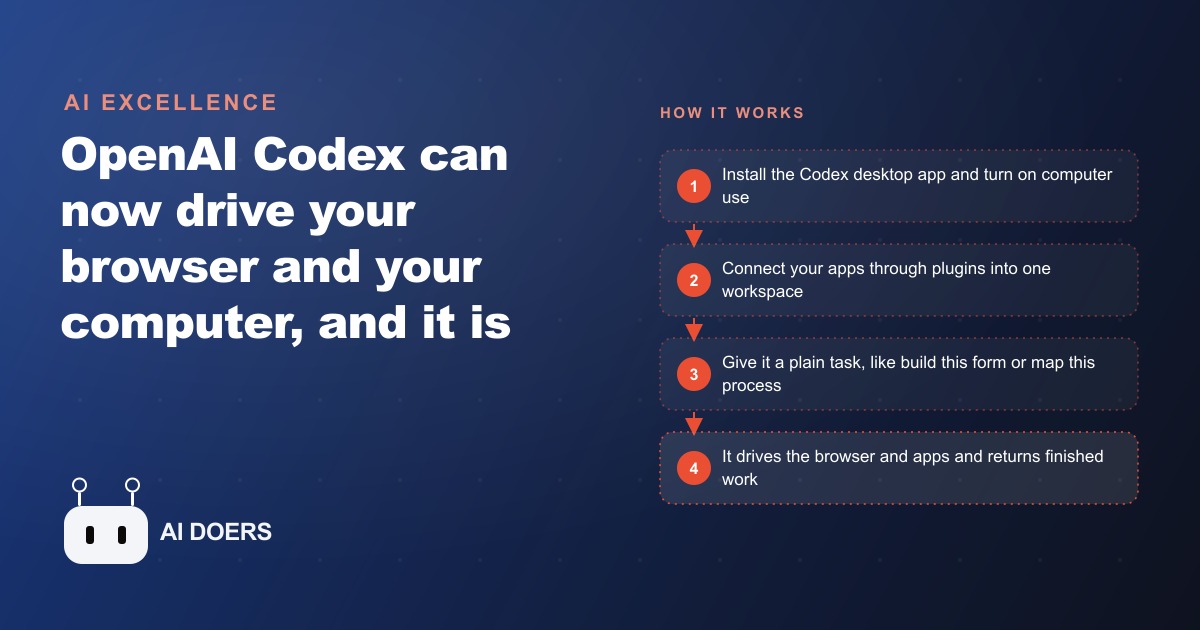
The clip everyone is sharing of OpenAI Codex driving a browser, moving a visible cursor around and building a Google Form on its own, is the least important thing about this release. I know that is not the popular take. The popular take is that watching an agent remote-control your computer is the future arriving. My position is the opposite: the browser spectacle is a distraction, the genuinely valuable feature is a boring text prompt almost nobody is talking about, and the part that should actually make you pause is that broad access to your machine is being handed to non-technical people before the guardrails and the interface caught up. I am Madhuranjan Kumar, and I want to argue for a calmer, more useful way to read what Codex just became.
The demo everyone shares is the least useful part
Codex is now, in plain terms, ChatGPT with access to your actual computer, built to run on its own and do work for you rather than just chat with you. It used to be a coding sidekick. Now it is a professional agent aimed at the large share of knowledge workers who are not developers. The headline change is that it can drive a browser, behaving like a mouse that actually works, remote-controlling tabs and even showing you the cursor moving, which most rival agents keep hidden. It is genuinely impressive to watch, and I understand why the clips travel.
But watching is not the same as valuing. A visible cursor building a form is a demonstration of a capability, not a business outcome. Filling in a Google Form from a prompt is a party trick that saves you five minutes once. The reason the demo spreads is that it is legible, you can see it happening, and legibility is what makes something shareable. Legibility is not the same as leverage. The features that quietly save a business real hours tend to be invisible and unglamorous, which is exactly why they do not go viral and exactly why you should look past the ones that do.
What actually earns its keep is the boring audit prompt
Here is the feature I would put at the center of the release, and it is buried in a list. OpenAI published ten recommended prompts, and the one that matters most for a business is the workflow audit and automation spec. It drafts a standard operating procedure for a process and places a matching automation plan next to each step, so you can map how something actually gets done and immediately see which parts could be handed off. That is not a spectacle. It is a diagnosis. It tells you where your time is going and where the machine could take over, before you automate a single thing.
I put the audit prompt above the browser control for a simple reason: sequencing. The expensive mistake with agents is automating a bad process faster. If you point a browser-driving agent at a workflow you have never examined, you get the same mess executed at higher speed, with less visibility into what went wrong. The audit prompt forces you to look first. It turns a fuzzy how we do things into a written SOP with the automation opportunities marked, which is the map you need before you let anything touch a live system. The unglamorous prompt is the one that prevents the glamorous one from hurting you.
The seams still scream developer, and that is a warning
Now the part the marketing glides over. OpenAI is repositioning Codex from a developer tool toward something regular workers can use, but it is not finished, and the seams show. Open the settings and you are staring at MCP servers, Git environments, and work trees, all developer language that means nothing to an accountant or an office manager. To wire in the apps you already use, you open plugins, which is Codex's name for what other tools call connectors, and even that renaming is a tell that the product is mid-transition.
Why does this matter beyond aesthetics? Because a powerful tool with a confusing interface, aimed at people who cannot fully read that interface, is a specific kind of hazard. The capability is real. The comprehension is not guaranteed. A non-technical user can absolutely stand up something that works, and can just as absolutely misconfigure access or approve something they did not understand, because the menus assume a fluency they do not have. When the power outruns the clarity, caution is not pessimism, it is the correct response to the actual state of the product.
The raw capabilities are real, which is why to slow down
Let me be fair to the tool, because the caution only makes sense if the power is genuine, and it is. Beyond the browser, Codex can step outside the app and remote-control other software on your computer once you install computer use or browser use, which is the step that unlocks the good parts. It has image generation baked in, so it made a poster on its own while building a requested form, with no external tool connected. It found video files on a desktop, opened them, and analyzed the frames, a task a rival agent could not finish. This is a thorough, capable agent, not a toy.
That thoroughness is exactly the argument for slowing down, not speeding up. A weak agent that fumbles is self-limiting, because it fails visibly before it does damage. A capable one that follows through is the one that will confidently carry out a misread instruction to completion across several of your apps. The more reliably it acts, the more it matters that you pointed it at the right thing and bounded what it can touch. Capability and caution are not opposites here. The first is the reason for the second.
Broad access is the real risk, not a feature
This is the heart of my argument. The most powerful of the ten published prompts is a chief of staff that reviews your messages, calendar, and action items, and to do its job it needs access to nearly everything you use. Read that sentence again slowly. The value and the risk are the same sentence. An agent that can see your inbox, your calendar, your files, and your apps, and can act inside them, is exactly as useful as it is dangerous, and the danger scales with the access.
I am not saying do not use it. I am saying the access is the thing to design around, not the thing to grant casually because a setup wizard asked. Every app you connect widens what the agent can touch, and every widening is a place where a misread instruction or an over-eager action becomes a real problem inside a real system. The businesses that get burned will be the ones that treated broad access as a convenience to click through. The ones that benefit will treat it as a boundary to draw deliberately, connecting only the apps a given task actually needs and nothing more.
Keep a human on anything that leaves the building
The discipline that follows from all of this is simple and I hold it firmly: keep a person approving anything that leaves the firm or changes a live record, especially while you are still building trust. Codex is a thorough little agent. It found video files on a desktop, opened them, and analyzed the frames, a task a rival agent could not finish, and it can genuinely fill forms, move data into spreadsheets, and run on a schedule. That thoroughness is precisely why an unattended mistake propagates. The pause where a human checks the output is not friction slowing down the future. It is the safety rail that lets you use the power at all.
None of this is an argument against automation. It is an argument for the order of operations. Audit first so you understand the process. Connect narrowly so the access stays bounded. Keep a human on the exits so a confident error never reaches a client or a ledger unreviewed. Do it in that order and the browser-driving power becomes an asset. Do it backwards, dazzled by the demo, and you have handed broad access to an agent to run a process you never examined, which is how good tools produce bad outcomes.
What this looks like for an accounting firm
Let me make it concrete with one illustrative example. Picture an accounting firm where the daily reality is data moving by hand between a portal, a spreadsheet, an email inbox, and accounting software, most of it slow and error-prone. Following my own order of operations, the first thing I would do is not switch on browser control. It is run the workflow audit prompt on one real process, like monthly bookkeeping for a client, so Codex drafts the SOP and marks exactly which steps could be automated. That single document becomes the firm's map, and it is worth having even if the firm automated nothing else.
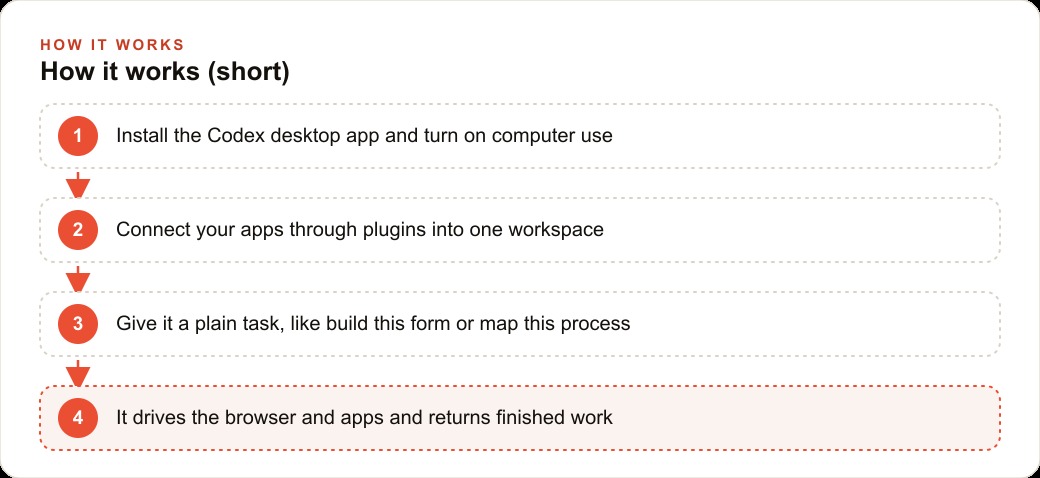
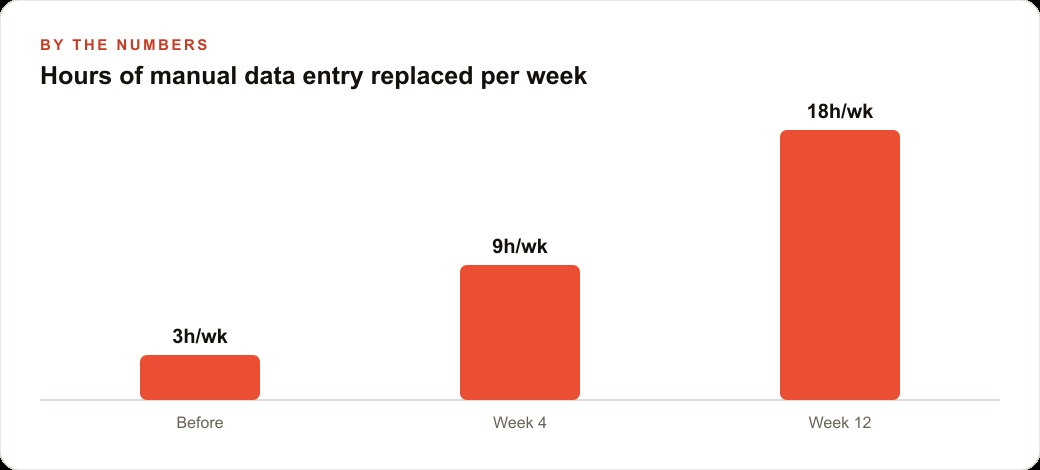
Only then would I turn on computer use and connect, narrowly, the inbox, the spreadsheet tool, and the calendar through plugins, so Codex can act on that one mapped process and nothing beyond it. From there the routine work gets handed off under supervision. Codex can pull receipts and statements out of email, drop the figures into the right spreadsheet, flag anything that does not reconcile, and draft the client follow-up asking for a missing document. During tax season it can take a stack of source files, read them, and pre-fill the working papers so a person only checks the exceptions. But every output that leaves the firm passes a human first, because the access is broad and the work is sensitive. The clean, structured client data these handoffs produce also feeds naturally into the firm's CRM and website stack, so follow-up and onboarding stop being separate manual chores. Picture the pure data-entry hours it absorbs climbing from a few a week, to nine by the first month, to eighteen by the third. The figures are illustrative, but the accountants spend that reclaimed time on judgment and advice, which is the part clients actually pay for.
Notice that the leverage in that story lives everywhere except the browser demo. It lives in the audit that mapped the process, the narrow connections that bounded the risk, and the human check that kept it safe. Those choices are what turn a flashy capability into a reliable one, and they are the parts no clip will ever show you.
The move to make
So here is the practical version of the contrarian case. Do not start with the feature that impressed you. Start with the audit prompt, on one real process, so you have a written SOP and a marked automation plan before anything touches a live system. Download the Codex desktop app, log in, and remember to install computer use or browser use, because without that step the best abilities stay locked, but treat that power as something to point carefully, not spray widely. Connect only the apps a given process needs, keep a human on anything that leaves the building, and expand one workflow at a time as trust is earned. The same audit-first discipline applies well beyond bookkeeping, too. Run it on how the firm handles inbound leads and it will map where a CRM and website stack should take over, and run it on how the marketing gets done and it will show where Facebook and Instagram ad campaigns and SEO and organic search could be supported without hiring for it. The broader industry is racing to unify all your apps behind one agent you talk to, and that race will keep producing impressive demos. Your advantage will come from ignoring the demos and getting the order of operations right.
One more habit is worth building: start narrow and widen only on evidence. Automate one audited process, watch it for a couple of weeks, and connect the next app or hand off the next task only once the first one has earned it. The temptation with a tool this capable is to connect everything at once and let it loose, because the demos make that look safe. It is not. The businesses that win with computer-use agents will be the ones that grew their trust in small, reviewable increments, so that by the time the agent is touching something sensitive, it has a track record behind it instead of a promise.
You can absolutely set this up yourself, and I would tell any firm to start with one audited process this week. If you would rather have someone map your real workflows, connect your tools safely, and stand up the automations so they work on the first run without exposing sensitive data, that is the kind of build I do for clients, and you can bring me in to handle it.
That is exactly what we do at AI DOERS. Book a private 30-minute call with Madhuranjan Kumar and we will map the fastest path to it for your specific business.
Book your call →
Madhuranjan Kumar
Madhuranjan Kumar brings 20 years of performance-marketing experience and has managed over $200 million in Facebook ad spend for brands across the United States and beyond. His expertise spans the full modern marketing stack: Meta, Google Ads, TikTok, email automation, CRM, and the websites that hold it together. At AI DOERS he turns that track record into lead-generation systems for businesses across every industry.