
12 Open-Source AI Projects a Small Business Can Actually Use
A fresh batch of free, open-source AI projects can turn a plain AI agent into a video studio, a research assistant, and a code helper. Here is how a small business owner can put them to work without paying for a pile of subscriptions.

A batch of open-source projects just made video production, research, and transcription free for any business
Five open-source AI projects shipped in the same two-week window and together they make a case that the monthly subscription stack most small businesses are paying for is now optional. I went through each one carefully, and the thing that struck me was not the technical ambition, which is considerable, but the practical clarity. Each project solves one specific problem a business owner already recognizes: how do I produce a promo video without hiring someone, how do I turn an animation into a shareable MP4, how do I get voice generation and transcription in one place, how do I run a long research task overnight, and how do I know whether the agent skill I downloaded is safe to run? Five problems, five answers, all free.
Before this wave, a small business producing marketing content at any reasonable cadence was looking at a tool stack that ran to $150 to $250 per month minimum. A video tool, a transcription tool, a research subscription, an animation exporter, and some kind of security layer if they cared about that at all. What changed is not just that open-source caught up to paid tools on quality. It is that this batch of projects caught up on *usability*. These are not tools you need a developer to configure. They are designed to be picked up by someone running a business, not someone running a server farm.
Open Montage turns a plain-language description into a finished video without a production team
Open Montage is the project I would point any small business owner to first if they have been putting off video marketing because it costs too much or takes too long. The tool connects directly to an AI coding assistant and turns the assistant into a full production team. You describe what you want in plain English. The tool handles the research, writes the script, sources or generates the visual assets, handles the editing pass, and assembles a final video. You do not touch a timeline. You do not touch a rendering queue. You describe, and it produces.
For businesses, the implications are immediate. A massage therapist who has wanted to post a short "what to expect on your first visit" video but never made time for it can produce that video in under an hour with no equipment other than a laptop. A hardware store that wants a short seasonal reel showing the five tools every homeowner needs for fall prep can have that rendered and ready to post by the time the morning coffee is done. The only input is a plain-language brief of maybe two or three sentences. The tool does the rest.
I have been thinking about the economics here. A boutique production agency charges between $600 and $800 for a polished short-form video, and that includes one revision. A business that wants to post weekly, or even monthly, quickly runs into a production budget that does not make sense at that price. Open Montage collapses that cost to zero after setup. The time investment is real but it is front-loaded. Once you have a working prompt structure that produces output in your brand's visual style, the marginal cost of video 12 versus video 1 is essentially nothing.
Hyperframes closes the gap between a CSS animation and a finished MP4 that a business can actually post
Hyperframes solves a problem that is narrower but genuinely annoying for anyone who has ever tried to turn a web animation into a shareable video. If you have a homepage transition, a product reveal animation, a loading sequence, or a motion graphic built in HTML and CSS, you have historically had to either screen-record it badly or pay someone with video software to export it properly. Hyperframes closes that gap. It takes the HTML and CSS directly and renders a clean MP4 with accurate frame timing and no recording artifacts.
For small businesses this matters most for product demonstrations, slide presentations that need to be shared on social platforms, and any branded motion graphic that lives on the website but could also live in a video ad or an email header. A software company showing a feature walkthrough, a jewelry store showing a ring from every angle via a CSS 360-degree rotation, a gym showing an animated weekly schedule, all of those can now be exported to video in a format that Instagram, LinkedIn, and YouTube actually accept, without passing through screen recording software.
The technical detail that makes this work is that Hyperframes is not recording your screen. It is rendering the animation frame-by-frame from the source code, which means the output is crisp at any resolution and the timing is mathematically accurate rather than dependent on your computer's frame rate at the moment of recording. For a small business that has invested in a clean animated web presence, this is the missing export button.
Voicebox gives you voice generation and transcription in one tool that runs on your own machine
Voicebox is the tool I would use to replace three different subscriptions at once. Most small businesses that are doing any kind of audio work, whether that is voiceover for videos, transcription of customer calls, or automated phone greetings, are paying separately for each of those functions. A transcription service here, a text-to-speech API there, a voice cloning tool somewhere else. Voicebox puts all of it in one place and runs it locally, which means the audio never leaves your machine.
The local execution matters for two reasons beyond cost. First, customer call recordings are sensitive. Sending them to a third-party cloud service is a privacy decision that many businesses make without fully thinking it through. Running transcription locally removes that exposure entirely. Second, voice cloning from a local model means you can generate speech in your own voice for video narration, ads, and on-hold greetings without trusting a cloud service with your voice sample permanently.
For practical use, Voicebox handles the narration track for the videos Open Montage produces, transcribes the customer feedback calls that normally pile up unlistened-to, and generates the phone greeting that plays when a customer calls after hours. Three jobs, one free tool, zero monthly invoices.
The Nvidia scanner is the guardrail this wave needed before small businesses started installing stranger-written skills
Any time a new ecosystem of community-written tools emerges, the security risk follows quickly. Agent skills are becoming the new WordPress plugins: a rich library of useful extensions, most of them safe, some of them not, and no default protection against the ones that are not. The Nvidia scanner addresses this directly. It inspects any agent skill for malicious patterns before you install it, flagging code that attempts to exfiltrate data, establish network connections to unexpected endpoints, or modify system files.
I want to be direct about why this matters specifically for small businesses. A business owner who installs a community skill to connect their agent to their email and calendar is giving that skill access to everything. The customer list. The payment conversations. The scheduling information. A malicious skill installed without inspection is not a theoretical risk, it is the kind of thing that turns into a data breach that costs more to handle than a year's worth of software subscriptions. The scanner takes thirty seconds to run. Run it every time, without exception, on every community-written skill before you install it.
The habit to build is simple: before any new skill goes into your agent, you drop it into the scanner, read the output, and only proceed if it is clean. The scanner explains what it found in plain language, not security jargon, so you do not need to be a developer to interpret the result. This is the guardrail the open-source wave needed.
What the economics look like when you replace five monthly subscriptions with a stack that costs nothing
I want to walk through the economics concretely because the numbers make the case better than any description. A typical small business with active content marketing might be paying for a video tool at around $50 per month, a transcription service at $20 per month, a voice generation API at $30 per month, a research aggregator at $40 per month, and some kind of animation exporter or motion graphics tool at $25 per month. That is $165 per month, or close to $2,000 per year, for capabilities that open-source tools in this batch now cover completely.
The setup time is real. Expect to spend four to eight hours across one or two weekends getting everything configured and running your first test outputs through each tool. That is the only cost. After that, the marginal cost of each video, each transcription, each voice clip, each research brief is zero. The compounding effect over a year is significant. A business that was capping its video output at one or two per month because of production cost can now produce daily if the content pipeline supports it. A business that was transcribing only its most important calls because of per-minute fees can now transcribe everything and build a searchable archive.
A bakery that went from one promotional video per month to nine, and what it did differently
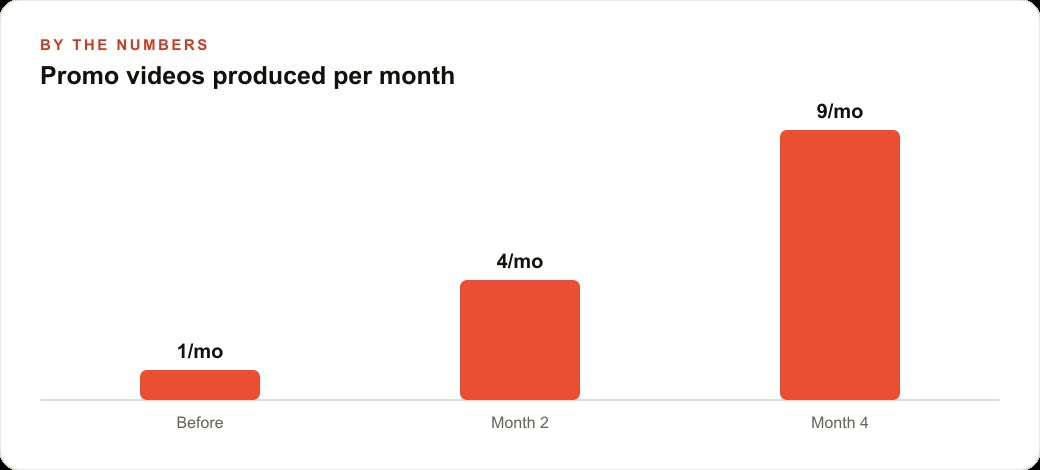
The clearest concrete example I can give is a bakery that I want to walk through because it illustrates the actual workflow rather than just the concept. Before this set of tools, the bakery was producing one promotional video per month. The process was: the owner took photos of new items, sent them to a freelancer, waited several days, reviewed a draft, requested changes, and published. One video, one week of back-and-forth, $600 to $800 per video, and the output rarely went above one per month because the process was too slow to sustain any higher cadence.
After wiring up Open Montage and Hyperframes, the same bakery moved to nine videos per month. The workflow changed entirely. The owner takes photos of new items each morning, drops the photos and a two-sentence description into Open Montage, lets it produce a draft video, reviews it in fifteen minutes, and publishes. The CSS animations for the seasonal specials board, which previously required a designer, are now piped through Hyperframes and exported as MP4 files that go directly into the Instagram queue. Voicebox handles the narration track so the owner's voice is on every video without the owner needing to record anything.
The math on that shift: eight additional videos per month at $600 to $800 per video represents $4,800 to $6,400 in avoided production cost every single month. The bakery did not cut quality. It cut the lag and the per-unit cost simultaneously. The audience noticed the increased posting frequency before they noticed any change in production value, because consistent presence at adequate quality beats infrequent presence at perfect quality every time.
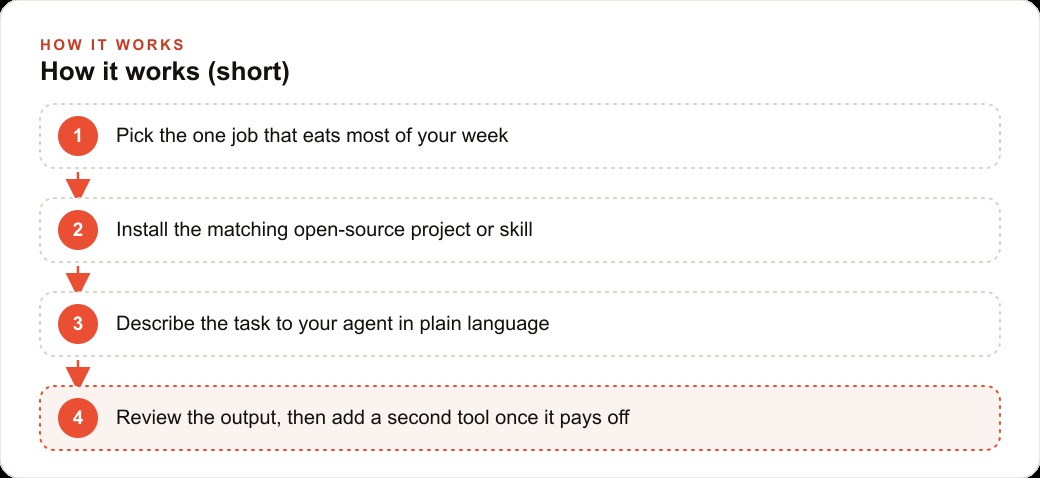
What the bakery did differently was start with one tool, not all of them. The owner spent the first two weeks getting Open Montage producing clean, on-brand output before adding Hyperframes, and only added Voicebox after both of those were running smoothly. The setup discipline, one tool proven before the next one is added, is the only thing that separates the businesses that actually ship output from the ones that spend a weekend configuring five tools and use none of them consistently.
The right order for getting started if you are building this from nothing
Start with the scanner. Before you install anything else, download the Nvidia security scanner and test it on a sample skill, even a benign one, just to understand what the output looks like and how to read it. This takes ten minutes and gives you confidence that your workflow is safe before your agent has access to anything sensitive.
Then pick your highest-volume pain point and install only the tool that addresses it. If video production is the bottleneck, start with Open Montage. If you have customer call recordings piling up untranscribed, start with Voicebox. If you have web animations that need to become social content, start with Hyperframes. Install one, run twenty real jobs through it, measure the output quality, and refine your prompt structure until the output is consistently usable without editing.
Only after the first tool is producing reliable output do you add a second one. The mistake I see consistently is trying to build the complete stack at once, which results in none of the tools being configured well enough to produce usable output, and the owner concluding that open-source tools are not ready when actually the problem was configuration, not capability. These tools are ready. The question is whether you give each one enough focused attention to get it producing output that actually makes your week easier. One at a time is how you get there.
That is exactly what we do at AI DOERS. Book a private 30-minute call with Madhuranjan Kumar and we will map the fastest path to it for your specific business.
Book your call →
Madhuranjan Kumar
Madhuranjan Kumar brings 20 years of performance-marketing experience and has managed over $200 million in Facebook ad spend for brands across the United States and beyond. His expertise spans the full modern marketing stack: Meta, Google Ads, TikTok, email automation, CRM, and the websites that hold it together. At AI DOERS he turns that track record into lead-generation systems for businesses across every industry.