
Open-Source AI Agents That Work 24/7: A Plain Guide for Small Business
A fast-growing open-source project showed that AI agents can now run nonstop on cheap hardware and handle real tasks. Here is what that means for an owner who just wants more done without hiring.


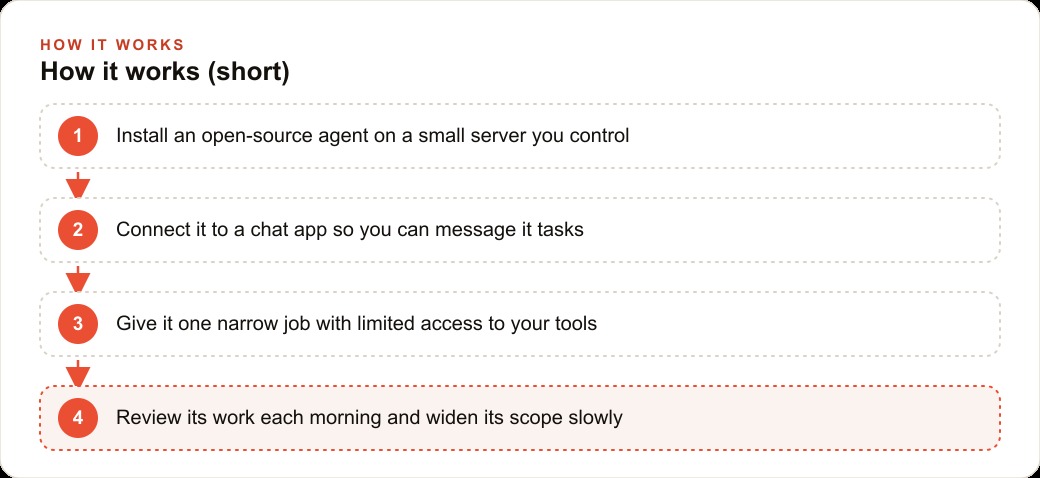
Most business owners who ask me about AI agents make the same mistake before they even install anything: they start by listing everything the agent could do, not everything it should never be allowed to touch. That ordering error causes every bad outcome I have seen, from agents sending the wrong message to the wrong customer to agents making schedule changes nobody authorized. This article is a step-by-step playbook for deploying a 24/7 open-source AI agent in a small business without creating a security problem, using a pest control company as the worked example throughout. The stages are not theoretical. They are the actual sequence that keeps a deployment safe.
Start with the Narrowest Possible Permission Set, Not the Most Impressive Capability
The first question is not "what can this agent do?" The first question is "what is the single most boring, repetitive task that currently falls through the cracks every evening?" That is the only task the agent gets access to. Nothing else.
For the pest control company in this example, that task was evening appointment confirmations. Every day, customers needed a reminder message the night before their scheduled treatment. The owner was doing it manually at around 8 PM, from a personal phone, after a full day on the road. It was taking 20 to 30 minutes. It was being skipped on busy days. It was the perfect candidate for an agent.
The permission set the agent received was extremely limited on purpose. It could read the appointment schedule for the following day. It could send outbound text messages from the business number. That was the complete list. It could not touch pricing. It could not reschedule appointments. It could not access billing records. It could not see customer payment history. It could not send emails. It had no write access to the schedule at all.
This is a deliberate constraint, not a limitation to be fixed later. The discipline of starting narrow is what makes it possible to expand confidently afterward. Every access you grant at the start is an access you will have to audit if something goes wrong. Keep the initial list short enough to describe in one sentence.
The tools that make this possible, including open-source agent frameworks like OpenClaw and its commercial variants, are built to support this kind of access scoping. The agent gets a configuration file that specifies which tools it can call, which data sources it can read, and which actions it can take. Filling that file with restrictions is not underpowering the agent. It is the responsible default.
Write the Business Context Document Before the First Live Task
An agent with tool access and no context is dangerous in a quiet way. It will attempt tasks with confidence and fill in the gaps it encounters using its training data rather than your business reality. That is where hallucinations happen. The agent does not know your service area. It does not know that you offer a different price for monthly contracts versus one-time services. It does not know that certain customers have requested morning-only contact windows. It will improvise, and the improvisation will be wrong.
The fix is a business context document, written before the agent runs a single live task. This is a plain text file that describes the business in the way a new hire would need it explained on day one. For the pest control company, the document covered the following: what the company does and the service area by city and zip code; the appointment types and what each involves; the correct tone for customer communication (friendly but brief, no hard-sell language after a job is booked); the exceptions list (customers who have opted out of texts, customers with morning-only preferences, commercial accounts that need a manager name in the greeting rather than a first name); and the escalation contacts for anything outside the script.
This document does not need to be long. The pest control version was about 600 words. What matters is that it answers the questions the agent would otherwise answer by guessing. Every hour you spend writing this document saves you from a customer service incident later.
The agent receives this document as part of its system prompt, which is the standing instruction set that frames everything it does. It reads it before every task, not just at setup time. This is important because agents in the open-source frameworks I use keep the context window populated with the system prompt on every run. The business context is always in scope, not forgotten after the first session.
Run in Draft Mode for Two Weeks Before Any Auto-Send
Draft mode means the agent writes every message and saves it for human review before it goes out. Nothing is sent automatically. You read the drafts at the end of each day, approve or edit, and send manually. This phase feels slow. It is the most important phase.
During the first two weeks with the pest control company, I ran draft mode every night and read the next day's confirmation messages in the morning. A few patterns came up in that review period. The agent was occasionally addressing commercial accounts by their contact's first name when the business name was more appropriate. It was sometimes adding a sentence about the treatment process that was accurate but not part of the standard customer-facing script. It was not doing anything wrong in a serious sense, but it was off-script in ways that mattered to the owner.
Each of those patterns became a clarification in the business context document. By the end of week two, the drafts were consistently clean. No edits needed on most days. That track record is what justified switching to auto-send.
Two weeks is the minimum. Some businesses take three or four weeks depending on how varied the customer interactions are. Do not rush this phase. The evidence that you can trust the agent comes from the draft record, and the draft record has to be long enough to have seen a variety of cases. A week of clean drafts is not enough. Two weeks without a single edit-required incident is a reasonable baseline.
One thing worth noting: the draft review period also reveals the edge cases you did not think to put in the business context document. By reading the drafts, you discover the questions the agent is answering by inference rather than by instruction. That is useful. Add those answers to the document before you switch to auto-send.
Expand Scope Only After a Clean Track Record
When auto-send on appointment confirmations had been running cleanly for 30 days, the conversation turned to what to add next. The owner wanted to add quote follow-ups: messages sent 48 hours after a quote was issued, checking whether the customer had questions and gently moving them toward booking.
This was a meaningfully more complex task than appointment confirmations. Confirmations had a fixed script and a fixed trigger. Quote follow-ups required the agent to know the status of each quote, to check whether a booking had been made (to avoid following up with someone who already said yes), and to adjust the tone depending on whether the quote was for a residential or commercial customer.
The right approach was not to add this to the existing agent configuration and flip a switch. The right approach was to treat it as a new deployment with its own draft mode period. The follow-up messages ran in draft for two more weeks, separate from the confirmation messages that were already running live.
This is how scope expansion should work: one task at a time, each one going through its own draft period before going live. It takes longer than a single large deployment. It produces a system you can actually trust, because each layer has its own verified track record before the next layer is added.
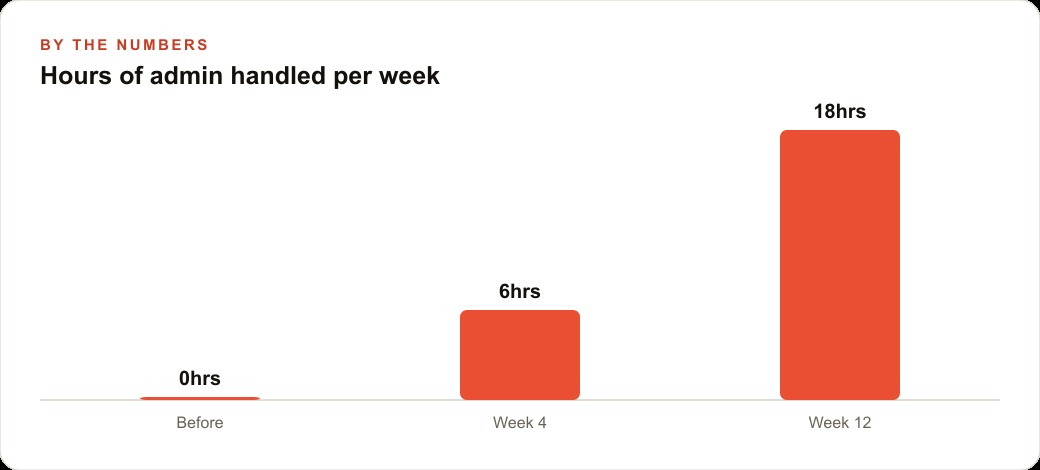
Within four months of starting with appointment confirmations, the pest control company had three active agent tasks: the evening confirmations, the 48-hour quote follow-ups, and automated review requests sent three days after a completed service. Each had been through its own draft period. The combined time saved across all three was running at roughly three hours per week, without a single customer-facing error.
The fourth task under consideration was quarterly contract renewal reminders. That one was still in draft mode at the time I am writing this. It involved a more sensitive message, one that touched on pricing and contract terms, and the owner wanted a longer review period before it went live. That caution is exactly right.
Define the Escalation Rule That Keeps Humans in the Loop
Every agent needs a hard rule that says: when this condition is true, stop and flag for human review. This rule is not optional. It is not a nice-to-have. It is the single mechanism that prevents the agent from compounding a mistake by continuing to act after something has gone wrong.
For the pest control company, the escalation rule was written in plain language in the business context document, and it was also hard-coded in the agent configuration: if a customer replies to any agent-sent message with anything that is not a simple confirmation, the agent stops the interaction and creates a flagged task for the owner to handle personally.
That rule covered scenarios like a customer saying they needed to reschedule, a customer asking a question about pricing, a customer expressing a complaint, and a customer asking to be removed from the list. None of those are scenarios where you want an agent improvising. All of them are scenarios where a human needs to be in the conversation.
The flagging mechanism used in this case was a simple task in the business management software that already existed. The agent could write to it. When a non-confirmation reply came in, it created a task entry with the customer's name, the message content, and a note that said "requires personal follow-up." The owner's morning routine included a 5-minute review of that task list.
The number of escalations in a typical week, once the system was running cleanly, was between zero and two. Most customers either confirmed or did not reply. The occasional reply that needed human attention was handled in the morning review, not missed, not handled by the agent in a way that could create a bigger problem.
The escalation rule is also what makes it possible to sleep at night knowing the agent is running. The agent is not autonomous in the sense of being unmonitored. It is autonomous within defined boundaries, and it hands off cleanly when it hits those boundaries. That is not a weakness in the design. That is the design.
What the Numbers Look Like After 90 Days
The pest control company ran the agent for 90 days before I asked the owner to pull any numbers. The picture was straightforward.
Before the agent: appointment no-shows were running at roughly 12 percent of scheduled appointments. After 60 days of evening confirmation messages: no-shows dropped to 4 percent. Each avoided no-show represents a recovered service call worth somewhere between 90 and 200 dollars depending on the treatment type.
The quote follow-up messages, at a 48-hour cadence with a single check-in, produced a measurable lift in booking rate on issued quotes. In the 90 days before the agent, the owner was closing roughly 40 percent of issued quotes. In the 90 days after: 51 percent. The follow-up message was the only change made during that period.
Review requests sent three days after service produced 23 new reviews in the first two months. The business had collected 14 reviews in the previous year.
None of these results required giving the agent access to billing, to customer payment history, or to any system that touched financial data. The agent never had those permissions. It operated on the schedule and the message-sending channel, and it produced outcomes that were meaningful for the business without needing access to anything sensitive.
That is the point. The most valuable agent tasks for a small business are not the ones that require deep integration with every system. They are the ones that close the gaps in routine customer communication, specifically the messages that are known to matter but are being skipped on busy days because there is no one available to send them. A 24/7 agent does not get tired. It does not skip the Thursday night confirmation batch because the van broke down. It runs the script, flags the exceptions, and stays inside its lane.
The playbook is five stages: start narrow, write the context document, run drafts for two weeks, expand one task at a time, and define the escalation rule before the first live send. Do them in order. Do not skip the draft phase because you feel confident. Do not expand scope without a clean track record. The businesses that deploy these agents well are not the ones that gave the agent the most access. They are the ones that gave it the right access and built trust incrementally.
That is exactly what we do at AI DOERS. Book a private 30-minute call with Madhuranjan Kumar and we will map the fastest path to it for your specific business.
Book your call →
Madhuranjan Kumar
Madhuranjan Kumar brings 20 years of performance-marketing experience and has managed over $200 million in Facebook ad spend for brands across the United States and beyond. His expertise spans the full modern marketing stack: Meta, Google Ads, TikTok, email automation, CRM, and the websites that hold it together. At AI DOERS he turns that track record into lead-generation systems for businesses across every industry.