
Can a Non Coder Build a Real App Faster Than a Senior Engineer?
A non coder using AI went head to head with an experienced engineer to build a working app under a tight clock. The takeaways are surprisingly useful for any business owner.


There is an assumption that has sat at the center of the software industry for thirty years, and a race I recently watched helped expose it clearly. The assumption is that building software is a specialist activity reserved for people who spent years learning to write code. The race was a head-to-head contest between someone who had never written a line of code and a senior engineer with over a decade of professional experience. The challenge was to build a working app with three photo-based features within a tight time limit. The non-coder held their own. The reason matters for every business owner who has an idea for an internal tool but no developer to build it. I am Madhuranjan Kumar. In this article I want to use that race as a starting point for a more grounded scenario: an accounting firm that builds a receipt and invoice reader to cut down on manual data entry, from first idea through first working version to the edge cases that broke it and what fixing them taught the team.
The race that exposed a thirty-year assumption about who can build software
The race challenge was to build one app combining three distinct features: a calorie counter that reads a food photo, a conversation reply suggester that reads a screenshot of a chat, and a selfie rater that analyzes a photo of a face. Three separate AI-powered capabilities bundled into a single interface, each requiring a vision model that can look at an image and return a useful result.
The engineer could write any code he wanted, using any tool or language he preferred. The non-coder used an AI building tool and described what they wanted in plain language. After the time limit, both had working versions of at least some of the features. The engineer acknowledged that building everything from scratch in twenty minutes would have been genuinely difficult even for him. The AI did the heavy lifting for both.
The part worth understanding is what the non-coder was doing during those twenty minutes. They were not typing faster than the engineer. They were describing what they wanted with enough precision for the AI to act on it. That is a different skill than writing code, and it is one that business owners, accountants, operations managers, and other domain experts already have in abundance. The bottleneck in building simple software has shifted. It used to be implementation skill: you either knew how to write code or you hired someone who did. Now the bottleneck is description clarity: your ability to articulate what you want the tool to do, what inputs it should accept, what outputs it should produce, and how it should behave when the input is unusual. People who understand their own business processes in detail are often better positioned to clear that bottleneck than a developer who is learning the business while building the tool simultaneously.
Picking the first feature: why the receipt reader is the right starting point for an accounting firm
When I work through the "build an internal AI tool" scenario with an accounting firm, the first question is always which feature to build first. The answer matters because the right first feature has clear inputs, clear outputs, and a clear definition of success. A feature that is ambiguous about any of those three things will take longer to build and longer to evaluate, and it will produce confusion rather than confidence at the end of the first day.
The receipt reader fits the criteria well. The input is clear: a photograph or scan of a receipt or invoice. The output is clear: a structured record with vendor name, date, total amount, and expense category. The definition of success is unambiguous: the extracted fields match what is actually printed on the document, and the format is consistent enough to import into the firm's accounting system without manual reformatting.
A more ambitious first feature, such as one that analyzes a client's full financial statements and flags anomalies, has inputs and outputs that are much harder to define precisely at the start. The result would be a prototype that does something plausible but is hard to evaluate without deep financial judgment, and applying that judgment to a rough prototype slows the development momentum. The receipt reader gives immediate, verifiable feedback: either the vendor name is right or it is not. Either the amount matches the receipt or it does not. That tight feedback loop keeps the first day productive.
The receipt reader also has a clear, immediate ROI. Manual data entry from receipts and invoices is a task most accounting staff would describe as the part of their job they would most gladly give up. It is repetitive, error-prone, and low on judgment. Automating it is not a threat to professional accountants. It is a relief.
The first run and what it got wrong about vendor names
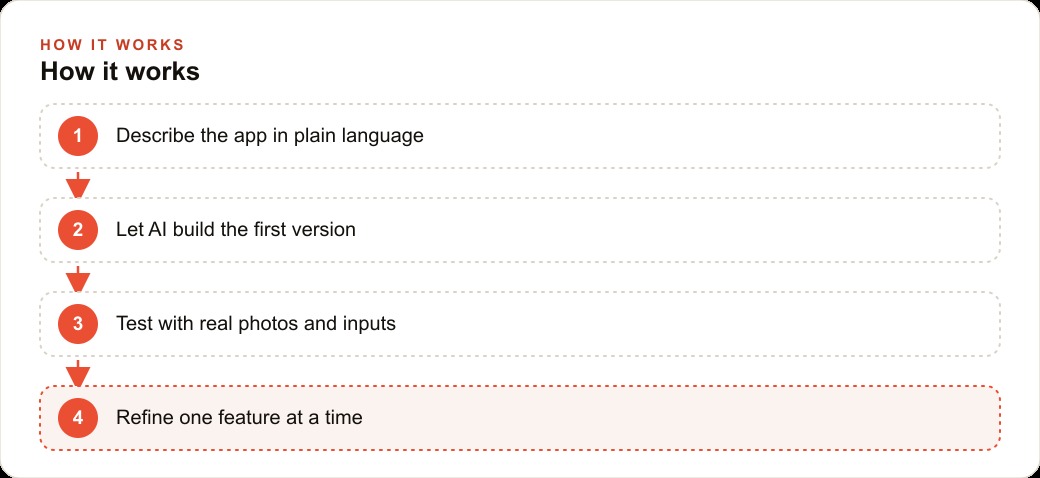
The first version of the receipt reader was built by describing it in plain language to an AI building platform: build a tool where a user uploads a photo of a receipt or invoice, the tool reads the image and extracts vendor name, date, total amount, and a category suggestion, and displays the results in a clean table. The AI building tool produced a working interface in about fifteen minutes, connected to a vision model capable of reading images and returning structured text.
The first set of test receipts were clean, modern, printed receipts from large national suppliers. The tool handled all of them correctly. Vendor name, date, and amount were extracted accurately. Category suggestions were sensible. The team felt confident about what they had built.
The first failure appeared on the third test receipt, which came from a small regional supplier whose printed receipts use an older format. The company name was printed in a condensed font at the top of a ruled table. Directly below it, in a larger and bolder font, was the city name. The tool returned the city name as the vendor name, because it used font prominence as a proxy for importance, and the city was the most visually prominent text on the document.
This was not a random error. It revealed a consistent logic flaw: the tool was not identifying the vendor name by understanding what a vendor name is. It was identifying the most prominent text element and assuming that was the vendor name. On a modern printed receipt where the company name is always the largest element, that assumption is usually correct. On older or non-standard receipt formats, it fails in predictable ways.
Testing with real data: the three invoice types that broke the first version
Over the following test sessions, three distinct document types emerged as reliable failure cases.
The first was multi-page supplier invoices where the total appeared on the second page and the vendor name appeared on the first. The initial build accepted only single-image uploads, so multi-page documents required manual photo-by-photo uploading. When only the second page was uploaded, the tool returned no vendor information and a correct total. When only the first page was uploaded, it returned the correct vendor name and no total. Neither result was useful.
The second failure type was invoices that listed amounts in multiple currencies. The firm handles several international clients and occasionally receives invoices in euros or British pounds. The tool extracted the numeric amount accurately but dropped the currency symbol in every case, so a 300 euro invoice and a 300 dollar invoice both appeared in the output as "300.00" with no denomination. If those figures had been imported into the accounting system without review, they would have been recorded as the same amount in the same currency, which is incorrect.
The third failure type was credit memos and partial payment records. These documents look structurally similar to standard invoices but represent negative amounts or partial balances. The tool extracted the amounts correctly but classified every document as a standard invoice, regardless of whether it was a credit memo, a partial payment receipt, or a pro forma invoice. This would have caused systematic miscategorization if the output had been imported without a review step.
Each of these three failure types revealed a gap between what the first version was built to handle and what the firm's real document intake actually contained. The first version was implicitly designed for clean, standard, single-currency invoices from known vendors. The real intake contained older formats, multi-page documents, multiple currencies, and non-standard document types.
Fixing the edge cases and the API key lesson that cannot be repeated
Fixing the vendor name problem required changing the instruction sent to the vision model. Rather than asking it to "read the vendor name," the instruction became: "identify the legal business name or trading name of the company that issued this document. This is typically printed at the top in a header or letterhead position. Do not return a city name, personal name, street address, or any text that does not identify a business entity." This change reduced vendor name errors by the large majority of cases in the test batch.
Fixing the multi-page invoice problem required allowing the tool to accept multiple images per submission and pass them to the vision model as a combined document. This was a structural change to the application rather than a prompt adjustment, and it required a second round of building time. The result was that multi-page invoices could now be uploaded as a set of photos and processed as a single document.
Fixing the currency problem required adding a specific instruction: always include the currency symbol or ISO currency code alongside any monetary amount in the output, and if no currency is explicitly stated on the document, flag the amount as currency-unverified for manual review rather than assigning a default currency.
The credit memo problem was addressed by adding a document classification step before the extraction step. The tool now first classifies the document type, and only applies the standard extraction logic to documents classified as invoices. Credit memos, partial payment records, and documents the classifier is uncertain about go into a review queue for manual processing.
During one of these fix sessions, a mistake occurred that must not be repeated and must be called out clearly. An API key was temporarily pasted into a prompt message to troubleshoot a connection issue. That key was immediately visible in the conversation history of the AI building platform. The key was rotated the same day, and access logs were checked to confirm it had not been used by anyone else. The lesson is not subtle: an API key is a password. It should live in a secure environment variable or a credentials file, never in a prompt, a code comment, a shared document, or a chat message. Any key that enters a text field visible to the AI must be treated as compromised and rotated immediately, regardless of whether visible evidence of misuse exists.
The result after one focused day: what the tool does and what it still cannot
After one day of focused building and iterative testing, the receipt reader correctly extracted vendor name, date, amount, and currency from approximately eighty-five percent of the document types in the firm's typical weekly intake. The remaining fifteen percent went into a review queue: multi-party documents where multiple vendors appear on a single form, heavily damaged or very low-resolution images, documents in languages other than English, and any document where the tool's classification confidence fell below a threshold set during calibration.
The review queue was a deliberate design choice, not a compromise. A tool that makes confident guesses on ambiguous documents and embeds wrong data into the accounting system is more dangerous than no tool at all, because the errors are invisible until someone notices a discrepancy weeks later. A tool that flags its uncertainty and routes ambiguous cases to a human reviewer is a tool that can be trusted for the eighty-five percent it handles confidently.
The staff member responsible for receipt processing now spends about three minutes reviewing flagged items per batch rather than thirty minutes entering all items by hand. The tool handles the routine cases. The staff member handles the exceptions. The total time for the same volume of receipts dropped from thirty minutes per batch to about five minutes, and the error rate on the automated cases is lower than the manual baseline.
What the tool cannot do is make accounting judgments about categorization based on business context. A fuel purchase might be a vehicle operating expense, a job site cost, or a subcontractor reimbursement depending on who made the purchase and for which project. The tool assigns a category suggestion based on the vendor type, but the accountant reviews and adjusts these for any purchase that is not straightforward. The tool handles the data extraction. The accountant handles the interpretation. That division is appropriate and intentional.
The deeper lesson: business knowledge is now the competitive advantage, not typing speed
The non-coder in the race did not succeed by being faster than the engineer. They competed by understanding the problem clearly enough to describe it precisely. The clarity came from domain knowledge, not from technical training.
This is the shift that changes the math for small professional service firms. For thirty years, having a good idea for an internal tool meant hiring a developer or learning to code yourself. Both are expensive in time or money. The barrier to a first working version has dropped from months of development to a day of focused description, testing, and iteration.
What has not changed is the requirement to understand your own business processes well enough to describe them precisely. The accountant who knows exactly which document types her firm processes, which fields matter for tax categorization, which edge cases appear regularly, and which situations require a licensed professional's judgment can describe those requirements to an AI building tool with enough clarity to produce a useful first version in a day. An accountant who is vague about those requirements will produce a vague tool that requires as much manual correction as the original process, because the tool's output is only as specific as the instructions it receives.
The competitive advantage is now business knowledge expressed as precise description and tested honestly against real data. The accounting firms, medical practices, legal offices, and operations teams that build useful internal tools over the next few years will not necessarily be the ones that hire the best developers. They will be the ones whose experienced professionals understand their own processes well enough to describe them precisely, test them against real conditions rather than idealized examples, and iterate quickly when the first version falls short.
That is a skill set that experienced accountants, operations managers, and business owners already have. The AI does the building. You provide the knowledge that makes the result useful rather than generic. The race proved that this combination can keep pace with a decade of professional engineering experience. The accounting firm's receipt reader proved that it can solve a real business problem in a single focused day.
That is exactly what we do at AI DOERS. Book a private 30-minute call with Madhuranjan Kumar and we will map the fastest path to it for your specific business.
Book your call →
Madhuranjan Kumar
Madhuranjan Kumar brings 20 years of performance-marketing experience and has managed over $200 million in Facebook ad spend for brands across the United States and beyond. His expertise spans the full modern marketing stack: Meta, Google Ads, TikTok, email automation, CRM, and the websites that hold it together. At AI DOERS he turns that track record into lead-generation systems for businesses across every industry.