
n8n Instance-Level MCP: Let Claude Run Every Workflow You Own
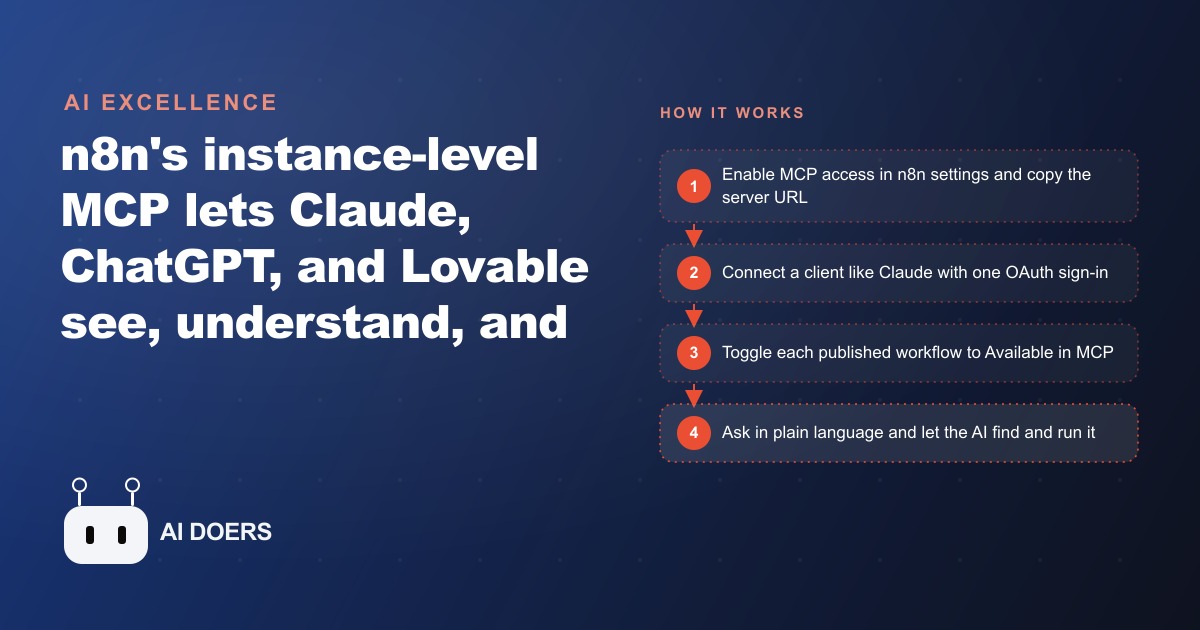
n8n's instance-level MCP lets AI clients like Claude, ChatGPT, and Lovable search your entire n8n account, understand each workflow, and execute any of them on request. Your existing automations become tools the AI can reach for from wherever you already work.

A Chiropractic Clinic's Automation Library Became Nearly Invisible to Its Own Staff
For the first eight months the clinic's automation library sat mostly unused, because the only person who remembered how to trigger any of it was the office manager who had built the workflows.
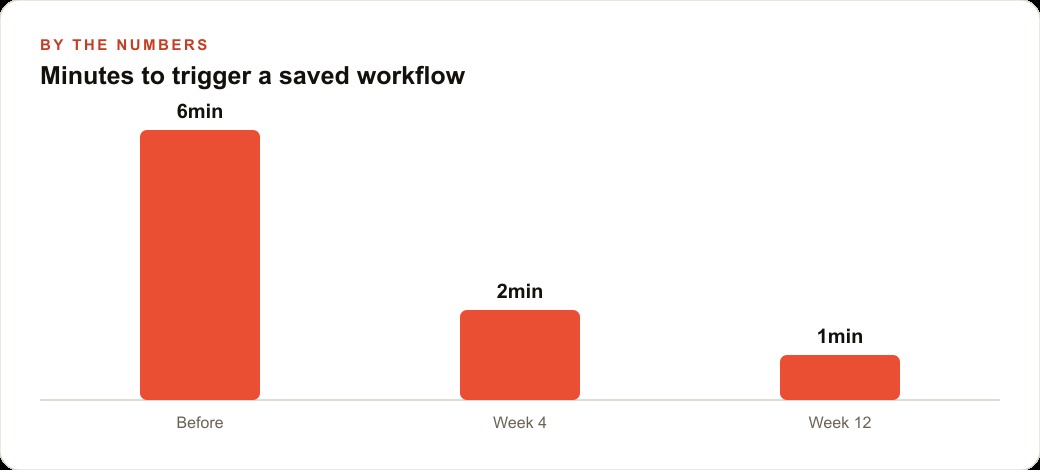
She had created three of them in her first month on the job: one that sent appointment reminder texts, one that created new patient records in the scheduling system, and one that pulled the day's no-show list. They worked correctly. The problem was that triggering any of them meant navigating into the n8n canvas, finding the right workflow among eighteen others, opening it, locating the correct button, and entering the required fields. That took six minutes for someone unfamiliar with the interface and three minutes even for her. On a morning when the phones were ringing, three minutes of navigation was three minutes the front desk did not have.
The second and third workflows almost never ran. The reminder workflow ran when the manager was in, when she had a spare moment, and when she remembered. The record creation and no-show workflows were essentially decorative. The automations had not failed. They had a friction problem, and friction this small is enough to stop adoption entirely.
The Feature That Changed What the Front Desk Could Ask For
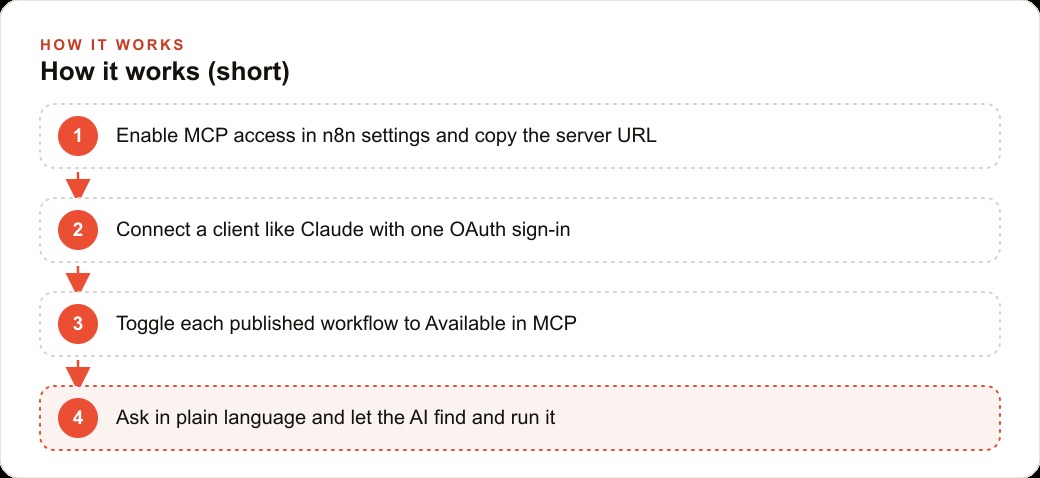
n8n's instance-level MCP is a setting that exposes your entire n8n account to an AI client so the AI can search your workflows, understand what each one does, and run any of them from a plain-language request. MCP stands for Model Context Protocol. The earlier version of MCP in n8n let you expose one or two specific workflows you chose in advance. Instance-level MCP removes that constraint. The AI client can look across the whole account, read each workflow's description and schema, understand the input fields, and call the right one when given a natural-language instruction.
The three tools the AI client receives once connected are search workflows, get workflow details, and execute workflow. That three-step loop handles everything: find the right workflow, understand what it needs, run it. For a front desk that has never opened n8n and has no intention of doing so, this is the difference between a tool that exists in theory and one that gets used every shift.
The shift is not about making workflows smarter. It is about making them accessible. The same automation that ran once a week because triggering it was inconvenient can run twenty times a week once triggering it requires a single sentence. Accessibility changes adoption, and adoption is what turns a built automation into a business result.
Connecting the Account in a Single OAuth Click
The clinic enabled MCP access in the n8n settings panel. The setting produced a server URL and a count of connected clients. Then the office manager opened her AI client, found n8n listed as a native connector, and clicked connect. An OAuth sign-in opened in a browser, she approved it, and the connection was made.
The setup took under four minutes. No API keys to paste manually, no JSON configuration files to edit, no developer help required.
After the connection, the manager went into each of the three clinic workflows and did two things. She confirmed each was published and active, then wrote a single description for each. The reminder workflow received: "Sends an SMS appointment reminder to a patient. Requires the patient name and appointment date and time." The record creation workflow received: "Creates a new patient record in the scheduling system. Requires first name, last name, date of birth, and phone number." The no-show workflow received: "Returns today's list of patients who missed their appointment without calling."
She also toggled Available in MCP on for all three. The five other operational workflows connected to billing and insurance records stayed toggled off. Nothing sensitive was exposed because the toggle is a manual per-workflow decision, not an all-or-nothing setting.
The descriptions are the part most businesses skip and then wonder why the AI client fails to pick the right workflow. The AI reads those descriptions to decide which workflow matches a given request. A description that says "send a text" is not useful. A description that says "sends an SMS appointment reminder given a patient name and time" is what allows a clean, reliable match every time.
What the Front Desk Could Do After Three Published Workflows
On the first day after setup, the receptionist on duty had a patient confirm an appointment for Thursday at two in the afternoon. Without leaving her scheduling screen, she typed: "Use the n8n reminder to text Maria, Thursday 2pm adjustment." The AI searched the account, found the reminder workflow, read the required fields, filled in the patient name and time, and ran it. The patient received a text ninety seconds later.
That task had previously taken either three minutes of n8n navigation or simply not happening during a busy shift.
The same morning, a new patient called to book an intake appointment. The receptionist typed the patient's details into the chat interface while still on the phone. The AI created the record in the scheduling system before the call ended. After hanging up, she asked for the no-show list and it came back as a formatted response in the same interface she was already using.
What did not happen is equally significant. The receptionist did not learn n8n. She did not ask which workflow to use. She did not wait until a quieter moment to send the reminder. She described what she needed in the same way she would ask a colleague, and the result arrived. The automation library that had been invisible to everyone except the manager became something the whole team could reach from wherever they were already working.
The behavior also shifted in a subtler way. Before the MCP connection, triggering a workflow felt like a deliberate technical action, something you had to decide was worth the effort and navigate to explicitly. After the connection, triggering a workflow felt like asking a question. The threshold for doing it dropped dramatically, which meant the workflows ran far more often.
The quality improvement that follows from higher trigger frequency is easy to underestimate. A patient reminder that runs eighty percent of the time because it is easy to trigger produces fewer no-shows than a reminder that runs forty percent of the time because it requires navigation. The workflow did not improve. The trigger rate improved, and that improvement flows directly into clinical outcomes and revenue.
The Numbers Six Weeks Later
Six weeks after enabling instance MCP on the three workflows, the clinic reviewed usage through n8n's execution history. The numbers showed a clear before-and-after pattern.
Before the MCP connection, the front desk triggered saved n8n workflows roughly four times per week. Mostly the reminder workflow, mostly run by the manager herself. The record creation and no-show workflows almost never ran unless the manager deliberately sat down to run them outside the normal flow of the day.
Six weeks after the connection, weekly workflow triggers averaged twenty-two. All three workflows were running regularly. The reminder ran for most appointments with patients who had not yet confirmed. The record creation workflow ran for every new patient intake. The no-show list was pulled at the end of each working day.
The average time to trigger a workflow dropped from around six minutes to under one minute. That reduction came partly from the speed of typing a sentence versus navigating a canvas, and partly from the shift in mindset. A task that takes under a minute gets done. A task that takes six minutes gets deferred, and deferred in a busy clinical environment often means skipped.
The clinic also stopped the informal practice of writing patient names on sticky notes to remind themselves to send reminders when things quieted down. Those sticky notes had been the gap between intention and action. The gap closed because the cost of acting on the intention dropped to nearly zero.
The Approval Loop the Clinic Added in Month Two
By month two, the clinic was ready to expand what was available through the MCP connection. The office manager had built two additional workflows: one that sent a follow-up message to patients after their third visit offering a referral discount, and one that generated a batch outreach list for patients who had not visited in over sixty days.
Both workflows were useful but operated at a different scale than a single appointment reminder. Sending a referral discount to the wrong patient segment, or pulling an inaccurate re-engagement list, could cause confusion that required manual correction. The manager decided to add an approval step to both before making them available in MCP.
The approval step was a simple modification inside n8n: instead of executing immediately when the AI triggered the workflow, it sent a message to the manager's interface showing the details of what it was about to do and waiting for confirmation before proceeding. The manager would see something like: "Ready to send referral discount messages to 7 patients from this week's third visits. Proceed?" She would type yes or no.
This pattern added under thirty seconds to those two workflows and removed the anxiety about triggering them incorrectly. The front desk could still initiate the task by describing it in plain language. The manager stayed in the decision loop for actions that touched a larger group of patients or had higher stakes if something was wrong.
After one month of the approval pattern running cleanly with consistent inputs, the manager removed the approval requirement from the follow-up message workflow. The re-engagement list kept the approval step because its source data benefited from periodic human review before outreach went out. The distinction between what needs confirmation and what can run automatically is a business judgment, not a technical one. The MCP setup accommodates both without requiring a rebuild.
The Pattern Any Business Can Copy
The clinic's experience breaks down into a sequence that transfers to any industry.
Start with the workflows you already have, not new ones. Every automation library contains built-and-forgotten workflows that stopped getting used because triggering them was inconvenient. Those are the first candidates to expose through an AI client. The setup work is writing a clear description and toggling a switch, not rebuilding anything.
Write a specific one-sentence description for each workflow before making it available. The description is what the AI reads to match a request to the right workflow. Be precise about what the workflow does, what input it requires, and what it returns. A description like "sends an SMS appointment reminder with the patient name and appointment time" is useful. "Send a text" is not.
Start with a small, trusted surface. Expose two or three workflows covering routine daily tasks. Confirm that the team uses them without friction before expanding. Add workflows as the pattern proves out, not all at once.
Add approval steps for any workflow that touches more than one record at a time, sends external communications to a list, or makes a change that is difficult to reverse. The approval step keeps a human decision in the loop for higher-stakes actions while still allowing the AI to initiate and prepare everything up to that decision point.
For businesses with larger automation libraries, the principle of selective exposure becomes more important, not less. An account with forty workflows should not expose all forty at launch. The AI client performs better with ten well-described workflows than with forty where half have vague names and no descriptions. Rank automations by daily-use frequency and importance, expose the top ten, and expand from there as usage proves out.
The compounding effect is the most important part of the pattern. Each workflow that becomes frictionless to trigger gets used consistently. Consistent use means reminders go out reliably, records are complete, and follow-up happens on schedule rather than the hit-or-miss patterns that manual execution produces under real working conditions. The quality of execution rises as friction falls, and that quality improvement flows directly into the business outcomes the workflows were built to support.
The setup itself, enabling MCP in n8n settings, connecting an AI client, writing workflow descriptions, and toggling the availability switch, takes less than a morning for three workflows. The operational benefit runs from that day forward, on every shift, for every member of the team who accesses the interface. The investment is front-loaded and small. The return is ongoing and compounds with every workflow added.
That is exactly what we do at AI DOERS. Book a private 30-minute call with Madhuranjan Kumar and we will map the fastest path to it for your specific business.
Book your call →
Madhuranjan Kumar
Madhuranjan Kumar brings 20 years of performance-marketing experience and has managed over $200 million in Facebook ad spend for brands across the United States and beyond. His expertise spans the full modern marketing stack: Meta, Google Ads, TikTok, email automation, CRM, and the websites that hold it together. At AI DOERS he turns that track record into lead-generation systems for businesses across every industry.