
How to Use n8n to Automate Your HVAC Business's Customer Communication and Lead Follow-Up
n8n is a free open-source automation tool that connects your apps, pulls data from the internet, processes it with AI, and sends the result wherever it needs to go, all on a schedule you set once.

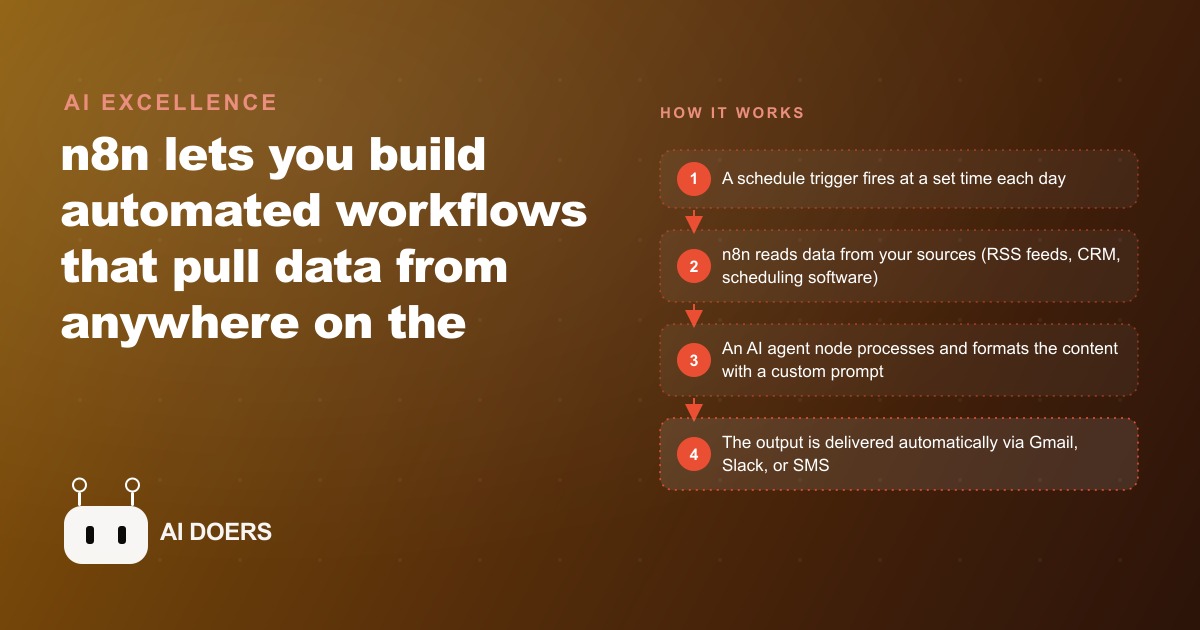
The single most expensive problem in a recurring-service business is not the cost of acquiring a customer. It is the cost of failing to communicate with that customer at exactly the right moment, and then failing again the next time, and the time after that.
Every HVAC company owner knows they should send a follow-up after a job is completed. Every plumber knows that an annual maintenance reminder would bring customers back on a predictable cycle. Every service business knows that a daily digest of overnight leads would help the owner start each morning with clarity rather than anxiety. None of this is a knowledge problem. The knowledge is universal. The execution is not.
What separates the businesses that do these things consistently from the ones that do them sporadically is not discipline or intention. It is architecture. n8n is a tool that builds that architecture, and most descriptions of what it does fail to capture why it actually matters for a service business.
The Reliability Problem That No Amount of Staff Discipline Can Solve
When a job is completed for a customer, there is typically a 24-to-48-hour window where satisfaction is at its peak and the customer is most likely to leave a positive review. Most service businesses know this. Most service businesses intend to send a follow-up message during this window. A significant fraction do not, consistently.
The failure is not motivational. The owner cares. The technician cares. The person nominally responsible for follow-up communication cares. The failure is structural. Someone has to remember to trigger the action, locate the customer's contact details, compose or copy the message, send it, and confirm it went out, all within a specific window, on top of the variable demands of a busy service day.
When two jobs close simultaneously, one customer gets the message and one does not. When a staff member is out sick, the entire follow-up queue stalls. When the afternoon is unusually busy, the review requests go out late or not at all. The communication that was supposed to be consistent is actually random, determined by how much capacity the team happens to have at the moment the trigger window opens.
The same problem applies to annual maintenance reminders. The customers who are due for seasonal service this week are identifiable in any CRM. Reaching out to them should be straightforward. In practice, it requires someone to pull the list, filter it by last service date, draft or copy a personalized message, and send it, every day, for every customer who crosses the 12-month threshold. This is manageable if one person owns the task and has reliable time for it. It is not manageable when that person's time is variable.
Staff discipline cannot solve a structural problem. A well-motivated team with clear instructions still has to manually initiate every customer-facing action, every time. The moment manual initiation is required, the action is subject to the variability of human attention under operational pressure.
Why Calling n8n an App Connector Understates What It Actually Does
Most introductions to n8n describe it as a tool that connects different software applications. You have a CRM, a Gmail account, and a scheduling tool, and n8n passes data between them. This framing is technically accurate and practically misleading.
The app connector framing suggests that the value is in the connection itself, that having your CRM talk to your email client is the outcome worth building toward. But most businesses already have partial versions of this. Email clients have basic scheduling. CRMs send automated confirmation messages after form submissions. Simple two-step connections are available through numerous tools.
What makes n8n different is not the connection. It is the combination of four properties that simpler tools either lack or make expensive at the scale relevant to a small service business.
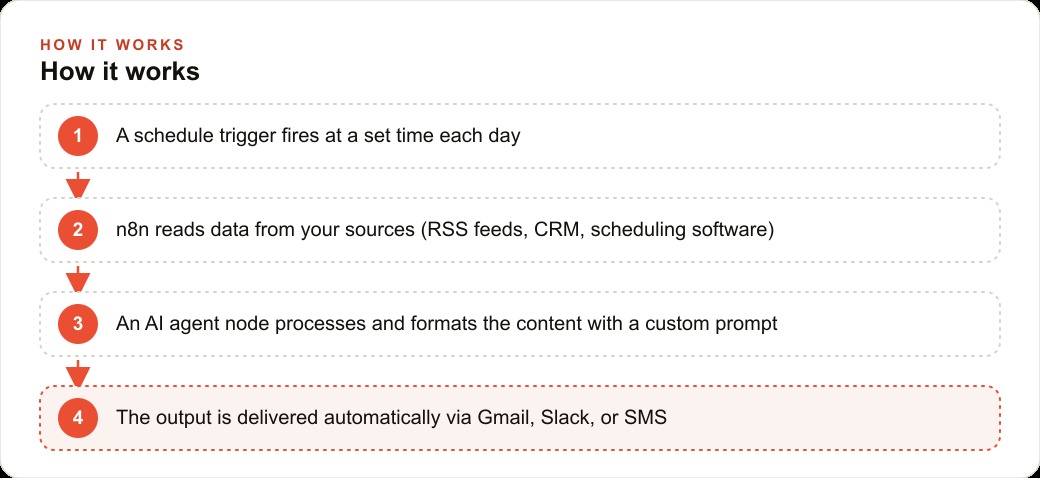
First, n8n includes an AI agent node that can call the OpenAI API as a step within a workflow. This means the model can summarize, personalize, or analyze data as part of an automated sequence, not as a separate manual step. Second, n8n can be self-hosted on a VPS for a flat monthly cost with no per-execution pricing. A workflow that fires 300 times per month costs the same to run as one that fires 3. Third, the template library contains nearly 6,000 pre-built workflow structures, which is large enough to cover the specific, somewhat unusual workflows that a service business needs. Fourth, because the workflows run on a hosted server rather than a local machine, they execute on schedule regardless of whether anyone at the business is at their desk.
That last property is where the reliability distinction lives. The app connector handles the connection. The hosted always-on server handles the reliability. Those are two separate contributions, and the second one is the one that actually changes the business outcome.
The Three Workflows That Create Most of the Value in a Recurring-Service Business
The automation literature tends to focus on lead generation workflows: capture a form submission, add the contact to a nurture sequence, send a series of follow-up emails. These workflows are valuable. But for a service business with an established customer base, the highest-return workflows operate on customers who already exist in the system.
The post-job review request is the highest-return workflow for most service businesses. A webhook fires when a job is marked complete in the field management or dispatching software. A 24-hour delay node holds the workflow. After the delay resolves, an AI node takes the customer's name, the technician's name, and the service type from the job record and generates a personalized review request message. The message goes to the customer's phone number or email address depending on what is on file. The entire sequence fires without anyone at the business initiating it.
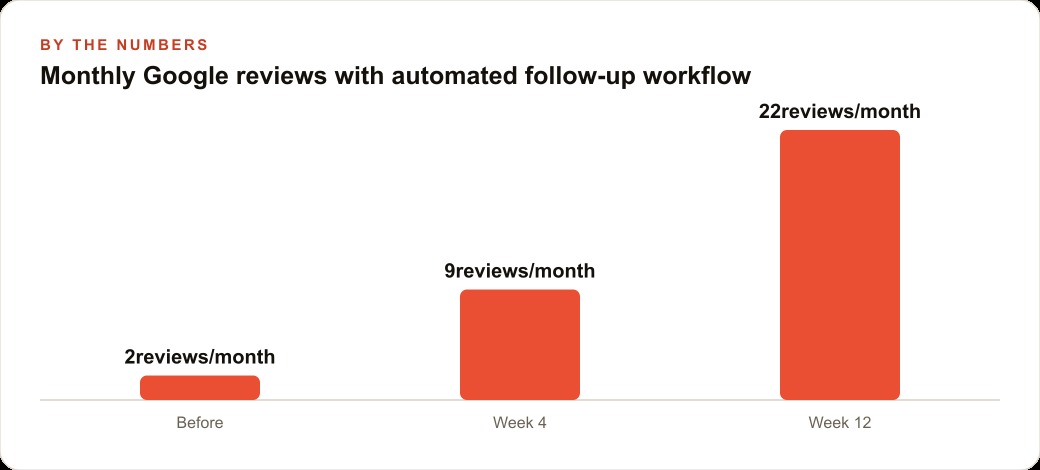
The output is consistent. Every completed job receives a follow-up at the 24-hour mark. Not the jobs that staff remembered. Not the jobs from slow afternoons when there was time. Every job. That consistency compounds. Over 600 service visits in a year, a consistent 12 percent conversion rate on review requests (a conservative estimate for a business with genuinely satisfied customers) produces 72 new Google reviews annually. That volume materially affects local search ranking and reduces paid customer acquisition cost.
The annual maintenance reminder workflow fires on a daily schedule. Each morning, a schedule trigger causes the workflow to check the customer database for anyone whose last service appointment was exactly 12 months ago or longer. For each customer who meets that threshold that day, an AI node generates a personalized outreach message referencing the last service date and the upcoming seasonal maintenance window. The message goes out automatically. No one on the staff initiated it. The customer receives communication that feels timely and personally relevant.
The daily lead digest is structurally simpler but has high practical utility. A schedule trigger fires at 7 a.m. An AI node pulls all contact form submissions, logged missed calls, and email inquiries from the previous evening and overnight. It summarizes them into a priority-ordered digest, converts the output to properly formatted HTML using a markdown-to-HTML conversion node, and emails it to the owner. The owner opens their inbox and sees a clean summary of every overnight inquiry ranked by urgency and recency, without having to log into three different systems to assemble that picture manually.
VPS Deployment Versus Running on a Local Machine: Why the Distinction Determines Whether It Works
n8n can be installed and run locally on a Mac or Windows machine. For learning and building workflows, this is the right starting point. The setup is faster, the cost is zero, and the feedback loop for testing is immediate.
For production use on customer-facing workflows, the local installation has a fundamental limitation: it stops working whenever the computer is off, asleep, closed, or restarting. The annual maintenance reminder workflow that should fire every morning at 7 a.m. does not fire if the laptop was closed the night before. The 24-hour delay node on a post-job review request does not resolve if there was a power interruption. Any workflow where the value depends on executing at a specific time, rather than eventually when someone remembers to open the application, cannot be trusted on a local machine.
A VPS running n8n is always on. The schedule trigger fires at 7 a.m. regardless of what anyone's laptop is doing. The 24-hour delay resolves to the correct minute regardless of whether anyone at the company is awake. The annual maintenance check runs every morning including weekends, holidays, and days when the owner is traveling.
The cost of a minimal VPS sufficient to host n8n for a small service business runs approximately $7 per month. Adding the OpenAI API cost for the AI personalization nodes, which for a business processing 20 to 40 AI-generated messages daily runs approximately $2 to $5 per month, brings total infrastructure cost to $10 to $15 per month. This is the complete operating cost for three always-on customer communication workflows.
An HVAC Company with 300 Customers: What the Numbers Actually Look Like
Consider an HVAC company with 300 active customers, defined as customers who had at least one service visit in the past 18 months. The company currently follows up on completed jobs manually. The follow-up happens on roughly 40 percent of completed jobs, varying with how busy the team is on a given afternoon.
Of the 300 active customers, approximately 180 are on a recurring maintenance relationship: they have had annual service for at least two consecutive seasons. The remaining 120 are transactional customers who have called once or twice but have not established a pattern.
Running the annual maintenance reminder workflow on the 180 recurring customers generates one outreach per customer per year, timed to the 12-month mark from their last service appointment. If 30 percent of those contacts convert to a booked maintenance visit at an average ticket of $180, that is 54 additional bookings per year. At $180 per visit, that is $9,720 in directly attributable revenue from a workflow costing $10 to $15 per month to operate.
Running the post-job review request workflow across all 300 customers over a full year, assuming the company completes 600 service visits, generates 600 review requests sent automatically. At a 12 percent conversion rate to new Google reviews, that is 72 new reviews annually. Local service business research consistently shows that review volume and recency are among the strongest factors in local search ranking, with meaningful effects on inbound call volume from organic search.
A conservative estimate of one additional inbound service call per week from improved local search ranking, at an average first-visit ticket of $220, represents $11,440 in additional annual revenue attributable to the review volume effect.
Combined, these two workflows produce estimated annual value exceeding $21,000 for a business spending $120 to $180 per year to run them. The ratio is the reason the "reliability engine" frame matters more than the "app connector" frame. The connections are the mechanism. The reliability of execution at scale is where the value lives. The practical starting point for any service business considering n8n is to choose a single workflow from the three described above and implement it completely before building a second. The annual maintenance reminder is often the strongest first choice because the return is visible and attributable: compare booking rate before and after the workflow runs for a full cycle. If the numbers support the time investment, extend to the post-job review request. If those two workflows together are producing measurable results, the daily lead digest becomes the natural third addition.
Reliability automation, unlike sales or marketing automation, does not require ongoing creative work. Once the workflows are running on a VPS, the system executes without further attention. The business owner's job becomes reviewing the outputs, responding to the leads the digest surfaced, and handling the bookings the reminders generated. That is the right use of a business owner's time, and it is the outcome a well-built n8n installation produces.
That is exactly what we do at AI DOERS. Book a private 30-minute call with Madhuranjan Kumar and we will map the fastest path to it for your specific business.
Book your call →
Madhuranjan Kumar
Madhuranjan Kumar brings 20 years of performance-marketing experience and has managed over $200 million in Facebook ad spend for brands across the United States and beyond. His expertise spans the full modern marketing stack: Meta, Google Ads, TikTok, email automation, CRM, and the websites that hold it together. At AI DOERS he turns that track record into lead-generation systems for businesses across every industry.