
How to Build a Live Camera Assistant That Sees and Talks Back
A famous real-time AI demo was heavily edited, but you can rebuild the real thing with vision, speech to text, and text to speech. Here is how it works and how a retail store could use it.

A famous multimodal AI demo that showed a live assistant holding a real-time conversation about a camera feed went viral across social media, then drew scrutiny when independent observers found that key pauses had been cut from the footage and that the session was more staged than it appeared. Madhuranjan Kumar's read on the story is that most coverage focused on the wrong thing: the editing was not the revelation. The revelation is that you do not need a proprietary magic system to get close to that experience. You can build it today with three models already in production and a loop you could prototype in an afternoon.
The reveal shifts the right question from "is AI ready for this?" to "which combination of models builds it now, and how do I wire them together reliably?" Those are engineering questions with concrete answers, not speculation about a future capability. That reframing is where the practical work begins.
The Famous Real-Time Vision Demo Was Edited, and That Changes How You Should Think About What to Build
When this breakdown circulated without disclosure, it set an implicit benchmark in the minds of anyone who watched it: a seamless, near-zero-latency conversation between a person and an AI that could see and hear simultaneously. That benchmark was not accurate. The actual experience involved pauses between question and answer, careful prompt selection, and post-production editing to present the best moments in sequence. None of that makes the underlying capability less real, but it does matter for how you plan a build.
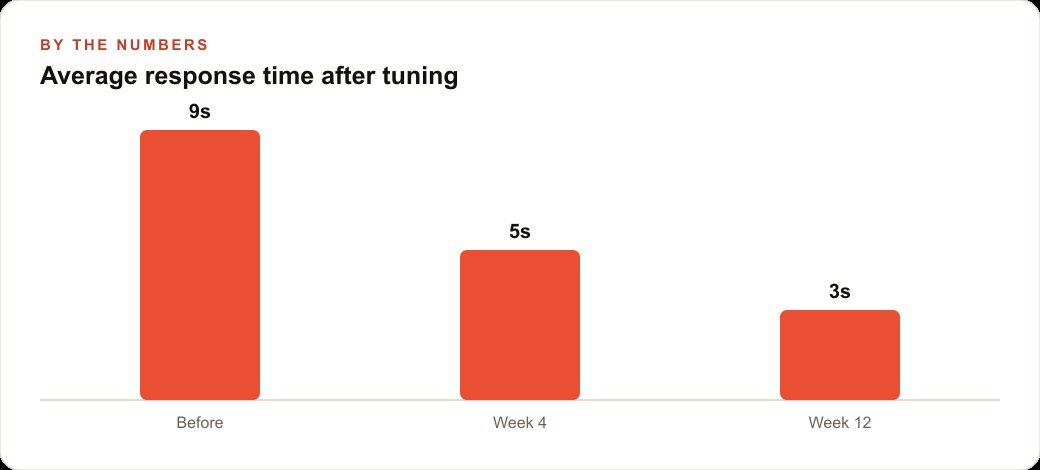
If you go into a project expecting the demo's apparent latency and seamlessness, you will spend your time trying to close a gap that does not need closing, because the gap was manufactured. The practical target is a response in three to five seconds for a well-formed visual question. That is achievable with current models and straightforward engineering. It does not feel like magic, but it feels like a useful tool, which is what a working deployment needs to be.
The edited demo also obscured the architecture. It looked like one unified system that could see and hear and speak simultaneously. The actual architecture is a chain of three separate models, each handling one modality. Understanding that structure is what unlocks the real flexibility of the approach, because it means any one component can be swapped without rebuilding the rest.
Three Models Already in Production Replace What Looked Like a Single Magic System
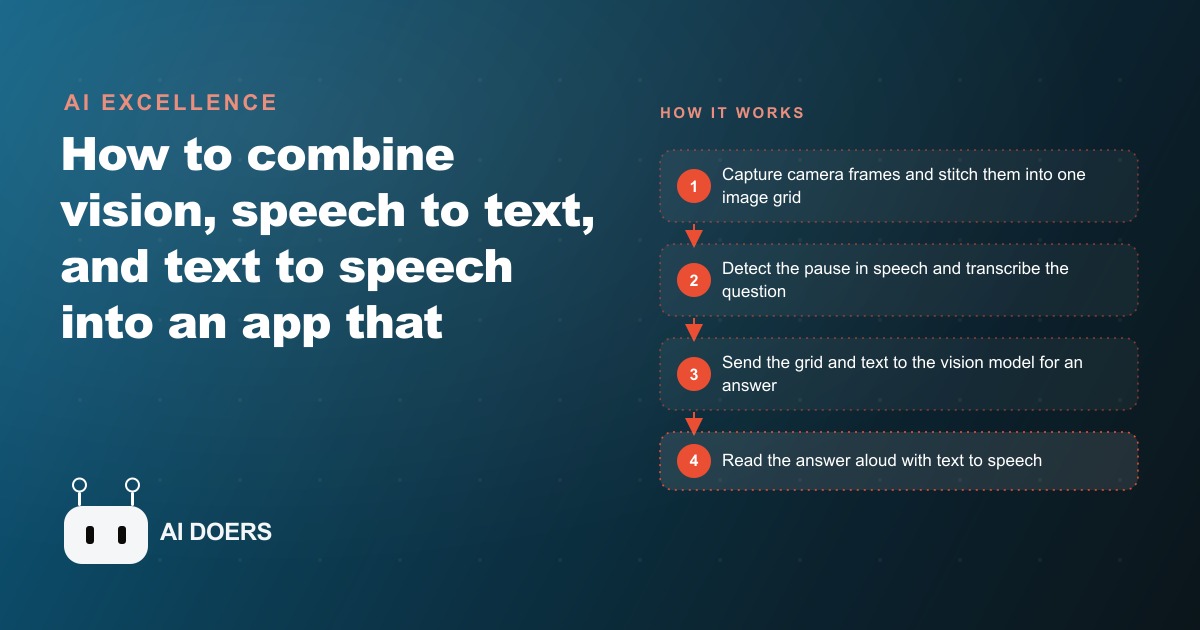
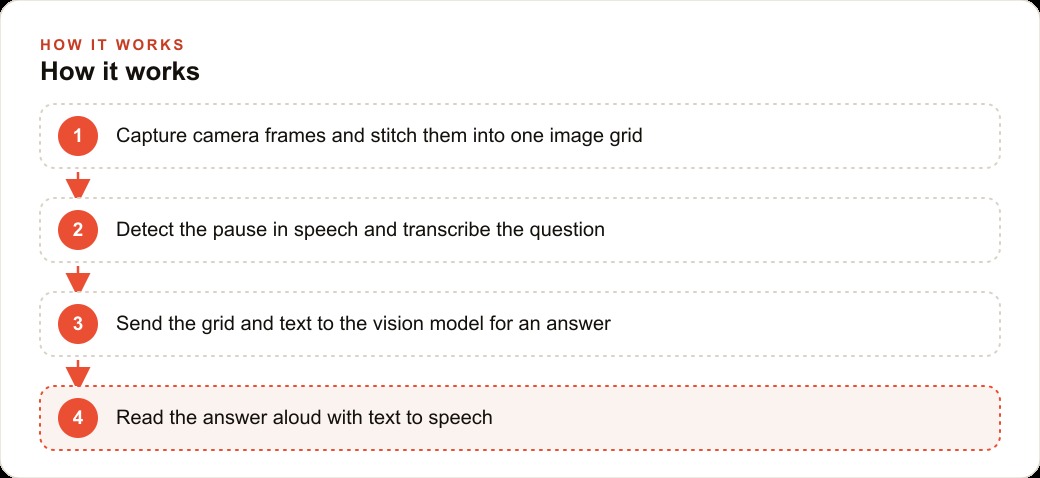
The pipeline has three stages, each handled by a specialized model. The first stage is vision. A vision model receives frames from the camera and the text of a question, then returns a natural language answer about what it sees. The second stage is speech recognition. A transcription model listens to a recorded audio clip and returns the text of what was said. That text becomes the prompt paired with the camera frames. The third stage is text to speech. A synthesis model receives the vision model's answer and returns audio, which plays back to the user through a speaker.
Each of these stages is served by a model that can be replaced independently. If a new vision model handles low-light frames better, it replaces the first stage with no change to the rest. If a synthesis voice sounds more natural or reduces latency, it drops into the third stage alone. The chain is durable because its components are modular. The demo's monolithic appearance hid this flexibility. Once you see the architecture as a chain, the build and the maintenance become much more straightforward.
The order of execution matters. The silence detector fires first, recording stops, audio goes to transcription, the transcript arrives, frames are collected and stitched, the combined payload goes to the vision model, the answer comes back, and text to speech returns audio. The whole sequence happens in one direction with no parallel branches at the model level. That simplicity is why the latency is manageable: there is no fan-out to coordinate, just one call following another.
Stitching Frames Into a Grid Is the Latency Fix Most Builders Overlook
The naive approach to feeding a live camera to a vision model is to grab the most recent single frame and send it with the question. The problem is that a single frame gives the model no sense of what just happened. If the person moved an object, or if the frame landed at an odd moment, the model answers about a static snapshot rather than the scene the user was experiencing. The second naive approach is to send multiple frames as separate API calls and aggregate the answers. That multiplies API calls and adds latency proportional to the number of frames.
The better solution is grid stitching. Capture frames at a fixed rate, arrange them in order into a single composite image, and send that composite as one API call. The model receives an image that encodes time as spatial position: the top-left cell is the oldest frame, the bottom-right cell is the most recent. The model interprets the sequence as visual history without needing video processing or special temporal modeling. It sees what happened across three seconds of camera time as a single coherent image.
The tuning parameters are the capture rate and the grid size. A rate of two frames per second with a six-frame grid covers three seconds of history in one image and one API call. For a scene where the subject moves slowly, three seconds of history is usually enough context. For a fast-moving scene, such as someone sorting objects or flipping through items on a shelf, reducing to four frames at three frames per second keeps the content current without adding cells to the grid. Madhuranjan Kumar recommends testing ten representative interactions before settling on these values. Choose the question types your users will actually ask, run them against each configuration, and check whether the model's answers are grounded in the current state of the scene. Adjust one variable at a time: first the frame rate, then the grid dimensions, so you can isolate what each change is doing to accuracy and latency.
Silence Detection Is What Makes the Experience Actually Hands-Free
The hands-free quality of the experience depends entirely on the silence detector. Without a way for the app to know that the person has finished speaking, the only alternative is a button press to signal the end of a question. That changes the interaction from a natural spoken exchange into a form with a submit action, which undermines the point of a voice interface in a physical environment.
A silence detector library listens to incoming audio and fires when the volume level drops below a threshold for a set duration. The threshold duration is the critical setting. At 1.5 seconds, most conversational pauses after a complete thought will trigger the detector. At 2 seconds, the system gives a bit more room for people who speak with natural breaks in the middle of a sentence. Below 1.5 seconds, the system cuts people off before they have finished their question, which is the most noticeable failure mode and the one that causes users to lose trust in the tool quickly.
The silence threshold is also a latency control. The full round-trip time for a question and answer is the silence threshold plus the transcription time plus the vision model time plus the text to speech time. Reducing the silence threshold from 2 seconds to 1.5 seconds subtracts half a second from every interaction. That is a meaningful change in a tool where the target total response time is three to five seconds. The tradeoff is that a shorter threshold cuts off more people who pause mid-sentence, so both values need to be tested with real users in the target environment before committing to one.
Ambient noise in the deployment environment also affects silence detection. A quiet office is straightforward. A retail floor with background music, other conversations, and equipment noise requires a higher volume threshold for what counts as silence, otherwise background sounds keep the recorder open indefinitely. Most silence detector libraries expose a noise floor parameter alongside the duration threshold. Set both based on a recording made in the actual room at the busiest expected time of day, not in a quiet test environment.
What the Vision Model Can and Cannot See, and Why That Determines Which Questions to Route to It
The vision model is strong at tasks that live entirely within what the camera can capture. Object identification is reliable. Hold two products side by side, ask which one is warmer, and the model can reason about visible attributes like material, weight implied by shape, and color. Label reading is reliable when the label is legible in the frame. Sequential comparison, such as identifying the next item in a visible pattern, works well. Explaining what is happening in a scene, describing a layout, or noting what changed between frames in the grid are all within the model's competent range.
What the model cannot do is answer questions that require information not visible in the frame. It cannot check whether a product is in stock. It cannot pull a price from a database. It cannot remember what was said in a previous question unless the prior exchange is explicitly included in the current prompt. It cannot tell you a product's batch number if the batch number is not printed somewhere visible. These are not failures of the architecture; they are the natural scope boundary of a system that reads images.
For a retail deployment, the practical implication is that the assistant should handle visual questions and route non-visual questions explicitly. The system prompt should tell the model: answer only what is visible in these camera frames, and if the question requires information you cannot see, say so directly and suggest the user speak with a staff member. That boundary, stated in the prompt and enforced consistently, prevents the model from generating confident-sounding answers to questions it cannot actually answer. Madhuranjan Kumar's approach is to add a second instruction: keep answers to two sentences or fewer. That constraint eliminates the tendency to pad an answer when the model is not certain, because there is no space for hedging language that sounds informative but says nothing.
A Retail Help Station Is the Clearest First Deployment of This Architecture
A retail store with a high volume of routine product questions is the use case where the three-model chain produces the clearest measurable result. The setup is a tablet or small mounted display with a front-facing camera, positioned at a help station near a product section where customers frequently have questions. The customer holds a product up toward the camera, asks a question out loud, and the assistant answers through the tablet's speaker.
Consider a store that logs 50 product questions per day across its floor. These are informational questions: what is this material, which one is better for outdoor use, how do I read this sizing label. Each question takes an average of two minutes of staff time to handle, which includes walking to the customer, answering, and returning to the task. That is 100 minutes of floor labor per day absorbed by informational queries.
If the assistant handles 35 of those 50 questions reliably, 70 minutes of staff time per day is freed for tasks that require judgment, relationship building, or physical action. At a loaded labor cost of $18 per hour, that is $21 of recovered labor capacity per day, or roughly $420 per month. The API cost for 35 questions per day, each involving one transcription call, one vision call with a six-frame grid, and one text to speech call, runs between $4 and $8 per month at current pricing from the major providers. The net recovery is in the range of $412 to $416 per month from a single help station. A two-station deployment doubles those figures with the same integration overhead.
The 15 questions per day that the assistant does not handle reliably are the ones that require information the camera cannot see: inventory status, store policy, custom order availability. The system prompt routes those explicitly to a staff member. The operator defines which question categories fall outside scope during setup, and that definition is a single paragraph added to the system prompt rather than a technical change to the pipeline.
The Response Time Target That Separates a Working Tool From a Demo
The edited demo created an expectation of near-instant response. The working tool has a real round-trip time that must be tuned to stay inside a range where it feels useful rather than slow. The practical range is 3 to 9 seconds. Below 3 seconds is possible for very short questions with a small frame grid and a brief system prompt. Above 9 seconds begins to feel like a failure rather than processing, based on how users respond in real deployment settings.
The target to build toward is 3 to 5 seconds for the majority of questions. The main levers are grid size, system prompt length, and answer length constraint. A smaller grid, four frames rather than six, reduces the size of the image the vision model must process. A shorter system prompt reduces the input token count. An explicit instruction to answer in one to two sentences reduces the output token count, which shortens generation time. All three changes shorten the round trip without affecting the quality of the answer for well-scoped visual questions.
Real-world conditions introduce variability that a test environment will not reveal. Ambient noise changes the silence detection threshold behavior, which means the effective start of the round trip shifts. Poor lighting degrades frame quality, which can cause the model to qualify its answer or describe uncertainty, both of which tend to produce longer outputs. Testing the system in the actual deployment environment, at the actual time of day when most use will occur, is the only way to know whether the 3 to 5 second target holds under real conditions. The gap between the demo and a working tool is not a model capability gap. It is a calibration gap, and calibration happens in the real environment with real questions, not in a development setup.
That is exactly what we do at AI DOERS. Book a private 30-minute call with Madhuranjan Kumar and we will map the fastest path to it for your specific business.
Book your call →
Madhuranjan Kumar
Madhuranjan Kumar brings 20 years of performance-marketing experience and has managed over $200 million in Facebook ad spend for brands across the United States and beyond. His expertise spans the full modern marketing stack: Meta, Google Ads, TikTok, email automation, CRM, and the websites that hold it together. At AI DOERS he turns that track record into lead-generation systems for businesses across every industry.