
Let Claude Code Build Your Automations: A Beginner's Guide
Connect Claude Code to an automation builder and it will turn a plain-language description into a working workflow, fix its own errors, and deploy it. Clear communication, not coding, is the only skill you need.

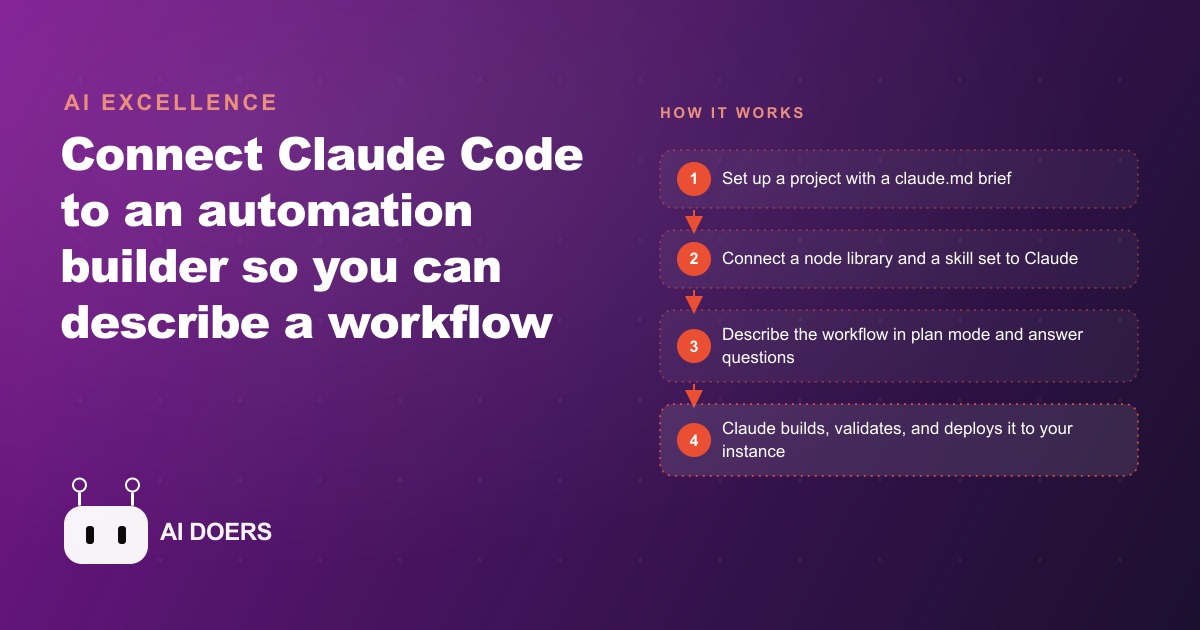
8 things that change when Claude Code builds your n8n automations
Automation workflows have a specific adoption problem. The people most capable of building them in n8n are developers or technical operators who are already stretched thin. The people who would benefit most from having their manual processes automated are often the non-technical owners and managers who cannot build the workflows themselves. Claude Code bridges that gap directly, and the bridge is worth understanding in some detail because the way it works is not exactly what most people expect.
I am Madhuranjan Kumar, and I want to walk through what actually changes when you use Claude Code to build n8n workflows rather than building them manually or trying to learn the n8n interface from scratch.
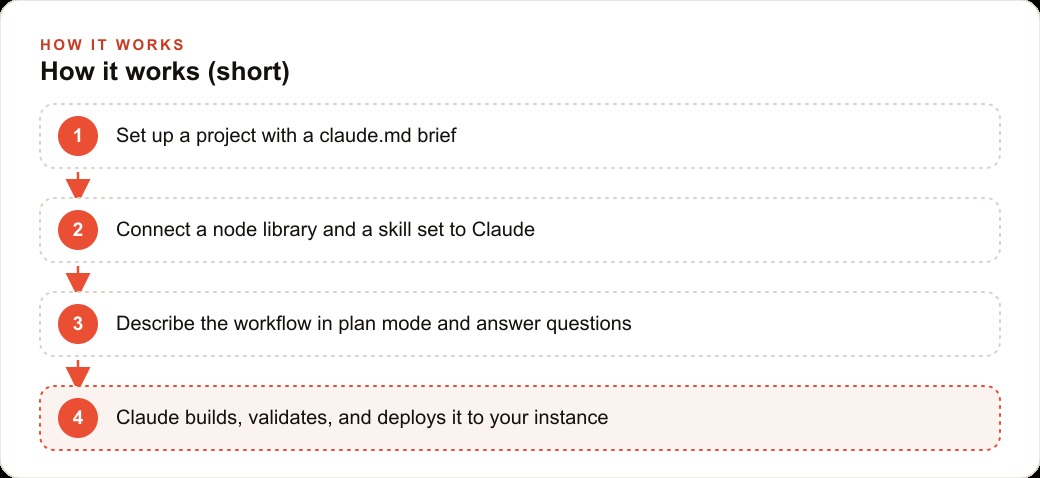
1. A plain-language description becomes a complete workflow in minutes
The starting point for building a workflow with Claude Code is describing the manual process in plain terms. Not the technical steps. The human steps: when this form comes in, I copy the contact details into a spreadsheet, then I send a confirmation email, then I add a reminder for myself to follow up in three days. That description, written the same way you would explain the task to a new team member, is sufficient input for Claude Code to build the matching automation.
The output is a complete n8n workflow, not a partial template or a skeleton to fill in. Claude Code maps the manual steps to the corresponding n8n nodes, configures them with the information from the description, and produces a workflow that can be imported and run. The gap between "I described this" and "this is running" is measured in minutes, not days.
2. When a step is misconfigured, Claude Code diagnoses and fixes it without you touching the code
Automation workflows fail in predictable ways. A node receives data in a format it does not expect. An API credential is missing. A downstream step references a field that does not exist in the output from the step before it. In a manually built workflow, diagnosing these failures requires reading error messages, understanding the n8n execution model, and finding the specific node that produced the problem.
When Claude Code builds the workflow, diagnosing failures is part of the same conversation. You copy the error output into the chat, and Claude Code identifies the node causing the problem, explains why it is failing, and proposes the correction. In most cases, it builds the corrected version directly. The non-technical operator's role is to report the error, not to diagnose it.
This changes the ongoing maintenance dynamic significantly. Workflows do not stay static. APIs change their response formats. Input data formats change when the upstream form or system is updated. With Claude Code in the loop, these changes produce an error, you report the error, and the workflow is corrected. Without it, these changes require someone technical to investigate the failure and find the fix.
3. Two specialized tools give Claude Code the expertise to build well
Connecting Claude Code to n8n with professional quality requires two components beyond the base model. An n8n MCP connector teaches Claude Code every node in n8n and how to manage n8n instances programmatically. A set of n8n skills teaches Claude Code the patterns and best practices for building reliable workflows, not just the syntax.
Without these components, Claude Code can build n8n workflows from general training data, but its output is less reliable and less idiomatic. With them, it builds the way an experienced n8n developer would build: choosing the appropriate node for each task, structuring data transformations correctly, and handling edge cases in the way that n8n's execution model requires.
The distinction matters for workflows that run at volume or that handle sensitive data. A workflow that works in testing but fails under production load, or that silently drops records in specific edge cases, is worse than no workflow because it creates the impression that the process is handled when it is not. The specialized tooling makes the difference between a proof of concept and a production workflow.
4. Skills load on demand rather than flooding the context with everything Claude knows
One of the specific design choices in the n8n skill set that makes Claude Code's performance reliable is that skills are loaded on demand rather than all at once. When Claude Code needs to build a specific type of node, it loads the skill that covers that node type, applies it, and releases it. It does not load all n8n knowledge into the context for every request.
This demand-based loading keeps the context focused on the relevant parts of the task and produces faster, more accurate responses than a system that preloads everything. For a complex workflow with many node types, the context stays clean throughout the build rather than becoming cluttered with knowledge that is relevant to other parts of the system but not to the current step.
5. Claude Code can handle the installation and configuration too
Setting up an n8n instance, configuring the correct environment variables, and connecting the MCP tools requires following a sequence of technical steps that is straightforward but tedious and error-prone for a non-technical operator. Claude Code can do this directly when given the relevant links and permissions.
Providing the documentation URLs for the n8n MCP tools and instructing Claude Code to install and configure them produces the setup without requiring the operator to follow technical steps manually. Claude Code reads the documentation, identifies the correct installation commands, executes them, and verifies the configuration. The operator's role is to grant the necessary permissions and confirm when the setup is complete.
This is a meaningful shift in the adoption cost of the workflow. A tool that requires significant technical setup before it produces any value has a high adoption barrier. A tool that can be set up by instructing it to set itself up has a much lower barrier.
6. Plan mode surfaces the questions that need answering before the build starts
When Claude Code runs in plan mode before building a workflow, it reads the description of the automation and asks the specific questions whose answers it needs before it can build correctly. Which email account should the confirmation be sent from? Which Google Sheet should the records be written to? What time zone should the follow-up reminder use?
These questions seem obvious in retrospect but are consistently overlooked in the initial description. The person describing the workflow knows the answers because they live in the business context. They do not think to include them because they are assumed background. Plan mode makes the assumptions visible before anything is built, which means the corrections happen at the planning stage rather than after a workflow fails in a specific scenario because an assumption turned out to be wrong.
The questions that plan mode surfaces are also the questions that distinguish a workflow that works for your specific business from a generic automation template that requires manual customization. By answering them before the build, you get a workflow that is specific to your context rather than one that requires a round of post-build editing to apply the specifics.
7. Clear description is the skill the operator needs to develop
The operating model of using Claude Code for n8n automation is different from the operating model of building n8n workflows manually in one specific way: the skill that determines quality is description, not technical knowledge.
A person who can describe a business process clearly, who can articulate the inputs, the steps, the decisions, and the outputs without ambiguity, can direct Claude Code to build a high-quality automation for that process. A person who cannot describe the process clearly will get an automation that reflects the ambiguity in the description.
The good news about this shift is that description quality is a learnable skill that does not require technical training. The discipline of describing a process with enough specificity that someone who has never seen it before could follow it is a general communication skill that many business owners already have. The ones who do not can develop it through practice with Claude Code, because the plan mode questions provide feedback on exactly where the description was ambiguous.
8. Building sensibly avoids the scaling problems that kill complex workflows
There is a practical constraint that matters for anyone building substantial automations: very large or very complex requests within a single workflow can exceed the resource limits of an n8n instance. A workflow that tries to do too much in a single execution sometimes fails at scale even when it succeeds in testing.
Claude Code, when instructed thoughtfully, builds workflows with sensible segmentation. Breaking a complex process into multiple linked workflows rather than one giant workflow distributes the load across multiple executions, makes individual failures easier to diagnose and fix, and makes the system easier to modify when requirements change.
The instinct when building automation is to make it comprehensive: one workflow that handles everything from intake to delivery. The more reliable approach is to build the workflow in stages, verify each stage, and connect them. Claude Code can build this staged architecture from a description, but the operator needs to know to ask for it rather than asking for everything at once.
For a business owner who is new to automation and is wondering where to start, the answer is one manual process that you run more than five times per week and that produces errors when you do it manually. Describe that process to Claude Code in plan mode, answer the questions that plan mode asks, build the workflow, test it with real data, and run it for two weeks before building the next one. That sequencing produces reliable automations rather than ambitious ones that break in ways that are hard to diagnose.
The first workflow that repays the investment fastest
The first automation a business owner builds should have three properties. It should be a process that runs frequently, because the time savings multiply with frequency. It should be a process that involves clear, deterministic steps, because the first workflow builds confidence in the system and ambiguous processes produce ambiguous automations. And it should be a process where errors are visible, because early feedback about whether the automation is working correctly is more valuable than early feedback about a process where errors might not surface for days or weeks.
The most common first workflow that meets all three criteria for a service business is the lead-to-record workflow. When someone fills out a contact form or submits a booking inquiry, the automation captures their details, writes them to a tracking sheet, sends a confirmation email to them, and creates a reminder task for the follow-up call. This workflow runs every time a new inquiry arrives. The steps are clear and deterministic. And the errors are visible: if the confirmation email does not arrive, the prospect notices and you find out quickly.
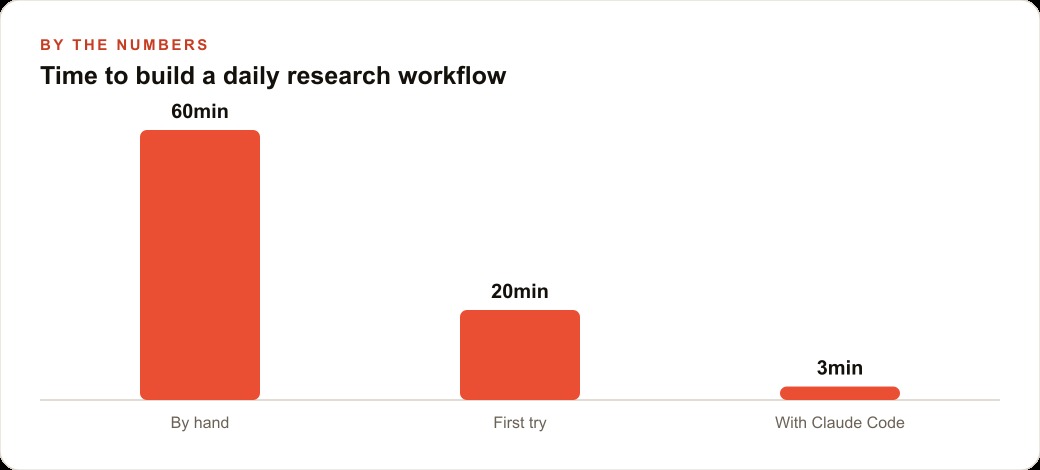
Building that one workflow with Claude Code takes an afternoon for a non-technical operator running plan mode first. The sustained time saving depends on inquiry volume. For a business receiving twenty to thirty inquiries per week, the manual version of this process takes roughly forty-five to sixty minutes per week. The automated version takes zero. Over twelve months, that is thirty-six to fifty hours returned from a single automation built in an afternoon.
When that first workflow has run reliably for two weeks, the second automation to build is the one that connects to the first. What happens after the follow-up call? Is there a manual step that records the outcome? Is there a step that changes the status of the lead in the tracking sheet based on the call outcome? Extending the automation downstream from the first touchpoint compounds the return from the initial investment.
That extension logic, building downstream automations that connect to the first, is where n8n's multi-workflow architecture becomes valuable. Each stage of a business process becomes its own workflow. The workflows connect through a shared data store or through triggers that one workflow fires when it completes. The architecture is modular: changing how the follow-up works means changing one workflow, not rebuilding the entire sequence from scratch.
Claude Code handles this modular extension the same way it handles the initial build: through description. Describe what should happen after the follow-up call is logged, describe how it should connect to the existing lead record, and Claude Code builds the extension. The operator's role stays at the level of describing the business logic, not managing the technical connections.
That is exactly what we do at AI DOERS. Book a private 30-minute call with Madhuranjan Kumar and we will map the fastest path to it for your specific business.
Book your call →
Madhuranjan Kumar
Madhuranjan Kumar brings 20 years of performance-marketing experience and has managed over $200 million in Facebook ad spend for brands across the United States and beyond. His expertise spans the full modern marketing stack: Meta, Google Ads, TikTok, email automation, CRM, and the websites that hold it together. At AI DOERS he turns that track record into lead-generation systems for businesses across every industry.