
How to Build Your First Agentic AI Workflow From Zero
An agentic workflow lets you describe the result you want and lets the AI plan the steps, build the tools, and fix its own errors. Here is what it is and how a small firm can use it.

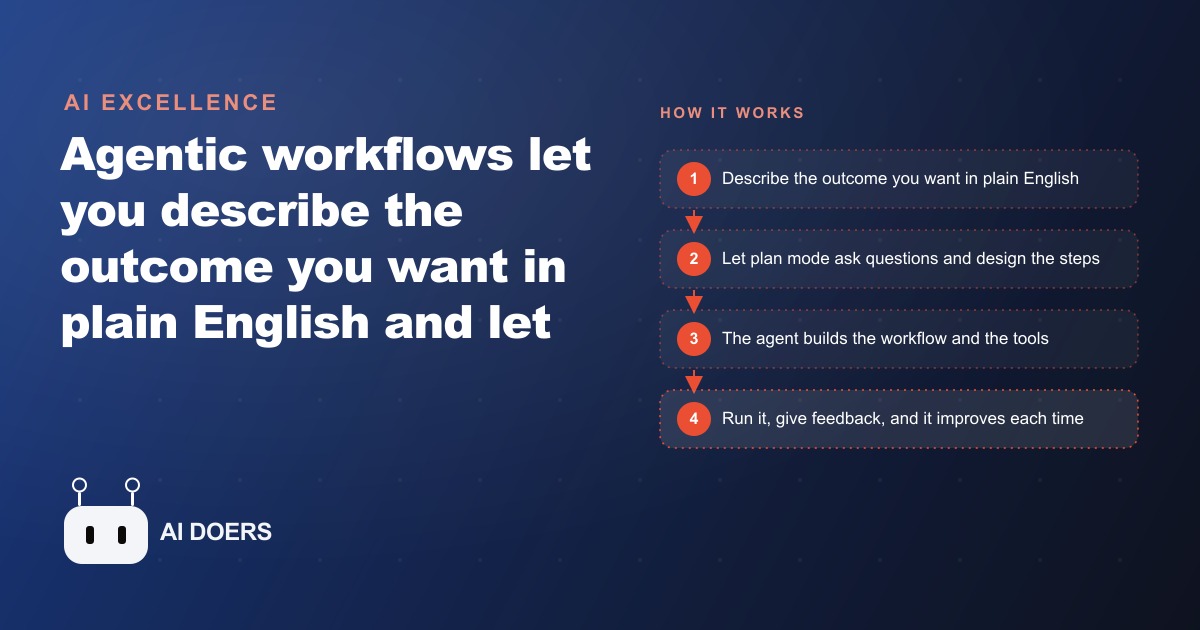
If you have ever dragged a node onto a canvas, wired it to the next one, tested it, watched it break, and fixed it yourself, you already understand why agentic workflows feel like a different job entirely. Instead of telling a system exactly how to do something step by step, you describe the outcome you want and let the agent plan the steps, build the tools it needs, and repair itself when something fails. I am Madhuranjan Kumar, and this is a practical path to standing up your first one from zero, written as the sequence I actually follow, so you finish with a working workflow rather than a pile of half-connected nodes.
The mental model that makes the rest click is simple. Building an agentic workflow is like hiring a talented developer. You do not sit and explain the code line by line. You walk in, describe the problem, describe the result you want, and ask what they need from you. That shift, from telling a system how to a telling it what, is the entire idea, and every step below is really just a way of having that conversation well.
Step 1: Decide whether the job even needs an agent
The first move is to not build an agent when you do not need one. Traditional automation, the drag-and-connect kind, is perfect for repetitive, predictable tasks, and in automation, predictable is beautiful, because you know exactly what happens every single time. If a job is deterministic, the same inputs producing the same outputs with no judgment required, keep it as a plain automation. That older style is not going away and it should not.
Agentic workflows are for the messy work, the non-deterministic jobs that need judgment at every step: research, content, support, lead handling, anything where the right next action depends on what just happened. So before you build anything, sort your task. If it is a fixed sequence, automate it the boring way. If it needs to read a situation and decide, that is where an agent earns its keep. Getting this sort right up front saves you from forcing judgment onto a task that never needed it, or worse, forcing rigidity onto a task that does.
Step 2: Describe the outcome, not the steps
Once you know the job needs an agent, resist the urge to specify how. Your job is to describe the result you want as clearly as you can, the way you would brief that talented developer. What should exist when this is done? What should it contain? Who is it for? The clearer you are about the destination, the less you have to care about the route, because the agent reasons out the route itself.
This is genuinely a different skill from configuring software, and it is mostly clear thinking rather than technical knowledge. A vague outcome produces a vague result, so spend your effort here. Not on the mechanics, but on articulating precisely what good looks like. That single paragraph of clear intent does more work than any amount of node-wiring, because everything downstream is the agent trying to reach the target you described.
Step 3: Set up the WAT structure so it stays organized
Structure is what keeps an agent from turning into chaos, the way a school locker becomes a disaster if you throw every paper in with no folders. So you give the agent folders, using a simple structure I call the WAT framework: Workflows, Agents, and Tools. Get these three roles clear and the whole thing stays legible even as it grows.
Workflows are the instructions, written in plain language. The agent is the coordinator that reads those instructions, decides which tool to use and when, and handles errors by researching and adapting, like a project manager who delegates. Tools are the workers, small scripts that each do one specific job. Before you build anything, give the agent an onboarding file that explains this structure, your workflows, the agent role, and the tools, so it stays organized from the very first run instead of inventing its own messy arrangement.
Step 4: Write the workflow as a plain markdown SOP
Now write the actual workflow, and here is the reassuring part: a workflow is just a standard operating procedure in plain markdown, like a job description. It tells the agent the sequence of steps to follow toward an end goal. A competitor analysis workflow, for example, might say to research a list of businesses, gather data from several sources, analyze the findings, and produce a report. No code, just the process written out the way you would explain it to a new hire.
The quiet power of this step is that the workflow file is not frozen. As the agent works and you tell it what you liked and did not like, it updates that file so it does better next time. You are writing the first draft of an SOP that improves itself. This is why the plain-language approach is not a limitation but the whole point: because the instructions live in readable text, both you and the agent can revise them, and the process gets sharper with every run instead of ossifying.
Step 5: Let plan mode interrogate you before it builds
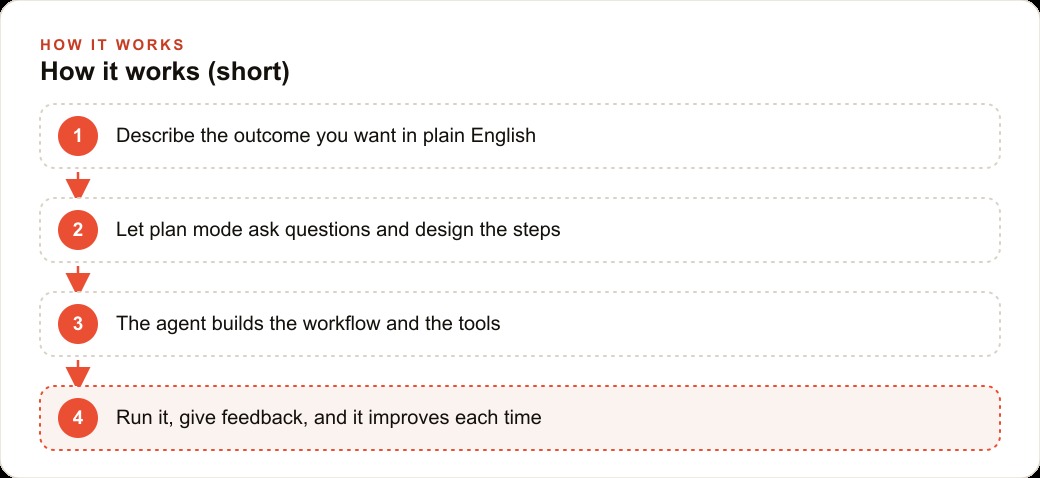
Do not let the agent start building the moment you describe the outcome. Use plan mode first. You describe the result, the agent asks clarifying questions, it proposes a plan, and only when you approve does it start to build. Answer its questions properly, because this is where a vague request gets turned into a precise one. Planning harder up front is exactly what prevents a fuzzy brief from producing a messy result.
Think of plan mode as the agent doing what a good developer does before touching the code: pushing back, asking where the data lives, what the edges are, how often this should run, what the budget per run is. Every question it asks is a place where an assumption could have gone wrong. The time you spend here is the cheapest time in the whole process, because a misunderstanding caught in planning costs a sentence to fix, while the same misunderstanding caught after the build costs a rework.
Step 6: Turn it loose to build and fix its own tools
With an approved plan, let it run. The agent writes the tools itself, each one a small script that does a single action like scraping a site, analyzing numbers, or generating a PDF, and it reasons through the sequence on its own, calling a search tool, then a scrape tool, then an analysis tool, then an output tool. The ugly code lives inside those tools, and you never touch it, which is the freedom of this approach. When a tool fails, the agent reads the error, researches, and repairs the script so that failure does not happen again.
This self-repair is what makes the whole thing viable for a non-developer. In old-style automation, a broken step meant you opened it and debugged. Here, the agent owns the fixing. Your role stays at the level of intent and judgment, describing what you want and evaluating what comes back, while the mechanical work of building and repairing tools happens below your line of sight. That division of labor is precisely what lets someone who cannot code end up with working custom software.
Step 7: Review the first messy run and give feedback
Expect the first run to be rough, and treat that as normal rather than a failure. The first output will surface a flaw or two, maybe a chart that is hard to read or a section that misses the point. Your job is not to fix it in the code. It is to say so, in plain English, the way you would give feedback to that developer. Tell it what was wrong and what good would have looked like, and the agent updates the relevant tool or workflow.
This feedback loop is the real work of the early sessions, and it front-loads deliberately. The setup asks a lot of questions and the first runs need correction, but each round of feedback gets saved, so the effort compounds instead of repeating. What feels like overhead in week one is what makes week four nearly effortless. The discipline is patience: give clear feedback now so you are not giving the same feedback forever.
Step 8: Let it compound with every use
The final step is not really a step, it is the payoff. Because the agent saves your business facts and your feedback into its workflow and tool files, each run gets smarter and faster than the last. The early questions you answered become knowledge it reuses. The corrections you gave become behavior it keeps. A workflow that took real effort to shape in the first week becomes a one-line request by the second month, running cheaply on everything it already knows about how you work.
This is why the payoff is that you stop being the person who builds and fixes every step. You describe the outcome, the system builds the tools, and when something breaks it repairs itself. Any process your business repeats, onboarding a client, building a report, qualifying a lead, monitoring competitors, is a candidate, because every one of those is really a sequence of steps with a few judgment calls, which is exactly the shape an agentic workflow fits.
A worked example: the monthly financial summary
Let me ground the whole path in one illustrative example. Picture a small accounting firm that spends hours each month building a client-ready financial summary by hand. The partner wants a branded PDF: the firm logo, the firm colors, a clean breakdown of the numbers, and a short list of insights. Instead of specifying how, the partner describes exactly that outcome. In plan mode, the agent asks the right questions, where should it pull the figures, which sections matter, how often should this run, and what is the budget per run, and the partner answers each one.
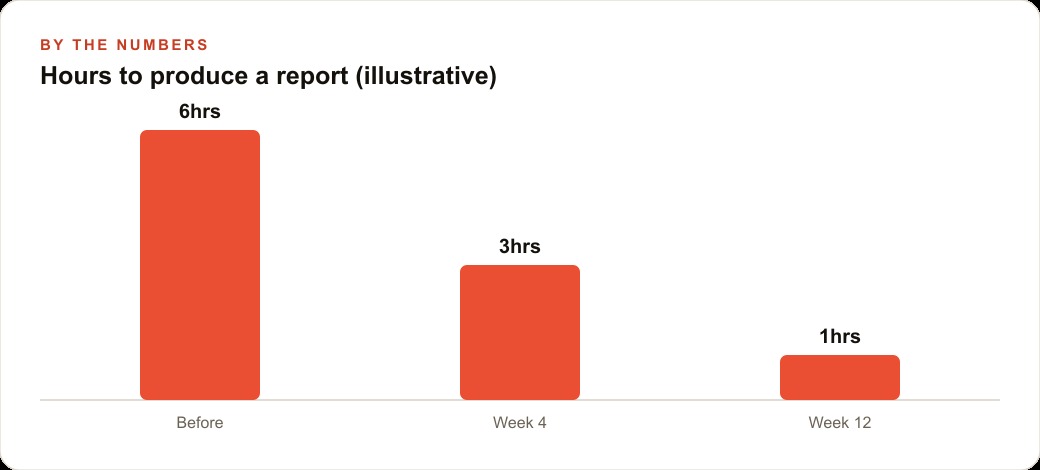
Then it builds the pieces. One tool reads the source data, one analyzes the numbers, one generates the charts, and one assembles the branded PDF. The partner drops in the logo and brand guide, and the agent extracts the colors and typography so the output looks like the firm produced it. The first run surfaces a flaw, maybe a chart that is hard to read, and the partner just says so in plain English and the agent fixes the tool. From then on, the monthly report that used to eat an afternoon is a one-line request, and the time to produce it drops from around six hours, to three by the first month, to about one by the third. Those numbers are illustrative, but the curve is real, because the agent reuses everything it already learned about the firm.
The value does not stay locked in that one report, either. The clean, structured client data the workflow produces feeds naturally into the firm's CRM and website stack, and the same disciplined process thinking that maps a report can map how leads are qualified or how a service page is kept current for SEO and organic search. Build one workflow well and you have not just solved one task, you have learned a pattern that applies to every repeatable process in the business. The second workflow is always faster to stand up than the first, because you already know how to describe an outcome, how to answer plan mode's questions, and how to give feedback that lands. The skill you are really building in that first afternoon is not a report generator. It is a way of working with agents that transfers to everything you do next.
None of this requires you to write code or read API documentation. It is mostly clear thinking about the result you want, patient feedback on the early runs, and the discipline to plan before you build. You can absolutely stand up a first workflow yourself in an afternoon by following these eight steps. If you would rather have the framework, the tools, and the retry behavior set up cleanly so you are not debugging in front of a client, that is the kind of work an expert can stand up for you, leaving you to do the describing and the judging while the machine handles the rest.
That is exactly what we do at AI DOERS. Book a private 30-minute call with Madhuranjan Kumar and we will map the fastest path to it for your specific business.
Book your call →
Madhuranjan Kumar
Madhuranjan Kumar brings 20 years of performance-marketing experience and has managed over $200 million in Facebook ad spend for brands across the United States and beyond. His expertise spans the full modern marketing stack: Meta, Google Ads, TikTok, email automation, CRM, and the websites that hold it together. At AI DOERS he turns that track record into lead-generation systems for businesses across every industry.