
How to Actually Build Anything with Claude Code, Using the 4 Pillars
Claude Code can ship a working app, an agent, or a website even if you are not a full-time developer, but the people who win plan first, save a reusable setup, and guide the agent with care. Here is the system and how I would run it for a real business.

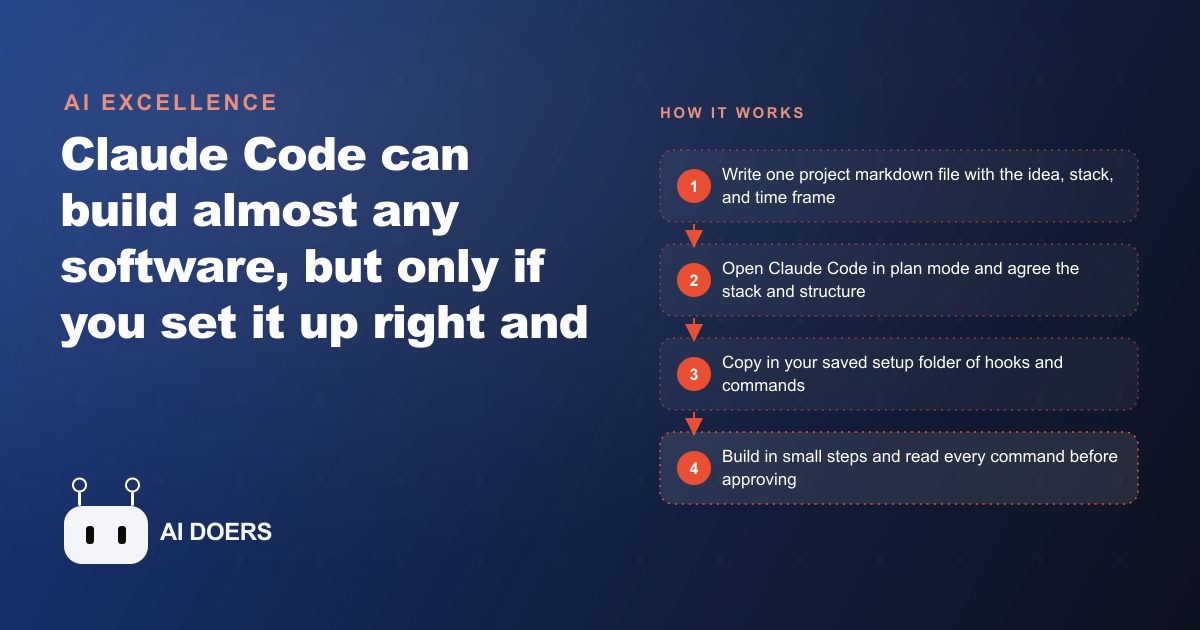
Claude Code can build a real working application for your business this week, but only if four specific things are in place before you write your first prompt. Miss any one of them and the output is confused, half-finished, or structured in a way that breaks under real use.
I am Madhuranjan Kumar, and the difference between builders who ship working software with Claude Code and builders who end up with a pile of generated files that do not fit together is not intelligence or prior experience. It is setup. The four pillars below are not theory. They are the practical foundation that determines whether a Claude Code session produces something useful or something you discard, and each one has a specific reason it matters.
Pillar 1: The Project Markdown File That Every Future Session Reads First
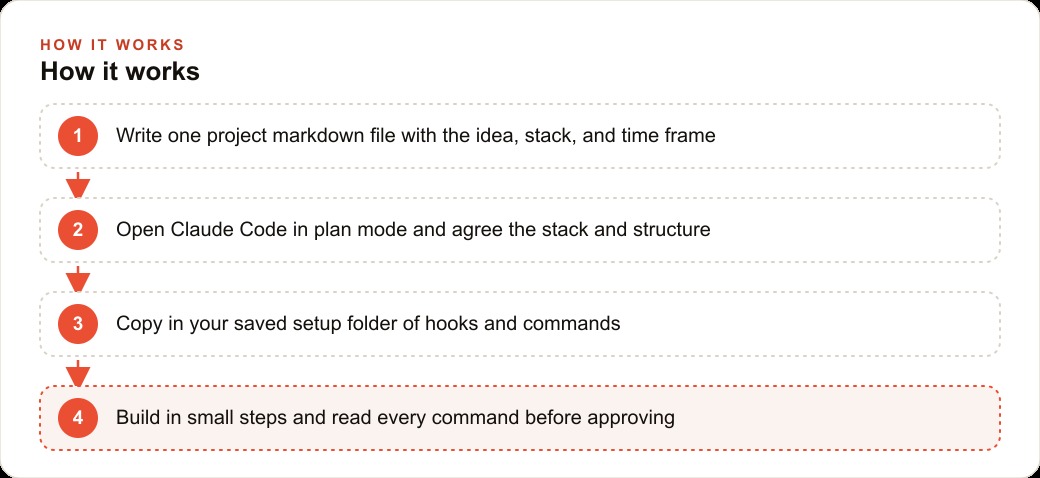
Before you ask Claude Code to write a single line of your application, create one markdown file in the project folder. Name it PLAN.md, PROJECT.md, or anything that makes its purpose obvious. Write four things into it: what the project is, what the goal is, which technology stack you are using, and what the time frame and resource constraints look like.
That document becomes the persistent memory of the entire build. The reason this matters so specifically is that every Claude Code session starts without knowledge of what happened in any previous session. If you open a new session without providing context, the agent cannot know what has already been built, what decisions were made about the folder structure, or why certain architecture choices were made over alternatives. Each session makes its own decisions, often inconsistent with the previous one, and the codebase accumulates contradictions.
The project markdown file solves this problem structurally. Every session begins by reading the file, which gives the agent instant full context: what we are building, why we are building it, what technology it runs on, and what level of complexity is appropriate for this project's size and timeline.
For a home cleaning company building a job-scheduling and customer-communication tool, the markdown file might say: we are building a web tool for internal use. The goal is to replace the current Google Sheets job tracking system with a tool where the team can see open jobs by date, mark jobs as complete, add notes for each job, and automatically send a confirmation email to the customer when a job is booked. The stack is Next.js with a SQLite database. The time frame is two weeks, one to two hours per day of AI-assisted work, no dedicated developer. This is an internal tool, not a consumer product.
That paragraph tells every session exactly what to build, what technology to use, what scope is appropriate, and who the audience is. The agent does not invent a different stack, add infrastructure for a team of fifty when the project serves a five-person crew, or produce architecture patterns suited to a platform business when you need a simple scheduling board.
The second part of the markdown discipline is writing decisions back into the file as they are made. When the agent proposes a folder structure in plan mode and you approve it, have the agent add that structure to the markdown. When a key decision about how data is stored or how authentication works is made, it goes into the file. The file grows with the project and becomes a living document that any session can rely on, rather than a static starting brief that goes stale after the first day.
For the cleaning company, after the first plan-mode session, the markdown might include: the main data models are jobs, customers, and notifications; jobs belong to customers and notifications fire when job status changes; the folder structure has pages, api, lib, and types directories; authentication is not needed in the first version since this is internal and only staff use it. All of that is now preserved across every future session.
Pillar 2: Plan Mode Before the First Line of Code
Every builder's instinct is to start generating code immediately. The idea is clear, the tool is ready, and the fastest path seems to be describing the feature and watching the agent produce it. That instinct produces worse software and wastes more time than any other single mistake in AI-assisted building.
Plan mode exists for exactly this reason. Before any code is written, switch into plan mode and have the agent think through the structure with you. What is the right stack for this project's size and time frame? How should the folder structure be organized? What are the main data models? Where does the business logic live and where does the presentation logic live? What are the main points where the application could fail, and how will it handle them?
Spending twenty to thirty minutes in plan mode before the build begins changes the quality of what comes out of the first code generation. The agent has a clear model of the system in its context, and the code it produces fits together as a coherent whole rather than a set of individually generated pieces that conflict when assembled.
For the home cleaning company tool, plan mode might produce these decisions: the application has three main data models, jobs with status and notes, customers with name and contact information, and notifications as records of messages sent. Jobs belong to customers. The status field on a job drives the notification trigger. The folder structure separates database utilities into a lib folder, API routes into an api folder, and page components into a pages folder. TypeScript types shared across the application live in a types folder. The agent proposes all of this, you confirm it, and it gets written into the markdown before any code generation begins.
The alternative is building without this planning step, where each new feature adds its logic wherever there is space and the database schema expands without a clear model. A month into that kind of build, adding a new feature requires understanding a system that was never designed, only accumulated. Plan mode makes the design decision happen before the code exists, and every subsequent session generates code that fits into the agreed structure rather than creating new patterns as it goes.
Pillar 3: A Reusable Setup Folder You Copy Into Every New Project
The difference between someone who builds one thing with Claude Code and someone who builds many things consistently is the reusable setup. A folder containing hooks, commands, and sub-agent configurations that have been refined over several projects turns every new project start from a blank slate into a standing start.
Hooks are the most valuable item in that folder. A hook is a short automation that runs at specific points in the Claude Code workflow: before a prompt is submitted, after a command is approved, at the end of a session. A hook that appends a specific reasoning instruction to every prompt, one that tells the agent to reason through the approach before writing any code, costs a few minutes to write once and saves twenty to thirty seconds on every subsequent prompt for the life of the project.
Twenty to thirty seconds per prompt sounds small until you calculate it across a full working day of building. If you submit forty prompts in a session and each one benefits from a two-sentence reasoning instruction that the hook appends automatically, the hook saves roughly twenty minutes per day without any additional effort. Over a month of consistent building, that is multiple hours recovered through a one-time setup decision.
For the home cleaning company tool, the setup folder would contain: a hook that appends a reasoning instruction and a reminder to check the project markdown for context before writing code, a set of safe commands that the agent can run without requesting approval on each invocation, and a sub-agent configuration for running the local test suite after each code generation to catch issues immediately rather than at the end of a session.
Those three items are written once and copied into every new project. The cleaning company tool gets the same standing start as the previous project had, and the next project after that gets the same start again. The setup investment compounds across every project rather than being rebuilt from scratch each time.
The commands in the safe-approval list deserve specific attention because building that list is an active discipline rather than something that fills itself in. Claude Code asks for approval before running any shell command because some commands are destructive and the tool cannot know which ones are safe for your specific project. Reading each command before approving it, every time, is the habit that builds the safe-approval list correctly. When you approve a command and understand what it does, you add it to the list. Over several projects, the list covers the operations that happen repeatedly in every build, and those commands run automatically without interrupting the build's momentum.
The sub-agent configurations in the setup folder matter for larger builds. A sub-agent set up to handle a specific repeating task, such as running the test suite and returning a summary of failures, or checking that new code follows the project's naming conventions, removes a category of manual checks from the main build loop. For the cleaning company tool, a sub-agent that verifies the job status notification logic after each change to the status system keeps a critical piece of business logic from breaking silently.
Pillar 4: Context Engineering That Keeps the Agent Sharp Across Long Sessions
The most important skill in AI-assisted building is not writing clear prompts for individual features. It is managing the context the agent carries across an entire session, so that output quality does not degrade as the session gets longer and the context window fills with earlier work.
Two commands handle this in Claude Code. The first is /clear, which resets the conversation entirely. When you switch from one topic to another, such as moving from building the database migration for a new jobs table to writing the customer notification system, the context from the database work is not relevant to the notification work and may actively confuse the agent by suggesting connections between systems that are not actually connected. Clearing the context before a topic switch keeps the agent focused on the actual problem rather than trying to reconcile two different concerns in the same thread.
The second command is /compact, which summarizes a long conversation into a concise representation and continues from that summary rather than the full thread. When a session has been running for several hours and the context window is filling with earlier decisions that have already been resolved, /compact preserves the key state of the project and the current task without keeping the complete history. The agent after a /compact has the same understanding of the project it had before, but the context is lean and current rather than cluttered with resolved discussions.
For the home cleaning company tool, a typical long session might start with setting up the database schema for jobs and customers, move to building the job listing page, encounter a problem with the status update logic, spend thirty minutes debugging and fixing it, and then shift to building the customer detail view. By the time the customer detail work starts, the debugging conversation about the status update is occupying context with details that are now irrelevant to what is being built. A /compact before the customer detail section gives the agent a clean context that knows the overall project state without carrying the debugging thread that no longer applies.
Reading every command before approving it, building the safe-approval list deliberately through that reading habit, using /clear and /compact to manage context across topic switches and long sessions, and keeping the project markdown current as decisions are made: these four operational habits are what separate a Claude Code session that ends with something shipped from one that ended with something promising that stopped working.
The home cleaning company owner who applies these four pillars consistently ends up with a real scheduling and communication tool: a page that displays all open jobs sorted by date, the ability to assign a job to a team member, a status system that marks jobs as booked, in progress, and complete, and an automatic email to the customer when the job is booked and again when it is marked complete. That tool replaces the Google Sheets and the group message thread that were handling the same work less reliably. It took two weeks of one to two hours per day of AI-assisted work, not because the technology is difficult but because the four pillars were in place from the start.
For business owners who are also managing customer acquisition through digital channels, the internal tools built with Claude Code feed those channels in a specific way. A job-scheduling tool that captures structured data, job types, customer locations, completion rates, and communication history, produces exactly the kind of first-party data that sharpens targeting in Meta Ads and Google Ads campaigns and makes the kind of audience segmentation that web CRM automation depends on actually possible. The business that builds its own internal tool is not just improving operations. It is building a data asset that its growth channels can use.
Building with Claude Code also connects to the content growth work that SEO and web content supports over time. A cleaning company that publishes genuinely useful content about home care and also has a tool on its website where customers can book and receive automated updates is building two complementary assets at once. The content brings organic visitors. The tool converts and retains them. Both projects are now within reach of an owner who follows the four pillars, with no engineering team required and no large capital outlay at the start.
That is exactly what we do at AI DOERS. Book a private 30-minute call with Madhuranjan Kumar and we will map the fastest path to it for your specific business.
Book your call →
Madhuranjan Kumar
Madhuranjan Kumar brings 20 years of performance-marketing experience and has managed over $200 million in Facebook ad spend for brands across the United States and beyond. His expertise spans the full modern marketing stack: Meta, Google Ads, TikTok, email automation, CRM, and the websites that hold it together. At AI DOERS he turns that track record into lead-generation systems for businesses across every industry.