
How to Build Agentic Workflows That Are Actually Worth Real Money
Agentic workflows let an AI design and self-correct your automations while it builds them. Here is how they work, who they help, and how a small service business can put one to work.

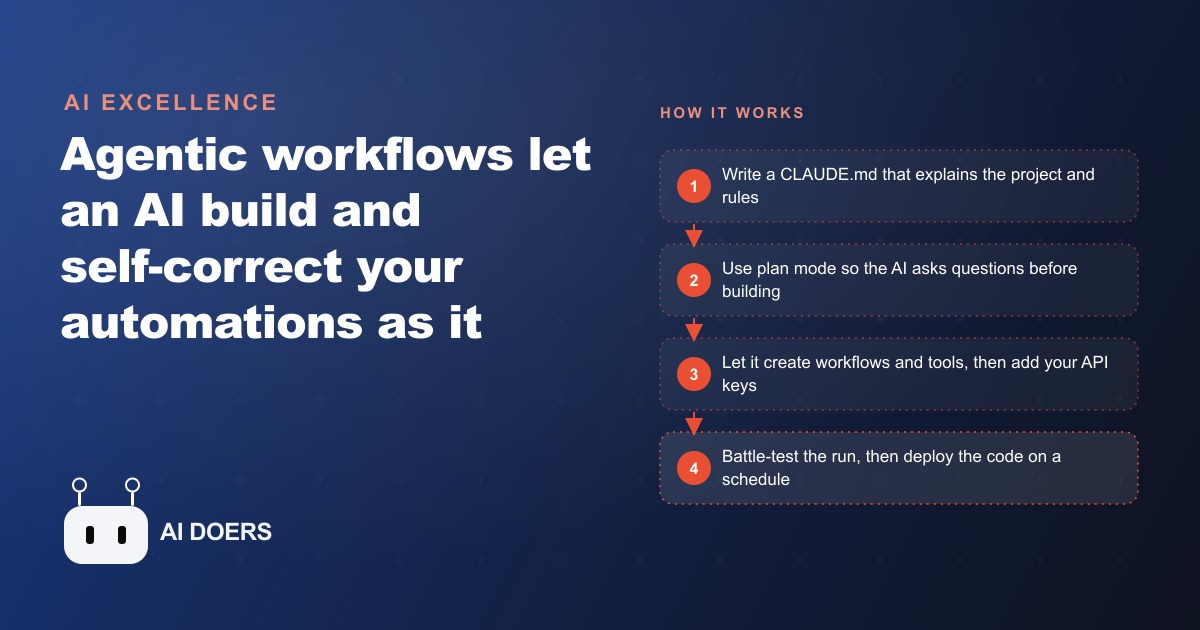
The agentic AI market is moving from a few billion dollars today toward tens of billions over the next several years, and a real share of enterprises are already running pilots. That is not hype, it is budget relocating into a new way of working. But most people chasing that money build the wrong thing, a flashy demo instead of a solution to a real problem. This is a build playbook for agentic workflows that are actually worth paying for, and the through line is simple: solve the right bottleneck, not the most impressive one.
I am Madhuranjan Kumar, and I want to walk you through this as a sequence of stages, because the order matters as much as the tools. Get the order wrong and you produce something clever that nobody needs.
Stage 1: Understand what makes a workflow agentic
Before you build, get the concept right. An agentic workflow is an automation that an AI agent builds, runs, and repairs on its own, instead of one you wire together by hand step by step. The reason this beats traditional automation is worth internalizing. If you have built in a tool like Zapier, you know the routine: map every step, connect every block, handle every edge case yourself. It works until it hits something it was not told about, and then it breaks, and a human goes in to fix it. That maintenance is time, and time is money.
Agentic building is different during the phase that counts. When you are sitting in a tool like Claude Code and you trigger a job, the agent is right there. If something breaks mid run, it reads the error, tries a different approach, updates its own tool, and keeps going. That self healing is real while you build and iterate. There is one honest catch you must plan around: once you deploy the workflow to run on a schedule or a webhook, you are shipping the code and the tools, not the live agent, so it behaves like a normal deterministic automation. That is actually good, because predictable automations are the dependable ones. The advantage lives in how you build, not just how it runs.
Stage 2: Diagnose before you build anything
This is the stage that separates workflows worth real money from expensive toys, and almost everyone skips it. Think of a business like plumbing. If a pipe is clogged, pouring more water in does not help. Most owners keep pouring water, hiring more people and bolting AI onto random problems, when what they actually need is someone to find the clog and clear it.
So before you touch a tool, act as the doctor who runs the diagnosis, not the pharmacist who fills whatever was requested. Sit with the business and find where the real time and money leak out. It is rarely the thing that would make a cool demo. It is usually leads slipping through the cracks, onboarding that drags, or piles of manual data entry. When you eventually talk to an owner, you do not lead with the words agentic workflow. You lead with how many hours a month you will give them back and how many errors you will remove. The diagnosis is the deliverable that gets paid, because it is the part the owner cannot do themselves.
Stage 3: Set up the project and its standing rules
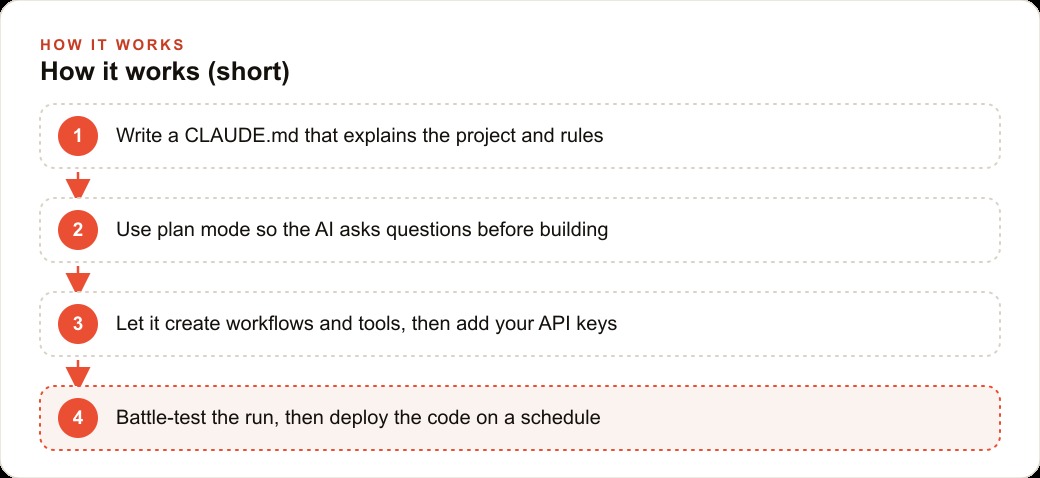
Once you know the problem, structure the build. A clean way to think about it is the WAT framework: workflows, agent, tools. Workflows are recipes written in plain language. Tools are the ingredients, like a research call or a function that sends a message. The agent reads the recipe and uses the tools in the right order. Sitting on top is a project file, the CLAUDE.md, which holds the standing instructions the agent reads on every single message.
Practically, that means installing Claude Code in an editor you are comfortable in, opening a fresh project folder, and writing that CLAUDE.md first. Explain the project, where files live, and the rules to follow. This is the foundation everything else stands on, because an agent with clear standing instructions stays on track, and one without them drifts.
Stage 4: Plan before you build
The real power move is plan mode, and using it is a discipline, not an option. Instead of giving a goal and letting the AI charge off building, you give a loose goal and let it ask the questions that matter first, then hand you a plan to approve before it writes a single file. This is where ambiguity gets resolved cheaply. It is far better to catch a misunderstanding in a plan than to discover it after the agent has built the wrong thing.
Describe what you want in plain language, even loosely, and let the AI interrogate it. Approve the plan only when it reflects the actual bottleneck you diagnosed in stage two. This keeps the build aimed at the outcome that pays, rather than the feature that demos well.
Stage 5: Build, then battle test before you trust it
With the plan approved, let the agent create the workflows and tools. When it needs credentials, paste your API keys into the environment file, not into the chat. Then run it once and watch closely. During this phase the self healing shines: when a messaging tool hits a wrong endpoint, the agent searches the docs, finds the fix, and updates the tool so it never trips there again. You fix the first issues in natural language, and after that first pass it tends to run cleanly.
Do not skip the hard test run. Traditional automation is like laying every rail of a train track by hand. Agentic building is like telling a crew to lay the track from here to there and letting them solve the problems they hit along the way. You end up with a better track, built faster, but you still test it hard before it carries real traffic. Only after it survives a battle test do you deploy the code to run on a schedule or a webhook.
A worked example: rescuing a plumbing company's leads
Let me run the whole playbook on one business. Picture a busy plumbing company drowning in inbound calls and form fills. Half the leads never get a callback fast enough, and the office manager spends hours each day copying job details between the booking form, the calendar, and a spreadsheet. Stage two diagnosis is done: that slow response and manual re entry is the clog.
Now build to the diagnosis. I would create a lead intake workflow with a few simple tools: one that reads each new inquiry, one that scores how urgent the job is so a burst water line jumps the queue ahead of a slow drain, one that drafts a personal text back to the customer, and one that drops the clean record into the scheduling sheet. The workflow is the recipe telling the agent to read, score, reply, then log. During the build, when the messaging tool hits a wrong endpoint, the agent finds the fix and updates the tool. After a hard test run, I deploy the code so it runs on every new lead automatically.
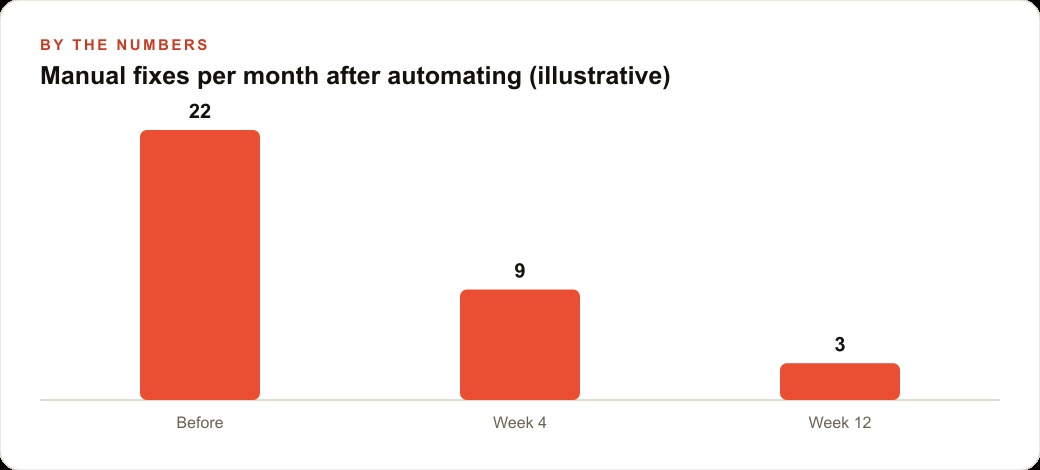
Put illustrative numbers on the result. Suppose the office was fixing twenty two things a month by hand, chasing missed leads and re typing records. After the workflow goes live, that manual load might fall to single digits within a few weeks as the automation handles the routine cases, freeing the office manager for the work that actually needs a person. The owner stops losing jobs to slow replies, which is the same reason fast follow up lifts the return on Facebook and Instagram ad campaigns and Google Ads: the ad spend that brings a lead in is wasted if nobody answers in time, and the workflow closes that gap. Because the clean records land in the CRM and website stack, the follow up sequence can pick up automatically from there.
Stage 6: Price on the outcome, not the hours
The last stage is commercial, and it is where most builders leave money on the table. If a build that takes a few days saves a client ten thousand dollars a month, hourly pricing is a mistake. Charge for the outcome you deliver, not the time you spent. You diagnosed the clog, you cleared it, and the value is the recovered hours and rescued leads, not the number of afternoons at the keyboard. Pricing on value is the natural conclusion of stage two: if the diagnosis is the deliverable, the outcome is what you invoice.
Why the build phase and the run phase are not the same thing
One misunderstanding sinks more agentic projects than any technical error, so it is worth stating plainly. The self healing you see while you build is not the same thing that runs in production. During the build, the live agent sits with you, reads errors, and repairs its own tools in real time, which feels almost magical. Once you deploy that workflow to a schedule or a webhook, you are running the code and tools it produced, not the live agent. It behaves like any deterministic automation from that point on.
This is not a downside to hide from a client. It is the correct design, and you should explain it as a feature. Production systems should be predictable, because a workflow that quietly rewrites itself on a live customer's lead is a workflow you cannot trust. The intelligence belongs in the build and iteration phase, where a human is watching and the cost of a mistake is a retry. The reliability belongs in production, where the same steps run the same way every time. Confusing the two, and promising a client a system that keeps evolving on its own in production, is how you set an expectation you cannot safely meet.
Pricing on value only works if you diagnosed first
Charging for the outcome rather than the hours sounds obvious until you try to justify the number, and that is where the diagnosis stage pays off twice. You cannot credibly price on value if you never quantified the problem. The reason you can walk into a plumbing company and propose a fee tied to rescued leads and recovered hours is that you already measured the clog: the leads going cold, the hours lost to manual re entry, the cost of each of those in real money. Without that measurement, value pricing is just a bigger number you cannot defend.
So the diagnosis is not only how you find the right thing to build. It is how you earn the right to price on impact. When an owner can see that slow callbacks are costing a specific amount every month, a fee that captures a fraction of what you save becomes an easy yes, because it is clearly cheaper than the bleeding. Skip the diagnosis and you are back to selling hours, competing on rate, and leaving the real value on the table. The doctor gets paid for the diagnosis and the cure, not for the minutes spent in the room, and that is only possible because the diagnosis came first.
The skill that actually gets paid is judgment
Strip away the tooling and what remains is a simple truth about this work. The money does not follow whoever can wire the most impressive automation. It follows whoever can look at a business, find the one bottleneck that is quietly bleeding time and leads, and clear it before adding anything flashy on top. The build is the easy part once the diagnosis is right. Owning that judgment, the ability to be the doctor rather than the pharmacist, is the durable skill that keeps paying long after any single tool changes.
None of this requires deep coding, but it does reward someone who understands the process underneath. You can absolutely build a first version yourself over a weekend, and I would encourage you to try it on your own biggest bottleneck first. If you would rather have the bottleneck found, the workflow designed, and the whole thing tested so it does not embarrass you in front of customers, that is exactly the kind of work an expert can set up cleanly, and a short call is the fastest way to find the clog worth clearing.
That is exactly what we do at AI DOERS. Book a private 30-minute call with Madhuranjan Kumar and we will map the fastest path to it for your specific business.
Book your call →
Madhuranjan Kumar
Madhuranjan Kumar brings 20 years of performance-marketing experience and has managed over $200 million in Facebook ad spend for brands across the United States and beyond. His expertise spans the full modern marketing stack: Meta, Google Ads, TikTok, email automation, CRM, and the websites that hold it together. At AI DOERS he turns that track record into lead-generation systems for businesses across every industry.