
How One OpenClaw Agent on a VPS Can Run an Entire Business
Deploy a single OpenClaw agent on a cheap VPS, power it with Claude Sonnet and Perplexity search, feed it your knowledge as markdown living files, and connect it to Slack so the whole team gets an AI that works while everyone sleeps.

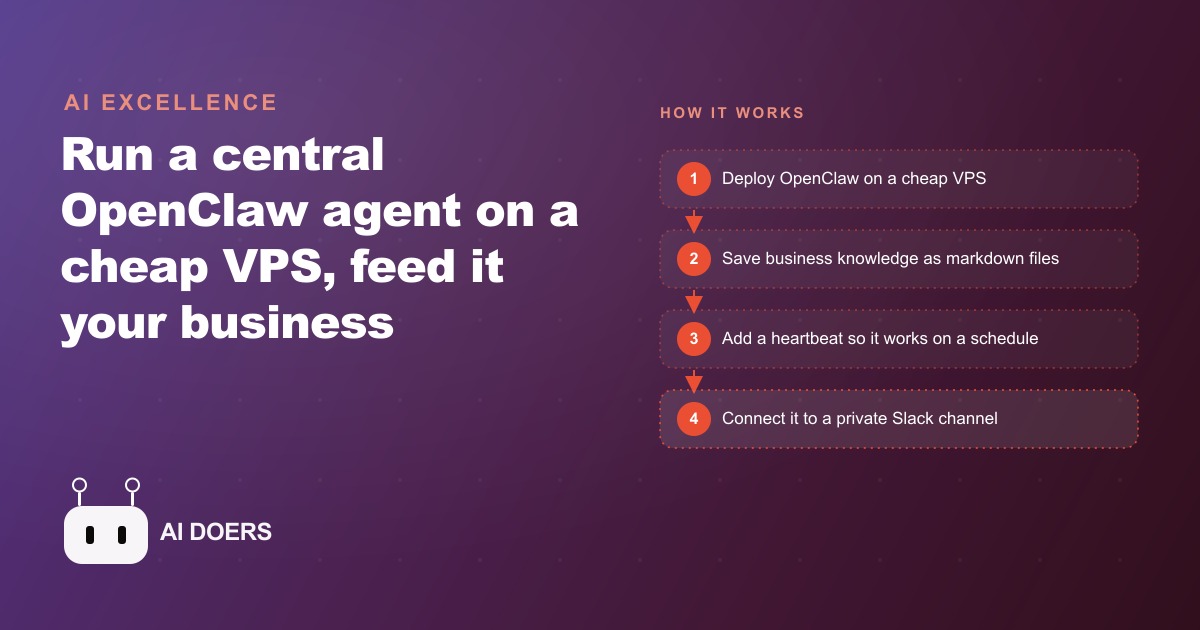
The gap between a chatbot and an agent is not a marketing distinction. It is an architectural one, and the practical difference determines whether AI becomes a tool you occasionally consult or a system that does real, continuous work while your team focuses on other things. Madhuranjan Kumar has built and studied both, and the shift to a living-file agent deployed on a cheap virtual private server is the shift that changes what a lean team can actually accomplish.
OpenClaw makes this concrete. One agent on a VPS costing less per month than a single business lunch can handle internal research, draft responses, maintain institutional memory, answer team questions, monitor business metrics, flag issues before anyone on the team notices them, and update its own knowledge base as it learns. This is not theoretical. Each of the following properties is architectural, meaning it is built into the design rather than bolted on, and each one explains why this category of tool produces different results than a chatbot.
Here are nine things that distinguish a properly configured living-file agent from a chatbot you paste text into.
1. It Acts on a Schedule, Not on Your Prompt
A chatbot waits. You open it, type something, it responds, the conversation ends, and nothing happens again until you return. A living-file agent runs on a heartbeat: a recurring task that fires on a fixed schedule, every 15 to 30 minutes, regardless of whether anyone on the team has interacted with it recently.
The heartbeat can execute anything a prompt can execute. Check a metric against its expected range and send an alert if the number is outside the boundary. Review the team's priority list and flag anything that has been sitting without action for longer than the defined threshold. Pull the latest information on a topic the team is tracking and summarize it into a file. The agent is not waiting for permission to work. It is working continuously, surfacing information and taking action on its own schedule.
This shift from reactive to proactive is the most underappreciated architectural difference between a chatbot and an agent. A chatbot's value is bounded by how often you remember to open it. An agent's value compounds with time as it accumulates context about the business, takes action across many cycles, and keeps its understanding current without requiring anyone to initiate each cycle. The team does not manage the agent's attention. The agent manages its own attention according to the rules you wrote at setup.
For a team that has experimented with chatbots and found them useful but inconsistent in their impact, switching to a heartbeat-driven agent often produces a different experience: the tool feels like a team member rather than a search engine.
2. Every File the Agent Cannot Access Is a Dead File
The living files concept is the foundational idea behind this architecture. Any piece of information stored in a format the agent cannot read is information the agent cannot use. A Google Doc the agent has no access to is a dead file. A decision made in a conversation that was never written down is a dead idea. A process that lives in someone's head is a dead process from the agent's perspective. It exists somewhere but it does not exist in the agent's world.
Convert information the agent needs into markdown files in folders the agent can access, and each piece of information becomes a living file. A playbook for handling customer objections becomes a markdown document the agent reads before drafting any customer response. A list of the metrics the team tracks and what each one means becomes a markdown document the agent consults before writing any report. A record of past decisions and the reasoning behind them becomes a markdown document the agent checks before making recommendations that could conflict with established direction.
The discipline of converting information to living files also produces a useful secondary effect: the information has to be written clearly enough that an agent can understand it without the conversational context that lives in a specific person's head. That requirement produces documentation that is useful to human team members as well, not only to the agent. Onboarding a new team member becomes faster when the knowledge base is already written for a reader without background context.
3. The Mistakes File Is the Most Valuable Document in the System
In the root directory of the agent's working folder, above the playbooks folder and the research folder and the metrics folder, there is a file called mistakes.md. It is a running log of every error the agent has made, every misunderstanding it has produced, and every time its output required correction before use.
The file sits at the root level because the agent reads files in the root directory first, before anything else, at the start of every task cycle. The mistakes file is not archived after a period of time. It is not treated as a historical record the agent might consult occasionally. It is the first thing the agent reads before taking any action.
The reasoning behind this priority is direct: if the agent made the same mistake twice, the second instance cost the team time and trust that it should not have. Each entry in the mistakes file is an explicit instruction against repeating a known error. A line that reads "do not include a specific price in any customer response without first checking the current pricing document" is an instruction that was written because the agent included an outdated price at some point and that error had consequences. Every line makes the agent more reliable without requiring any additional training or technical configuration.
Most teams underinvest in the mistakes file during the first weeks of deployment and regret it by month two. The right time to create the file is before the first task runs, with a header and a note that no mistakes have been logged yet. The habit of adding entries after corrections develops faster when the file exists from the beginning rather than being created reactively after the third or fourth error.
4. Search Costs a Cent Per Query and Outperforms the Agent's Built-In Knowledge
An agent that relies only on built-in knowledge is an agent working from information that was current at the time of its training and has not been updated since. For many stable questions that matters little. For anything involving current events, recent competitor moves, new regulatory requirements, newly available tools, or pricing that changes with the market, the gap between training-time knowledge and present-day accuracy can be significant.
Perplexity Sonar Pro, available via API, costs approximately one cent per search query. A team running an agent that performs 20 to 50 searches per day spends $0.20 to $0.50 per day in search costs. The difference in output quality between an agent with access to real-time search results and one without is not marginal. It is the difference between an agent that can accurately report what a competitor announced last week and one that confidently reports information that has since changed.
The configuration is straightforward. The agent calls the search API when it encounters a question that requires current information rather than stable background knowledge, retrieves the results, reads the most relevant sources, and incorporates that current information into its response. The search cost is a negligible budget item against the value of having an agent that gives accurate answers rather than outdated ones delivered with the same confidence as accurate ones.
5. The Heartbeat File Makes the Agent's Schedule Visible to Everyone
The heartbeat file is a structured markdown document that defines what the agent does on each recurring cycle: which metrics it checks, what output it produces, which thresholds trigger an alert, and which actions it takes automatically versus which it surfaces for human review before executing.
Having the heartbeat defined in a file rather than embedded invisibly in the system configuration serves two important purposes. First, anyone on the team can read it and understand exactly what the agent is doing and when. There is no operational black box. A team member who wants to know whether the agent monitors a specific metric can check the heartbeat file rather than having to ask someone who remembers the setup. Second, the team can modify the heartbeat by editing a file rather than reconfiguring the underlying agent. Adding a new recurring check means adding a line. Removing one means deleting a line. Changes are tracked in version control like any other file.
The heartbeat file also serves as the most accurate piece of onboarding documentation available. When a new team member joins, reading the heartbeat file tells them what the agent handles automatically and what still requires human attention. That clarity prevents the failure mode where tasks get dropped because everyone assumed the agent was handling them, and the agent was not configured to do so.
6. Small Rule Files Beat One Giant System Prompt
A system prompt that tries to encode everything the agent needs to know becomes unmanageable quickly. It grows with each new requirement until it is too long to read carefully during updates, too dense to modify without risking contradictions with earlier entries, and too rigid to handle the variation in real-world requests without producing errors at the edges.
Small rule files solve this with modularity. Each file covers one domain of responsibility: a file for how to handle customer questions, a file for how to write internal summaries, a file for the naming conventions the team uses in shared documents, a file for which metrics trigger immediate escalation versus which ones are logged for the daily review. The agent reads the relevant rule file when it is about to do something in that domain.
Updating the customer question guidelines means editing one file. The change does not touch the rules for internal summaries or the metric thresholds or the naming conventions. Changes are isolated to the domain they affect, which makes testing simple: adjust one rule file, run a few representative test cases against that domain, and confirm the change produced the intended behavior without affecting anything else. The modularity also makes the system easier to explain to a new team member who will eventually maintain it.
7. Business Knowledge Belongs in Structured Folders, Not in Conversations
Everything the team has learned about how the business works should eventually exist in the agent's knowledge folder, organized by domain. Playbooks for recurring situations: how to handle a lead asking about pricing, how to respond to a negative review, how to onboard a new client in the first week. Metrics documentation: what each tracked number means, how it is calculated, what the current targets are, and what history looks like. Research: competitor analysis, market positioning notes, industry data that informs decisions. Copywriting: brand voice guidelines, headline approaches that have worked, phrases to avoid, tone benchmarks.
The knowledge folder is not a static archive created at setup and then left to age. The agent updates it as it works. When it discovers new information during research that is relevant to an existing topic, it adds it to the appropriate file. When a playbook response is edited and improved by the team, the updated version replaces the original. When a competitor changes its pricing, the competitive research file is updated. The folder grows more valuable over time because it accumulates the team's real, current working knowledge rather than a one-time setup document.
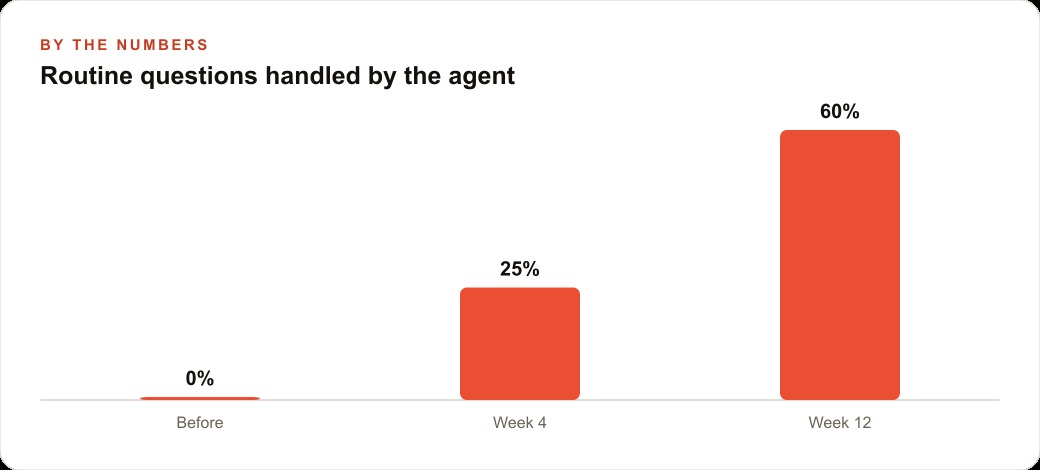
An accounting firm with a lean team deployed this architecture and measured the result at eight weeks. The agent, connected to the firm's knowledge base and to Slack, handled approximately 60 percent of the routine internal questions that had previously been directed to the senior partners. Questions about filing deadlines, document requirements for common client scenarios, procedures for standard workflows, and clarifications on recurring process questions were all answered by the agent from the knowledge base. The senior partners recaptured roughly 12 hours per week of time that had been consumed by answering questions any well-documented system could answer. At a billing rate of $180 per hour, that represents $2,160 per week returned to client-facing work.
8. Slack Becomes the Terminal Everyone Already Has
Connecting the agent to Slack means any team member can ask a question, request a summary, give a task, or flag an issue without changing tools or switching contexts. The interface the team already uses for internal communication becomes the interface for interacting with the agent. The learning curve for adoption is zero because the interaction happens in a tool everyone already uses every day.
This matters for sustained adoption in a way that dedicated agent interfaces do not. An agent that requires logging into a separate platform will be used by the people who remember to check it, which in practice means the people who set it up and a subset of early adopters. An agent that responds in the same Slack channel where the team already communicates will be used by everyone on the team, continuously, because the friction of using it is eliminated.
The Slack integration also makes the agent's output visible to the team collectively. A summary the agent posts in a shared channel is shared context for everyone who reads it. A flag the agent raises about an out-of-range metric is seen by everyone who might need to act on it, not only by the person who thought to ask. The agent becomes part of the team's shared working environment rather than a private tool that some team members use in isolation.
9. Self-Update and Restart Means the Agent Improves Without Requiring Manual Deployment
An agent that requires manual intervention for every update is not autonomous in any meaningful sense. It is a system where the limiting factor on improvement is still how quickly a team member can push a configuration change. That speed is bounded by human availability, which means the agent's quality is bounded by how much time the team can allocate to maintaining it.
OpenClaw supports self-update within defined boundaries: the agent can modify its own knowledge files, update rule files based on observed outcomes and corrections, add entries to the mistakes file after identifying a failure mode, and restart itself to apply the changes. The boundary between what it can change autonomously and what requires human approval is explicit and enforced. The agent does not expand its own permissions. It does not modify its own core operating constraints. It improves the accuracy and completeness of its working knowledge within the space the team has defined.
Within those boundaries, self-update changes the development curve of an agent deployment in a measurable way. In the first weeks, the team is frequently correcting the agent, adding entries to the mistakes file, refining the rule files for the domains that have produced errors. In months two and three, the agent is doing more of that refinement itself, flagging uncertainty, identifying gaps in the knowledge base, and improving its own responses based on the feedback loop. By month four or five, the team is spending significantly less time on maintenance because the agent has internalized the patterns and exceptions through repeated exposure.
The agent that improves continuously as it operates is categorically different from the agent that stays at exactly the level it was at when deployed. The first type compounding its value over time without proportionate increases in maintenance effort. The second decays in relevance as the business evolves and the knowledge base fails to keep pace with changes in the operation.
The nine properties above are each independently useful, but their real value comes from how they reinforce each other. The heartbeat drives continuous operation. The living files give the agent accurate current information to act on. The mistakes file prevents repeated errors. The search capability supplements built-in knowledge with current information. The rule files ensure consistent quality across domains. The knowledge folder accumulates the team's working knowledge in a form the agent can use. Slack provides a zero-friction interface for the whole team. Self-update means the system improves as it operates. Together, these properties describe a system that is genuinely different in kind from a chatbot, and the difference is architectural, not a matter of prompt engineering or extra configuration effort.
That is exactly what we do at AI DOERS. Book a private 30-minute call with Madhuranjan Kumar and we will map the fastest path to it for your specific business.
Book your call →
Madhuranjan Kumar
Madhuranjan Kumar brings 20 years of performance-marketing experience and has managed over $200 million in Facebook ad spend for brands across the United States and beyond. His expertise spans the full modern marketing stack: Meta, Google Ads, TikTok, email automation, CRM, and the websites that hold it together. At AI DOERS he turns that track record into lead-generation systems for businesses across every industry.