
How Claude Turns Plain Language Into Edited Video With Motion Graphics
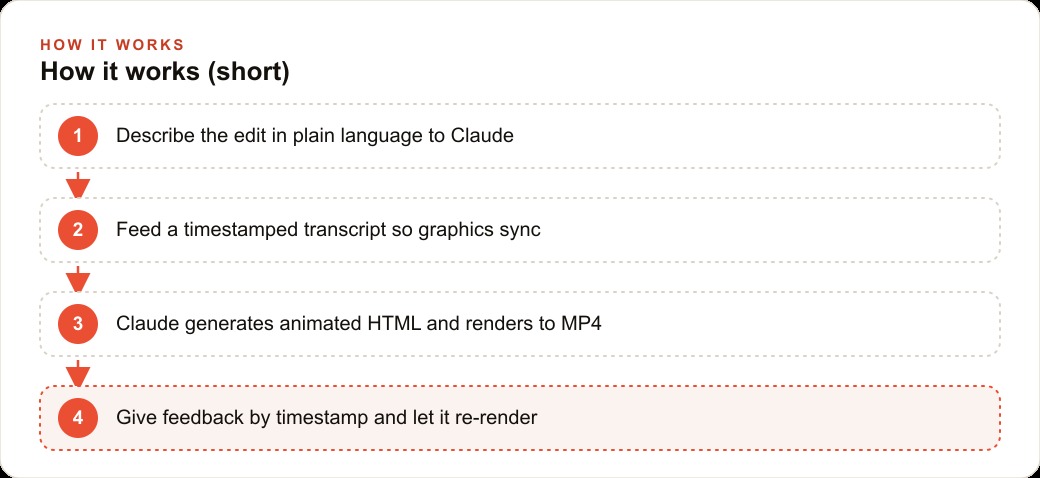
Claude edits video by generating animated HTML that renders to MP4 through FFmpeg, using Claude Design for branded animations and HyperFrames in Claude Code for deeper control, and the key is feeding a timestamped transcript so on-screen text and graphics land on the exact word.

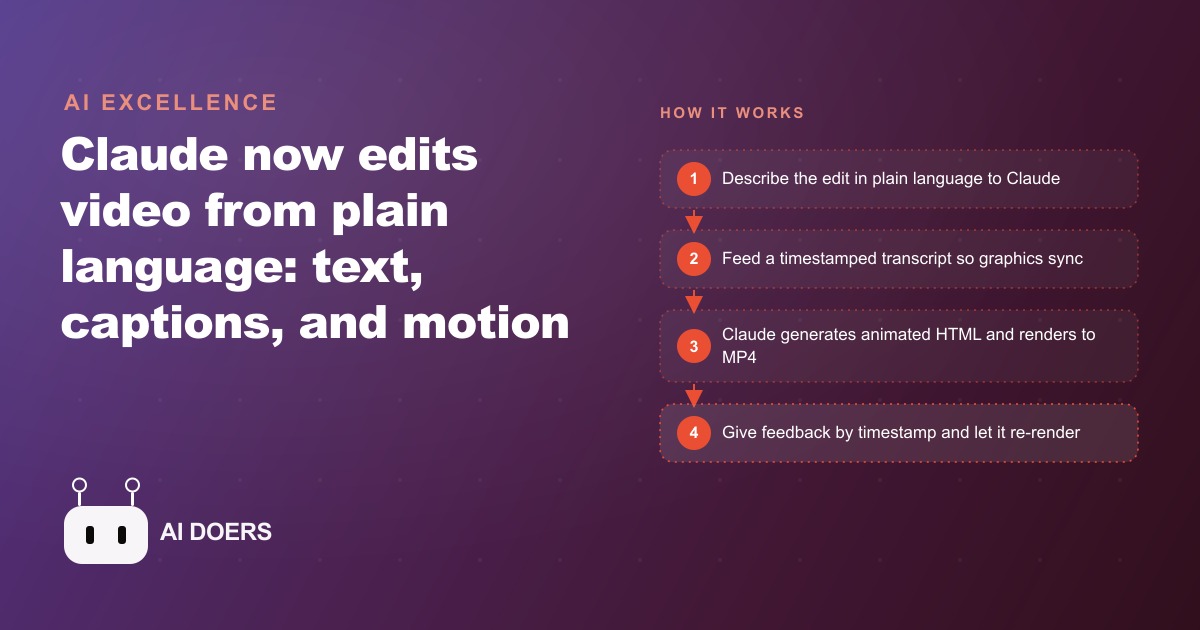
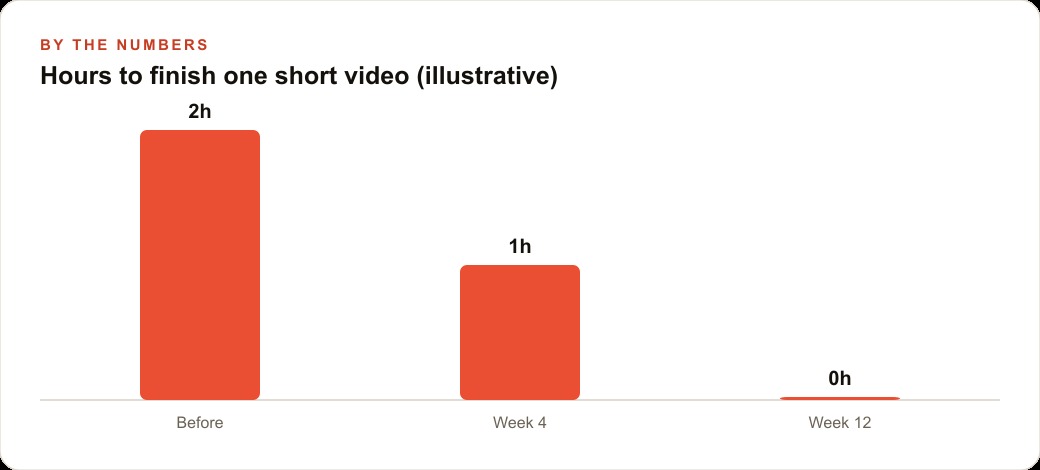
In 2024, producing a three-minute polished promotional video with synchronized captions, animated text overlays, and branded motion graphics required a dedicated editor, a timeline tool, and two to four hours of hands-on work. In 2025, Claude generates animated HTML, FFmpeg renders it to MP4, and you direct the entire thing with plain language. The pipeline did not improve incrementally. It changed the category of skill required to produce the output.
I am Madhuranjan Kumar. This piece is not about Claude being impressive. It is about how the pipeline actually works at a technical level and what determines whether you get a polished result or an unsatisfying one. Those are different questions, and answering them requires going deeper than describing what you want.
Two paths exist for this workflow. Claude Design is the web application, and HyperFrames runs inside Claude Code. Both rest on the same mechanism: animated HTML that renders to MP4 through FFmpeg. Understanding why that intermediate format is the right one is the first thing to get clear.
HTML is the right intermediate format for AI-generated video because it is native to what Claude produces best
Claude's strongest generative capability is producing clean, structured text output, and animated HTML is text. Every CSS animation, every keyframe, every layout instruction, every timed element is expressible as text in a way that a traditional video editing instruction cannot be. If you asked Claude to produce keyframe data for a professional NLE timeline, you would be asking it to produce a binary-adjacent format through text, which is fragile and difficult to verify.
Animated HTML is different. Claude can produce it, inspect it, correct it, and modify specific elements within it using the same language model capabilities it applies to everything else. When you ask Claude to change the timing of a title card or move a graphic element to the lower-left corner, it reads the HTML it produced, finds the relevant style rule, changes the value, and produces the corrected file. That is a text editing task operating within Claude's native capability. This breakdown production step, rendering HTML to MP4 through FFmpeg, is a well-understood, repeatable technical process that does not involve Claude at all.
The architecture matters because it tells you exactly what the tool is doing well and where the seams are. Claude is responsible for the HTML. FFmpeg is responsible for the render. Whisper, in the HyperFrames path, is responsible for the word-level timestamps. Each component does one job it is well-suited for. When something looks wrong in the rendered video, you can trace it to exactly which step produced the problem and give Claude a specific correction.
The timestamped transcript is the input that separates synchronized video from generic slide content
Claude Design cannot hear audio. This is not a limitation that will change soon, and it matters practically because the entire value of synchronized on-screen text is that it lands on the exact moment the spoken word appears. If you provide Claude Design with a raw script without timestamps, the resulting video will have text and graphics that appear at roughly estimated moments rather than precisely synchronized ones. The output will look like a slide deck rendered to video rather than a professionally edited clip.
The solution is to transcribe your audio before working with Claude Design. Running the recording through Whisper takes minutes and produces a transcript with word-level timestamps. You paste that timestamped transcript into the session, and Claude can now place every text element, every graphic, and every animation at the exact second it corresponds to in the audio. The investment in transcription is what converts the tool from a slide-to-video converter into an actual video editor.
HyperFrames handles transcription automatically within its workflow. It runs Whisper against the source audio either locally or via API and produces word-level timestamps as part of its scene planning step. That is why HyperFrames is described as the more powerful path: it eliminates the manual transcription step and integrates the timestamp data directly into the generation pipeline. For anyone producing video regularly, the time saving from automated transcription compounds quickly across many projects.
This timestamp discipline also extends to how you store and organize your source content. For any business that wants to use video content consistently, such as for Facebook and Instagram ad campaigns, maintaining an organized library of transcribed recordings with timestamps is what makes this breakdown production workflow fast. The bottleneck shifts from how to produce a video to what content to make next, which is where creative time belongs.
Giving feedback by timestamp produces clean re-renders on the first instruction rather than the third
The feedback loop is where this workflow either compounds efficiently or wastes time. The pattern that works is: review the rendered video, note the specific timestamp and the specific change, give that as the instruction, and re-render. The pattern that wastes time is: watch the rendered video, feel that something looks off, describe that general impression, and wait for a re-render that may or may not address the actual problem.
The difference comes down to the specificity of the spatial and temporal instruction. "At 8 seconds, the title card is too small, increase the font size by 25 percent" produces a clean re-render on the first instruction because Claude has a specific target, a specific location in time, and a specific quantitative change. "The title card doesn't feel right" forces Claude to interpret what "feel" means, make a guess, and produce a re-render that may not match what the reviewer actually wanted.
This specificity skill is learnable and worth developing deliberately. After a few projects, the reflex of noting timestamp and element name and the specific change becomes automatic. Reviewers who develop that reflex move from V1 to final quality in three to four iterations. Those who give vague impressions often spend seven or eight iterations on the same correction.
The original demo went from V1 to V4 with plain-language notes at each stage. The movement from version to version was efficient because each note was temporally anchored and spatially specific. V2 fixed the title timing. V3 corrected the background color and the caption positioning. V4 addressed the pacing of the closing call-to-action. Each iteration had a clear scope and produced a clear result.
Every session that saves a design skill builds a video studio that starts from a stronger baseline next time
The accumulation mechanism in this workflow is the design skill and design document that you save at the end of each session. A design skill in Claude Code is a reusable instruction set that encodes the decisions you made during that session: the brand colors and where they appear, the font choices and their weights, the animation timing conventions, the graphic element placements, and the caption style rules.
Without saving, every new video project starts from zero. You spend the first part of each session re-establishing your brand conventions, re-explaining your style preferences, and re-generating the foundational HTML structure you had in the previous project. That is wasted time.
With a saved design skill, every new session starts with the full brand system already established. Claude Code loads the skill at the beginning of the session, and the first prompt can go directly to the specific content of the new video rather than to re-establishing the foundation. Across a dozen projects, the time saving from this accumulation is substantial. Across a year of regular video production, this breakdown studio that has been built in Claude Code is meaningfully more capable than the one that started twelve months earlier, entirely from accumulated knowledge rather than from any change in the underlying tool.
For a business that wants to maintain visual consistency across multiple content types, such as a combination of organic social video and branded content for Google Ads campaigns, the design skill is also what ensures that videos produced weeks apart look like they came from the same system. The brand conventions are encoded in the skill file rather than held in someone's memory or maintained manually through repeated instructions.
This workflow multiplies good creative instincts and cannot supply them
The honest assessment of this workflow is that it multiplies what you bring to it. A reviewer with strong instincts for pacing, visual clarity, and brand consistency will direct Claude toward excellent outputs. A reviewer with weak creative instincts will produce technically correct but uninspiring video.
This matters to state clearly because the workflow is sometimes presented as a solution to the need for creative skill. It is not. It is a solution to the need for technical editing skill, which is a different thing. You no longer need to know how to use a timeline editor, place keyframes, or export render settings. You do need to know what makes a video compelling, when a title card has too much text, when an animation is moving too fast for a viewer to absorb, when the pacing of cuts is creating tension rather than flow.
Those creative instincts come from watching a lot of video with active attention, from understanding your audience, and from reviewing enough of your own outputs to develop calibration. The tool lowers the barrier to execution. It does not lower the barrier to creative judgment.
For a business owner who already has strong marketing instincts but has been held back by the technical complexity of video production, this workflow is a significant unlock. For a business owner without those instincts, the workflow produces video faster than before but at roughly the same quality level.
A med spa turning one monthly recording into four treatment videos
Here is how I would apply this for a med spa client producing promotional video consistently. Once a month, the lead aesthetician records a 30-minute session covering four treatments: a seasonal facial offer, a body contouring treatment, an injectable maintenance package, and a skin texture treatment. The recording is done in one continuous session to respect the aesthetician's time.
That recording gets sent through Whisper immediately after, producing a full transcript with word-level timestamps. The transcript is then split by treatment, which is a straightforward cut at the timestamp where each treatment segment begins and ends. Four timestamp-anchored transcript segments come out of one 30-minute recording.
For the seasonal facial offer, Claude Design works well because the brand system is already loaded and the output is a 60-second promo video. I paste the facial segment transcript, load the med spa's design system, and describe the desired video: the offer headline fades in over a soft background, the three key benefits appear one by one as the aesthetician mentions each one, and the booking call to action appears with the clinic's name in the final five seconds. With the timestamps already in the transcript, the synchronization is precise. I review, note two or three specific fixes by timestamp, and the V2 render is typically final.
For the body contouring treatment, which includes a before-and-after comparison and an animated chart showing typical results across an eight-session course, I switch to HyperFrames in Claude Code. The animated chart requires more precise control over the animation timing and data binding than Claude Design handles cleanly, and HyperFrames gives access to the full scene planning and multi-element coordination that those elements need. The feedback loop is the same: review, note specific timestamps and element changes, re-render. After each session I save the design skill so next month's session starts with the med spa's full visual system already in place.
From one 30-minute recording, four polished treatment videos come out. The production time is one afternoon rather than eight hours of editing across four separate editing sessions. The videos go into the clinic's content library for use across organic social posts and as creative assets for paid campaigns.
The total token cost for four videos with a typical two or three revision rounds each is modest, well under twenty dollars at current rates. The time recovered compared to traditional video editing is the more significant number.
What determines quality in practice
The three variables that most consistently determine output quality in this workflow are the clarity of the design system loaded at the start, the precision of the timestamped transcript, and the specificity of feedback notes. Those three factors together explain more variance in the quality of the final render than any other aspect of the workflow.
A well-loaded design system means Claude is not guessing at brand colors, font choices, or logo placement. A precise timestamped transcript means every text element lands exactly when the spoken content corresponds to it. Specific feedback notes mean each revision round makes targeted, verifiable improvements rather than general adjustments that may or may not match the reviewer's intent.
None of these factors requires any technical background. They require the habit of preparation, the discipline of precise observation, and the practice of articulating spatial and temporal changes in specific terms. Those habits are learnable quickly with any amount of attention, and the workflow rewards them immediately with cleaner outputs and faster iteration cycles.
If you want to set up this video production workflow for your business, whether for consistent social content, ad creative for paid campaigns, or branded promotional material, the building blocks are all in this piece. You can follow the steps yourself. If you would rather have the design system configured, the workflow established, and the first batch of videos produced end to end, and you are thinking about how video fits into your broader SEO and organic search content strategy, that is the kind of setup I do for clients.
That is exactly what we do at AI DOERS. Book a private 30-minute call with Madhuranjan Kumar and we will map the fastest path to it for your specific business.
Book your call →
Madhuranjan Kumar
Madhuranjan Kumar brings 20 years of performance-marketing experience and has managed over $200 million in Facebook ad spend for brands across the United States and beyond. His expertise spans the full modern marketing stack: Meta, Google Ads, TikTok, email automation, CRM, and the websites that hold it together. At AI DOERS he turns that track record into lead-generation systems for businesses across every industry.