
How A Vapi MCP Gives Your AI Agent A Real Phone Number
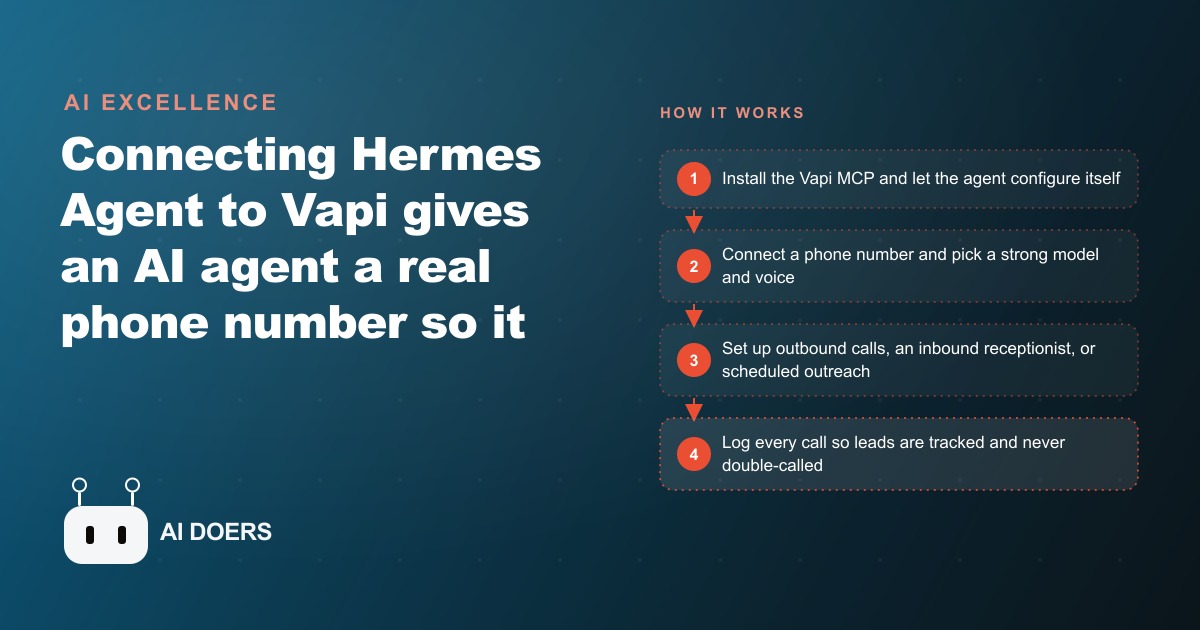
Connecting an AI agent to Vapi through a single MCP install gives it a working phone number, so it can place outbound calls, answer inbound calls, and run scheduled outreach, with calls costing only a few cents each.

A single call that ran nineteen seconds and cost five cents
The number that reframes this entire topic is small enough to miss. One outbound call, placed by an AI agent through a voice platform called Vapi, ran nineteen seconds and cost roughly five cents in credits. That is not a rounding error on a phone bill. That is the price of a machine finding a business, dialing it, holding a short conversation, and logging the result, all on its own. I am Madhuranjan Kumar, and I want to walk through the journey of one business that took that five cent call and turned it into a system, because the story is more instructive than any feature list.
The business in this walkthrough is a small residential plumbing company. I am using an unnamed owner and an unnamed office because the shape of the problem is identical across thousands of trades. The company had two technicians, one part time person answering phones during the day, and a voicemail box that carried the entire load after five in the evening. The owner already knew the leak in the operation, and it had nothing to do with pipes.
The Monday the owner finally counted the missed calls
Every good project starts with an honest number, and this one started on a Monday when the owner sat down and actually counted. Over the previous week the company had received about forty calls. Twelve of them came in after hours. Of those twelve, seven left a voicemail, and only three of those seven ever booked a job. The other nine were gone. A homeowner with a leaking water heater does not wait until morning. They call the next plumber on the list, and the next plumber answers.
The owner had priced a receptionist service and a night answering service before, and the math never worked for a two technician shop. A human answering service that could actually book jobs cost more than the jobs it would save. So the calls kept rolling to voicemail, and the owner kept telling himself it was the cost of being small. The agent plus Vapi idea landed at exactly the right moment, because it attacked the same problem from the cost side. If answering a call costs five to ten cents instead of an hourly wage, the entire equation flips.
Week one: one phone number and one real call
The owner did not build a system in week one. He built one call. The setup was a single MCP install, which is worth pausing on, because it is the reason a non technical owner could even attempt this. Instead of wiring services together by hand, he pasted a connection URL and told the agent to set itself up. The agent, which shipped with dozens of pre built skills and knew its own configuration, edited its own config file, added the server, and asked only for the API key. That was the whole install.
The first test was deliberately unglamorous. The owner typed a plain instruction along the lines of find a supply house nearby and call to check if a part is in stock. The agent searched the web, picked a number, and placed the call through Vapi. It ran under half a minute. It cost a few cents. And crucially, the owner listened to the recording and the transcript afterward. This is the step most people skip and the reason their projects stall. He was not judging whether the demo was impressive. He was judging whether the voice sounded like his shop and whether it captured the right detail.
The first attempts were not flawless. A weaker model got stuck on a voicemail menu, pressing nothing and waiting until the call timed out. The fix was straightforward once he saw it: upgrade to a stronger model and add a rule to hang up the moment voicemail is detected. That single guardrail turned a flaky demo into something he could trust, and it is the kind of small correction that only surfaces when you run real calls and read the transcripts.
Building the after-hours receptionist
With one reliable outbound call proven, the second chapter was the piece that actually recovered revenue: an inbound receptionist that never sleeps. The owner had the agent build a Vapi assistant configured to answer every incoming call, day or night. In the demo world this kind of assistant can be stood up in under a minute, but the owner spent real time on the part that matters, which is the knowledge the assistant speaks from.
He wrote out the service areas, the rough price bands for common jobs, the hours, the warranty language, and a clear script for an emergency: capture the address, ask what is leaking and how badly, and either book the next available slot or promise a first thing morning callback. The assistant answered in a calm, human sounding voice, paused when the caller spoke, and did not sound like a phone tree. Every captured call landed as a structured record with a name, an address, and a description of the problem, dropped straight into the team's email and into the CRM and website stack where the morning shift picks up follow ups.
The emotional tone of the voice did more work than the owner expected. A homeowner whose air conditioning or water heater has just failed is stressed, and a warm, unhurried voice that acknowledges the problem keeps them on the line long enough to book. The difference between a voicemail beep and a voice that says it can get someone out in the morning is the difference between a lost lead and a scheduled job.
The scheduled outreach that stopped leads from going cold
The third chapter turned the agent from a receptionist into a quiet salesperson. Plenty of the company's leads were not emergencies. They were people who called for a quote, got a number, and then went quiet. In the old world those leads died in a spreadsheet. Here, the owner set up a scheduled job: every lead that asked for a quote but did not book got a friendly follow up call the next day, and every job on the calendar got a confirmation call the morning of the visit.
The agent ran this on its own schedule, calling a new lead every so often and logging each one in a small database so nobody was ever called twice. The confirmation calls cut wasted truck rolls, because a technician no longer drove across town to an empty house. The follow up calls recovered quotes that would otherwise have gone to whichever competitor called first. None of this required the owner to sit and dial. It ran in the background at a few cents a call.
What the numbers looked like after twelve weeks
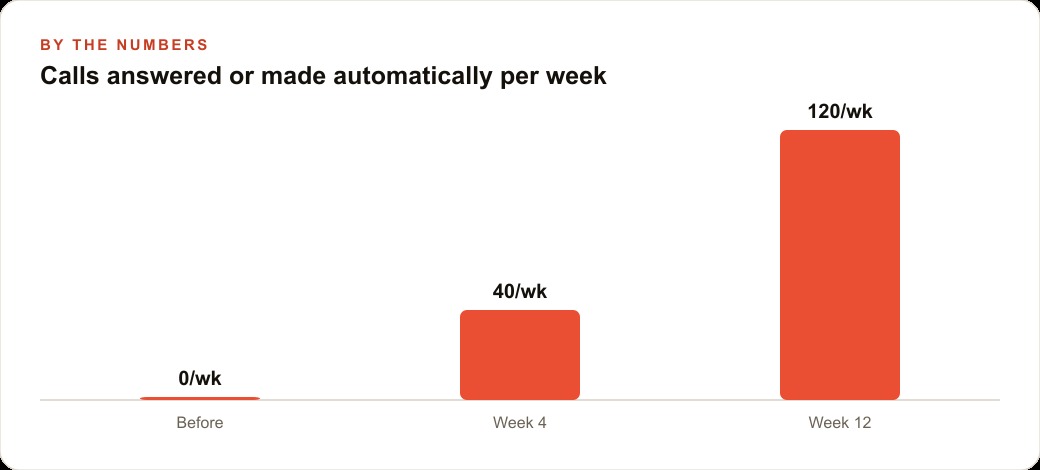
Here is where the journey pays off, and I want to be clear that these figures are illustrative of the pattern rather than an audited client report. In the baseline week, the company answered zero after hours calls and recovered three of twelve. By around week four, the agent was handling roughly forty calls and confirmations a week that used to go unanswered. By week twelve it was comfortably north of a hundred calls answered or placed each week across inbound, confirmations, and follow ups.
Translate even part of that into booked work and the shape becomes obvious. Recovering five or six after hours leads a week that used to vanish, at a typical job value in the hundreds of dollars and a realistic close rate, adds meaningful weekly revenue against a cost measured in cents and free phone numbers. The owner did not add a person. He added a system that answers when the business is closed and follows up when the office is busy. The point of the graph in this piece is exactly that curve: from zero calls handled automatically, to a steady hundred plus per week, without new payroll.
Where a build like this goes wrong
Honesty about the failure modes is what separates a real walkthrough from a sales pitch. The first place this goes wrong is a thin knowledge base. An assistant that cannot answer the caller's very first question is worse than voicemail, because it wastes the caller's patience and then loses them anyway. The owner's twenty most common questions and their accurate answers were non negotiable before going live.
The second failure is the wrong model. A cheap model that gets trapped on voicemail or misreads a stressed caller will quietly erode trust in the whole system. Paying slightly more per call for a model that handles real conversation is the correct trade. The third is treating the agent as fire and forget. The owner listened to transcripts weekly for the first month and corrected the script each time, and that review loop is what turned a clever toy into a dependable part of the business. You can even wire the reverse direction, where the voice assistant pulls extra context from the agent mid call or messages the owner when a large job comes in, but that is a refinement to add after the basics are solid, not on day one.
The economics that make this different from every prior answering service
It is worth sitting with the money for a moment, because the cost structure is the reason this works now and did not before. A traditional answering service charges by the seat or the minute at human rates, and the more calls you route to it, the more it costs, which punishes exactly the growth you want. A voice agent inverts that. The marginal cost of one more call is a few cents, so a busy Friday night does not blow the budget, it barely moves it. Average cost lands near ten cents a minute, and the platform offered up to ten free numbers per account, which means a shop can run separate numbers for inbound, for confirmations, and for outreach without stacking up subscriptions.
The owner also discovered a second saving that never showed up on the Vapi invoice. Every confirmation call the agent made the morning of a visit prevented a wasted truck roll, and a single avoided drive across town, with fuel and an hour of a technician's time, is worth more than a month of call credits. The agent was not just answering the phone cheaply. It was protecting the most expensive resource the company had, which is a technician sitting in a truck. That is the kind of second order return that only becomes visible once the system has run for a few weeks and the owner can compare a normal month against the baseline.
Running the same play in your own business
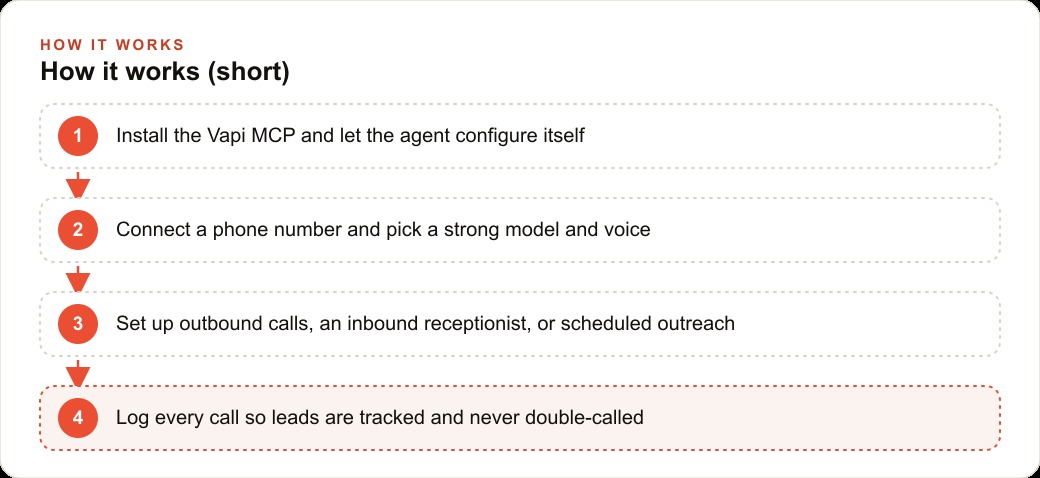
The journey scales down to a checklist any owner can follow. Install the Vapi MCP and let the agent configure itself with your API key. Prove one real call, listen to the recording, and fix the model and the voicemail rule before you do anything else. Then build the inbound receptionist and pour your energy into the knowledge base, not the tech. Only after that add the scheduled confirmations and follow ups, and log every call so no lead is contacted twice.
The reason this matters beyond the phone is that answered calls feed everything else. The leads you capture at eleven at night flow into the same CRM and website stack that runs your follow up automation, and the paid traffic you already buy through Facebook and Instagram ad campaigns and Google Ads stops leaking at the exact moment it used to, which is the ring that no human is around to answer. A voice agent does not replace your team. It makes sure the money you already spend to make the phone ring actually turns into booked work.
You can build this yourself, starting with a single test call this week. If you would rather have the phone number, the after hours receptionist, and the follow up automation wired up so it is answering and booking from day one, that is exactly the kind of build I do for clients, and you can bring me in to handle it.
That is exactly what we do at AI DOERS. Book a private 30-minute call with Madhuranjan Kumar and we will map the fastest path to it for your specific business.
Book your call →
Madhuranjan Kumar
Madhuranjan Kumar brings 20 years of performance-marketing experience and has managed over $200 million in Facebook ad spend for brands across the United States and beyond. His expertise spans the full modern marketing stack: Meta, Google Ads, TikTok, email automation, CRM, and the websites that hold it together. At AI DOERS he turns that track record into lead-generation systems for businesses across every industry.