
How a Claude Code Agent Turns Trending Topics Into Short Videos on Autopilot
By stacking a few Claude Code skills, a posting skill, an image generator, and a video skill, an agent on a dedicated Mac Mini pulls a trending topic, renders a captioned short, and posts it on its own. The whole run is saved as a reusable skill.

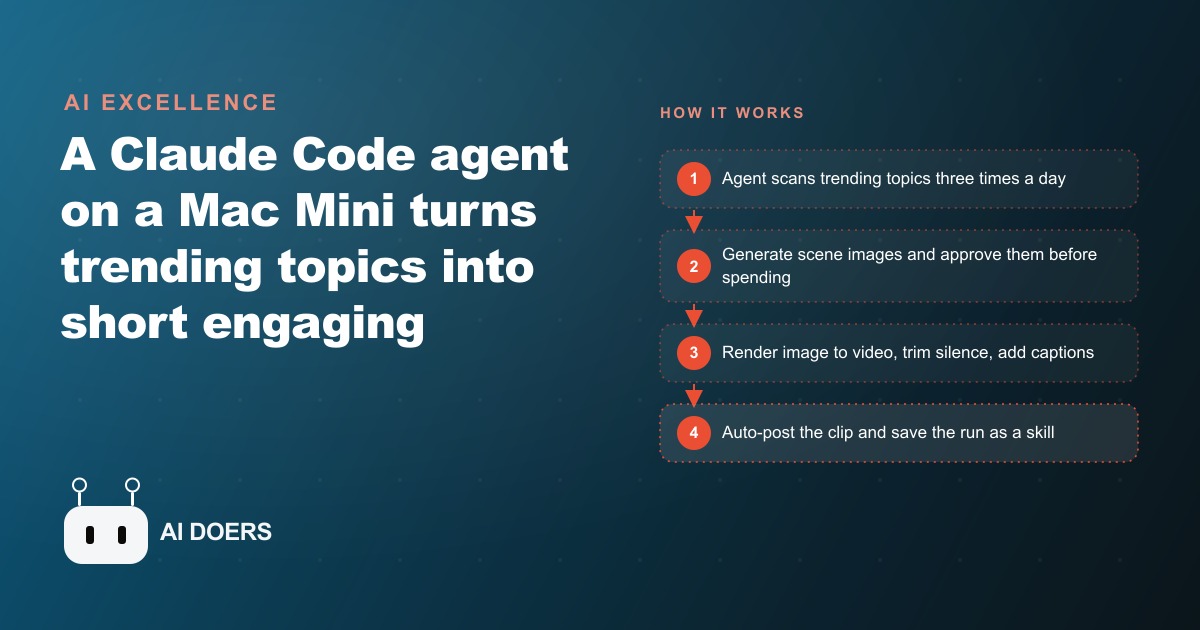
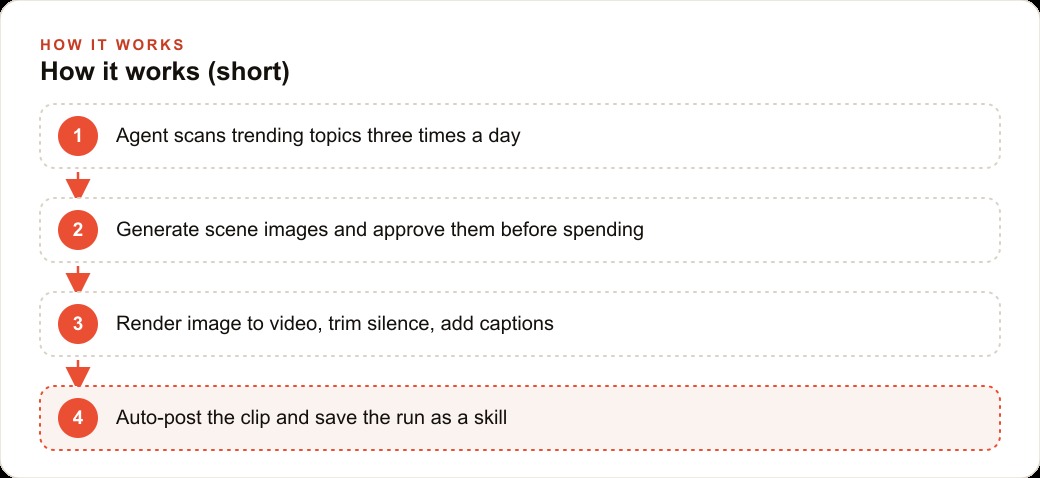
A Mac Mini sits on a shelf in a home office. No screen attached, no one watching. Every three hours it scans what is trending in AI, writes a short video script from whatever is hot right now, generates scene images, waits for a human approval on a phone, renders those images into video clips with a consistent narrator voice, trims the silence, adds captions, and posts the finished clip. That is not a description of a future product. It is a working pipeline built with Claude Code skills, running today, that any business owner can replicate.
The system is not magic or proprietary. It is a chain of skill files, each written in plain markdown, each handling one part of the job, each designed to hand output cleanly to the next step. The whole chain starts with a single prompt and ends with a published clip, with exactly one human checkpoint in the middle for image approval. Here is how each component actually works.
1. A trending-topics file that the agent refreshes three times a day, so the script is always current
The first component is a file the agent maintains on a schedule. Three times a day, the agent runs a research step: it looks at what is being discussed in AI right now, identifies the three to five topics with the most active conversation, and writes them to a plain text file. When a video session starts, the script pulls from that file rather than asking the operator to choose a topic.
This matters because the hardest part of posting consistently is deciding what to post about. Most content producers have no shortage of production capacity. They run out of topics, or the topics they pick are not aligned with what an audience is already searching for. A file that reflects what is actually trending, refreshed three times per day, solves that problem automatically. The topic selection becomes a function of current conversation, not of someone's best guess about what might be interesting this week.
2. A character reference template that keeps the face consistent across every scene
Image generation models do not naturally produce consistent faces across separate generations. Without explicit guidance, the character in scene one looks like a different person from the character in scene three. For a content channel where Madhuranjan Kumar is a consistent on-camera persona, that inconsistency destroys the visual identity of the channel.
The solution is a character reference template: a set of images from multiple angles, front, side, and three-quarter view, that anchor every new generation to the same face. The image generation skill in this pipeline uses Nano Banana with those reference shots built into the prompt. When a new scene is requested, the model generates from the reference rather than inventing a new person. The result is a face that looks recognizably consistent across every clip, which is the minimum required for an audience to register the channel as having a coherent identity and a reason to follow it.
3. An approval gate before this breakdown generation step so bad images never cost real credits
Video generation is the expensive step in the pipeline. A bad image turned into a video is a wasted generation credit and a clip that cannot be used. The approval gate prevents that waste by inserting a human checkpoint after images are generated and before this breakdown render begins.
After the scene images are produced, the agent sends them to the operator for review. On a phone, this takes under a minute: scroll through the generated scenes, approve the ones that look right, flag the ones with a distorted face or a broken prop for regeneration. The agent only proceeds to video once approval comes back. A broken shot, a character with an extra hand or a blurred face, gets caught and corrected at the cost of a new image generation rather than a full video render. The checkpoint is not optional. It is the gate that makes the rest of the pipeline economical.
4. A Kling image-to-video step with a consistent voice ID across all clips
Once the images are approved, each one becomes the starting frame for a video clip. The pipeline uses Kling's image-to-video model to animate each approved scene into motion. The result is a clip that starts with the generated image and unfolds into a few seconds of movement, character animation, or environmental motion depending on the prompt.
The voice layer adds a second consistency requirement. A narration track runs across all the clips, and that narration must sound like the same person every time. FAL AI's voice ID feature anchors the text-to-speech output to a consistent voice profile. The operator records a short reference sample once, and that sample is used to generate all subsequent narration in the same voice. The visual face is consistent through the image reference template. The narrator voice is consistent through the voice ID. Together they produce a channel that sounds and looks like a single coherent presenter across every clip regardless of when or how quickly the clips are generated.
5. A three-angle shooting structure with per-clip length rules and pacing suggestions
A short video built from a single static angle feels flat even when the content is good. The pipeline generates three distinct scene images from three different angles: a wide shot, a medium shot, and a closer view. Each becomes one clip in the short. That variety is what gives the finished video its visual interest and pacing rhythm.
The per-clip length rule sets each clip at approximately ten seconds, which puts the full short at around 30 seconds before editing. The agent applies its own pacing judgment: if it assesses the third clip as needing slightly more room for the narration to land, it will suggest bumping that clip to twelve seconds. That suggestion comes as a note in the approval step, not as an automatic adjustment, so the operator makes the final call. The structure is a scaffold, not a rigid constraint, and the agent's willingness to propose a deviation is part of what makes it feel like a collaborator rather than a fixed script.
6. A video-editing skill that trims silence, smooths transitions, and adds centered captions
After the three clips are rendered, the editing skill takes over. Using Remotion, the skill assembles the clips, trims any dead air at the start or end of each one, and smooths the transitions between scenes. Dead air at the start of a short is the single most common reason viewers swipe away before the content begins. Trimming it automatically means no clip starts with a half-second of nothing.
Captions are added in the same step. The narration track is transcribed, the transcript is synced to the audio, and centered captions are rendered in a smaller font that does not block the visual. Captions matter because most short-form video is watched without sound in the first second or two. A caption keeps viewers engaged through those silent first moments and gives the platform's recommendation algorithm more text to index when deciding who to show the clip to.
7. A posting skill that opens the account and uploads with a caption, hands-off
The final production step is the posting skill. It opens the target social account, uploads the finished video file, attaches a short caption generated from this breakdown's topic and key point, and submits the post. The entire step runs without the operator touching a keyboard. The clip goes from the editing skill output directly to the platform.
The caption is generated as part of the same session that produced this breakdown, so it reflects the actual content rather than a generic description. The skill knows the platform's character limit and formats accordingly. After the post goes up, the skill confirms completion and logs the details including the topic, clip length, caption, and timestamp. That log accumulates over time and makes it easy to review what was posted and when without hunting through the platform's own analytics interface.
8. A skill file in plain markdown that any agent can read and reuse without rebuilding logic
Each capability in this pipeline exists as a skill file: a markdown document that describes what the skill does, what inputs it needs, what outputs it produces, and the specific steps it takes to get there. The posting skill is a markdown file. The image generation skill is a markdown file. The trend research skill is a markdown file. Any agent that can read markdown can pick up a skill file and execute it without the logic being rebuilt from scratch.
This is the design principle that makes the pipeline composable. You do not need to re-explain the posting workflow every time you start a new session. You hand the agent the skill file and it knows what to do. Adding a new platform is adding a new skill file. Changing the image generation model is updating one skill file. The architecture is flat and readable, which means it is maintainable by someone who did not originally build it and adaptable as any single component improves or is replaced.
9. A write-back step that saves the refined run into the skill file for the next iteration
Each time the pipeline runs, some refinement happens. The approval step catches an image that needed regeneration. The agent suggests a pacing adjustment. The operator changes the caption tone. Those refinements are worth keeping. The write-back step captures them.
After a successful run, the agent writes any refinements from that session back into the relevant skill file. The pacing adjustment becomes the new default. The caption tone becomes the new instruction. The image regeneration note becomes a guidance update in the character reference section. The next run starts from the updated version of the skill file, which means the manual back-and-forth from the previous run does not repeat. This is the compounding benefit of the architecture: the skill file reflects the current best version of the workflow, not the original version from the first day it was built.
10. A dedicated machine running around the clock so your laptop stays closed
The entire pipeline runs on a dedicated Mac Mini that does nothing else. It is always on, always connected, and not being used for anything that would interrupt the scheduled tasks. The operator's laptop stays closed during production runs because the dedicated machine handles everything from trend research to posting without any dependency on personal hardware being available.
A dedicated machine is not strictly required to start, but it is what makes the always-on version of this pipeline reliable. A laptop that goes to sleep stops the research refresh. A laptop in use for other work cannot run scheduled background tasks without interference. The dedicated machine removes those constraints and makes the pipeline's scheduled behavior genuinely consistent. The marginal cost is the hardware and electricity, which is modest against the value of content produced daily without human time investment per clip.
11. A single-prompt chain that goes from topic research to published clip without a human decision at each step
The full system chains together into a single run that starts with a prompt and ends with a published clip. The operator does not make a decision at each step. The only human interaction required is the image approval checkpoint. Everything else, the topic selection, the script, the image generation, this breakdown render, the edit, the caption, the post, runs in sequence without manual direction between steps.
That single-prompt chain is the practical definition of what makes this an agent rather than a set of tools. An agent takes a starting instruction and drives itself through the steps until the job is done. The capability to chain steps, pass outputs between them, apply its own judgment on pacing and quality, and log the result without being directed at each decision point is what separates this pipeline from a well-organized to-do list with several apps open.
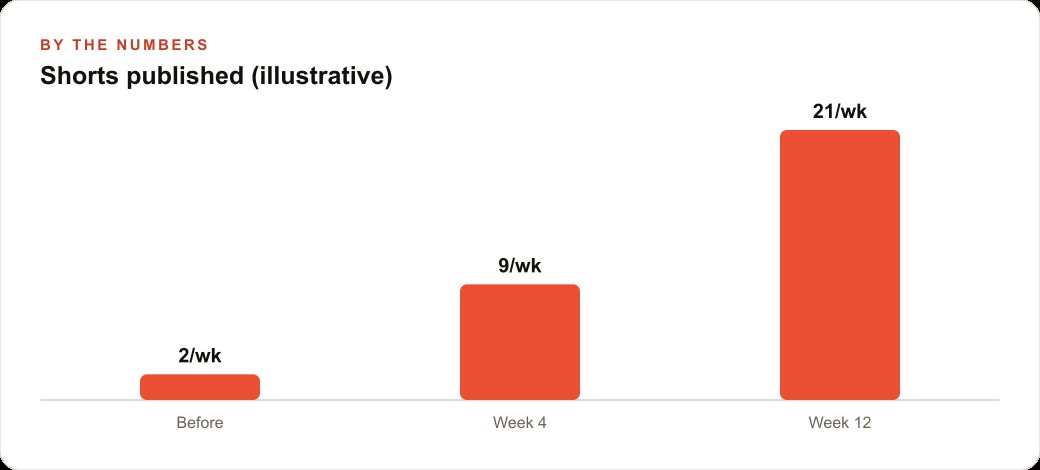
A neighborhood restaurant shows what this looks like when deployed for a real business. Before the pipeline, the restaurant posts two or fewer short video clips per week, limited by whoever has time to film, edit, and upload. After deploying the pipeline, the restaurant posts one clip daily. Each clip features a consistent visual identity and a 30-second narration about that day's special or a kitchen moment. The generation cost per clip is approximately 50 cents for image and video combined. Monthly generation cost is roughly 15 dollars.
At that posting frequency, the restaurant builds a daily presence on short-form video platforms. Businesses posting daily rather than a few times per week typically see meaningfully higher profile visit rates over time as platforms reward consistent posting behavior in their recommendation systems. One additional table booking per day, at an average check of 45 dollars, produces 1,350 dollars of incremental monthly revenue from a content pipeline that costs 15 dollars in generation credits and one 90-second approval check per day. The pipeline is not a guarantee of that booking. It is the mechanism that makes daily posting economical enough to give the strategy a genuine long-term trial.
That is exactly what we do at AI DOERS. Book a private 30-minute call with Madhuranjan Kumar and we will map the fastest path to it for your specific business.
Book your call →
Madhuranjan Kumar
Madhuranjan Kumar brings 20 years of performance-marketing experience and has managed over $200 million in Facebook ad spend for brands across the United States and beyond. His expertise spans the full modern marketing stack: Meta, Google Ads, TikTok, email automation, CRM, and the websites that hold it together. At AI DOERS he turns that track record into lead-generation systems for businesses across every industry.