
GPT-4.5 for Plus Users, Two Voice AIs Better Than ChatGPT, and a Free OCR Tool That Wins on Every Test
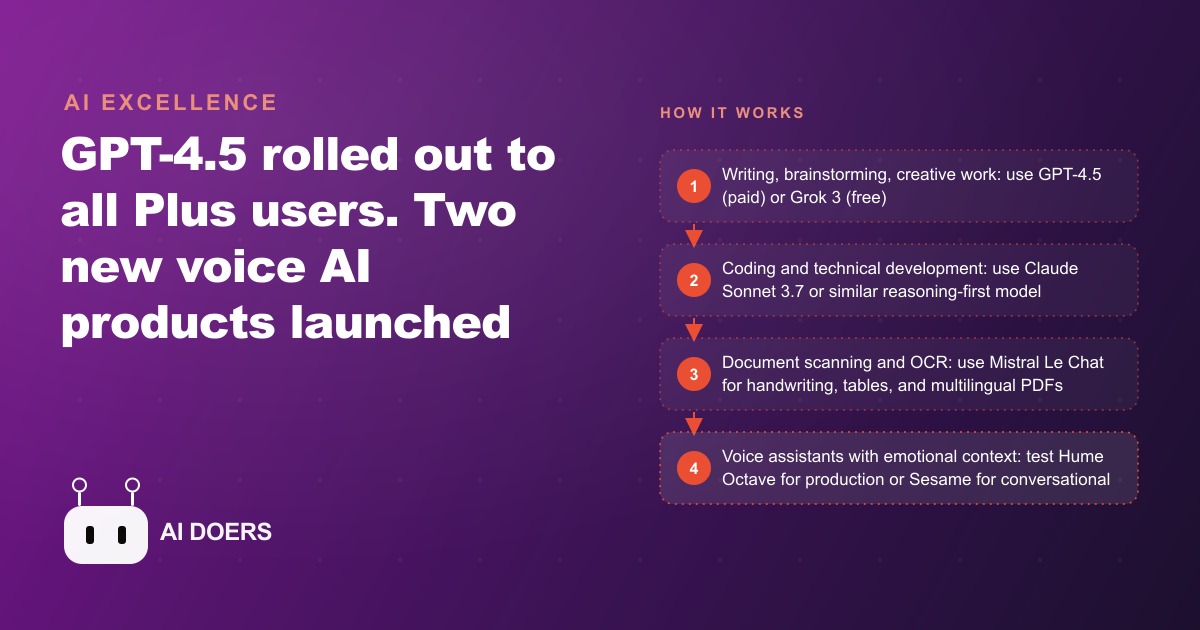
This week's releases cover the full stack from language models to voice assistants to document processing. Here is what changed, what it compares to, and which tools are worth your time.

A single week that quietly rearranged the AI toolbox
Every so often a week of AI releases lands not as one loud headline but as a set of small shifts that, taken together, change which tool you should reach for on Monday morning. This was one of those weeks. A leading language model became affordable enough for ordinary use, two voice products pushed past what the biggest chat assistant offers, and a document-reading tool quietly beat the giants at a task businesses actually need every day. None of these will make the evening news. All of them change the practical answer to the question every owner keeps asking, which is simply: for this specific job, what should I use right now.
I want to walk through the week the way I actually think about it, not as a feature list but as an argument about matching tools to tasks. Because the real skill in this era is not knowing every model. It is refusing to use one model for everything, and instead reaching for the right one for writing, the right one for code, the right one for voice, and the right one for reading documents. The week's releases sharpen every one of those choices.
The best writing tool got cheap, and that changes who can use it
The most consequential change is not a new capability but a new price. GPT-4.5, from OpenAI, is a direct-response model rather than a slow reasoning model, and its distinguishing trait is writing quality. It launched behind an expensive top tier, which meant most people never touched it. This week it reached the standard paid tier at a far lower monthly cost, and that single move matters more than any benchmark, because a tool only counts if people can actually afford to use it.
After a week of pushing it across writing, brainstorming, marketing copy, and personal communication, the writing claim holds up in a specific and noticeable way. The tone is different from the usual machine output. It skips the hollow enthusiasm that marks most AI writing, the "I am delighted to help" opener, the "it is worth noting" hedge, the restated conclusion at the end. The text reads like something a person with an actual point of view wrote. For the jobs where voice matters, an email that needs the right interpersonal register, marketing copy that has to sound like someone who believes in the product, brainstorming with genuine variety, this is the strongest option available right now.
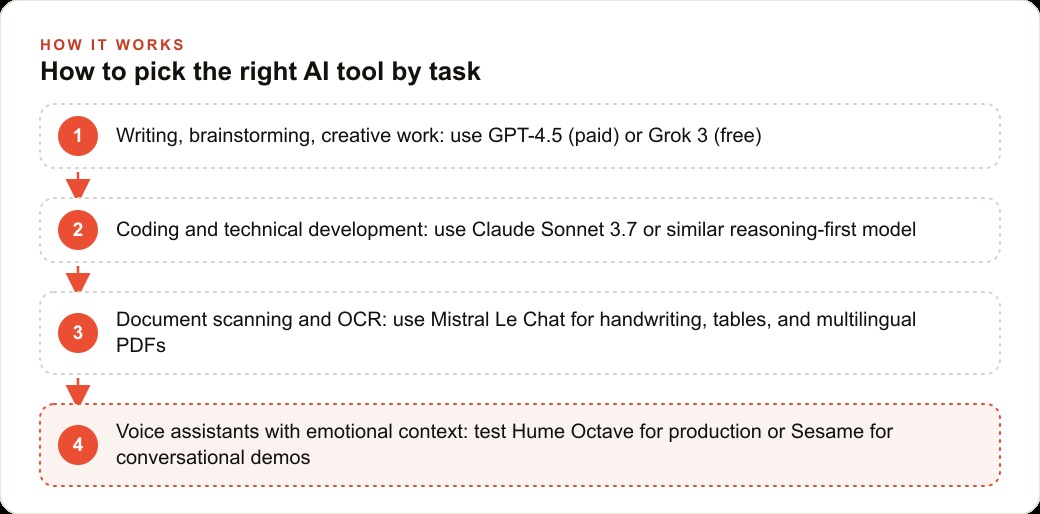
But notice the discipline in that recommendation. It is the best at writing, and only writing. For code, the consensus still points to a reasoning-first model like Claude Sonnet, because a writing model does not compete on complex technical problems. The whole point of the week is that the right answer depends on the task, and the person who uses the writing model for code is making the same mistake as the person who uses a code model for a heartfelt email. The tool is not the strategy. The match is.
For anyone on a zero-dollar budget, the free option is closer than you think
The counterpoint that keeps this honest is Grok 3, the strongest free alternative. Side by side on ideation and research prompts, it produced results virtually identical to the paid writing model. The structure of an ideation task, the number and variety of suggestions, the depth of any single idea, all comparable. The clearest gap showed up only in pure writing, where the paid model produced text that felt more tonal and more personal, while the free one was competent and clear but carried more of the mechanical quality common to machine output.
So here is the argument that actually helps a small business. If your budget is zero, the free option gets you most of the way there for most tasks, and the gap relative to the paid writing model is real but not dramatic outside of writing-heavy work. The paid tier earns its cost specifically when polished, human-sounding writing is the deliverable, and not much otherwise. For coding, the recommendation flips regardless of budget, because the performance gap on code between a reasoning model and either of these is larger than the writing gap between the free and paid options. Spend where the gap is wide. Save where it is narrow. That is the entire logic of the week compressed into a sentence.
Voice was the loud surprise, and it exposed a ceiling
The most attention-grabbing releases were in voice, and they did something useful beyond being impressive. They showed that the biggest chat assistant's voice mode, good as it was when it launched, is no longer the ceiling. Two products cleared it in two different directions.
The first, Hume AI's Octave, reads what it is saying and adjusts its delivery to match, which is a bigger deal than it first sounds. Every ordinary text-to-speech model reads at a flat, neutral register no matter the content. A line in all caps is read the same as a calm description. A sarcastic remark gets the same intonation as a sincere one. Octave recognizes those signals and reacts. Emphatic text gets read with force, sarcasm gets the delivery that actually signals sarcasm, and a script describing an auction gets read with the pacing of an auctioneer. The business use is voice content that sounds engaging without a human narrator for every recording, which for anyone producing podcast audio, explainers, or marketing voiceovers means noticeably better audio from the same script.
The second, Sesame AI's Maya demo, went viral for one specific quality: how it handles interruptions. The big assistant's voice mode has a persistent awkwardness where interrupting it mid-sentence causes an abrupt, mechanical stop. Maya handled interruptions gracefully, adjusting in conversation without the jarring cut-off, and its overall voice was described as slightly warmer. The caution worth stating is that a viral demo is not a shipped product, so for building a voice assistant today the more mature options are the better bet. But the direction is unmistakable. Voice is moving fast, and the current best is already past what the default assistant offers.
The quiet winner was a document reader
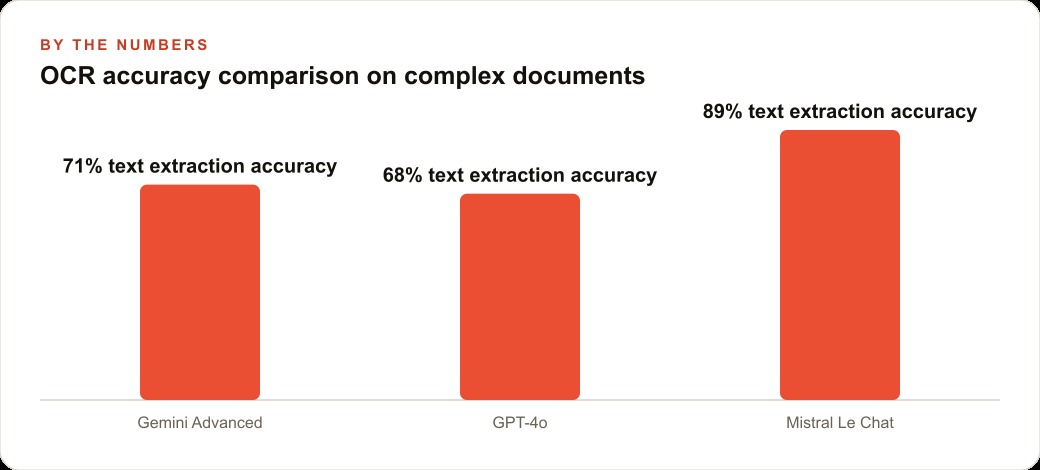
The release that will save businesses the most time got the least attention, because reading documents is not glamorous. Optical character recognition, turning a scanned or photographed page into editable digital text, is a chore every office quietly deals with, and Mistral's new capability in its Le Chat interface reportedly beat both a leading OpenAI model and Gemini at it. In a deliberately hard test using near-illegible handwriting, it read the text correctly while the others made errors on the same input.
It also handled complex tables and multi-column layouts cleanly, the kind that usually trip other models, and its multilingual performance was particularly strong, winning across languages including ones most competitors handle poorly. The practical value is immediate and unglamorous, which is exactly why it matters. Any operation drowning in handwritten forms, scanned contracts, or printed invoices has, until now, either paid for dedicated software or done the retyping by hand. A free interface that reads difficult documents accurately removes a real cost that most businesses had simply accepted as unavoidable.
One business, one week of releases, real numbers
Let me pull the whole week into a single business so the choices stop being abstract. Picture a medical spa offering advanced aesthetics treatments, with two providers and four support staff, and three separate problems that this week's releases each happen to solve.
The first is consultation notes. Providers scribble handwritten notes during consultations, about concerns, history, contraindications, and desired outcomes, and those notes sit in physical files, unsearchable and easy to lose. With the new document reader, the front desk photographs each note, uploads it, and extracts clean text to paste into the client system, roughly two minutes per note, and suddenly the entire consultation history is searchable and safe.
The second is client communication. Follow-up emails after treatments need to be warm, specific to the treatment, and consistent with the brand voice, and writing them from scratch or fixing generic drafts eats time. With the paid writing model, the coordinator keeps one base template and adapts it per client, including the treatment received and the timeline for visible results, and the stronger tone means less editing. What took fifteen minutes per client drops to about four. Across, say, forty follow-ups a week, that is over seven hours recovered, and those emails are also the connective tissue that keeps clients returning, so they feed directly into the value of the CRM and website stack where the spa tracks its repeat business.
The third is audio for social. The spa wants short narrated treatment clips for stories, but filming a provider means scheduling and editing. With the emotion-aware voice tool, the coordinator writes a fifty-word description and generates a warm, reassuring narration that fits a healthcare-adjacent audience, laid over a visual of the treatment room. That polished audio is exactly the kind of creative that lifts performance on Facebook and Instagram ad campaigns, and the same written descriptions, lightly expanded, become blog and page content that feeds SEO and organic search without extra work. On cost, the picture is modest: the writing tool at the standard paid tier, the document reader free for the web interface, and the voice tool with a free tier sufficient for a few clips a week. The recovered hours dwarf the spend many times over.
Why a week of small releases beats one big launch
There is a temptation to wait for the giant, headline-grabbing model release and ignore weeks like this one, and that instinct is backwards for a business. A single dramatic launch usually improves a tool you already use at a task you already do. A week of scattered releases like this one does something more valuable: it hands you new best-in-class options across several different jobs at once, and the businesses that pay attention to the quiet ones get an edge precisely because their competitors are only watching the loud ones.
Think about what actually moved this week. The affordability of strong writing, the arrival of emotion-aware voice, the quiet leap in reading difficult documents. None of those is a headline on its own, yet together they upgrade three separate parts of a normal operation. The owner who only tracks the flagship launches misses all three, while the owner who reads the boring releases quietly retools writing, voice, and document handling in the same month. Over a year, that difference in attention compounds into a real gap in how efficiently the two businesses run.
The habit the week is really teaching
Strip away the specific products and the durable lesson is a habit. Do not adopt a single AI tool and force every task through it. Pick the writing tool for writing, the reasoning model for code, the emotion-aware voice tool where audio needs warmth, and the document reader where paper needs digitizing. Test each on your own real inputs before you trust it, because the most dramatic advantages, the handwriting reading, the writing tone, show up on some inputs and not others, and clean typeset text or simple neutral copy narrows the gap. And do not chase a paid upgrade where a free tool is nearly as good. Spend where the difference is wide and save where it is narrow.
There is worth noting one more quiet structural signal from the week. The protocol that lets these models connect to external tools and data is being adopted across the major providers, which means the tools you pick today are increasingly able to plug into the same systems tomorrow. That lowers the risk of committing to any one choice, because the connections are becoming standard rather than proprietary.
Matching the right tool to each task, testing it on your own data, and wiring it into how your business actually runs is the part that takes real judgment, even when each individual tool is easy to try. You can absolutely evaluate all of these yourself using the framework above. If you would rather have someone map your workflows to the right tools and hand the setup over already working, that is the kind of work I do for clients.
That is exactly what we do at AI DOERS. Book a private 30-minute call with Madhuranjan Kumar and we will map the fastest path to it for your specific business.
Book your call →
Madhuranjan Kumar
Madhuranjan Kumar brings 20 years of performance-marketing experience and has managed over $200 million in Facebook ad spend for brands across the United States and beyond. His expertise spans the full modern marketing stack: Meta, Google Ads, TikTok, email automation, CRM, and the websites that hold it together. At AI DOERS he turns that track record into lead-generation systems for businesses across every industry.