
How the Google Workspace CLI Supercharges Claude Code Across Your Whole Google Account
A free Google command line tool gives Claude Code one clean connection to Drive, Gmail, Calendar, Docs, Sheets, and Slides, turning the AI into an assistant that does real work.

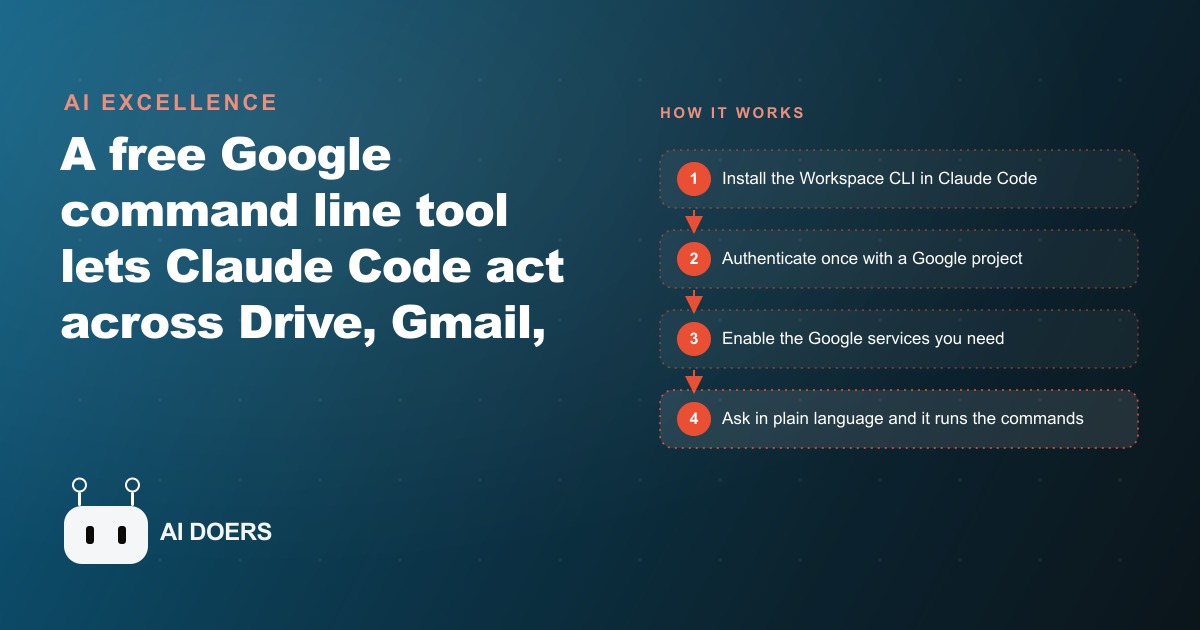
Google released a free command line tool that connects Claude Code to every Google Workspace app at once, and the implications for small businesses are larger than the tech press is covering. I am Madhuranjan Kumar, and this is a news-analysis piece about what actually shipped, what it does, and why the timing matters for any business running on Google Drive, Gmail, Calendar, Docs, Sheets, or Slides.
Google just gave small businesses their first free AI upgrade that reaches across all six apps at once
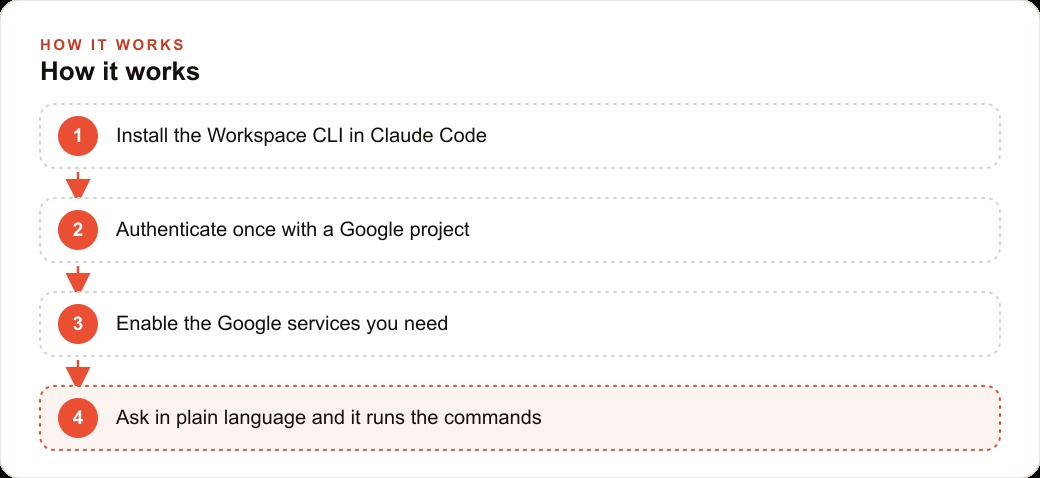
The announcement that matters is not a new model or a new chat interface. It is a free developer tool called the Google Workspace CLI that gives an AI agent like Claude Code a single, clean connection to your entire Google account. One install. One authentication. Every app in your Workspace becomes something the agent can search, read, write, move, and share.
For context on why this is significant: the previous approach to connecting AI to Google Workspace was a pile of separate integrations. One connector for Drive. Another for Gmail. A different one for Calendar. Each one required its own setup, its own credentials, and its own maintenance when the underlying API changed. A business trying to automate across two or three Google apps was maintaining an entire ecosystem of glue, not just a tool.
The CLI replaces that pile with a single interface. The agent talks to all of Google through one tool, which keeps configuration clean, reduces the failure surface, and makes it significantly easier to build workflows that span multiple apps in the same operation. Draft the agenda in Docs, pull the attendee list from Sheets, check the Calendar for conflicts, send the summary to Gmail: a four-app workflow in a single instructed sequence, not four separate integrations firing in coordination.
The tool is maintained by Google itself, which means it stays current as Google adds features to Workspace. Third-party connectors that break when an underlying API changes are a recurring headache for businesses running automated workflows. A connector built by the platform owner does not have that problem. When Google updates Drive, the CLI updates. The business running on it does not patch anything.
One connection now handles what six separate integrations used to require
The most underappreciated feature of the CLI is not the breadth of what it connects to but the quality of what it produces. When an AI agent creates a document through this tool, it creates a real Google Doc with real formatting. Headers, inline links, properly structured paragraphs, embedded images. Not a markdown file waiting to be cleaned up. Not a plain text export that someone has to format before sending to a client.
That output quality matters enormously for professional use. A client-facing report that lands in Drive looking like a finished document is a different artifact than one that lands looking like a first-pass draft. The CLI produces the former because the Google Docs API that the CLI wraps handles the formatting natively. The agent does not have to approximate formatting through hacks. It creates a properly formatted document the same way a person with full Drive access would, because the tool it uses to create the document is the same API a person uses when they click New Doc.
The prebuilt recipe library extends this across common multi-step jobs. Building a report from a template and a data set. Creating a client-facing document from meeting notes. Generating a calendar invite from a project brief. These are workflows that every business runs repeatedly and that each take manual time to assemble. The CLI ships with over a hundred of these recipes ready to use, which means a business does not have to describe every step of a routine job from scratch. It describes the outcome and the agent selects the closest matching recipe.
Email triage stops being a daily willpower test when the agent applies scoring criteria instead
The Gmail integration through the CLI produces one of the most immediately useful automation patterns for any owner or manager dealing with inbox volume. The agent can score unread email against a set of criteria you define, flag what requires immediate action, categorize the rest, and present a summary rather than an undifferentiated stack.
This is different from a filter. Filters are static rules applied to message metadata: sender, subject line, presence of a keyword. The agent scoring emails through the CLI reads the actual content of each message and applies reasoning to decide its priority. A message from a supplier mentioning a delivery delay is not caught by a filter that looks for supplier names. An agent reading the message identifies the delay, notes the project it affects, and surfaces it in the priority summary regardless of how it was phrased in the subject line.
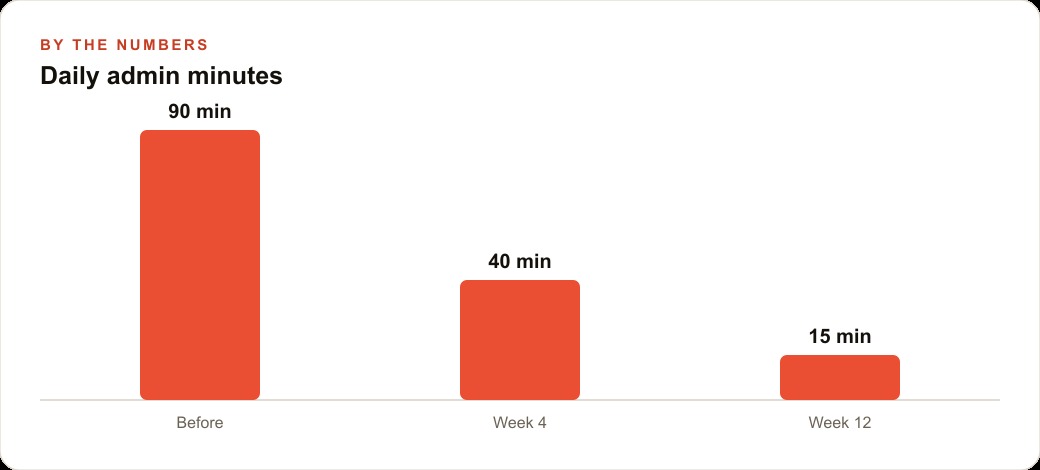
For a business receiving significant email volume each day, the difference between a filtered inbox and an agent-triaged inbox is the difference between a sorted pile and a briefed day. The agent does not just sort. It reads and judges. That judgment is what turns ninety minutes of inbox processing every morning into fifteen minutes of reviewing what the agent already surfaced and flagged.
For businesses also running meta-ads or other paid channels where inbound lead volume adds to the email load, an agent that can identify and prioritize commercial inquiries across a busy inbox removes one of the most common conversion bottlenecks in small business: the lead that arrived while the owner was answering operational emails and sat unread long enough for the prospect to call a competitor.
An IT services company's week changes shape when the agent handles the Google layer
Consider a managed IT services provider whose owner supports a dozen client accounts from a single person operation. Each week they produce client status reports from support logs, send update emails to each account, schedule check-in calls around their own availability, and maintain shared Drive folders for each client. That work is entirely real, entirely necessary, and almost entirely delegatable to an agent once the CLI is in place.
The morning starts differently when the agent handles the Google layer. The owner walks in and the inbox has already been triaged. The priority items are flagged. The routine client questions have been drafted, not sent, waiting for a thirty-second review before going out. The weekly status reports for three clients are in the Drafts folder, assembled from the previous week's support ticket data that lives in a Sheet. The calendar shows the check-in slots the agent identified as mutually free based on the team's Calendar data.
Before this setup, that administrative layer took ninety minutes of focus every morning before actual technical work could begin. After the setup, it takes fifteen minutes of review. Seventy-five minutes per day recovered and redirected to billable client work. At any reasonable hourly rate for a skilled IT consultant, that is a meaningful shift in the economics of the practice.
The same pattern holds for any knowledge business where a significant share of daily time goes to Google Workspace administration. Consulting firms generating client deliverables from templates. Marketing agencies turning meeting notes into formatted briefs. Clinics managing appointment correspondence. The CLI is not a solution specific to any industry. It is a connection layer that makes AI action across Google Workspace available to any business that runs on it.
The businesses that build these workflows now will be running a structurally different operation in six months
The compounding aspect of this tool is worth naming directly. The first automation saves a set amount of time per week. The second automation saves more. By the sixth, the business is running a fundamentally different operation than the one that existed before the CLI was installed, and the gap between it and a competitor still doing the same work manually has become very difficult to close quickly.
This is not hypothetical. The same dynamic played out with email in the early 2000s and with spreadsheets before that. The businesses that built systematic workflows around new tools early did not stay slightly ahead. They pulled increasingly further ahead because the time savings they captured were reinvested into more capability, which generated more savings, which funded more capability. The manual-operation competitor was not standing still either, but they were competing with progressively fewer hours available for growth work.
For SEO and organic search operations specifically, the ability to generate formatted Docs from research data and publish them to shared Drive locations for team review without manual assembly changes the cadence of content production. A team that used to spend three hours assembling a content brief from research notes and keyword data can now generate the same brief in a prompted sequence and spend the three hours on strategy and editorial judgment instead. The output volume increases while the quality-control work stays human.
The setup involves a one-time authentication: creating a project in the Google Cloud console, setting up a consent screen, downloading a credentials file, and running the login command. Once authenticated you enable the specific Workspace services you need and the agent can act across them from plain-language instructions. No ongoing technical maintenance is required. The tool updates itself as Google updates Workspace, and the workflows you build on top of it continue to run without adjustment.
For businesses managing a CRM and website stack alongside Workspace, the ability to push data from a Sheets-based contact list into a formatted Drive document and route the result through Gmail in a single instructed sequence makes the handoff between sales activity and client onboarding faster and more consistent. The CLI is the bridge that removes the manual copy-paste step between your Google tools and your client-facing outputs, and it is free to install starting today.
The difference between cost reduction and profit improvement
AI automation tools are often framed primarily as cost reduction tools: replace hours of manual work with a few minutes of automated processing and capture the difference as margin improvement. The cost reduction is real, but it is usually the smaller part of the value for a growing business.
The larger value is reallocation. The hours that were spent on manual data processing, report compilation, or repetitive content production were hours unavailable for the work that actually grows a business: customer conversations, strategic decisions, product improvement, new service development. Automation that removes the manual work does not just reduce cost. It makes those hours available for higher-leverage activities.
A service business owner who was spending twelve hours per week on reporting, invoicing, and scheduling can redeploy those twelve hours toward client acquisition conversations, service quality improvements, and the strategic thinking that would have otherwise been squeezed out by the operational overhead. The ROI calculation that counts only cost savings misses this reallocation value, which is typically larger than the direct cost reduction.
For businesses that are also investing in paid advertising and content marketing to grow their customer base, the reallocation value of operational automation is particularly relevant. The hours reclaimed from operational overhead can go toward producing better content, managing advertising campaigns more actively, and having the client conversations that turn prospects into customers. The automation investment compounds into growth capacity in a way that cost reduction alone does not.
Selecting the right starting process for automation
Not every business process is a good candidate for early automation, and selecting the wrong starting process is the most common mistake businesses make when beginning to implement operational AI tools. The right starting process has three characteristics: it is highly repetitive with consistent inputs and outputs, it does not require creative or contextual judgment in the majority of cases, and errors in the automated output are detectable before they cause problems.
Data processing tasks tend to meet all three criteria: the inputs are consistent (data files or database records), the outputs are well-defined (transformed data in a specified format), and errors in the output are visible when the results are checked against expected values or reviewed before use. Starting automation with data processing establishes the workflow and the validation habits without exposing the business to the risk of automated errors reaching customers or downstream systems unchecked.
Customer-facing tasks are usually not the right starting point for automation, not because they cannot be automated eventually, but because the acceptable error rate is lower and the consequences of errors are higher. An automated report with a minor error is correctable before it causes any external impact. An automated customer communication with a minor error reaches the customer first.
The sequence that works best for most businesses is: automate data processing first, automate internal reporting second, automate internal notifications third, and only then consider automating any customer-facing communications, with review processes in place for each automated output during the initial deployment period.
That is exactly what we do at AI DOERS. Book a private 30-minute call with Madhuranjan Kumar and we will map the fastest path to it for your specific business.
Book your call →
Madhuranjan Kumar
Madhuranjan Kumar brings 20 years of performance-marketing experience and has managed over $200 million in Facebook ad spend for brands across the United States and beyond. His expertise spans the full modern marketing stack: Meta, Google Ads, TikTok, email automation, CRM, and the websites that hold it together. At AI DOERS he turns that track record into lead-generation systems for businesses across every industry.