
Google's Massive AI Week: Flash, Deep Research Visuals, and Workflows in Gemini
Google opened the floodgates with about ten releases at once, led by a fast Gemini Flash model, deep research that bakes graphs and visuals into reports, and multi-step workflows built directly into the assistant, while OpenAI matched on images.

Google shipped roughly ten AI features in a single week, and while the headlines argued about which image model looks prettier, the releases that actually change how a small business operates slipped by almost unnoticed. I am Madhuranjan Kumar, and this is a working playbook for turning that flood into real time saved. Instead of reviewing every announcement, I want to hand you the exact order of moves: which tool to reach for, for which job, and how to wire the repetitive stuff so it runs on a single trigger. OpenAI matched Google on images this week, but the practical wins were Google's, and three of them stack.
First, sort the noise from the tools that change your week
Before touching anything, understand the shape of what shipped. On images, the two big players are now at roughly the same level. The OpenAI model leads on prompt adherence, doing exactly what you ask, while Gemini behaves more like a designer with taste. That is a fun debate, but it is not where your time savings live. The releases that matter for an owner are three: deep research that now builds visuals into its reports, a genuinely fast model called Flash, and workflows built directly into the assistant. The rest, from live read aloud translation to search by feeling, are signals that AI is being woven into nearly every app at once. Your job is not to try all ten. It is to pick the two or three that map onto tasks you already repeat, and ignore the rest until later.
Reach for Flash when speed matters more than a perfect draft
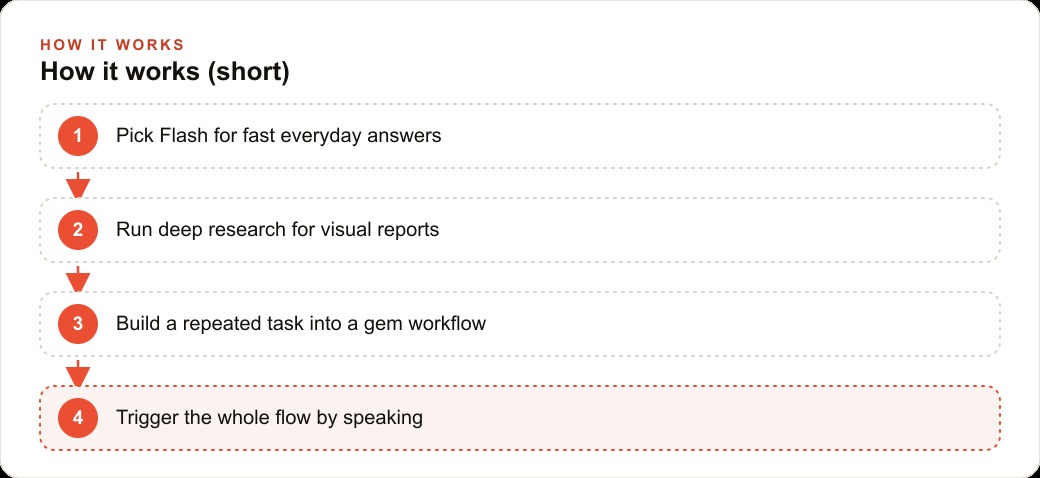
Start with the simplest upgrade, because it pays off immediately. Gemini now has a fast model called Flash, and in a live side by side it finished a long essay while the competing model was still on its fourth paragraph, roughly five to ten times quicker in the consumer app. Speed alone would be worthless if the model were weak, but Flash still scores above the rival's variants on the leaderboard where tens of thousands of users rate which answer they prefer. Fast and capable in one model is a real combination, not a compromise.
The move here is to make Flash your default for everyday drafting: menu descriptions, review replies, event announcements, quick rewrites, and the small writing jobs that pile up. Anywhere you want a good answer in seconds rather than a slightly better answer in a minute, reach for the fast model. Save the slower, heavier reasoning for the rare task that truly needs it. Getting this habit in place clears the low value writing off your plate first, which is exactly the drag that keeps owners from doing higher value work.
Run deep research when you need a report you can actually read
The second move is for the bigger questions, the competitor scan or the market check you keep meaning to do and never finish. Deep research is an assistant that opens dozens of tabs, runs many searches, and compiles everything into a single report. The new version also builds graphs, images, slides, and other visuals directly into that report, so you get a finished, presentable document instead of a wall of text you have to slog through. In the comparisons shown, Gemini pulled ahead here, though it currently sits behind a higher tier plan.
Use it deliberately. When you want to understand local competitors, popular offerings in your area, or pricing, ask for a report with the visuals baked in, and you get something you can read in five minutes rather than an intimidating block of prose. This is the tool that finally makes market research something you actually do, because the output arrives in a form a busy person will read. Pair the findings with your Facebook and Instagram ad campaigns, and you can adjust targeting and messaging based on what the report shows is working nearby instead of guessing.
Turn your most repeated task into a gem workflow
The third move is the most significant, and it is where the real leverage lives. Gems are specialized chatbots, essentially custom assistants, and they can now run multi step automation inside the assistant, the kind of thing people used to build in dedicated tools. The trick to using this well is to find the chain of steps you personally repeat every week and fold that entire chain into one gem you trigger by speaking.
A single gem can do a whole sequence on its own. It can take in a video and summarize its content, turn that summary into instructions for an infographic, generate the infographic with the image model, and then turn that infographic into a website. The reason this matters is subtle. Most people never got value from no code automation because they built a flow once and never reused it. Folding the workflow into the assistant, where you describe what you want by talking, finally puts that power within reach of a normal owner who is not going to sit and wire nodes together. Identify the one repetitive chain you do most, build it into a gem, and from then on it runs on a single trigger.
Wire the smaller releases in only where they remove real friction
Once the three core moves are in place, layer the lighter releases on top, but only where they solve an actual problem for you. Google Labs is testing a personalized morning brief that pulls from your inbox and tells you what needs attention, so you start the day already oriented. Pomelli, an easy graphic design tool, added a button that turns the images it creates into videos, stitching more of the ecosystem into one flow. There is even an experimental generative browser being tested. Do not chase these. Add one only if it removes a friction you feel every day. The discipline of the playbook is that you adopt tools against real tasks, not out of fear of missing out.
A worked example: a restaurant running its marketing in minutes a day
Let me put the whole order of moves together for a restaurant, because it shows how the pieces stack. A restaurant owner is chronically short on time and rarely has a marketing person, so the fast model becomes their quick helper first. Menu descriptions, replies to reviews, and event announcements all get drafted in seconds instead of sitting on a to do list for a week. That single habit clears the daily writing drag off the owner's plate.
Next, deep research handles the bigger picture. Once a month the owner asks for a visual report on local competitors, the dishes trending in the area, and pricing, and gets back a document with the charts already built in that they can read in five minutes. That tells them which dishes and price points are actually working nearby, which then informs both the menu and the ads.
The real win is a gem workflow for social content. I would build one gem that takes a short clip of a dish being plated, summarizes it, drafts instructions for a clean promotional graphic, generates that graphic, and assembles it into a simple post. The owner records one video on their phone after the lunch rush and triggers the whole chain by speaking, instead of juggling three separate apps. Add the personalized morning brief so they start each day knowing what needs attention, and the marketing runs in minutes a day.
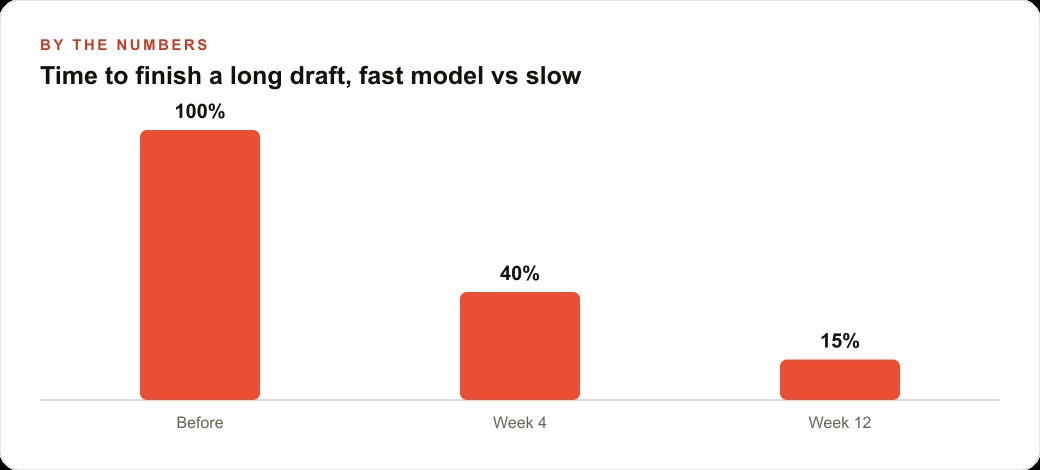
Now the numbers, framed as illustrative. Say the owner used to spend the equivalent of a full working day of effort each week on drafting posts, writing descriptions, and fumbling through basic research, call it one hundred percent of a fixed content workload. With Flash clearing the small writing and the gem owning the content chain, that same workload drops to around forty percent of the old time within a month, then to roughly fifteen percent by the twelfth week as the gem gets tuned and the habits settle. The point of those figures is the trend, not the exact digits: a chain that used to eat a day a week shrinks to a couple of short sessions, and none of it required hiring a marketing person.
Skip these traps when adopting a flood of new tools
Two mistakes will waste the week. The first is trying to adopt all ten releases at once, which guarantees you finish none of them. Pick the two or three that map to real tasks and let the rest wait. The second is treating the fancy features as toys instead of tying them to a workflow. A gem you build once and never reuse is worth nothing, exactly like the no code flows that gathered dust before. The value only appears when a tool sits inside a task you actually repeat.
Also remember that the real signal of the week is not any single feature. It is that AI is being wired into nearly every app at once, and the integration layer is where the value is moving. The content foundation you build with these tools also feeds SEO and organic search and lands leads in your CRM and website stack, so one well built gem quietly improves several channels rather than just one.
Why the integration layer is where the value moved
Step back from the individual tools and notice the pattern the week reveals. A year or two ago, the story was about raw model power, whose model scored highest on which test. This week the story is different. It is about where the models live. The fast model, the visual research, and the workflows are all valuable precisely because they are folded into an assistant you already open, triggered by talking instead of configuring. The capability stopped being the hard part. The integration became the hard part, and therefore the valuable part.
That shift matters for how an owner should spend attention. Chasing the newest, most powerful model is a losing game, because the leaderboard reshuffles every few weeks and the differences at the top are small. Wiring a genuinely good model into the exact task you repeat is a winning game, because that integration keeps paying off no matter which model happens to lead next month. The businesses that pulled ahead this week are not the ones with the smartest model. They are the ones who turned a repeated chore into a gem and stopped doing it by hand.
You can see the same principle in the smaller releases. Read aloud translation, search by feeling, a morning brief from your inbox, each one takes an existing capability and drops it into a place you already are, removing a step you used to do manually. None of them are breakthroughs in raw intelligence. All of them are breakthroughs in convenience, and convenience is what actually changes behavior. A tool you have to go out of your way to use gets abandoned. A tool that meets you inside an app you already open gets used every day.
The practical takeaway is to stop evaluating AI news by model benchmarks and start evaluating it by fit. When a release lands, do not ask whether it is the most powerful option. Ask whether it drops a capability into a task you already repeat. If it does, wire it in. If it does not, let it pass. That single filter turns a chaotic flood of ten announcements into a short, calm list of two or three moves worth making.
Your setup checklist for this week
Make Flash your default for everyday drafts where speed beats a marginally better answer. Run deep research when you want graphs and visuals baked straight into a report, like a competitor or market scan. Take the prompt chain you repeat most and turn it into a gem so the whole multi step flow runs on one trigger. Sign up for the early access morning brief if a personalized daily summary from your inbox would genuinely save you time. Then stop, and let those settle before adding anything else.
You can set all of this up yourself with the steps above. If you would rather have the workflows designed, the gems built, and your content engine running without the trial and error, that is exactly the kind of setup I help businesses put in place, and you can bring me in to do it with you.
That is exactly what we do at AI DOERS. Book a private 30-minute call with Madhuranjan Kumar and we will map the fastest path to it for your specific business.
Book your call →
Madhuranjan Kumar
Madhuranjan Kumar brings 20 years of performance-marketing experience and has managed over $200 million in Facebook ad spend for brands across the United States and beyond. His expertise spans the full modern marketing stack: Meta, Google Ads, TikTok, email automation, CRM, and the websites that hold it together. At AI DOERS he turns that track record into lead-generation systems for businesses across every industry.