
A Renovation Contractor's Guide to Gemini Image AI: Cut Your Marketing Photo Budget to Zero
Gemini's image model resizes, repairs, composites, and creates visual marketing assets from existing job-site photos, eliminating the need for professional photography in most contractor marketing scenarios.


Somewhere between the last coat of paint and the signed contract for the next job sits a pile of blurry phone photos that never made it into the portfolio. Every renovation contractor takes them. Most delete half, crop the rest badly, and post one serviceable shot per project to Instagram when they remember. The marketing stops there, not because the work is not worth showing, but because professional photography costs $350 to $600 per session and nobody on a working job site has time to coordinate a shoot around project completions.
Gemini's image model closes that gap in a way that nothing before it has. I am Madhuranjan Kumar, and after working through the full toolkit, my position is direct: professional photography used to be a moat separating larger contractors from independents. Gemini just filled it in.
The photography gap that used to cost you bids
The home services and renovation industry runs on trust, and trust runs on visuals. Before a homeowner signs a $38,000 kitchen contract, they want to see what you have done before. Websites with stock photos lose to websites with real project photography. Google Business Profile listings with strong before-and-after images generate more calls than listings with low-quality phone shots. Proposal PDFs with clean project photos get read to the end. Proposals with no photos get skimmed and set aside.
This has been true for a long time, and it created a structural advantage for larger contractors. A firm billing $2 million per year can justify a $500 monthly photography budget. A two-person operation billing $400,000 cannot, at least not comfortably, and not consistently. So the two-person shop posts inconsistently. The portfolio gaps translate directly into credibility gaps when a homeowner compares three bids side by side.
The standard workaround was to hire a photographer for one major project per quarter, extract a set of images from that single shoot, and stretch them across every marketing channel for months. That approach still costs $1,500 to $2,400 per year in photography alone, the portfolio ages steadily, and the best recent projects never make it to any visible platform because the photographer was not scheduled for them.
The problem is not that smaller contractors do worse work. In many markets the two-person renovation team outperforms larger firms on quality, communication, and responsiveness. The problem is that the larger firm looks more professional in the proposal stage, and looking professional wins bids before the work starts. That is what the photography moat actually did for years. That is what Gemini removes.
There is a second-order effect worth naming. When the portfolio gap is wide enough, homeowners assume the price gap between bids is justified by quality differences rather than by marketing budget differences. Contractors who cannot document their work visually get undercut on pricing by firms whose photography makes them look more polished. Gemini changes that by making the documentation cheap and fast enough that any contractor can do it for every project, not just the showcase ones.
Turning phone photos into a portfolio
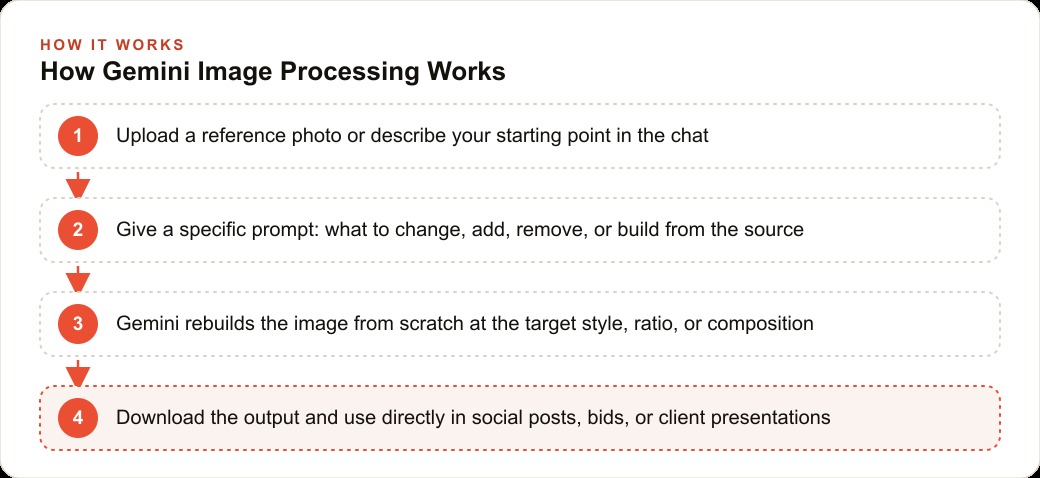
What Gemini actually does, at its most practical level, is take the photos a business already produces on job sites and convert them into professional marketing assets. Every renovation job produces phone photos. They are taken in a hurry, in mixed lighting, with construction materials still in frame, at whatever angle the site allowed. Most are not immediately usable for marketing. Gemini makes most of them usable with a direct prompt.
The sharpening function handles the most common problem first. A photo taken quickly in a bathroom with overhead fluorescents and a phone that did not focus cleanly can come back from Gemini looking like it was shot with deliberate care. Testing on significantly blurred images shows strong detail recovery. The tool works from the visual information present in the source, so severely overexposed or extremely low-resolution images have a lower ceiling, but for the range of typical job-site phone photography the results are consistently good enough for marketing use.
Object removal handles the second most common problem. A finished countertop with a drill left on it. A completed tile job with a bucket in the corner. A freshly painted hallway with masking tape still visible along the trim. Each of these requires one prompt describing what to remove. Gemini fills the space naturally, and the fill usually requires at most one follow-up prompt on complex backgrounds.
Once a clean source image exists, the aspect ratio resize capability becomes important for any contractor running Facebook and Instagram ads or managing organic content across multiple platforms. A landscape-orientation job-site photo needs to become a square for the Instagram grid, a portrait for stories, and a wider version for a Facebook ad creative. Traditional cropping cuts part of the finished work out of the frame. Gemini rebuilds the full composition at the new dimensions proportionally, so every element of the project photo stays visible across every format you need.
The casual-photo-to-professional-headshot feature is less obvious but equally practical. The owner of a renovation company needs a clean headshot for the website, the Google Business Profile, and the proposal cover page. Booking a headshot session is another task that never gets scheduled. Upload a clear casual photo, specify a professional background and attire in the prompt, and Gemini returns a usable professional headshot in one session. The same approach applies to team photos: a casual group shot from the job site becomes a clean team image with a consistent background, finally replacing the stock photo that has been sitting on the About page since the website launched.
The eight moves that replaced the photographer
The eight capabilities Gemini brings to renovation marketing are not eight separate tools. They form one logical workflow, each step building on the previous one, all starting from photos the business already takes.
Repairing the source photo comes first. Upload the job-site image and ask Gemini to sharpen focus and improve the lighting. This is the clean starting point that everything else depends on.
Removing distractions comes second. Objects that undercut the finished work, tools, staging materials, visible product branding that was not part of the project, all get removed by prompt, and the frame is filled naturally.
Resizing without cropping comes third. From the cleaned source image, generate a version for every platform format needed: 1080 by 1080 for the Instagram grid, 1080 by 1920 for stories, and 1200 by 628 for a Facebook ad.
Scene placement comes fourth. The cleaned finished-project photo gets placed into contexts beyond the raw job site. A tile bathroom appears on a magazine cover with the specific headline text you specify. A finished kitchen becomes a billboard creative with a call-to-action line. These outputs serve as social ad creatives, proposal cover images, and client presentation visuals without a separate design step.
Headshot and team photo production from casual photos comes fifth. Any casual photo of a person or a group becomes a professional-looking image by specifying the desired outfit, background, and lighting in the prompt.
Infographic generation from text comes sixth. Paste the phases of a renovation project, the materials breakdown in an estimate, or the steps in your quality inspection process into Gemini with a prompt to turn it into a structured visual with icons and labels. The result goes directly into a proposal PDF, reads more professionally than a plain bullet list, and reduces client questions about scope and timeline.
Multi-image composition comes seventh. Gemini accepts multiple source images and composes them into a single scene. A team member from one project photo, a finished surface detail from a second photo, and a background from a third combine into a single coherent marketing image. For renovation contractors this means building aspirational portfolio images from components already on hand, with no additional photography session required.
Text specification for ad creatives comes eighth. Every time a generated image needs words, a call-to-action for a social ad, a headline for a proposal page, a branded tagline on a portfolio image, specifying the exact text in the prompt produces accurate rendering. This matters particularly for anyone managing Google Ads campaigns where the image creative and the ad copy need to align precisely and consistently across every variation tested.
One week, before and after
A two-person renovation contractor handling kitchen and bathroom projects finishes a bathroom tile installation on Monday. The foreman takes 14 phone photos during the final walkthrough. Six are sharp and clean. Four need sharpening. Three have tools or materials in frame that should be removed. One is overexposed past recovery. From those 14 originals, Gemini produces ten clean portfolio images in about 25 minutes.
Tuesday, social content is needed. From the best bathroom photo, four Gemini sessions run in sequence: a square version for the Instagram grid, a vertical version for stories, a magazine-cover layout for a Facebook ad with specified call-to-action text, and a clean white-background version for the proposal library. That produces the week's social content and a new proposal asset from one source image in about 30 minutes.
Wednesday, a prospective client requests a proposal for a kitchen renovation and asks for a visual project timeline. The project phases go into Gemini as plain text with a prompt to generate a structured infographic with icons and connecting arrows. The result goes into the proposal PDF with no design software involved.
Friday, the team's About page still has a stock photo from three years ago. A casual group photo from that day's job site becomes a professional team image with a clean background in one Gemini session.
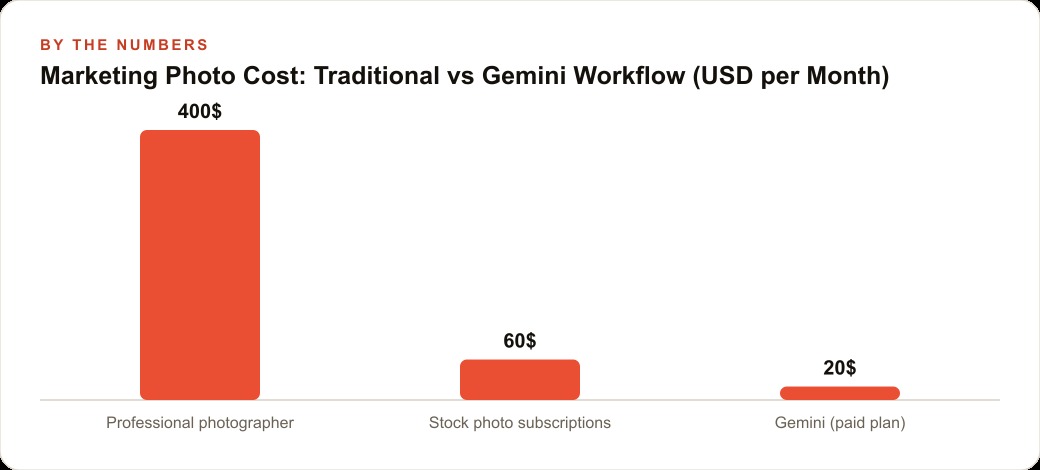
Before this workflow, the contractor was spending $400 per month on a part-time photographer for quarterly sessions and $60 per month on a stock photo subscription to fill the gaps. Total: $460 monthly, $5,520 per year. The output was intermittent, tied to the photographer's scheduling, and always a few days delayed from when the project was actually completed. The marketing was always running behind the work.
The Gemini paid plan runs roughly $20 per month. The same workflow produces more output, at higher consistency, from the contractor's own real project photography. Every image in the portfolio is tied to completed work, which carries more credibility than stock imagery by default. The cost reduction is more than 95 percent and the output volume increases because the scheduling constraint no longer exists.
The traps that waste your time
The most common mistake when starting with Gemini image editing is generating from text description alone without a reference photo. If you describe a kitchen renovation from text and ask Gemini to produce the image, the output will be a generic kitchen. It will not look like your work, will not match your aesthetic, and will not carry the specificity that makes a real project photo convincing to a prospective client. Always upload one of your own project photos as the starting point. The model anchors to the reference and applies your prompt on top of it.
A second trap is carrying visual context across unrelated projects within the same chat session. Style and tone persist across a conversation. If you produce images for a dark, dramatic bathroom renovation and then try to generate a bright, airy kitchen in the same session, the kitchen output inherits the visual tone from earlier in the conversation. Start a new chat for each distinct project or style.
A third trap is forgetting to specify exact text when generating ad creatives or infographics. Gemini handles text in generated images well when you tell it exactly what the words should be. When you leave it unspecified, it invents placeholder text that is usually wrong and sometimes garbled. Write the exact phrase in the prompt: not "add a headline" but "add the text: Free Estimate This Week."
Visual marketing in home services is a compounding asset. A contractor who consistently documents finished work and publishes it builds a searchable portfolio that generates inbound inquiries from homeowners who find it through organic search, Google Business Profile, or social platforms. The contractors who will benefit most from this shift are the ones who build the documentation habit alongside the Gemini workflow: photograph the finished work, run the best shots through Gemini the same day, and add them to the portfolio before the project mentally closes. The gap between contractors who do this consistently and those who do not is already widening, and the tools have never been this affordable.
Professional photography was a competitive signal in home services and renovation precisely because it was expensive enough to be rare. The contractors who could afford consistent professional photography looked more established and commanded higher prices. That was a real advantage for a long time. It is now accessible to any contractor willing to spend 20 minutes learning a tool that costs $20 per month. The only remaining advantage is learning it before the competitors in your market figure out the same thing.
That is exactly what we do at AI DOERS. Book a private 30-minute call with Madhuranjan Kumar and we will map the fastest path to it for your specific business.
Book your call →
Madhuranjan Kumar
Madhuranjan Kumar brings 20 years of performance-marketing experience and has managed over $200 million in Facebook ad spend for brands across the United States and beyond. His expertise spans the full modern marketing stack: Meta, Google Ads, TikTok, email automation, CRM, and the websites that hold it together. At AI DOERS he turns that track record into lead-generation systems for businesses across every industry.