
8 AI Tools Nobody Talks About That Are Better Than the Famous Ones for Specific Tasks
The most popular AI tools are popular for good reasons, but they are not always the best tool for every job. Here are eight underrated alternatives that consistently outperform the famous options in specific areas, especially image generation with text and consistent character illustration.

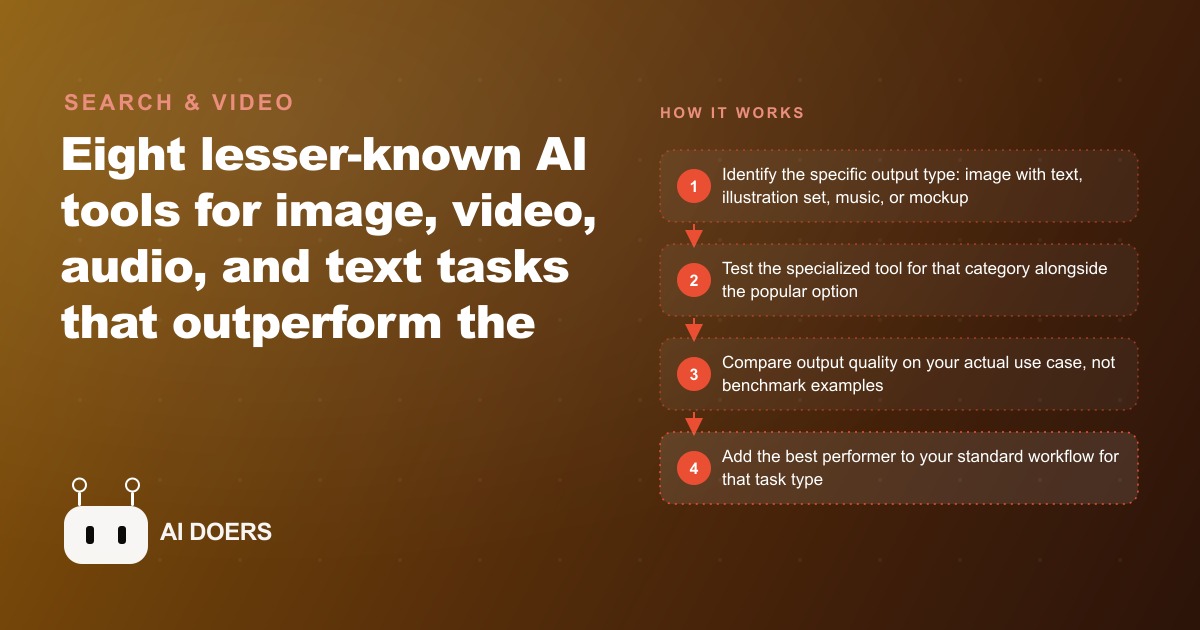
The most famous AI tools are famous for good reasons, and that is exactly why they quietly cost you time. When one name gets so big it becomes the default for an entire category, you stop asking whether it is the right tool for the specific job in front of you. You just open it, because everyone else does. And for a whole class of tasks, that reflex is expensive. The AI landscape has matured past the point where one tool does everything best, and the businesses getting real leverage are the ones that noticed.
I want to make an argument in this piece, not just list some apps. The argument is this, the era of the single, do-everything AI tool is over, and treating a generalist as your answer for every visual or creative task is now a competitive disadvantage. The fix is not more subscriptions for their own sake. It is a small, deliberate toolkit of specialists, each the best option for its particular category, with a simple system for knowing which one to reach for.
The generalists earned their fame, and that is the trap
Start by giving the popular tools their due, because the argument only works if it is fair to them. The big names in image, music, video, and voice generation are excellent. They handle an enormous range of requests competently, and their reputation is deserved. But competence across a wide range is precisely what they were built for. They are generalists by design, tuned to be good at almost everything rather than exceptional at any one thing.
The trap is that fame becomes a mental shortcut. Because a tool is the most talked-about option, it becomes the default, and defaults go unquestioned. So you reach for the famous general image generator to make a promotional graphic with a price on it, watch it garble the text, regenerate five times, and give up half an hour later with a mediocre result. The tool did not fail. It was never the right tool for that job. You used a generalist where a specialist would have finished in one pass.
Specialists win because they were built to win one thing
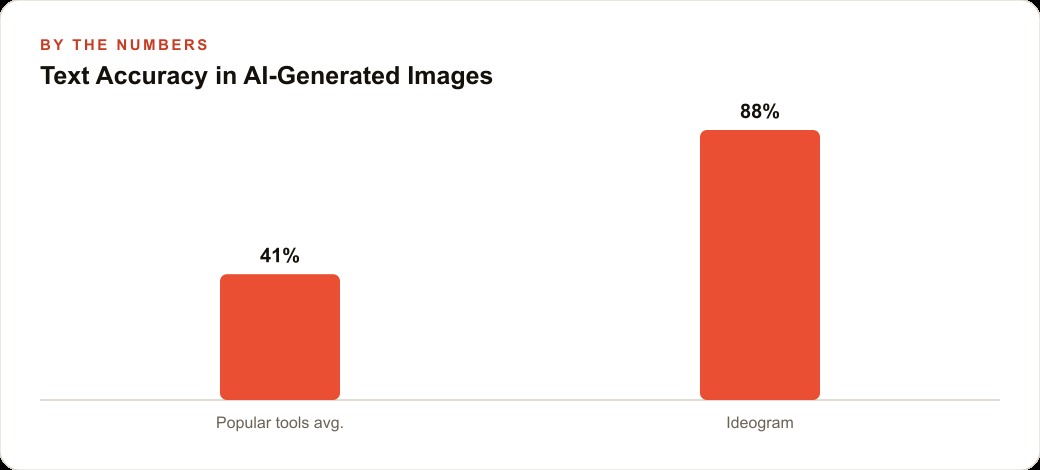
The counter to the generalist is the specialist, a tool built from the start to solve one specific problem extremely well. The clearest example is text inside images. Most AI image generators produce garbled or misspelled words inside graphics because their underlying models were never optimized for that. A tool like Ideogram was optimized for exactly that, with text rendering treated as a priority from day one. The result is that words inside a generated image come out readable and correctly spelled with a consistency the generalists cannot match.
That single focus changes the economics of a whole category of work. If your business makes social graphics, posters, product labels, or any visual that needs a readable headline or price baked in, a text-first generator saves you round after round of regenerating and editing. And the same specialist logic applies beyond text. There are tools built for consistent-style image sets, where you define a visual treatment once and generate multiple images that all share it, which is what you need for a series of service illustrations or a batch of social posts that must look like they belong together. General tools struggle badly with that kind of consistency. Specialists handle it as a core feature. There are also tools built to generate professional product mockups from a text description alone, useful for showing a product before a physical sample exists.
The point is not that any one of these names is the secret best tool forever. Names change every quarter. The point is the pattern. For any task where a specialist exists, the specialist usually wins on quality, and often on price too, since several of these focused tools cost meaningfully less than the famous generalists.
Knowing which tool to reach for is now a real skill
There is a professional skill hiding in all this, and it is worth naming. In the early days, if you wanted any image, you used one or two options and that was the whole decision. Today there are dozens of capable generators, each with distinct strengths, and knowing which one to open for which task is a genuine competency. It is the difference between a content workflow that flows and one that stalls.
This is why building a toolkit beats depending on a single app. A business that makes educational graphics, promotional posters with sale percentages, and branded content needs different capabilities than one that mostly produces atmospheric food photography. The right set of tools looks different for each. And the cost dimension only sharpens the argument. If a focused tool does your specific job better and costs less than the famous default, there is simply no reason to keep reaching for the default out of habit.
A salon's content week, before and after
Let me make this concrete with one business. Consider a salon with two stylists and a receptionist who also runs the social media. The salon posts five times a week across Instagram and Facebook, a promotional post with a current offer, an educational hair-care tip, a before-and-after showcase, and two engagement posts.
Before, the promotional graphic was the painful one, because it needed a current offer with a dollar amount shown inside the image. The receptionist built it by hand in a general design tool, finding a background, placing text, adjusting fonts, and resizing for each format. Call it thirty to forty-five minutes per graphic. With a text-first image generator, the receptionist writes a prompt describing a clean promotional graphic for a salon showing the offer in an elegant editorial style, and gets four readable variations in under a minute. Pick one, download, done, roughly four minutes total.
The educational tip post used to mean a designer building a multi-step visual guide, close to a half-day of work. With a tool built for consistent illustration sets, the receptionist generates a five-panel guide where every panel shares the same style, in about fifteen minutes including refinement. Across the full week, the salon recovers roughly two hours of the receptionist's time. That person redirects those two hours to customer follow-up calls and booking confirmations, which touch revenue directly.
Run the simple math on it. If the receptionist earns twenty dollars an hour and the toolkit recovers four hours a week that used to go to manual content, that is eighty dollars of recovered value weekly. A set of three specialist tools at around fifteen dollars a month each is forty-five dollars, so even at modest rates the net gain is a few hundred dollars a month, plus content that looks more professional and ships far faster. Treat those figures as illustrative rather than a guarantee, but the shape of the return holds across a lot of small businesses.
Where the specialist toolkit connects to the rest of the business
None of this content work lives in a vacuum. The readable, on-brand graphics a specialist generator produces are the raw material for Facebook and Instagram ad campaigns, and a consistent visual style across a series is exactly what makes an ad set feel like a real brand rather than a stock template. The same batch of images and the written guides behind them feed SEO and organic search on the salon's site, so one afternoon of content creation pays off in more than one channel. And when the posts and ads bring inquiries in, they belong in a CRM and website stack where follow-up can be automated, so the time the toolkit saved does not leak back out through dropped leads.
The mistakes that quietly undo the whole approach
A few errors will erase the advantage, so name them and avoid them. The first is the one this whole essay is about, using a general tool for a task where a specialist is clearly better, most often forcing a generalist to render text it was never good at. Know the limitation and use the right specialist.
The second is not testing a tool on your actual use case. Marketing examples on any tool's website show it at its best. Test it with your real prompts, your real brand colors, and your real content categories before you commit. The third is building a toolkit without a system. If you have seven tools for seven tasks and no reference for which to open when, the mental overhead of managing them erodes the time they save. Keep a one-page note mapping each content type to its tool. The fourth is ignoring free tiers. Nearly every tool worth evaluating has a free tier or trial. Prove the output quality on your real work before paying anything.
The categories most owners overlook: audio, video, and voice
The text-in-images example is the easiest to see, so it gets most of the attention, but the specialist logic runs through every creative category, and the ones owners overlook are where the quietest wins hide. Take audio. The most-promoted music-generation platform is genuinely good, but there are alternatives that produce usable background music for videos and ads quickly, sometimes without requiring a subscription to the biggest name at all. For a business that just needs a clean, non-distracting bed of music under a product video, the cheaper specialist is not a compromise. It is the correct tool, and the famous one is overkill.
Voice is another. The big voice-generation names are excellent for a polished, produced sound, but plenty of tasks, a quick internal explainer, a draft voiceover to test a script, a simple phone-menu prompt, do not need the flagship. A lighter specialist gets you there faster and cheaper, and the difference in quality is inaudible for the use case. The mistake is reaching for the premium option reflexively because it is the one you have heard of, when the job in front of you never called for premium.
Video generation is moving fastest of all, which makes the systematic-testing habit even more important there. A tool that was clearly best three months ago may have been passed twice since. This is precisely why the point of this whole piece is a habit rather than a list of names. If I hand you names, they go stale by next quarter. If I hand you the habit, identify the specific output, test the specialist against your default on real work, keep what wins, you can re-run it forever as the tools churn beneath you.
There is a compounding effect worth naming. Once you have built the habit for images, applying it to audio, then video, then voice costs almost nothing, because the process is identical. You are not learning a new skill for each category. You are running the same evaluation you already know on a new kind of output. A business that has done this across four or five categories ends up with a small, sharp toolkit where every tool earns its place, and a genuine feel for where AI helps and where it still falls short. That feel, honestly, is worth more than any single tool, because it is what lets you spot the next opportunity before your competitors do.
The takeaway is a habit, not a shopping list
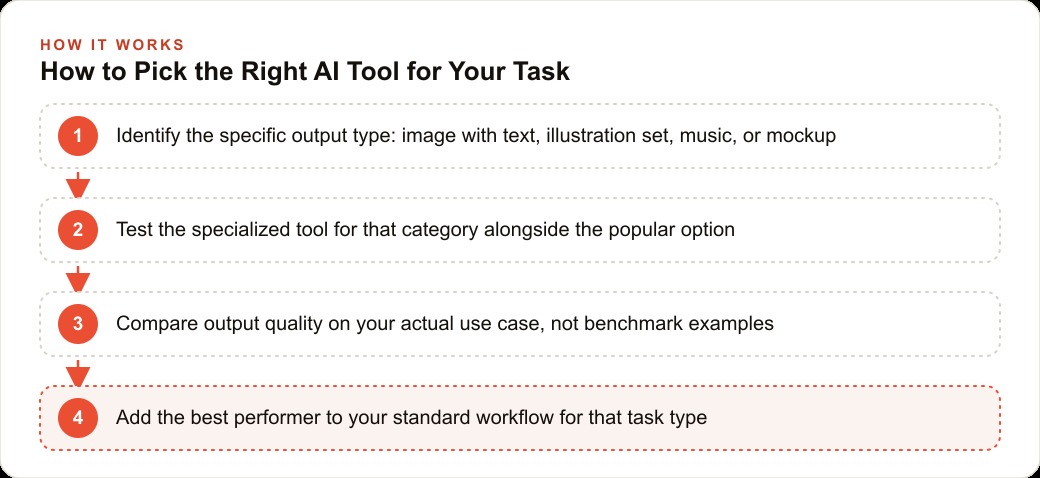
The lasting point is not a list of names, because the names will rotate. The habit is what endures. Identify the specific output you need, image with text, illustration set, music, or mockup. Test the specialist for that category alongside your usual default, on your actual work. Add whatever wins to your standard workflow, and keep a simple reference so you and your team always know which tool fits which job. Then spend an hour a month scanning for new specialists, because the landscape moves fast and a tool that launched last quarter might be the perfect fit for something you still do by hand.
You can build this entirely on your own through systematic testing, and honestly you should, because the testing teaches you where your real friction points are. If you would rather have someone identify the exact combination of tools that fits your content needs and wire up an efficient workflow around them, that is worth a focused consultation. Either way, stop defaulting to the famous option out of habit, and start matching the specialist to the task.
That is exactly what we do at AI DOERS. Book a private 30-minute call with Madhuranjan Kumar and we will map the fastest path to it for your specific business.
Book your call →
Madhuranjan Kumar
Madhuranjan Kumar brings 20 years of performance-marketing experience and has managed over $200 million in Facebook ad spend for brands across the United States and beyond. His expertise spans the full modern marketing stack: Meta, Google Ads, TikTok, email automation, CRM, and the websites that hold it together. At AI DOERS he turns that track record into lead-generation systems for businesses across every industry.