
Docker, Explained Plainly: Why It Fixes the It Runs On My Machine Problem
Docker packages an app and every dependency into one portable container so it runs the same everywhere. Here is what images, Dockerfiles, containers, and Compose actually do, and how a software team should put them to work.

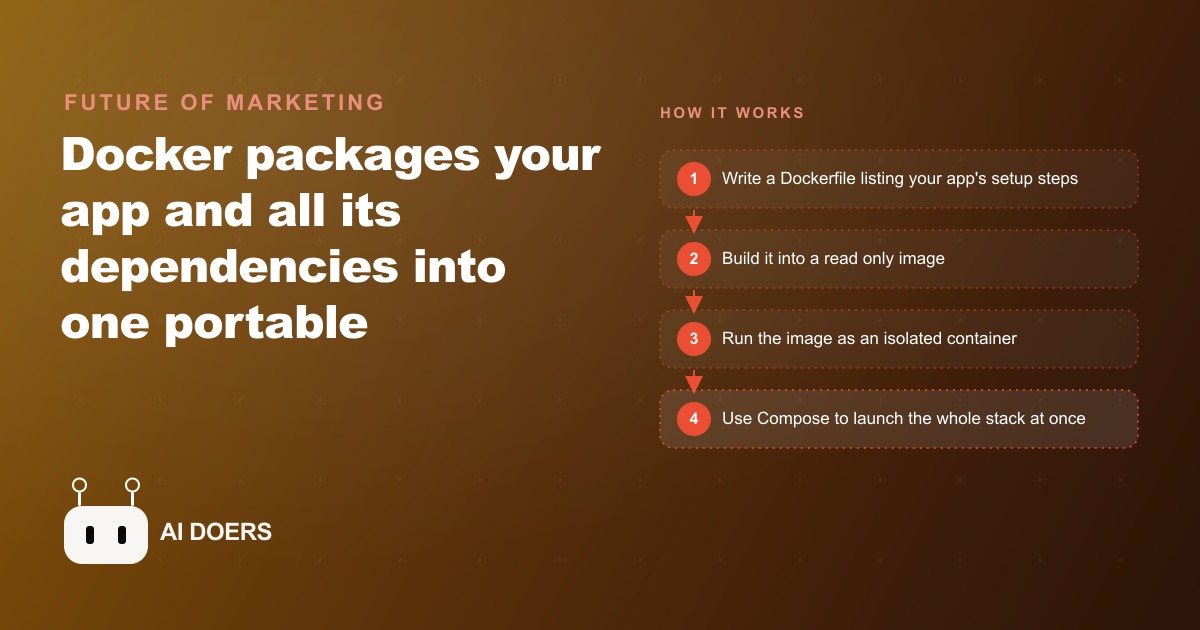
Ninety percent of the developers who lean on Docker every day would still struggle to explain it in one clean sentence. It has become background infrastructure, the thing that is just there, which is a strange fate for a tool that quietly reorganized how software gets built and shipped. So here is Docker taken apart into the pieces that actually matter, one concrete idea at a time, with a worked example near the end so the whole thing clicks.
1. The one problem Docker was built to kill
Start with the pain, because Docker only makes sense once you feel it. You build an app on your laptop and it runs perfectly. You hand it to a teammate or push it to a server, and it breaks, because their machine has a slightly different version of something. That is the it runs on my machine problem, and it has burned countless hours across every software team that ever existed. A single mismatched dependency version is enough to take an app down. Docker exists to end that specific misery by packaging your app and every dependency it needs into one portable unit that behaves the same everywhere. Everything else in this list is just the machinery that makes that one promise real.
2. The image is a frozen blueprint you can hand to anyone
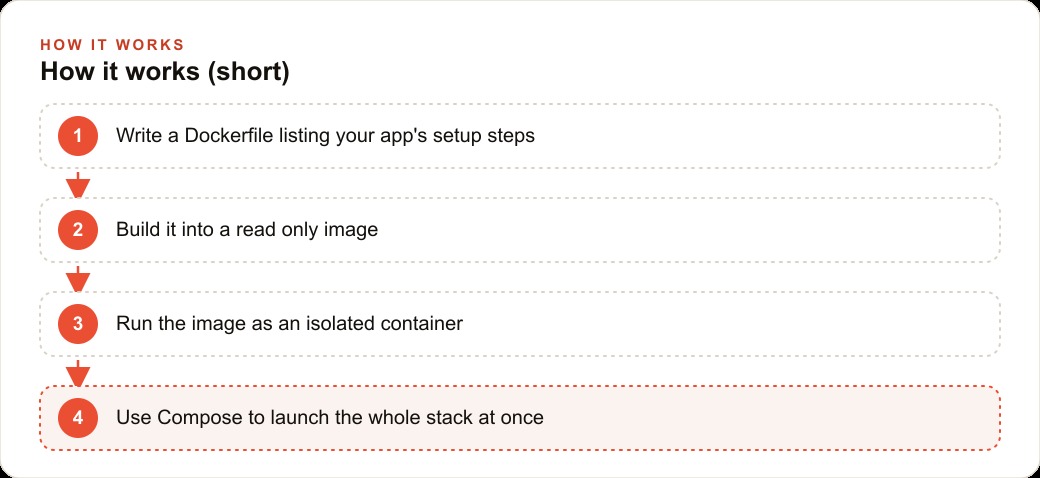
An image is the thing you actually share, so it is worth understanding first. It is a read-only package that holds everything your app needs to run: the code, the language runtime, the libraries, and the tools, frozen together into one blueprint. Read-only is the key phrase. Once an image is built it does not change, which is exactly why it is trustworthy. Two people who download the same image get the same environment down to the byte, with no room for it worked on mine to creep in. Images live in registries like Docker Hub, so instead of writing a setup document and hoping everyone follows it, you publish the image once and anyone can pull the finished environment. That shift, from describing an environment to shipping the environment itself, is the quiet superpower underneath everything else Docker does.
3. The Dockerfile is a recipe your whole team can read
If the image is the frozen result, the Dockerfile is the recipe that produced it, and it is refreshingly boring in the best way. It is a plain text file with step by step instructions, read top to bottom. Each line does one clear thing: choose a base image to start from, install a piece of software, copy your files in, set an environment variable, or define the command that runs when the app starts. Docker executes those steps automatically and hands you a finished image. Because it is plain text, it lives in version control right next to your code, which means the exact setup of your environment becomes reviewable, diffable history instead of tribal knowledge locked in one senior engineer's head. When a new hire asks how the environment is built, the answer is read the Dockerfile, and that is the whole answer.
4. A container is the image brought to life and sealed off
An image just sits there. A container is what happens when you bring it to life. It is a running instance of an image, executing your app in its own isolated space with its own file system, its own network setup, and its own processes. The clever part is what it does not do: it does not boot a whole separate operating system. It shares Madhuranjan Kumar machine's kernel, which is what makes it start in a second or two and stay light. That isolation is the safety wall. Whatever happens inside one container, the crashes, the odd file changes, the version quirks, stays inside that container and does not leak out to the rest of your machine or to the container running next to it.
5. Conflicting projects can finally share one machine
Here is the first payoff that makes people fall in love with it. Every developer has hit the wall where one project needs an old version of a language and another needs the newest, and installing both on one machine turns into a fight neither side wins. Because each container is sealed off with its own dependencies, that fight disappears. You run one project in a container pinned to the old version and another in a container pinned to the new one, side by side, on the same laptop, and they never even know the other exists. No more breaking a working setup just to try something new. No more an entire afternoon lost to untangling version clashes. Each project carries its own environment, so switching between them costs you nothing.
6. Docker Compose starts your whole stack with one command
Real applications are rarely one thing. A typical stack is a backend, a frontend, a database, and a couple of supporting services, and starting each one by hand in the right order is tedious and easy to get wrong. Docker Compose fixes that with a single file that defines all of those containers together. One command reads the file and spins the entire stack up at once, wired to talk to each other. This is the moment Docker stops being a neat trick and becomes a workflow. A new developer clones the repository, runs one compose command, and has the full application running locally in minutes, with no twelve-step setup guide and no missing piece. It is also the same discipline that keeps a client's CRM and website stack consistent from a developer's laptop through staging and into production.
7. Kubernetes takes over when one machine is not enough
One machine has a ceiling. When an app gets popular enough that you are running many containers across many servers, you need something to conduct the orchestra, and that something is usually Kubernetes. It handles the jobs no human wants to do by hand at scale: rolling out new versions, spinning up more copies when traffic rises, balancing load across them, and, most importantly, restarting any container that crashes so the app stays up. You do not reach for Kubernetes on day one, and you should not. It earns its complexity only when the number of containers and servers grows past what a person can babysit. But knowing it is there is what lets a small team believe it can grow without rebuilding everything later.
8. Containers are lighter than virtual machines, and the difference is not small
People who came up on virtual machines often assume containers are just lighter VMs, and the difference is worth spelling out because it explains the whole efficiency story. A virtual machine runs an entire guest operating system on top of your real one, which means every VM drags gigabytes of disk and a heavy slice of memory before your app does anything useful. A container skips all of that. It shares Madhuranjan Kumar operating system's kernel and packages only your app and its dependencies, so it is measured in megabytes, not gigabytes, and starts in seconds, not minutes. That lightness is why you can run a dozen containers on a laptop that would choke on three full virtual machines, and it is the practical reason containers won the argument.
9. A worked example: five client projects on one laptop
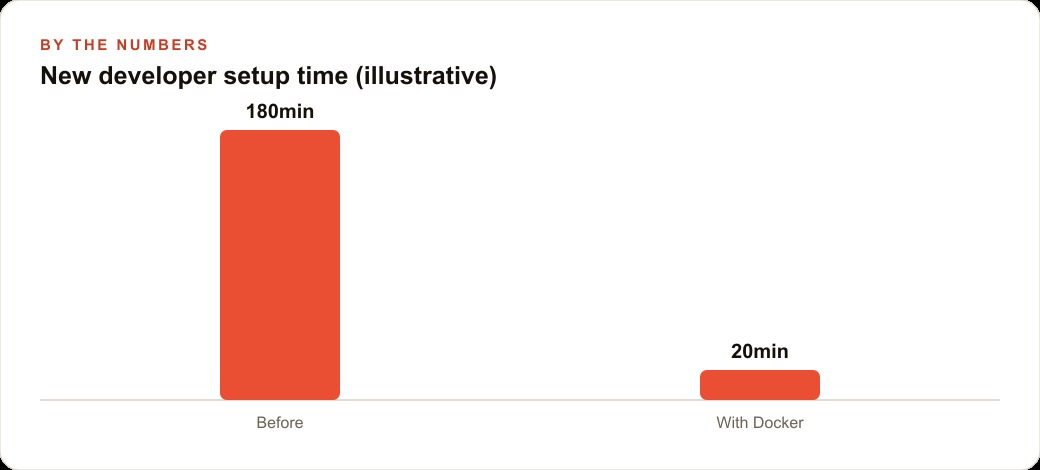
Let me make this concrete. Picture an IT services company running five client projects at once, each needing a different language version and its own database. Before Docker, onboarding a new engineer meant a lost morning per project getting each one to run, so a first day could burn most of a week just on setup, and a fix that worked on one laptop routinely broke on another. Here is the change I would make. For each client project I would write one Dockerfile that pins the exact runtime and dependencies, build it into an image, and add a compose file so the backend, frontend, and database start together.
Now a new engineer runs one command and has a full environment in roughly twenty minutes instead of three hours, and that same gap repeats for every project and every hire. All five clients run on one machine without a single version clash. When a client's app gets busy, the company spins up more identical containers behind a load balancer, and for the largest clients Kubernetes keeps everything alive and restarts anything that fails. Fewer late night emergencies, faster handoffs, and predictable deploys, which for a services business translates directly into hours billed on real work instead of setup. Predictable deploys also mean the client sites stay fast and stay up, which quietly protects the money flowing through their Google Ads and the rankings behind their SEO and organic search.
Run the math on just the onboarding piece and the case makes itself. Five projects that each cost an engineer roughly three hours of setup is fifteen hours gone before any real work starts, and that bill repeats for every new hire and every fresh machine. Drop each of those to twenty minutes and the same five projects cost under two hours combined. For a shop that hires a few engineers a year and reprovisions machines regularly, that is not a rounding error. It is days of senior time returned to billable work, plus the harder to measure win of fixes that behave the same in testing as they do in production. The reason this matters beyond the accounting is trust: when the environment is guaranteed identical everywhere, engineers stop hedging, stop adding it should work caveats, and start shipping with confidence, because the ground under them no longer shifts from one machine to the next.
10. The registry is how the whole team stays in sync
There is one piece that ties images and teams together and deserves its own entry: the registry. A registry is a shared store where built images live, whether that is a public one like Docker Hub or a private one your company runs. Its job is quiet but essential. Once a Dockerfile builds into an image, you push that image to the registry, and from then on every developer and every server pulls the exact same finished blueprint rather than rebuilding from scratch and hoping the result matches. This is what removes the guesswork from handoffs. When a project moves from one engineer to another, or from a laptop to a production server, nobody rebuilds anything by hand. They pull the identical image that was already tested, so what runs in production is byte for byte what ran on the machine where it was verified. The registry turns the promise of images from a personal convenience into a team-wide guarantee, and it is the reason a distributed team can trust that everyone is running the same thing.
11. Where teams actually get stuck
None of this is hard to start, which is worth saying plainly. A capable developer can containerize a first small project in an afternoon: install Docker Desktop, which is free and gives you a simple interface, make a folder, add a tiny app file, then write a short Dockerfile that picks a lightweight base image, sets a working directory, copies the file in, and names the command to run. Build the image with one command, make sure Docker Desktop is running, then run the container and watch your app execute inside it. Once you have done that loop a single time, the whole concept clicks. From there you add a database, then a compose file, then think about scaling.
Where teams actually stall is the next mile: pinning the right versions across many projects, structuring compose files cleanly, deciding when Kubernetes is worth its weight, and keeping images small and secure. That judgment is the part that takes reps, and it is where a lot of otherwise strong teams lose weeks. If you would rather have your stack containerized properly and handed over working, that is exactly the kind of setup I do for clients. You can take the do it yourself path above, or bring in someone who has already wired this up many times.
That is exactly what we do at AI DOERS. Book a private 30-minute call with Madhuranjan Kumar and we will map the fastest path to it for your specific business.
Book your call →
Madhuranjan Kumar
Madhuranjan Kumar brings 20 years of performance-marketing experience and has managed over $200 million in Facebook ad spend for brands across the United States and beyond. His expertise spans the full modern marketing stack: Meta, Google Ads, TikTok, email automation, CRM, and the websites that hold it together. At AI DOERS he turns that track record into lead-generation systems for businesses across every industry.