
How the Cursor Agent Lets You Build a Research and Analysis Tool Without Code
A walkthrough of the Cursor agent feature building a tool that pulls content, analyzes it with affordable AI, and saves it to an archive. Includes a worked law firm example.

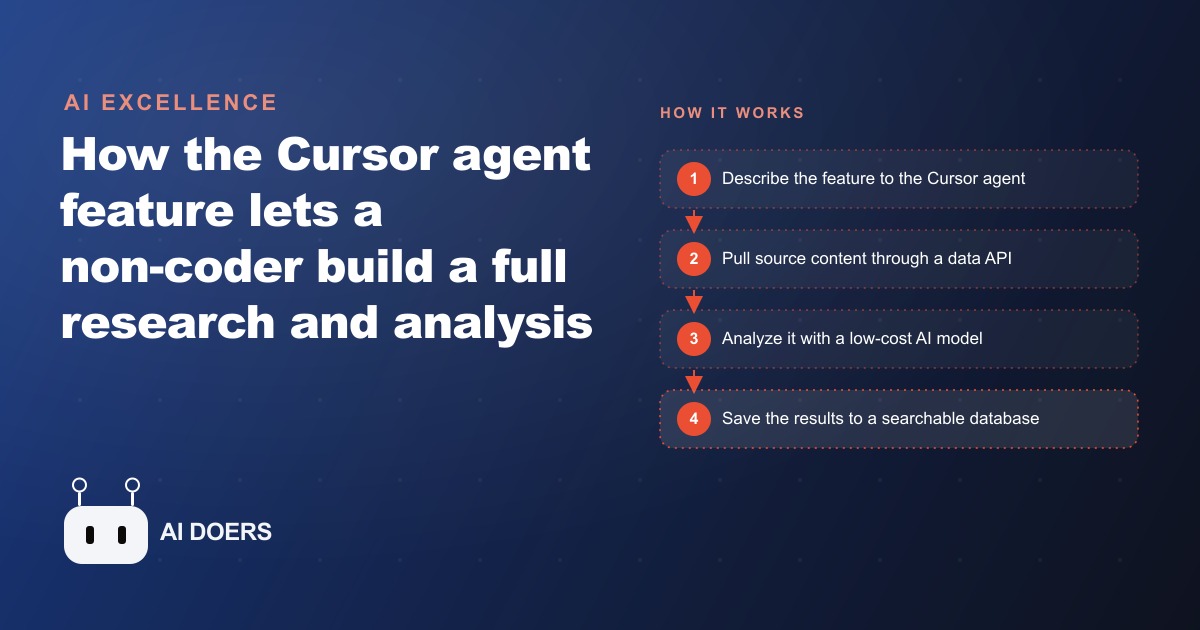
The Cursor agent feature changes the unit of work in software building from a line of code to a complete feature. That shift is more significant than it might sound, because it means a business owner who has never written code can now describe what they need in plain English and watch a working piece of software get built and tested in front of them, feature by feature, over the course of an afternoon. I, Madhuranjan Kumar, want to walk through exactly how this works, what the session that demonstrated it actually showed, and how a business handling large volumes of research and document review can apply the same approach to build a custom tool that fits their specific workflow.
Before this kind of agent capability existed, the options for a business owner who wanted a custom research or analysis tool were limited. You could hire a developer and wait weeks for a result that might or might not match what you actually needed. You could buy an off-the-shelf SaaS product and adapt your workflow to its constraints. Or you could manage the research manually, which meant reading documents one by one and storing results in a spreadsheet that quickly became impossible to search and compare. The Cursor agent opens a fourth option: build the exact tool you need, in a session measured in hours, by describing each feature in plain language and reviewing the output before the next piece is added.
Define the research unit before the agent writes anything
The most important decision in any research tool build is made before a single line of code is written. That decision is: what is the unit of research? A unit of research is the smallest piece of content the tool will pull, analyze, and store in one operation. Defining it clearly before the agent starts building determines whether the tool produces useful, organized output or a pile of loosely related information that is harder to work with than the manual process it was meant to replace.
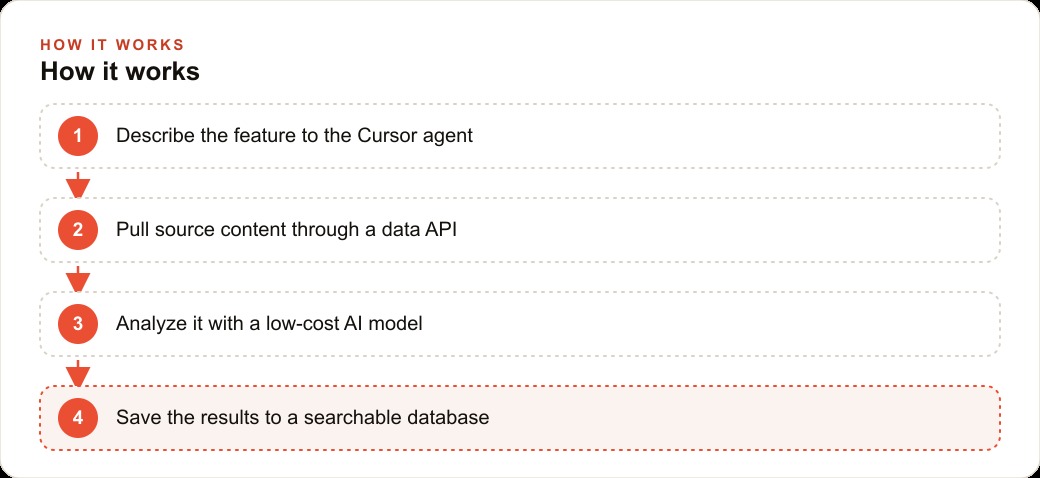
In the session that demonstrated this capability, the unit was a single article pulled by its URL. The tool would take one URL, retrieve the full text of that article through a data service, pass that text to an AI model for analysis, and produce a structured set of cards summarizing the key points. Every subsequent feature, the search capability, the database, the draft generator, was built around that one unit. The clarity about the unit meant that the agent had a precise target for every feature it added.
For a legal practice, the unit might be a single case document or a single regulatory filing. For a marketing agency, the unit might be a single competitor page or a single campaign brief. For a recruitment firm, the unit might be a single job posting or a single candidate profile. The unit should be the smallest piece of content that, once analyzed, would add something meaningful to a growing archive.
Once the unit is defined, describe it to the Cursor agent in one sentence before asking it to write any code. Something like: this tool takes one URL, retrieves the full article text, runs it through an AI analysis, and displays the results as four to six short cards. That single sentence gives the agent a target for every feature that follows and prevents the common problem of building a tool that is technically capable but structurally confused about what it is actually supposed to do.
The other decision to make before writing anything is the scope of the first session. A research tool with a content retrieval feature, an AI analysis layer, a search capability, a database, and a draft generator is a full application. Trying to describe all of that in the first prompt tends to produce code that technically covers the description but is structurally fragile because the agent had to make too many architectural decisions simultaneously. Starting with the retrieval and analysis features only, testing them on real inputs, and adding the rest in subsequent prompts produces a more reliable result at each stage.
Wire the content source and keep the cost model honest
The second stage of the build is connecting the tool to the actual content it will process. In the session, this meant connecting a data service that takes a URL and returns the full text of the article at that URL. The agent handled the connection by writing the code that calls the service's API, but the decision about which service to use, and the API key to authenticate with it, came from the person directing the build.
This stage is where the cost model for the tool gets determined, and it is worth thinking through honestly before the agent builds anything. AI analysis of text costs money per token of text processed. A premium model costs significantly more per token than an economical one. The difference in cost matters when the tool will be processing dozens or hundreds of documents rather than a single one. In the session, the choice was made deliberately to use an economical AI model for the analysis layer, because the goal was to analyze a high volume of content at a low cost per item. The quality of analysis from an economical model is sufficient for extracting key points and surfacing important patterns across a research corpus. The premium model is reserved for tasks where the nuance of a single response genuinely justifies the additional cost.
For a law firm reviewing case documents, this cost calculation is directly relevant. If the tool will be used to analyze dozens of documents per matter and the firm handles multiple concurrent matters, running a premium model on every document would produce a significant and growing monthly cost. Using an economical model to do the initial extraction and flagging, and reserving human review and premium model usage for the documents that the initial analysis identifies as most significant, gives the firm a cost structure that scales with usage rather than one that becomes prohibitive as the tool is used more.
The other practical consideration at this stage is the volume of text going into the model per request. Most AI models have a practical limit on how much text they can process reliably in a single call. The session addressed this by capping the amount of text sent from each retrieved article to a reasonable limit before analysis. This prevents errors that occur when an unusually long document is passed in full and also keeps the per-request cost predictable. The agent can implement this cap with a simple instruction once the content retrieval is working.
For businesses that rely heavily on content from organic search to inform their strategy, this stage of the build is also where integration with your SEO and organic search monitoring becomes useful. A research tool that can pull and analyze competitor content, industry publications, or trending topics in your category is a different kind of intelligence asset than a manually maintained reading list. The tool accumulates a searchable archive over time, which means research done three months ago is still accessible and comparable to research done today.
Structure the output as scannable cards before you build the archive
The analysis stage produces text. The question is what shape that text takes when it is displayed to the person using the tool. The session made a specific choice here that is worth understanding: the AI was instructed to format its analysis output as short, independent cards rather than as one connected summary. Each card covers one point, one obligation, one notable finding, with a brief note explaining why it matters.
The card format is not an aesthetic preference. It is a functional one. A long connected summary requires reading from start to finish to find the point you are looking for. A set of short cards lets you scan visually, identify the two or three items most relevant to your current question, and ignore the rest. When a research tool processes many documents over time, the difference between searchable card output and long-form summary output becomes the difference between a tool people use daily and one that gets opened occasionally and then abandoned because finding anything in it takes too long.
The instruction to the agent at this stage is simple: after the AI analyzes the retrieved text, display the results as cards. Each card has a short heading describing what the point is about, two to three sentences of explanation, and a brief note on why it is relevant. Keep each card to what fits in a glance. This instruction goes into the prompt that sets the AI model's behavior, not into the code itself, which means it can be adjusted as you see what the output actually looks like in practice.
For a marketing agency building this tool to analyze competitor content, the card format lets account managers quickly scan what a competitor's latest campaign brief emphasizes, what claims they are making, and what audience language they are using, without reading the entire brief. For a recruitment firm using the tool to analyze job postings, the card format surfaces the required qualifications, the compensation signals, and the organizational language in a form that can be compared across postings without reading each one in full.
Once the card format is working and producing useful output on real content, the next step is connecting the search feature. A search service that returns a clean list of relevant results based on a topic query adds the ability to discover content to analyze rather than only analyzing content you already know about. The agent connects this service the same way it connected the content retrieval service: you provide the API key and the documentation, describe what the feature should do, and it builds the interface and the connection.
Turn the saved archive into a first-pass draft
The archive is where the compounding value of the tool lives. Once the research tool is saving analyzed content to a database, every session adds to a growing body of knowledge that was not available to the manual process it replaced. A paralegal who used to start every research task from scratch now starts every task with a searchable archive of prior relevant analysis. An analyst who used to reassemble context at the start of every project now has months of organized findings they can query in seconds.
The archive feature in the session was built as a simple database that stores each analyzed unit with its cards and the source it came from. The interface allows selecting and saving items the user wants to keep. That selection step is important because not every analyzed document belongs in the long-term archive. The tool should make it easy to save the useful and discard the rest, so the archive stays signal-rich rather than filling with noise.
The draft generation feature builds on the archive in a specific way. The user selects several saved items relevant to a current task, chooses a template for the output format, and the AI assembles a first-pass draft from the selected material. For the law firm, this might be a draft research memo based on the saved key points from three to five relevant case documents. For the marketing agency, this might be a draft campaign rationale based on saved analysis of competitor positioning and recent industry content.
The draft that comes back is not a finished document. It is a first pass built from your own saved research, which means it is already informed by the specific material you have gathered rather than by the AI's general knowledge. The editing work from that starting point is substantially less than drafting from a blank page, and the output reflects research that was done deliberately rather than generic content that needs to be replaced.
The error-handling pattern throughout the build is consistent and worth noting. When the agent writes code that produces an error, the fix is to copy the exact error message and paste it back into the conversation. The agent reads the error, identifies what went wrong in the code it wrote, and produces a corrected version. This loop, build, test, copy error, fix, test again, is the normal rhythm of development with an agent, not a sign that something has gone wrong. Business owners who understand this expect it and find it manageable. Those who expect the agent to produce working code on the first try find the error-fix cycle frustrating and sometimes abandon the build before it reaches a working state.
A firm using this tool alongside their CRM and website stack can connect the research archive to their client management process. Client-specific research, competitor analysis pulled before a pitch, industry content gathered during a matter, all of it lives in one searchable place rather than scattered across email attachments, folder hierarchies, and individual team members' bookmarks. The institutional knowledge that was previously locked in the habits of individual researchers becomes accessible and searchable for the whole team.
The pattern for building this tool is reproducible for any business where the volume of reading is high, the same research gets reused across projects or clients, and the current process involves manually reading and storing findings in formats that are hard to search and compare later. Define the research unit clearly before the agent builds anything. Choose an economical AI model for the analysis layer and cap the text volume per request. Instruct the AI to format output as scannable cards rather than connected prose. Build the archive and the draft generation on top of a retrieval and analysis foundation that has been tested on real content first.
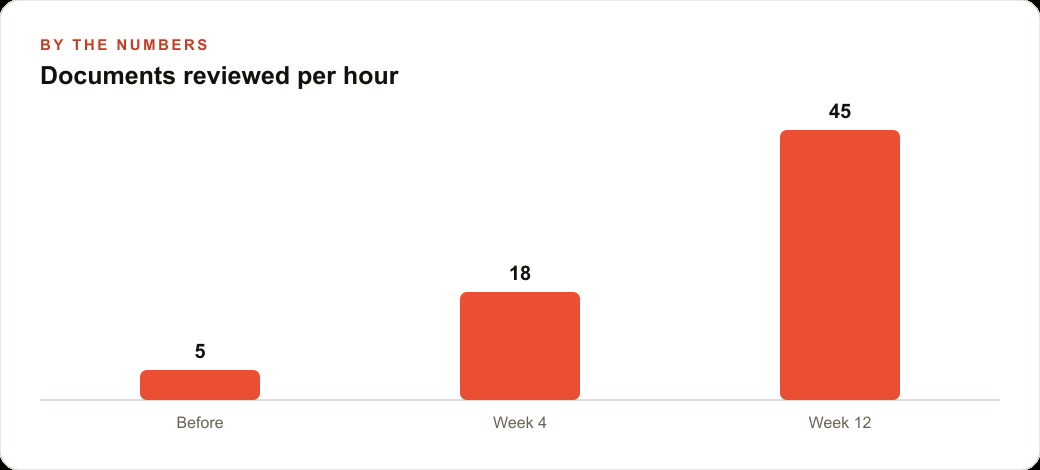
The illustrative pattern shown in the chart holds across different types of practices: the number of documents reviewed per hour increases sharply as the workflow becomes more structured, not because the AI is faster at reading but because the card format and the searchable archive eliminate the time spent restating context and reassembling prior research at the start of each new task. The tool earns its build time back within the first month of consistent use, and the archive it builds becomes more valuable with every research session that adds to it.
For businesses managing client acquisition through Meta ads and needing to track competitor creative and messaging at volume, this kind of tool replaces an entire category of manual monitoring work. Instead of an account manager spending hours scrolling through competitors' public content, the tool pulls and analyzes it systematically, saves what is relevant, and makes the findings searchable across months of accumulated intelligence. That is a different quality of competitive awareness than what is practically achievable with manual monitoring, and it is available through a tool that a non-technical business owner can build in an afternoon with the approach described above.
That is exactly what we do at AI DOERS. Book a private 30-minute call with Madhuranjan Kumar and we will map the fastest path to it for your specific business.
Book your call →
Madhuranjan Kumar
Madhuranjan Kumar brings 20 years of performance-marketing experience and has managed over $200 million in Facebook ad spend for brands across the United States and beyond. His expertise spans the full modern marketing stack: Meta, Google Ads, TikTok, email automation, CRM, and the websites that hold it together. At AI DOERS he turns that track record into lead-generation systems for businesses across every industry.