
How to Get Consistent Pro Images With Nano Banana 2 and JSON Prompting
Structured JSON prompts turn an AI image model from a slot machine into a reliable studio. Here is how the system works and how an e-commerce store could use it.

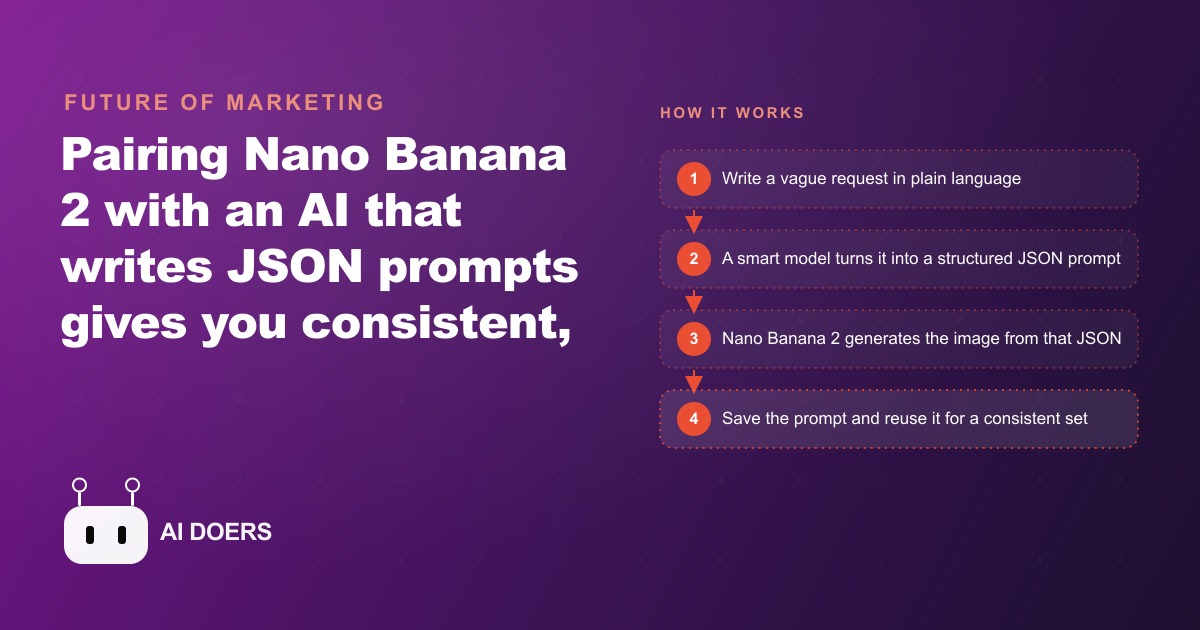
Most businesses generating AI images are using the wrong method and throwing away 70 percent of their generations. The tool is not the problem. The prompt structure is. A great model with a vague prompt is still a coin flip. A great model with a structured prompt is a repeatable system. I am Madhuranjan Kumar, and the difference between those two outcomes is what this article is about.
Nano Banana 2 is genuinely capable. It is faster than the Pro version, follows instructions more precisely, spells text correctly in infographics, and costs less to run at scale. But none of those advantages show up if you are still writing prompts the way most people do: one loose sentence describing what you want, submitted and hoped for. The model's strengths require a structured input to express themselves. JSON prompting is that structure.
Here are seven things to understand about JSON prompting with Nano Banana 2, followed by a walk-through of how an e-commerce store with 50 products and no photographer turns this into a complete product catalog in one afternoon.
Plain prompts are a coin flip, not a creative tool
A plain text prompt like "a woman holding a skincare product with soft lighting" gives the model five decision points it has to guess at: who is the woman, what does the product look like, what exactly is soft lighting, from which angle, in what setting. It guesses all five, and the guesses change every time you submit the same prompt. You get a different answer on each generation. Some outputs land close to what you wanted. Most do not.
The result is that you generate ten images and use two, which means you paid for ten to get two. At small volume this is tolerable. At the volume a real business needs to maintain a catalog, an ad account, or a content library, a 20 percent usable rate makes AI image generation a net negative compared to shooting one real photo. The slot machine metaphor is accurate because the mechanism is identical: you pull the lever and take what comes. That is not a creative workflow. That is hope with a subscription. JSON prompting fixes this by replacing each guess with a specification.
JSON turns your creative brief into something a model can execute
When you structure a prompt as JSON, every decision gets its own field. The subject field describes exactly who or what is in the scene. The setting field places them precisely. The lighting field specifies the quality, direction, and color temperature of the light. The camera angle field defines the composition. The style field locks in the mood and visual aesthetic. The negative prompt field explicitly excludes the elements that show up wrong most often: blown-out highlights, cluttered backgrounds, distorted anatomy, generic faces.
Because every variable is named, the model has nothing left to guess. It reads each field and executes it. The output matches the brief because the brief was complete. The same JSON submitted twice produces outputs that share the same visual language because the specification is identical. That is what makes JSON prompting a production tool rather than an experiment.
Consistency across a set of images is the commercial value here. A single great image is achievable even with plain prompts, given enough retries. A set of twenty images that all share the same lighting temperature, the same compositional framing, the same depth-of-field treatment, that is what looks professional in a product catalog, an ad account, or a content library. JSON delivers that consistency because the variables are locked, not guessed.
You do not write the JSON yourself: the AI writes it from your plain request
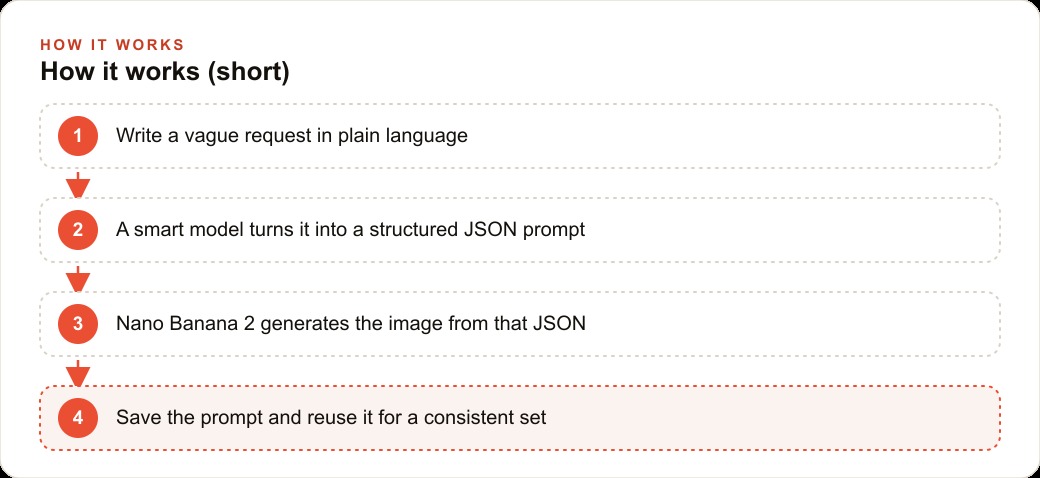
This is the part that removes the technical barrier entirely. You do not sit down and manually type JSON fields for each generation. You write a short, vague request in plain English, exactly the way you have always written prompts. Then a capable AI model, running inside a project with a saved JSON image skill, reads your request, consults the skill instructions, and expands your vague brief into a complete structured prompt. That structured prompt then goes to Nano Banana 2.
The skill is a markdown file that defines your brand look: the lighting style your images use, the color temperature, the aspect ratio for your primary platform, the background treatment, the level of realism. Once the skill is set, every plain-English request you write gets expanded into a brief that matches your brand standards automatically. You write "a woman holding the serum bottle in a kitchen" and the model writes the full JSON. You review the output and refine the fields if needed.
This is also how the system compounds over time. Each round of feedback you give about what you liked or disliked about a batch shapes the skill file. The next batch starts closer to your target. You are training a brand brief, not just iterating on prompts.
Real-time grounding fixes the accuracy problem that plagues product shots
One persistent problem with AI image generation for products is accuracy. Ask a model to show a bottle of face serum and it invents a bottle. The shape is wrong. The label font is wrong. The volume listed on the label is a random number. The color scheme is a creative guess. The result is an AI image that cannot be used as a marketing asset for a real product because it does not represent the real product.
Nano Banana 2 can run with web search enabled during generation. When the model can ground its output in real information, product details come out more accurate because it is referencing actual sources rather than guessing from training data. For products with any public web presence, the label text, color scheme, and general form factor can be anchored to real references. This alone closes a significant quality gap for any business that sells branded physical goods. Combined with the image-to-image workflow, grounding gives you the most accurate starting point available without a professional product photography session.
Image-to-image keeps your actual product recognizable across every scene
The image-to-image workflow is the single most important capability for any business that sells physical products. You upload a photo of the real product, then prompt Nano Banana 2 to generate a studio shot, a lifestyle scene, or an ad creative that includes that product. The model keeps the real bottle shape, the real label font, and the real color scheme while placing the product in the context you specify.
This means you can take one product photo and generate a clean white-background studio shot, a kitchen counter lifestyle scene, a bathroom shelf arrangement, and an outdoor table setting from a single source image and four prompts. Each output is usable in a different marketing context. For brands running Facebook and Instagram ads, this is the asset library that lets you test four different creative environments for the same product without booking four separate photo shoots. A traditional studio shoot with multiple setups costs $500 to $1,500. Four JSON image-to-image sessions cost a few cents.
Testing three styles in one session finds your visual winner fast
One of the practical advantages of running Nano Banana 2 with JSON prompts is the ability to request multiple style variations in a single session and compare them directly. You specify three different style fields across three versions of the same JSON brief and generate all three in sequence. Pick the one that best matches your brand vision, then save that exact JSON as your standard brief for future batches.
This is how you converge on a visual identity in a single afternoon rather than iterating across weeks. Generate three hero styles, pick the winner, generate ten more in that style to confirm it holds consistently, and you have a proven brief you can reuse across the entire catalog. For businesses managing Google Ads creative testing, having a proven visual style that generates consistent variations is worth considerably more than any single great image, because the testing budget needs creative variation at scale, not one-off heroes.
The style test also reveals which approach your specific product category responds to best. Some categories perform better with clean studio isolation. Others convert better with lifestyle context. You find out in one session instead of paying for two separate photo shoots to answer the same question.
Running at scale through a low-cost provider changes the unit economics entirely
The official API rate for image generation is not always the cheapest option when you are running hundreds of images per week. Several providers offer access to the same models at substantially lower per-generation costs, which matters when you are producing a full product catalog, a set of social ad creatives across multiple campaigns, or a batch of infographics for a monthly content calendar.
At $0.02 to $0.04 per generation through a low-cost provider versus $0.06 to $0.10 at the standard API rate, the difference seems small per image but compounds fast at volume. Fifty products with four creative variations each is 200 generations. At the higher rate that is $12 to $20. At the lower rate it is $4 to $8. Across a month of ongoing content production the savings recycle into more creative testing, which is where quality gains actually come from.
More importantly, the lower unit cost removes the psychological barrier to generating more options. When each generation carries meaningful cost, you stop after three tries even when four or five would find a noticeably better output. When the cost is near zero per image, you generate until you have genuinely good options rather than just acceptable ones.
The worked example: fifty products, no photographer, one afternoon
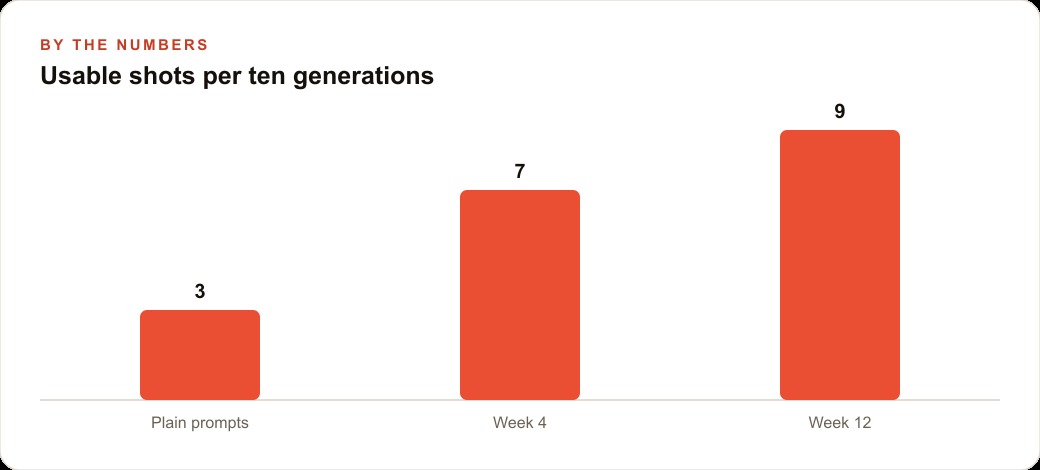
Here is how this plays out for an e-commerce store with 50 products and no in-house photographer. Before JSON prompting, the store was generating images with plain text prompts and getting roughly three usable shots per ten generations. Unusable outputs included wrong product shapes, mismatched label colors, garbled text on labels, and scenes that clashed with the brand aesthetic. The owner was spending significant time reviewing and rejecting outputs, which largely offset the time saved by not booking a photographer.
The new workflow starts with building the brand skill: a markdown file encoding the lighting style (soft diffused top light, slightly warm), the background treatment (clean white or muted neutral surface), the aspect ratio (1:1 for the product grid, 4:5 for Instagram feed ads), and the negative prompt list (no text clutter, no distracting props, no oversaturated colors, no distorted product shapes). That skill file gets saved into the project.
For each product, the owner uploads the supplier photo and writes a short plain request: "studio shot of this bottle on a kitchen counter, lifestyle ad feel." The AI expands that into a full JSON prompt using the brand skill, sends it to Nano Banana 2, and returns an image. The output matches the brand style because the skill enforces it. The product shape and label are recognizable because the image-to-image reference holds them in place.
The owner generates three style variations for the hero product, picks the one that matches the brand vision, saves that exact JSON as the standard brief, and runs all 50 products through the same brief with their individual image-to-image references. The result is a complete, consistent product catalog with matched lighting, matching backgrounds, and recognizable product details, produced in an afternoon rather than a week-long photo shoot.
The usable output rate goes from three per ten generations to nine per ten, because the JSON brief eliminates the variables the model was guessing at. The time spent reviewing and rejecting outputs drops proportionally. The output quality is consistent enough to go directly into the product grid, the ad account, and the email campaigns without additional editing. That is the practical value of structured prompting: the method changed, the model did not, and the output went from mostly unusable to mostly production-ready.
That is exactly what we do at AI DOERS. Book a private 30-minute call with Madhuranjan Kumar and we will map the fastest path to it for your specific business.
Book your call →
Madhuranjan Kumar
Madhuranjan Kumar brings 20 years of performance-marketing experience and has managed over $200 million in Facebook ad spend for brands across the United States and beyond. His expertise spans the full modern marketing stack: Meta, Google Ads, TikTok, email automation, CRM, and the websites that hold it together. At AI DOERS he turns that track record into lead-generation systems for businesses across every industry.