
Computer Controlling AI Agents And The Universal Web Scraper You Can Build Today
A new class of AI agent uses a browser like a human, so it can work on any site, even ones with no API. The most practical thing you can build with it right now is a universal scraper.

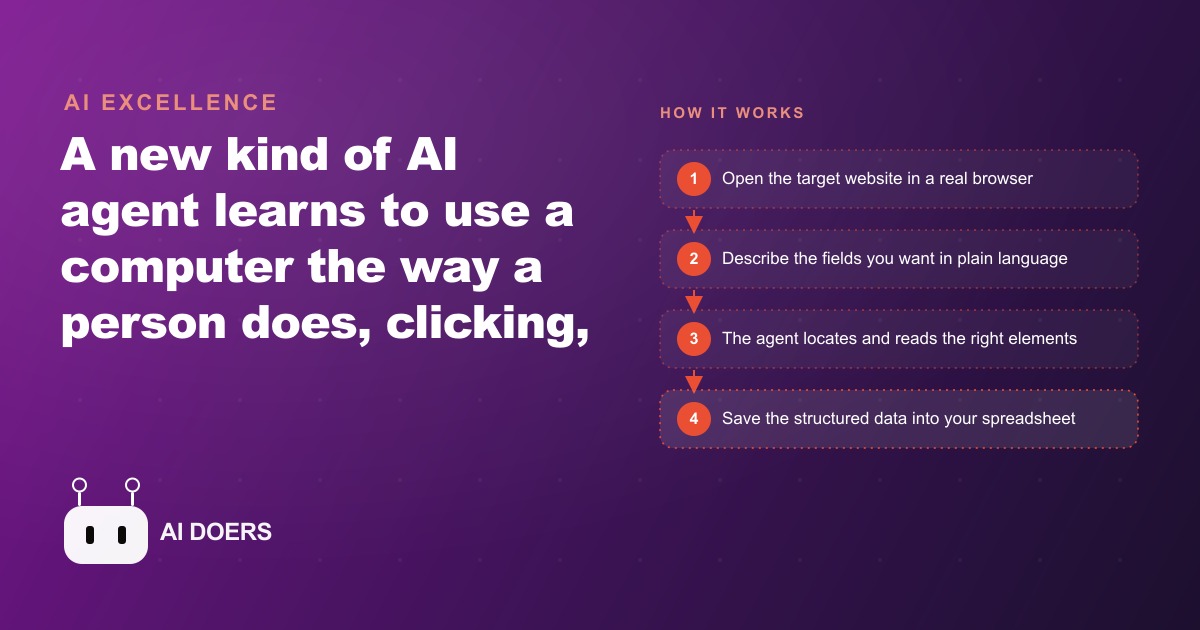
A universal web agent that never needs a custom API for each website just became a practical business tool. I am Madhuranjan Kumar, and I want to be direct about what that sentence means and what it does not mean, because the gap between the two is where most teams either miss the opportunity or waste months building something that breaks in week two.
For years the assumption baked into every automation project was simple: if you want software to talk to a website, the website needs to cooperate by providing an API. An API is a formal door. The website leaves it open, tells you where to knock, and gives you a key. Without that door you were locked out. You could write a scraper in Python that hunted for specific HTML tags on the page, but those scrapers broke the moment the website changed its layout and they required a separate build for every new site. The dream of truly universal web automation was on hold.
That assumption is now gone. A new class of AI agent does not need the API door. It walks up to the front window, looks in, understands what it sees, and operates the site using the same controls a human would. Click, scroll, fill in a field, read the result, move to the next step. The agent behaves like a person sitting at a keyboard, which means it can work on any site that a person can use, including the hundreds of millions of websites that have never published an API and never will.
The API assumption that locked most of the internet out of automation is now obsolete
The scale of this shift is worth pausing on. The internet contains well over one billion websites. The number that publish formal, documented APIs for external use is a tiny fraction of that total. Your local supplier's inventory page has no API. Your competitor's pricing page has no API. The regional permit database you check every week has no API. The niche job board that posts listings before they appear anywhere else has no API. All of these were inaccessible to software automation in any reliable form until now.
The new class of browser-using agent changes that relationship entirely. Instead of waiting for the website to cooperate, the agent cooperates with the website on the website's own terms. It reads what is on the screen, identifies the element it needs, and interacts with it. The result is that data and tasks that were locked behind human labor are now candidates for automation.
This is a bigger infrastructure shift than it sounds. The value of any automation tool has always been proportional to the number of systems it can reach. A tool that connects to fifty popular APIs is useful. A tool that can work on any website ever built is a different category of thing entirely.
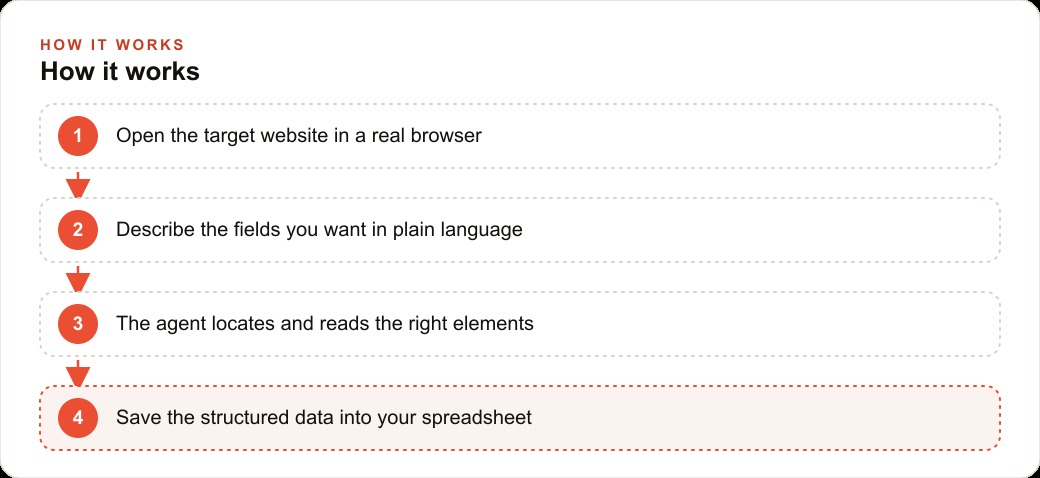
How a browser-using agent actually sees and operates a page it has never visited before
Understanding why this works at a technical level helps you set appropriate expectations about where it succeeds and where it struggles. There are three main approaches that teams use today, and most production systems combine at least two of them.
The first approach uses the accessibility tree. Every modern browser maintains a structured representation of the page that is designed for screen readers and assistive technology. It strips out visual decoration and exposes the underlying semantic structure: buttons, input fields, links, tables, headings. An agent reading the accessibility tree sees the page as a clean hierarchy of interactive elements rather than a mass of CSS and JavaScript. This approach is fast and reliable when the page is built with accessibility in mind, which well-maintained applications usually are.
The second approach uses screenshots with coordinate mapping. The agent takes a screenshot of the page, processes it as an image, identifies the visual location of the element it wants, and translates that into screen coordinates for the browser to click. This works on pages that are visually well-structured even if the underlying code is messy. It handles legacy interfaces and custom-rendered components that the accessibility tree misses, at the cost of added latency and occasional misidentification.
The third approach combines both signals. The agent reads the accessibility tree to understand the semantic structure, takes a screenshot to verify what the page actually looks like, and uses both together to make a more confident decision about what to click. Most leading implementations today use this hybrid approach because neither alone is sufficient for the full range of real-world pages.
Speed is the first real constraint, and the arithmetic tells you where it matters
A browser-using agent completes tasks through many sequential steps. Logging into a website, navigating to a specific page, reading a table, extracting ten rows of data, and moving to the next page might require fifteen to twenty individual actions. Each action takes time. A task that a fast human could complete in thirty seconds might take the agent two to three minutes because the agent waits for each page load, processes the result, decides on the next action, and then executes it.
For workflows where you need thousands of records collected quickly, this speed gap is a real constraint that shapes your design decisions. For workflows where the alternative is a person doing the same task manually over several hours, two to three minutes per site is still a dramatic improvement. The speed limit hurts most when you need near-real-time data and helps least when you are comparing it against zero automation at all.
Scraping workflows tend to be speed-tolerant precisely because you can run them in off-hours. A property manager who needs fresh rental data by 8am can run the scraping agent overnight and arrive to a completed spreadsheet. Speed is a constraint but not a blocker for most practical use cases.
Accuracy drops on dynamic pages, and that constraint shapes your project list
Modern websites frequently update their content in real time, show different layouts to different users based on A/B tests, require scroll-triggered loading for content that sits below the fold, or display modal dialogs that must be dismissed before the main content is accessible. Agents handle many of these situations, but accuracy drops on pages that behave unpredictably between visits.
A page that changes its layout between Monday and Tuesday will confuse an agent that learned the Monday layout. A site that puts a cookie consent popup in front of the content on first visit but not on subsequent visits requires the agent to handle both states. A results page that shows different ordering depending on the user's IP address will produce inconsistent output unless the agent normalizes for that variation.
Human verification remains necessary for high-stakes extractions until the agent has demonstrated consistent accuracy on the specific page in question. The practical approach is to run a scraper ten times on the same page over five days, compare every output, and identify where the variation comes from before deciding whether the workflow is reliable enough for production use.
Task completion on long-horizon processes is still the frontier
An agent asked to complete an end-to-end process, such as finding a contractor, reading their availability, filling out a contact form, and confirming a booking, may complete four of those five steps successfully but loop or stall on the fifth. The agent has no awareness of being stuck. It will keep trying variations of the same action rather than recognizing that it needs to escalate or stop.
Long-horizon task completion remains an active research problem. The progress has been rapid and will continue, but it is not yet reliable enough for unattended mission-critical workflows that span many sequential steps across multiple pages. The sweet spot today is workflows with a clearly defined endpoint, a small number of steps, and a predictable page structure for each step.
Scraping sits well inside that sweet spot. Read this page, extract these fields, move to the next page. The endpoint is clear, the steps are few, and the structure of each page is known in advance. That is why scraping is where the technology earns its keep right now.
Web scraping is where the reliability equation already works in your favor
Scraping is fundamentally a reading task, not a multi-step execution task. You are extracting data, not completing a transaction. Each page visit is largely independent. If the agent fails on one page, it moves to the next and you catch the gap in your output rather than in a crashed workflow. The failure mode is a missing row in a spreadsheet, not a broken purchase process.
Scraping is also repeatable in a way that makes accuracy issues manageable. The first time you run a scrape on a new site, you verify the output against the source manually. Once you confirm it is accurate, you can run it on schedule with confidence because site structure changes infrequently. You build confidence through one-time verification rather than hoping the agent handles every edge case on every run.
The economics are clear. Hiring a person to manually collect data from thirty competitor websites every week is expensive and boring work that creates turnover. Running a browser agent to do the same thing costs a fraction of that and runs without fatigue. The return on investment becomes visible within the first two to four weeks of operation for any team that was collecting this data manually before.
The element locator tool is the specific capability that changes reliability on production scrapes
One particular tool that makes these agents meaningfully more reliable is the element locator. Rather than asking the agent to identify what to click or read through general reasoning about the page, the element locator returns the precise identifier for the element the agent needs to interact with. The agent calls the locator, receives a specific reference to the input field or data cell, and uses that reference to act.
This matters because the biggest source of errors in browser automation has always been selecting the wrong element. On a complex page with dozens of links and buttons, selecting the correct one through visual reasoning alone is a meaningful challenge, especially when page layouts shift between visits or when multiple elements look similar.
The element locator eliminates this class of error for the elements it covers. The agent stops guessing and starts working from a precise reference. Think of it as the difference between telling someone "click the blue button near the top" and "click the button with the ID checkout-submit." The second instruction never fails due to visual ambiguity. The locator brings that same precision to an agent navigating a site it has never seen before.
A property management team that built a unified rental database across twelve portals without a single API deal
The most immediate business value from this technology is visible in operations that currently require someone to spend hours collecting information from multiple websites manually. Property management is a clear illustration because the problem is both common and expensive.
A property management office monitors rental listings across a dozen different portals. One portal shows one set of data. Another shows a different set. Local property sites show a third. The team needs to know, for any given neighborhood, what is available, at what price, with how many bedrooms, how many square feet, and when the unit is available. Collecting that information manually for even a single neighborhood across twelve portals takes several hours each week.
With a browser-using agent, the workflow changes. The team writes a single query that describes the fields they want: address, monthly rent, number of bedrooms, square footage, available date. The agent opens each portal, navigates to the relevant search results for the target neighborhood, extracts the listed fields from each result, and pushes everything into a shared spreadsheet. The same query runs on every portal, even though each portal has a completely different layout and none of them shares an API.
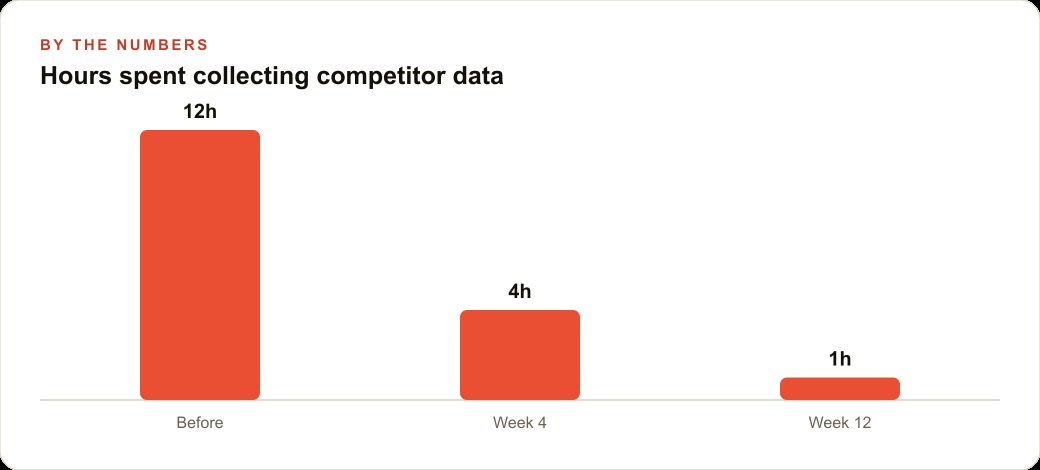
The output is a unified competitive rental database built automatically. The team updates it daily or weekly by running the agent again. The hours previously spent on manual collection collapse into the time it takes to review the output. Staff attention shifts from data collection to data analysis, which is where their judgment actually adds value.
The accuracy of the output depends on how carefully the initial extraction was verified, and any portal that introduces a major layout change will require a quick adjustment to the query. But those are manageable maintenance tasks, not fundamental obstacles. The operational gain is real and available today.
Your next competitive advantage may come from a site that offers no API at all
The business implication worth ending on is not about scraping specifically. It is about the category of competitive advantage that becomes available when the API constraint disappears.
Every industry has data that lives behind interfaces rather than behind APIs. Supplier pricing. Subcontractor availability. Local permit records. Competitor product catalogs. Regulatory filing databases. Market pricing on niche platforms. Until now, accessing any of this data systematically required either an API deal with the source, a large team collecting it manually, or a fragile custom scraper that broke constantly. Most businesses chose none of the above and simply went without the data.
A business that starts systematically collecting this data now, using browser agents that work reliably for the scraping use case, builds an information advantage that competitors who wait will not be able to close quickly. The data compounds. The analysis built on top of it compounds. The decisions made with that analysis compound. By the time the rest of the market catches up to the tooling, the early mover has months or years of structured data that took no manual labor to collect.
That is what "practical business tool" means in the opening sentence of this piece. Not a theoretical capability. Not a research prototype. A thing you can put to work this week on the specific problem of collecting structured data from websites that will never give you an API, starting to build an information advantage that actually changes outcomes.
The speed, accuracy, and task-completion limits I described are real and will keep improving. For scraping, they are already manageable. Start there, verify your outputs, and expand from that foundation as the technology matures under you.
That is exactly what we do at AI DOERS. Book a private 30-minute call with Madhuranjan Kumar and we will map the fastest path to it for your specific business.
Book your call →
Madhuranjan Kumar
Madhuranjan Kumar brings 20 years of performance-marketing experience and has managed over $200 million in Facebook ad spend for brands across the United States and beyond. His expertise spans the full modern marketing stack: Meta, Google Ads, TikTok, email automation, CRM, and the websites that hold it together. At AI DOERS he turns that track record into lead-generation systems for businesses across every industry.