
A Weekend with Clawdbot: The Local AI Assistant That Runs Your Tools
Clawdbot is an open-source assistant that runs on your own machine, connects to your apps, and actually does the work. Here is what it can do, what it costs, and how a business should approach it.

The Discovery: What Running Locally Actually Means for a Practice That Handles Patient Data
Three weeks ago Madhuranjan Kumar spent two weeks helping a dental practice evaluate an open-source local AI assistant called Clawdbot, and those two weeks produced some of the clearest lessons he has seen on how businesses should actually introduce this kind of tool. The first conversation was not about what the assistant could do. It was about what the word "local" means inside a practice where patient records, appointment histories, and clinical notes are confidential by law.
The answer is straightforward once you see it. Clawdbot runs on a machine the practice owns. The instructions you give it, the messages it reads, the tasks it completes: none of that leaves the building unless you explicitly configure it to. Most AI assistants send your data to a cloud server the moment you type a message. Clawdbot does not. The model processes on the hardware in front of you. For a practice that fields dozens of messages a day referencing patient names, appointment details, and treatment questions, that distinction is not academic. It determines whether the tool is usable at all under a normal standard of professional responsibility.
The practice's office manager had been reading about Clawdbot in an AI newsletter and was curious but cautious. She had two concerns: the data question, which the local architecture resolved, and the cost question, which would take the first week to understand fully. Getting both answers required actually setting it up and watching it run in a real environment rather than estimating from a product description.
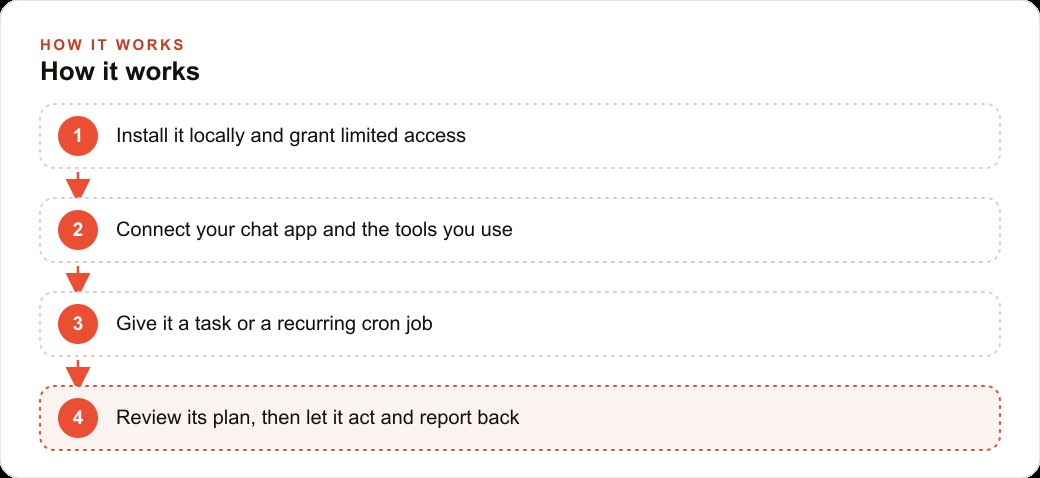
The setup took about three hours. During configuration, you grant the assistant access to only the systems you choose. That access decision is the first and most important choice a healthcare practice has to make before it starts using any AI tool on real operational data. In this case, the decision was conservative and deliberate: the general inquiry email inbox would be connected, and everything else would stay offline.
The Cautious Setup: One Inbox, Nothing That Touches Clinical Records
The practice connected Clawdbot to a single channel: the general inquiry email inbox that handled new patient questions, appointment requests, billing queries, and vendor pitches. The clinical record system, the appointment scheduling software, and the patient portal stayed completely disconnected. That boundary was non-negotiable and was agreed on before the first line of configuration was written.
The standing instruction was narrow. Clawdbot's only job was to read incoming messages during office hours, sort them into categories (appointment request, billing question, vendor pitch, general inquiry), and prepare a draft reply for the office manager to review and approve before anything went out. No messages left the practice without a human reading them first. The assistant could draft. It could not send. That approval requirement was not a temporary restriction to relax later. It was the permanent design.
Clawdbot connected to the inbox through a messaging interface the staff used through Slack, which means the assistant received new message alerts, drafted replies, and posted them into a Slack channel where the office manager could review and approve with a click. The front desk staff never saw the backend. From their perspective, approved replies were sent from the usual email address and the incoming queue stayed manageable. The first week's goal was not efficiency. It was learning how the assistant actually behaved on real messages from real patients and real vendors before extending its access or relaxing the review requirement.
This narrow scope matters more than most people building with AI tools acknowledge. A practice that connects an AI assistant to its scheduling system, its patient portal, or any system covered by healthcare privacy regulations, without careful expert review of the data implications, is taking a risk that does not need to be taken. The general inquiry inbox is a clean starting point because the stakes for any individual mistake are low and the value of triage is real and immediate.
The Cost Shock on Day One
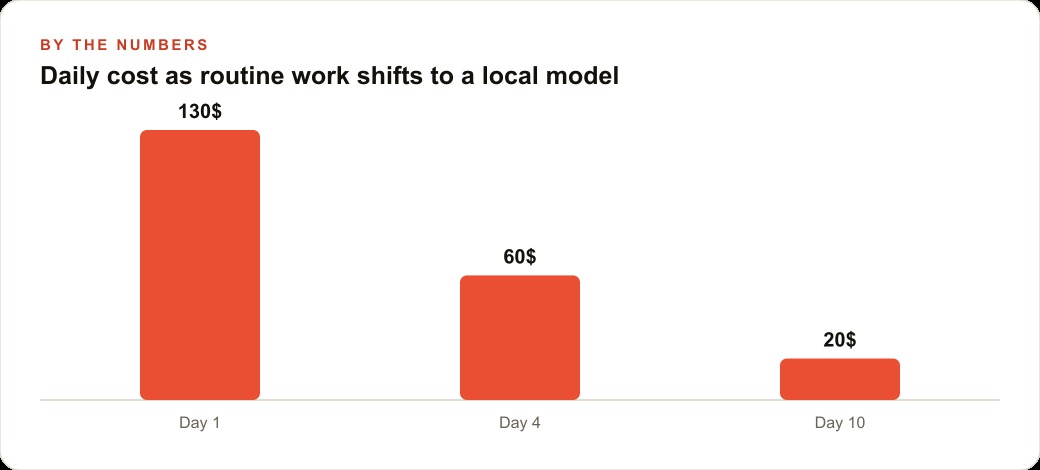
The first day of real operation produced an unwelcome number. By mid-afternoon, the API usage for the day was already at $55. By end of business, day one had cost $80 on the premium model the practice had selected for its stronger language handling.
That number surprised the office manager. She had expected the assistant to cost a few dollars a day. The gap between expectation and reality came from two factors. First, the premium model was being used for every single message, including vendor pitches that needed nothing more than a classification label. A sophisticated language model is expensive to run for a task as simple as deciding whether an email is from a patient or a supplier. Second, the assistant was loading more context than it needed for each classification. It was carrying a full summary of the practice's preferences and the full conversation history with every query, which drove token usage higher than it would have been if the context had been trimmed.
Both problems were diagnosable on day two. The solution to the first was model routing. The solution to the second was a tighter context rule. But before those fixes went in, day two and day three ran at roughly the same cost as day one. The practice was on track to spend well over $2,000 per month on a message triage tool, which was obviously not the plan. Getting to a sustainable cost required understanding where the tokens were actually going and making a deliberate routing decision based on that understanding.
What day one's cost actually proved was that using the most capable model for every task, regardless of task complexity, is the fastest way to run up an unexpected AI bill. Routine classification does not need premium reasoning capability. It needs fast, consistent pattern matching. The premium model's strengths: nuanced understanding of ambiguous language, careful tone calibration, handling of complex multi-part requests, are irrelevant for deciding whether an email is a vendor pitch or a patient question.
The Correction That Taught the Model to Distinguish Patient Messages From Vendors
The first week produced seven corrections. Three involved the assistant misclassifying vendor emails as potential patient inquiries, which resulted in draft replies that were warm and patient-focused when the message was actually a pitch from a dental supply company. Two involved the assistant misreading urgent messages as routine billing questions: the messages came from existing patients asking about follow-up prescriptions, a category the assistant had never been explicitly told to treat as high priority.
The remaining two corrections involved tone. The assistant was drafting replies to billing questions that were accurate but slightly formal in a way that did not match the practice's usual voice. A simple note in the correction that billing replies should use a warm and reassuring tone rather than a transactional one fixed that pattern.
The correction process is one of Clawdbot's genuinely useful features. When the office manager spotted a misclassification, she noted the correction in a simple feedback format, and the assistant updated its own classification notes. The first three vendor misclassifications produced a note that vendor emails typically include phrases such as "distributor," "bulk pricing," or "account representative" and rarely include a patient name or appointment reference. After that correction was logged, vendor misclassification dropped sharply. The remaining four corrections across the week each produced a similar note that the assistant could apply going forward.
This self-updating behavior is what separates a tool that gets better over time from one that makes the same mistake indefinitely. Each correction cost about five minutes to write and then compounded forward. By the end of week one, the assistant's accuracy on classification was materially better than it had been on day one. The seven corrections from the first week were not a sign of poor initial performance. They were the calibration cost of teaching the model how this specific practice's inbox actually looks.
The Routing Fix That Changed the Economics
The end of week one was the moment to address the cost. The practice had established which tasks the assistant handled well (classification, drafting standard replies, preparing appointment confirmation messages) and which tasks were being done by an expensive model when a cheap one would do fine (classification of vendor pitches, routine appointment acknowledgments, standard billing replies).
The routing fix separated the message flow by complexity. Any incoming message that the assistant could classify in a single pass using simple signals, things like "this is a vendor pitch" or "this is a standard appointment request," got routed to a lightweight local model that cost essentially nothing to run on the practice's own hardware. Only messages that required genuine interpretation (a patient describing a symptom, a message with ambiguous context, a draft reply that needed nuanced phrasing) went to the premium model.
The effect on cost was immediate and substantial. Day one had cost $80. After the routing fix was in place, the assistant was handling between 45 and 60 incoming messages per day and running at $8 per day. The work volume had not changed. The cost had dropped by 90 percent. The quality of the replies on complex messages was unchanged because those still used the premium model. The routine classification work, which accounted for the majority of message volume, now ran on local compute at near-zero marginal cost.
This routing principle applies to every business that uses AI at scale. The expensive model is not for everything. It is for the tasks where its capabilities actually matter. Developing the discipline to route by complexity rather than defaulting to the premium model for everything is the single change that most consistently produces a sustainable AI cost structure.
What Steady State Looked Like at Week Two
By the start of week two, the operation had settled into something close to its final shape. The assistant processed between 45 and 60 messages each day, classified them without significant errors, and prepared draft replies for the office manager's queue. The front desk recovered approximately 40 minutes per day that had previously gone to reading and sorting the inbox, triaging urgency, and drafting routine responses. That time went back to patients in the building.
Week two produced one correction, compared to seven in week one. The single second-week correction involved the assistant drafting a reply to a patient scheduling question that included a slightly outdated appointment slot phrasing. The office manager updated the standard phrasing in the assistant's notes and it applied correctly from that point forward.
The cost held at $8 per day. The practice could see from the usage logs exactly where each dollar was going, which messages triggered the premium model, and whether any unusual volume spikes warranted investigation. The two-week total API cost was approximately $104, which the office manager compared against the 8 hours of front-desk time she estimated the practice recovered over the same period. The math was favorable.
Two constraints held throughout the two weeks without exception. No message left the practice without human review. Nothing connected to the clinical records system. Both of those constraints were the reason the trial was a genuine evaluation of a useful tool rather than a liability exercise. The general inquiry inbox remains a clean starting point for any healthcare practice because the stakes for an individual mistake are low and the value of triage is real.
The Pattern That Makes This Repeatable
The dental practice trial illustrates the right way to introduce a capable but unfamiliar tool without creating the kind of surprise that ends an experiment before it delivers value. Start with the smallest useful scope. In this case, that was one inbox. Confirm the data-handling model before touching anything sensitive. In healthcare, that means local processing and explicit disconnection from clinical systems.
Let the tool run at real cost for a few days before trying to optimize, because you need to see the actual usage pattern before you can fix it intelligently. Document corrections as they happen, because the compounding value of a self-updating model only works if corrections get written down. Route by complexity from the moment the economics become clear.
The result after two weeks: an assistant triaging 45 to 60 messages per day, recovering 40 minutes of front desk time daily, producing one mistake in the second week versus seven in the first, and running at $8 per day after the routing fix. Those are numbers a practice can sustain indefinitely. More importantly, they were achieved without a single message going to a patient unsupervised and without touching any system that held clinical information.
The rough edges of this kind of tool are manageable when you design for them in advance. The businesses that get the most from local AI assistants are the ones that take the security and cost questions seriously before they start, write down every correction during the calibration week, and expand access only after trust builds over time. The two-week frame used in this trial is not arbitrary. It is long enough to see the real behavior of the tool on a diverse real-world sample, and short enough to keep the stakes low while the calibration happens.
That is exactly what we do at AI DOERS. Book a private 30-minute call with Madhuranjan Kumar and we will map the fastest path to it for your specific business.
Book your call →
Madhuranjan Kumar
Madhuranjan Kumar brings 20 years of performance-marketing experience and has managed over $200 million in Facebook ad spend for brands across the United States and beyond. His expertise spans the full modern marketing stack: Meta, Google Ads, TikTok, email automation, CRM, and the websites that hold it together. At AI DOERS he turns that track record into lead-generation systems for businesses across every industry.