
How I Turned Clawdbot Into an Always-On Executive Assistant
Clawdbot can run as a 24/7 assistant with its own accounts, a task board, and scheduled wake-ups, so it works on your backlog while you sleep. Here is how it works and how a small bakery could put it to use.

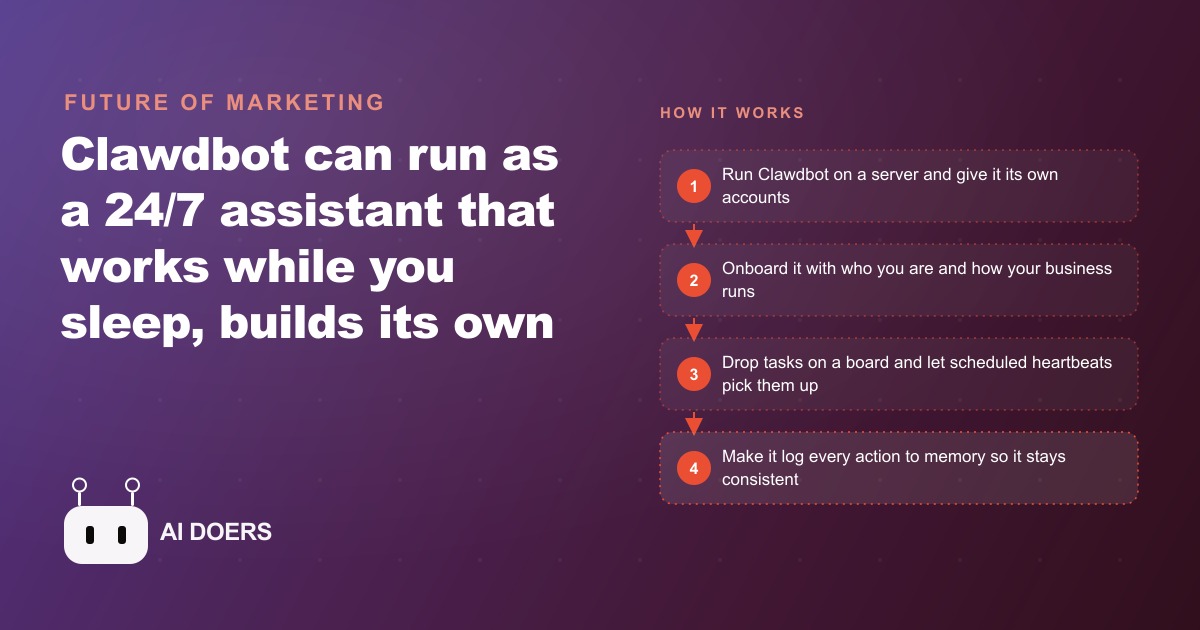
One night I gave an AI assistant a goal, told it I was going to sleep, and woke up to a finished first version of a small analytics dashboard. It had quietly broken the job into half a dozen tasks of its own and worked through them while I was offline. That single experience is what separates this kind of system from every chatbot you have used, and it is worth taking apart carefully, because the difference is not that the assistant is smarter. It is that the assistant has a presence. I am Madhuranjan Kumar, and I want to explain how an always-on assistant like Clawdbot actually works by pulling apart the four ideas that make it possible, then showing where the whole thing tends to break.
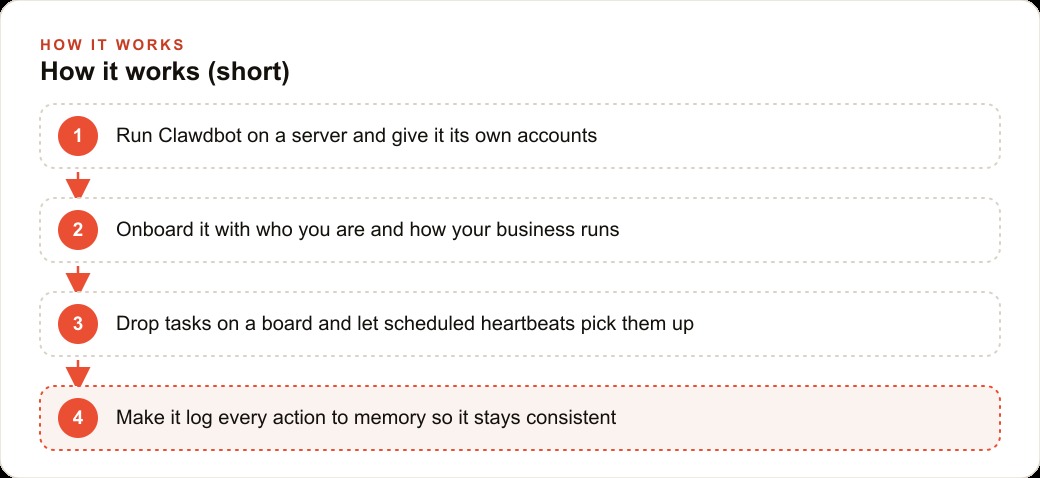
The reason this deserves a careful explanation rather than a hype tour is that the interesting part is architectural, not magical. An always-on assistant is not one clever feature. It is four ordinary pieces arranged so that their combination produces something that feels alive: its own accounts, a task board, scheduled wake-ups, and a memory made of files. Understand those four and how they interact, and you understand the entire category.
The first idea: it holds its own accounts, not yours
The most important design choice is also the least technical. The assistant gets its own email, its own drive, its own task accounts, rather than your logins. This sounds like a small detail and it is actually the whole safety model. You treat the assistant like a real hire. You forward it messages and CC it on things, exactly as you would a junior team member, and because it only has its own credentials, it can never delete your data or touch anything you did not deliberately share with it.
This reframing matters more than any capability. The instinct people have is to hand a powerful assistant their master accounts so it can do everything, and that instinct is a mistake. A brand-new human assistant does not get your bank logins on day one, and this one should not either. Give it its own accounts, mostly read access to start, and tight limits, and inside those rails it can save you real time every day without ever being able to cause real damage. The separation of accounts is what turns a scary autonomous system into a manageable one.
The second idea: a board makes the invisible visible
The second piece is a simple dashboard, and its job is psychological as much as functional. A board shows what is in the backlog, what is in progress, and what is done, plus a status light indicating whether the assistant is idle, thinking, or busy. That visibility is what makes an autonomous system tolerable to live with. Without it, you have a black box doing unknown things with your accounts, which no sane owner would accept. With it, you can glance over at any moment and know exactly what the assistant is doing and what it plans to do next.
The board is also the primary way you interact with it. Dropping a card on the board, or a note in its log, is enough to make the assistant pick the item up and either record it to memory or act on it. Natural language is the only interface. You do not configure workflows in a settings panel. You write what you want the way you would write it to a person, and the board becomes the shared surface where you and the assistant coordinate. That combination, visible state plus plain-language input, is what makes it feel like working with a colleague rather than programming a machine.
The third idea: heartbeats turn a chatbot into a presence
Here is the piece that actually creates the always-on quality, and it is the one people miss. The assistant runs on a schedule, a wake-up every so often, say every thirty minutes, that the system calls a heartbeat. Each heartbeat is a fresh start where the assistant checks the board for new notes, runs any daily routines, and picks up the next task in its backlog. That ambient, scheduled presence is the entire difference between a chatbot that only responds when you type and something that feels like it is genuinely working for you.
The heartbeat is also how the overnight magic works. You give the assistant an ordered checklist, and you tell it that on each heartbeat it should read the current state, do the next chunk of work, save its progress, then stop so the next wake-up can continue from a clean slate. Wake, read state, do one chunk, save, stop, repeat. That loop, running every half hour while you sleep, is how a job you handed off at midnight is a working first version by morning. It is not doing anything superhuman in a single burst. It is doing modest amounts of work, patiently, over and over, without needing you present to prompt each step.
The fourth idea: memory is a set of files, and it is the weak spot
The fourth piece is the one that determines whether the whole system is trustworthy or maddening, and it is genuinely the weak spot. The assistant wakes up with no memory of past conversations. It knows only what it has written into its files. There is an identity file for who it is, a profile file for who you are and how your business runs, and logs where it records daily notes, long-term lessons, and project details. If you do not tell it to write things down, it forgets.
I want to be blunt about this because it is the number-one reason people give up on these systems. I have watched an assistant lose the thread of a conversation within minutes, not because it is broken, but because it never wrote the important part down. The habit that saves you is a single repeated instruction: log everything you do, and save important facts to the right file. This is also why the plan-first pattern matters so much. You have the assistant write a plan into a document, then tell it to execute that document. The file gives it the context it needs across its forgetful wake-ups, and it saves you from repeating yourself every heartbeat. Once you internalize that memory is a discipline you enforce rather than a feature you get for free, the whole system becomes reliable.
How the four pieces work together
Step back and the interaction becomes clear. You message the assistant, usually through a chat app, and it reads its instructions, figures out what you want, and either acts immediately or queues the work onto its board where you can see it. The heartbeat wakes it on schedule to work through that board. Its own accounts keep the blast radius small so nothing it does can hurt you. And its file-based memory, if you enforce it, keeps it consistent across every forgetful restart. Remove any one of the four and it falls apart. Without its own accounts it is dangerous. Without the board it is opaque. Without heartbeats it is just a chatbot. Without disciplined memory it is unreliable. The magic is entirely in the combination.
A worked example: the bakery that runs its back office overnight
Let me make it concrete with an illustrative example. Picture a neighborhood bakery owner who is on the floor before dawn and has no time for the back office. Here is how the four pieces would serve that owner.
First, its own accounts. The assistant gets its own email and its own spreadsheet, never the owner's master logins. Then a scheduled routine, running on the morning heartbeats, pulls yesterday's sales into a simple sheet, flags which items sold out early, and texts the owner a two-line summary before opening so they know what to bake more of today. Second, the board and plain-language input. The assistant watches the shared inbox, and when a catering inquiry or a custom-cake request arrives, it drafts a friendly reply with standard pricing and lead times, then waits for the owner to approve before anything goes out. The owner drops a note on the board like plan a holiday gift box, and the assistant turns that into a small checklist and works through it on its heartbeats. Third, memory. Every decision, the standard pricing, the reorder thresholds, the owner's preferences, gets logged to the right file so the assistant stays consistent instead of asking the same questions every morning.
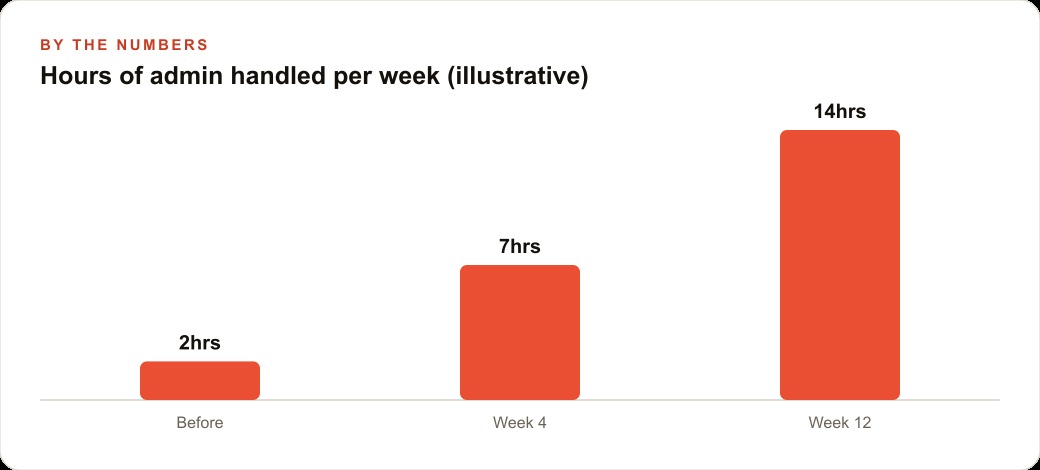
Now the illustrative numbers, meant to show the shape rather than promise a result. Before setting this up, the owner recovered maybe two hours a week from the routine paperwork they managed to touch. By the fourth week, with the morning sales routine and inbox drafting running, that might be closer to seven hours a week handled by the assistant. By the twelfth week, with more routines added and memory well-tended, it might reach fourteen hours a week of admin carried off the owner's plate. Those hours go back into baking and customers. The bakery captures a lot of its custom orders through Facebook and Instagram ad campaigns and its site, so an assistant that never lets an inquiry sit unanswered directly protects revenue, and the drafts and order lists it produces flow through the bakery's CRM and website stack where the owner keeps the final say.
How to stand up a first version safely
If you want to try this, the setup follows straight from the four ideas. Host it somewhere contained, a small private server or a dedicated mini machine, never your main computer, so its reach is limited by design. Then spend real time onboarding it. Talk to it for an hour, tell it who you are and how the business runs, and ask it to interview you about anything it does not know, because that conversation becomes the profile it leans on later. Create its own accounts and keep every secret in an environment file, never pasted into chat. Give it mostly read access at first and add the ability to act only where you are comfortable. Build the proactive habit by asking what currently takes you twenty minutes that it could turn into a two-minute review. And lean on the two habits that make or break it: plan first by having it write a plan into a document then execute that document, and insist it log every action so it survives its own forgetful wake-ups. Watch the cost too, since running on a paid model across millions of tokens adds up, so use a cheaper model wherever quality allows.
The honest cost, and the trap most people fall into
Before you rush to set this up, there are two practical realities worth internalizing, because they are where enthusiasm usually crashes. The first is cost. An always-on assistant is not free to run, because every heartbeat and every task consumes model usage, and across millions of tokens on a paid model that adds up faster than people expect. The fix is not to run it less, it is to run the right model for the right job. Use a cheaper, faster model for the routine heartbeats and the simple checks, and reserve the expensive, capable model only for the genuinely hard reasoning. Treating every wake-up as if it needs your smartest model is how a useful assistant turns into a surprising bill.
The second reality is the memory trap, and it deserves repeating because it is the single most common reason people abandon these systems in week two. They set it up, it dazzles them for a day, and then it starts forgetting things they clearly told it, and they conclude the technology is not ready. The technology is fine. The setup was incomplete. Because the assistant wakes with no memory and knows only what it wrote to its files, memory is a discipline you have to enforce with a standing instruction to log every action and save every important fact to the right file. Owners who internalize that from day one get a reliable colleague. Owners who assume memory is automatic get a frustrating goldfish. The difference is entirely in whether you treat the log as optional. It is not. It is the backbone that holds the whole always-on illusion together, and skipping it is the mistake that quietly sinks most first attempts.
None of this is out of reach for a determined owner with a free weekend, and the payoff is an assistant that quietly carries a real chunk of your admin every single day. You can absolutely stand up a first version yourself. If you would rather have the accounts, permissions, routines, and memory wired up cleanly so you are not debugging a forgetful assistant in the middle of a busy week, that is exactly the kind of setup I do for clients, and you can bring me in to hand it to you ready to run.
That is exactly what we do at AI DOERS. Book a private 30-minute call with Madhuranjan Kumar and we will map the fastest path to it for your specific business.
Book your call →
Madhuranjan Kumar
Madhuranjan Kumar brings 20 years of performance-marketing experience and has managed over $200 million in Facebook ad spend for brands across the United States and beyond. His expertise spans the full modern marketing stack: Meta, Google Ads, TikTok, email automation, CRM, and the websites that hold it together. At AI DOERS he turns that track record into lead-generation systems for businesses across every industry.