
Claude Cowork: An AI Agent for All Your Everyday Work, Not Just Code
Anthropic released Cowork, an AI agent that handles general computer tasks the way coding agents handle code. It plans, executes step by step, browses the web, and asks permission before anything risky. Here is what it means for a small business.

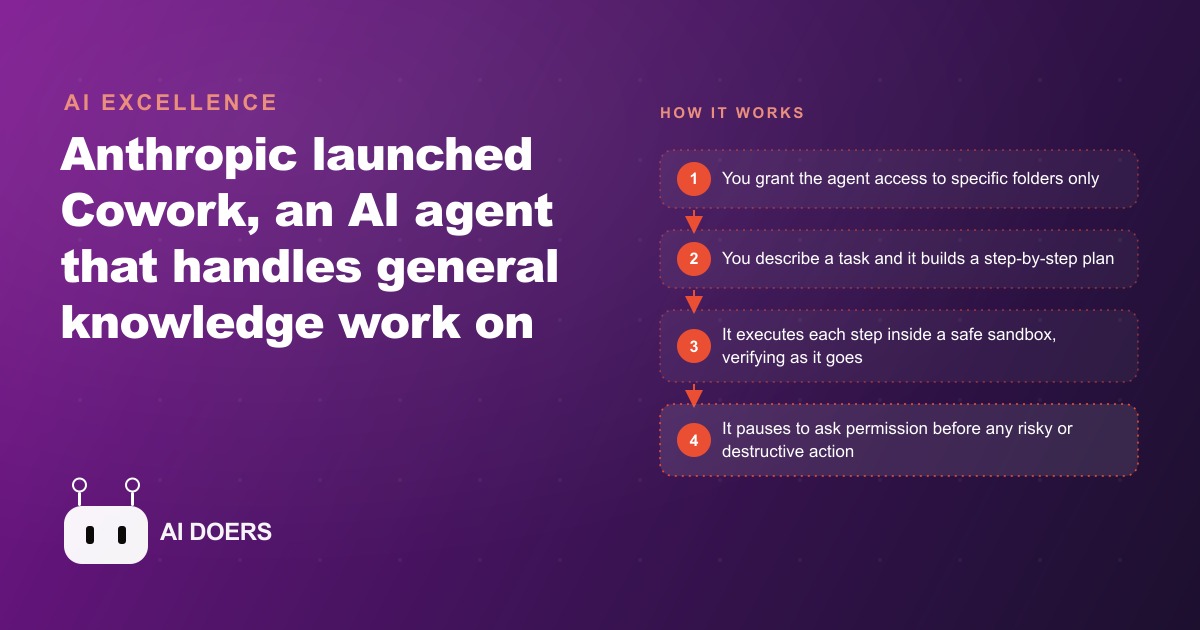
Claude Cowork just moved AI agents out of the code editor, and small businesses are the real winners
For a while now, developers have used AI coding agents that get access to a folder, write and edit files, and iterate on a project step by step. Anthropic just asked the obvious question: why should that stay limited to code? Cowork is an AI agent that does general knowledge work on your computer, and I am Madhuranjan Kumar, here to break down what it actually does through the features that matter to an owner rather than an engineer. It is early and a little raw by the team's own description, runs on Mac, and requires the top subscription tier, so it is not for everyone yet. But the design choices show real thought about ordinary users, and these are the eight that decide whether it earns a place in your week.
1. It plans first, then executes step by step
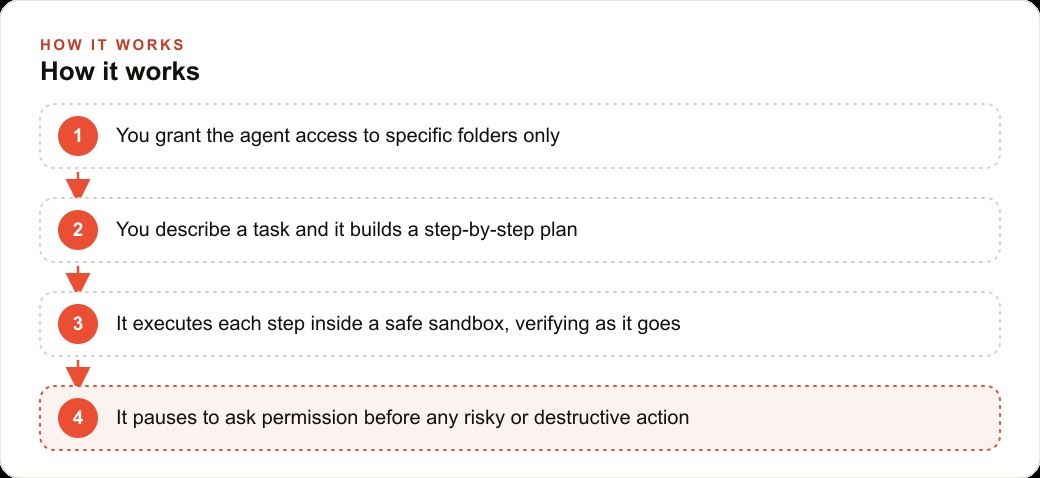
The core behavior mirrors a coding agent. You give it a task, it builds a plan, then it works through that plan one step at a time and verifies each step as it goes. Instead of spitting out a single guess, it reasons through the job in front of you, so you can follow the logic and stop it if it heads the wrong way. A simple demo is asking it to organize a cluttered desktop, where it reads what is there and sorts everything into a handful of clean, well-labeled folders almost instantly. Watching it reason is not a gimmick. It is what lets a non-technical owner trust the output.
2. It runs inside a safety sandbox
Cowork runs inside an isolated virtual machine, which is a sandbox that keeps it from roaming across your whole computer. This is the guardrail that matters most for people who are not developers, because the fear of an AI loose on your entire machine is exactly what stops most owners from trying one. A sandbox turns that fear into a boundary. The agent works in a walled-off space, and a mistake stays contained rather than touching everything you own. For a non-technical user, this single feature is the difference between curiosity and confidence.
3. It only touches the folders you grant
Beyond the sandbox, you grant the agent access to specific folders only, so it does not see your whole machine unless you allow it. Fine-grained access keeps you in control of exactly what it can read and change. This is how you dip a toe in safely: point it at one messy downloads folder and nothing else is exposed. As your trust grows, you widen access deliberately rather than handing over the keys on day one. Control that you dole out on your own schedule is control you actually keep.
4. Browser automation comes built in
Cowork can open a browser, navigate websites, complete a task, and come back when it is done, all out of the box. Routine online chores become hands-off. This is the feature that turns it from a file organizer into a genuine assistant, because so much small-business busywork lives in a browser: checking a portal, pulling a report, filling a form. An agent that can drive the web on your behalf reaches the work that never had an official connection to automate against, which is most of the annoying work.
5. You can queue tasks like a to-do list
You do not have to wait for one job to finish before adding the next. Stack instructions and Cowork works through them like a queue. This sounds minor and is not, because it changes how you use the thing. Instead of babysitting one task at a time, you brain-dump several jobs in the morning and let the agent grind through them while you do the work only a human can do. A queue turns an agent from a tool you operate into a worker you delegate to.
6. It asks permission before anything risky
Before doing anything significant or destructive, like deleting folders or making major changes, Cowork pauses and asks for your permission. That checkpoint is the guardrail that protects less technical users from costly mistakes. Combined with the sandbox and the folder-by-folder access, it forms a three-layer safety net: the agent is boxed in, limited to what you granted, and required to stop at any irreversible threshold. Those three together are precisely the guardrails a non-technical owner needs to feel safe handing over real tasks rather than toy ones.
7. It connects to the services you already use
Cowork connects to services you already rely on, like cloud storage, so it can work with your real files rather than a walled-off copy. That connection is what makes it useful instead of academic. The whole point of a work agent is that it operates on your actual documents and accounts, and it does so while staying inside the permissions and prompts above. Real files, real accounts, real work, with the guardrails intact.
8. Stay alert to prompt injection
Here is the honest caution, and it belongs on the list because ignoring it is the real risk. Because Cowork can read content from the internet, there is a genuine risk of prompt injection, where malicious content on a page tries to alter the agent's plan. The team has built defenses, but these systems are not perfectly predictable, so you supervise rather than blindly trust. Treat the agent as powerful but watched, especially early, and keep an eye on what it does when it reads from the open web.
Putting it to work: a gym
Features are abstract until you drop them onto one business, so picture a gym. The owner juggles a surprising amount of computer busywork, and Cowork could quietly absorb a lot of it.
Start with the weekly file mess. New member forms, waivers, progress photos, and class sign-up sheets pile up in a downloads folder with random names. You point the agent at that one folder, grant access to nothing else, and ask it to sort everything into clean, labeled folders by member and by month, the same way the desktop demo works, and you review the result before it commits. From there it gets more useful. The browser automation logs into the booking platform and pulls this week's class attendance into a simple summary, so the owner sees which sessions are full and which are dying without checking each one by hand. It drafts a batch of follow-up messages for members who have not checked in recently, queued one after another, then pauses and asks before actually sending anything. It takes a coach's rough notes and formats them into a clean training plan document.
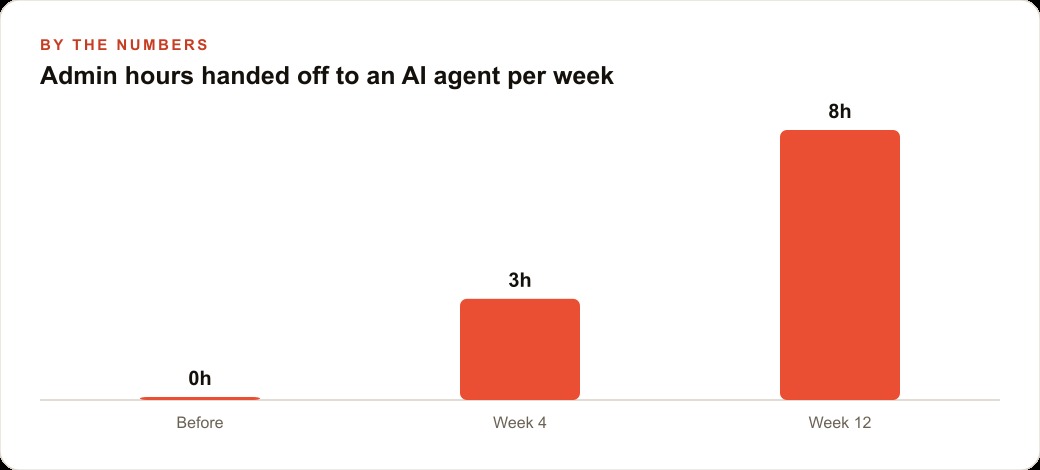
Put a number on it. If that scattered admin currently eats eight hours a week of the owner's time, and Cowork absorbs the bulk of it over the first few months, that is close to a full workday returned every week, or more than thirty hours a month back on the gym floor instead of behind a screen. Those follow-up messages the agent drafts can drop into the CRM and website stack so no lapsed member slips away, and the time the owner reclaims is time that can go into the Facebook and Instagram ad campaigns that actually fill the classes, or into the content that feeds SEO and organic search. Because you grant only the folders and accounts you choose, and it asks before any real action, the owner stays firmly in control while the agent eats the repetitive middle work.
Where Cowork still falls short today
It would be dishonest to sell this as finished, because the team themselves call it early and a little raw, and that framing is the right one to hold. Right now it runs on Mac and requires the top subscription tier, which rules out a lot of small operations on cost alone. It is new enough that its judgment on ambiguous tasks is still uneven, so the plan it builds is not always the plan you would have built. And the prompt-injection risk is real: content it reads on the open web could try to redirect it, and while defenses exist, they are not perfect. These are not dealbreakers, they are the honest edges of a first release.
The reason to pay attention anyway is the trajectory. The first coding agents felt exactly this raw at launch, and they matured quickly into tools that changed how software gets built. A general work agent that can plan, browse, and act, inside a sandbox with folder-level permissions and a permission prompt before anything risky, is clearly heading somewhere useful. Watching it now, on safe tasks, is how you build the judgment to use it well when it matures, rather than scrambling to learn it later. Treat this stage as a chance to get familiar cheaply, not as a finished product to bet the business on.
A thirty-day plan to bring it in safely
If you want a concrete on-ramp, spread it across a month so trust builds in step with access. In the first week, point it at one messy folder, grant nothing else, and let it do the desktop-style organizing task while you watch, reviewing before it commits. In the second week, connect one service you already use, like cloud storage, and let it work with real files on a low-stakes job, still with the permission prompts firmly on. In the third week, introduce a browser task, such as logging into a portal and pulling a weekly summary, and check its output against reality before you rely on it.
Only in the fourth week would I let it draft anything that reaches a customer, and even then queued behind a human approval so nothing sends without a glance. By the end of the month you have a clear map of where the agent is reliable and where it still needs a chaperone, a few proven workflows running the repetitive middle work, and the guardrails, sandbox, folder permissions, and permission prompts, all exercised rather than assumed. That is the pace that turns a raw but promising tool into real reclaimed hours, without ever handing it more control than it has earned. Power that you grant in careful steps is power you can always take back.
The delegation mindset is the real unlock
The feature list is impressive, but the shift that actually changes how a small team works is subtler than any single capability. When an agent plans, executes step by step, queues multiple jobs, and asks before anything risky, you stop operating a tool one command at a time and start delegating the way you would to a junior assistant. You describe the outcome, hand over the folders and accounts it needs, and let it work through the queue while you do the things only a person can do. That change from operating to delegating is what gives a tiny team some of the leverage a much larger company gets from a back office.
For a small business, that leverage is the whole point, because you usually cannot hire someone just to do admin, so the owner or one overloaded employee absorbs it all. An agent that lives on the computer and handles the boring middle steps, safely boxed in and asking permission at the thresholds that matter, gives back the hours that repetitive work quietly steals. The mindset to adopt is not about any one feature. It is about learning to hand off whole categories of chores, supervising at first and loosening the reins as trust builds, until the busywork simply runs and your attention goes back to the work that actually grows the business.
The takeaway
Cowork is powerful but still raw, and the value comes from setting it up carefully and supervising at first, not from trusting it blindly on day one. Start small: pick one low-risk, high-annoyance task, grant access to only what it needs, keep the permission prompts on, and widen its reach as you build trust. You can absolutely teach yourself this with a few patient sessions on safe tasks. If you would rather have the right tasks identified, the permissions configured safely, and the routine workflows built around your actual business so the busywork just runs, that is the kind of setup you can hand to an expert and skip the guesswork.
That is exactly what we do at AI DOERS. Book a private 30-minute call with Madhuranjan Kumar and we will map the fastest path to it for your specific business.
Book your call →
Madhuranjan Kumar
Madhuranjan Kumar brings 20 years of performance-marketing experience and has managed over $200 million in Facebook ad spend for brands across the United States and beyond. His expertise spans the full modern marketing stack: Meta, Google Ads, TikTok, email automation, CRM, and the websites that hold it together. At AI DOERS he turns that track record into lead-generation systems for businesses across every industry.