
Claude Code Now Edits Videos End-to-End From a Single Raw File
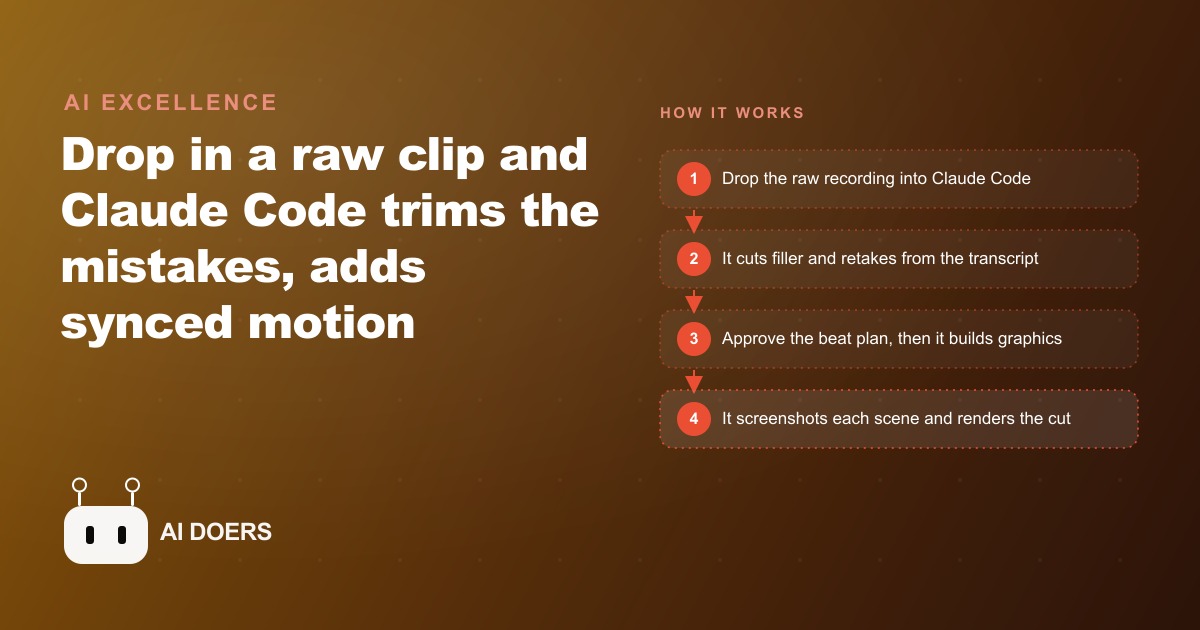
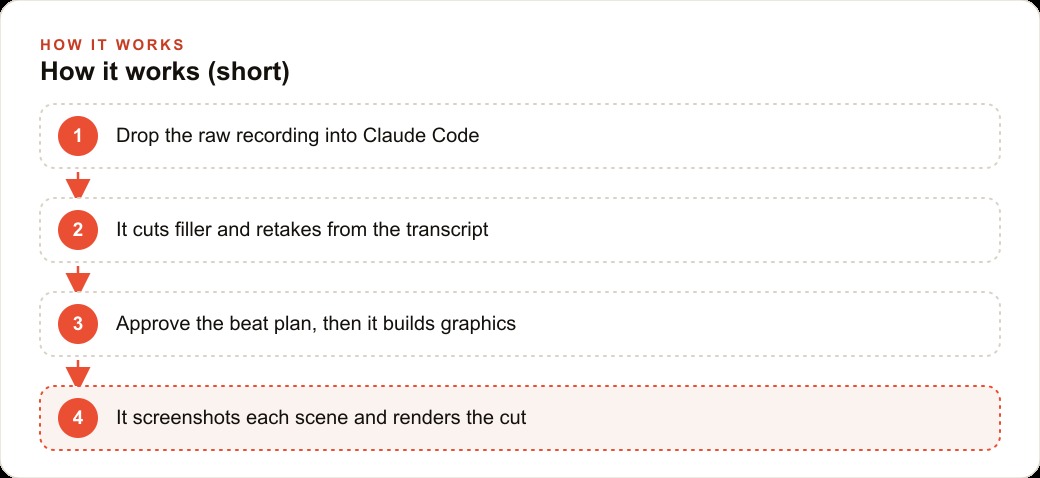
Claude Code acts as an orchestrator that wires Video Use for trimming and HyperFrames for motion graphics into one pipeline. You drop in a raw recording, it cuts the filler and retakes using word-level timestamps, adds graphics synced to your speech, and renders the result, all driven by natural language.

The gap between recording a video and publishing a polished one is about to shrink permanently
The most underappreciated bottleneck in video content for small businesses is not recording. Most people who struggle to publish consistently can record without difficulty. The bottleneck is everything after the recording ends: trimming filler words, cutting dead air, adding titles and lower thirds, timing graphics to specific moments in the narration, and exporting a file that looks intentional rather than raw. That process takes most non-editors longer than the recording itself, and it has been the friction point that turns "I should post more video" into "I will get to that when I have more time."
I am Madhuranjan Kumar, and I want to explain what Claude-orchestrated video editing actually looks like in practice, because the headline "AI edits video" does not capture what makes this technically interesting or operationally significant.
The three-layer architecture that makes this work
This breakdown editing pipeline demonstrated with Claude Code rests on three components working together. Claude Code acts as the orchestrator. It sits at the center, reads natural language instructions, decides which editing action to take, and coordinates the tools that execute those actions. It does not do the editing directly. It directs.
The two tools that do the heavy lifting are Video Use and HyperFrames. Video Use handles the trimming and cutting operations: identifying timestamps where problems occur in the recording, removing dead air and false starts, and producing a cleaned transcript with word-level timing data. HyperFrames handles the motion graphics layer: placing visual elements at specific timestamps, applying animation to those elements, and generating the styled overlays that turn a plain recording into something that looks produced.
Claude Code wires these two tools into a pipeline that a person controls through plain language. The editing decisions, which words to cut, where to place a title card, what the graphic should say and how long it should appear, are expressed as English sentences. The execution happens through the tool layer without requiring the operator to know what the code looks like.
This architecture matters because it separates concerns cleanly. Improving the trimming quality means updating the Video Use integration. Improving the graphic quality means updating the HyperFrames integration. Improving the understanding of natural language editing instructions means improving the Claude Code layer. None of these improvements require rebuilding the system from scratch.
What word-level transcript timing actually enables
The most technically significant element of this pipeline is the word-level timing data that Video Use produces from a cleaned recording. This means that after trimming, the system knows not just what was said but the exact timestamp at which each word appeared in the audio.
That data changes what motion graphics can do. In a traditional editing workflow, placing a graphic to coincide with a spoken word requires manually scrubbing to find the right timestamp, setting a keyframe, and verifying the timing by playback. In a word-timed pipeline, you say "show the title card when I say the phrase 'three key questions'" and the system finds that phrase in the transcript data, identifies its start timestamp, and places the graphic at exactly that moment.
For educational or instructional content where visuals are meant to reinforce specific moments in the narration, this synchronization is the difference between graphics that feel explanatory and graphics that feel decorative. A title that appears the instant a concept is named, rather than a second or two after it, reads as intentional. The half-second delay that typically appears in manually placed graphics is not usually noticed consciously, but its absence is.
The practical consequence is that the kind of precise timing that used to require someone with real editing skill and patience is now specified through language. The precision is baked into the system rather than being dependent on the operator's timing accuracy.
How the description-to-graphic translation works
Describing a motion graphic in plain language and having the system produce it is the part of this pipeline that most people find hardest to believe until they see it demonstrated. The description can be quite specific: a card with a frosted glass appearance, positioned on the left side of the frame, with the current subtitle text in a large typeface and the speaker's name in a smaller typeface below it, appearing over three seconds with a fade-in.
The system translates that description into the code that defines the visual and the timing. The translation is imperfect at first, which is expected. The correction process is also in natural language: the card is covering the speaker's face, move it lower and to the right. The font size is too large for mobile viewing, reduce it by about thirty percent. Those corrections flow back into the code and the updated version renders.
For someone who has never edited video, this workflow is transformative because the feedback loop is legible. You see the result, you describe what needs to change, you see the updated result. The editing skill required is the ability to describe what you see and what you want instead, which is a skill that does not require technical training.
For someone who has edited video and understands what is possible, the workflow is transformative in a different direction. It removes the mechanical work of implementing changes that are conceptually simple but time-consuming to execute through a traditional editing interface. Moving a graphic from one position to another in a traditional editing timeline is not conceptually hard. It takes time because of the interface. In a description-based system, describing the move takes ten seconds.
The plan-before-build mode and why it matters
One of the specific features of the Claude Code orchestration layer is the ability to run in plan mode before the system begins generating output. In plan mode, Claude Code reads the recording, analyzes the transcript, and produces a written plan describing each editing decision it proposes to make: which sections to trim, where to place each graphic, what each graphic should say, and when each should appear.
That plan can be reviewed, modified, and approved before anything is built. This is important for two reasons. First, it surfaces the system's understanding of the recording before it acts on that understanding. If the system proposes trimming a section that the operator wants to keep, the correction happens at the plan stage rather than after the output has been generated. Second, it makes the decision trail auditable. The operator knows what the system decided and why, not just what the output looks like.
For a business that is using this workflow for client-facing content, the plan mode review is the step where quality control happens before production rather than after. Catching a misunderstanding about where a title card should appear at the plan stage costs nothing. Catching it after this breakdown has been rendered costs a re-render.
The iteration-from-comment model for refinement
After the initial output is generated, the refinement model is the same as the one used throughout: describe the change in plain language, and the system updates the output. The ability to comment on specific elements and have those comments reflected in the code is what makes iterative refinement feel like a natural creative conversation rather than a debugging session.
A comment like "the lower third graphic is appearing before I finish the first sentence, delay it by about two seconds" maps to a specific change in the timing parameter for that graphic's appearance. The system makes that change, updates the output, and presents the revision. The operator checks the timing, confirms it works, and moves to the next iteration.
For a business publishing regular video content, this model changes the relationship to the editing process. Instead of editing being a technical skill that requires either learning or outsourcing, it becomes a review-and-comment process that requires only the ability to watch the output and describe what to change. The creative judgment about what this breakdown should look and sound like remains with the operator. The mechanical work of implementing that judgment moves to the system.
The accumulating style advantage for teams that publish consistently
There is a compounding benefit to this pipeline that becomes visible after several months of consistent use. Every editing decision that is specified and executed through the system is, in principle, recordable as a preference or a style rule. If a business consistently places titles in the first five seconds of every video in a specific visual style, that preference can be codified as a starting instruction that applies to every new video automatically.
Over time, the instructions that would be described from scratch for each new video become shorter because the style is already established. A new recording can be described in terms of its specific content, and the system applies the established visual style without needing each element to be specified again. The editing time per video decreases as the style library grows.
For a business producing educational content across a series, this means the thirtieth video in the series is edited faster than the first, not because the system improves but because the operator's style instructions are more refined and the system's starting point for each new video is richer.
That trajectory is the long-term case for building this capability rather than outsourcing video editing on a per-project basis. The investment in defining a style and building the workflow pays dividends on every subsequent video. Outsourcing each video on a per-project basis resets the cost every time and does not compound.
The screenshot verification step that closes the quality loop
One aspect of this pipeline that distinguishes it from a simpler automation is the verification layer. After each major editing step, Claude Code takes screenshots of the output and reviews them against the description that was used to generate the step. If a graphic specified to appear on the left side of the frame is rendering on the right, the verification catches it before the operator sees the final output.
This means the system is not just generating output and handing it to the operator for review. It is running a self-check against the specifications and flagging cases where the output does not match the description. The operator still reviews everything, but they are reviewing output that has already passed an initial quality check rather than output that might contain straightforward errors the system could have caught itself.
For a business owner who is not a trained video editor, the value of this verification layer is that it reduces the gap between what they described and what they need to correct in the output. The iterations are about creative judgment, not about fixing implementation errors that a more systematic check would have caught automatically.
What a realistic first video through this pipeline looks like
For a business owner considering this workflow, the most useful mental model is what the first video actually costs in terms of time and what the output looks like compared to a raw recording.
The recording exists: a ten-minute explainer that covers a topic relevant to the business's customers. The recording has some filler words, a few restarts at the beginning of sentences, and a section in the middle that ran long and could be tightened. The business owner wants titles to appear at the key topic transitions and a lower-third graphic showing the business name and website to appear at the beginning and end.
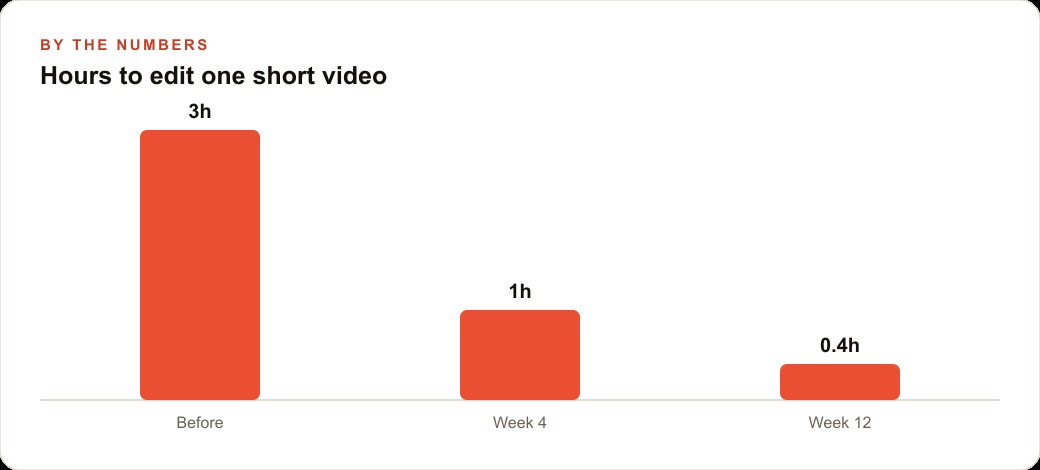
Walking through this with Claude Code in plan mode first, reviewing the proposed edit plan, and approving it takes roughly twenty minutes. Generating the initial output and reviewing it takes another twenty minutes. Making corrections based on the review takes ten minutes. The total editing time for a ten-minute video is approximately fifty minutes for a first-time operator who has never used the system before.
That fifty minutes will decrease with practice. A second video through the same system, with the style established from the first, takes closer to thirty minutes. A fifth video, with a refined style and a cleaner initial recording, takes closer to twenty.
Compare that to the alternative of learning a traditional editing application, which takes weeks of learning time before the editing itself is fast, or outsourcing the edit, which involves a brief, a turnaround wait, a review, and a revision cycle. The pipeline is not instantaneous. But it is fast enough to make consistent video publishing operationally realistic for a business owner who does not have a production team.
That is exactly what we do at AI DOERS. Book a private 30-minute call with Madhuranjan Kumar and we will map the fastest path to it for your specific business.
Book your call →
Madhuranjan Kumar
Madhuranjan Kumar brings 20 years of performance-marketing experience and has managed over $200 million in Facebook ad spend for brands across the United States and beyond. His expertise spans the full modern marketing stack: Meta, Google Ads, TikTok, email automation, CRM, and the websites that hold it together. At AI DOERS he turns that track record into lead-generation systems for businesses across every industry.