
Claude Code Loops: Schedule an AI to Check On Things For You
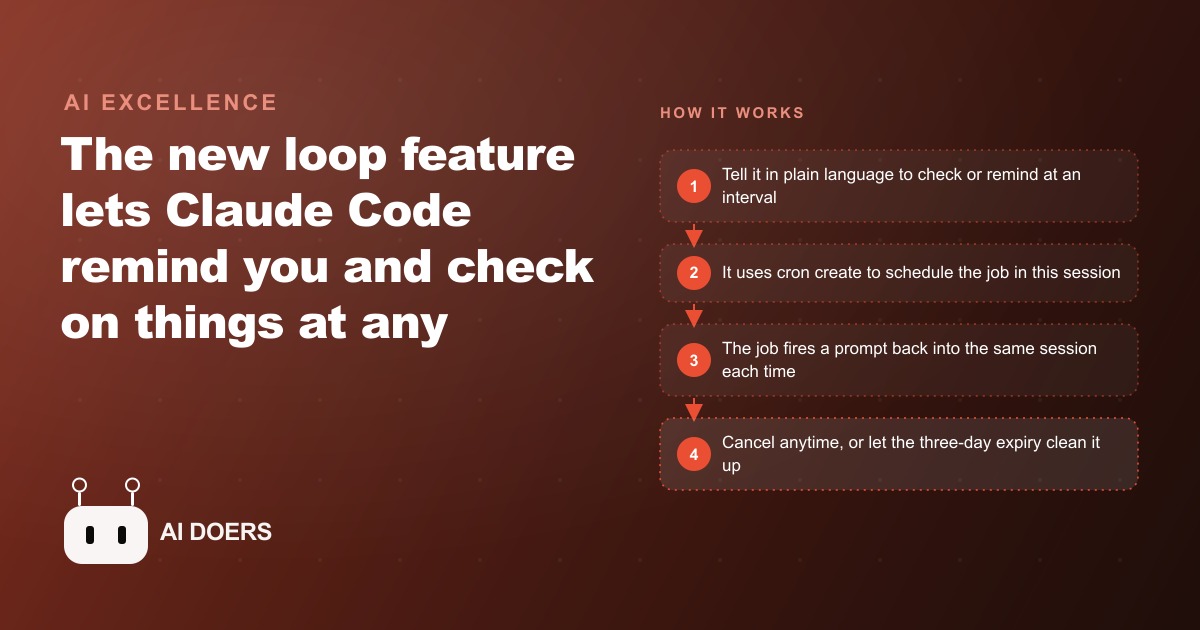
A new loop feature lets Claude Code remind you and watch over things on any interval for up to three days, all in one session. Here is how it works and where it earns its keep.

Loops in Claude Code are one of those features that sounds minor in a changelog and turns out to matter more than expected once you actually use one. I am Madhuranjan Kumar, and I want to walk through this as a working playbook rather than a feature overview, because the payoff only appears when you set things up in the right order with a clear understanding of what the tool can and cannot do.
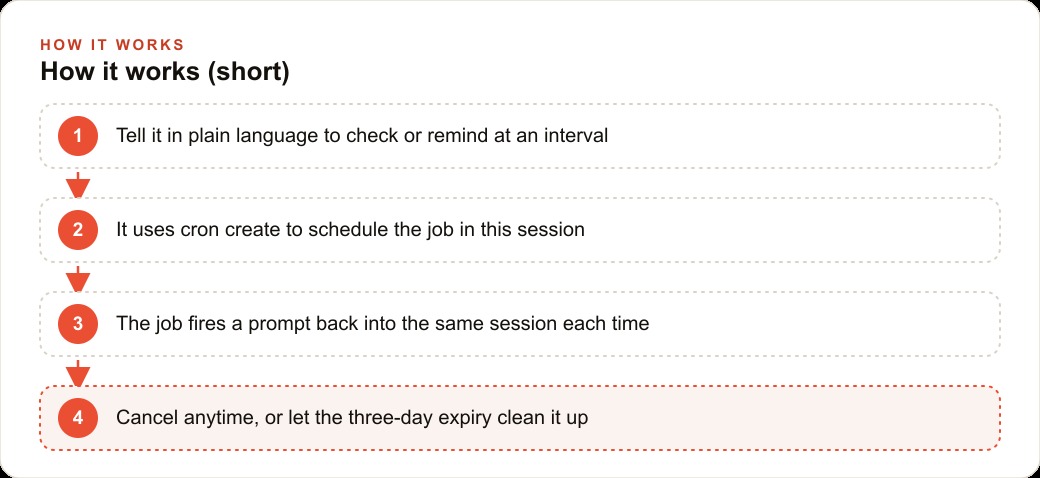
The core function is this. You tell the assistant in plain language to check something on a schedule, or to remind you at a specific moment, and it creates a cron job inside your current session that fires exactly as you described. Each time the job fires, the prompt goes back into the same live session, the assistant runs the check or reminder, and you get an update without touching anything. Three tools power the entire feature: cron create, cron list, and cron delete. All three respond to plain conversational language, so you never have to write scheduling syntax or look up a reference page.
Decide what is worth watching before you set a single loop
The first step is not opening Claude Code. It is thinking clearly about which monitoring tasks you currently do by hand and how often those checks actually surface something worth acting on. This matters because a loop on something that barely changes is a token-burning distraction, while a loop on something that changes unpredictably and needs a fast response is genuinely valuable.
I would start by writing down every routine check I do during a typical workday: not decisions or creative work, just monitoring. Did the new lead arrive. Did the client payment clear. Did the job board update. Did the appointment get confirmed. Did the inventory alert trigger. For each one I would ask two questions: how often do I actually check it in a day, and how often does checking it find something that changes what I do next. The checks with a high frequency and a low hit rate are the best loop targets. The ones where almost every check finds something actionable can stay manual.
This exercise also surfaces something uncomfortable. When you are checking the same inbox eight times before noon and finding nothing new seven of those eight times, the checking has become a background anxiety rather than a useful practice. It burns attention on a zero-information result over and over. A loop that watches that inbox and only speaks up when something arrives gives you permission to fully focus on other work between checks, not because you are being optimistic about your discipline but because the system is handling the vigilance for you.
The most valuable loop targets share three properties: they update unpredictably rather than on a fixed schedule, the information is time-sensitive when it does update, and the cost of missing an update is meaningful. Emergency service calls, incoming payment confirmations, approval status on a pending proposal, and shift-coverage gaps on a job board all fit that profile. Monthly reporting and end-of-week summaries do not.
Know the three tools and you know the whole feature
Cron create schedules a job in the current session. Cron list shows every job running in this session right now. Cron delete cancels a job you no longer need. That is the complete toolset. You invoke them either by using a slash loop command explicitly or by describing what you want in natural language and letting the assistant call the right tool. Both approaches work.
Two modes cover every practical use case. A one-time reminder picks a specific future moment, fires once, sends its message into the session, and deletes itself with no ongoing cost or management. A recurring loop runs on an interval you choose, every five minutes, every thirty minutes, every few hours, and keeps running on that schedule until you delete it or the built-in three-day expiry triggers automatically.
The three-day expiry is worth understanding as a deliberate feature, not a bug. It prevents a forgotten loop from running for weeks after you have moved on from the task that prompted it. When a loop expires, the natural question is whether this monitoring pattern earned a permanent place in your operations or whether the sprint it served is over. That decision, revisited every three days, is a healthier discipline than accumulating perpetually running jobs you stopped thinking about.
Loops can also point directly at saved skills and slash commands, which means a skill you have already built and tested can run on a schedule without you rewriting its logic into the loop prompt. This is often cleaner than a long verbose prompt built from scratch, because the skill already knows the right output format and the appropriate level of detail for its purpose.
Set the interval tight enough to be useful, loose enough to not burn tokens
Interval selection is where most people make their first mistake. The instinct is to set intervals short because responsiveness sounds like a good thing. Short intervals mean fast alerts. The problem is that every loop run costs tokens equal to the prompt you defined plus whatever the assistant does in response. A loop that fires every five minutes and returns a two-hundred-word status update adds over two thousand words of context to the session per hour before you have typed a single thing yourself.
Context window is a finite resource in a live session. As it fills, the assistant's responses get slower and less precise because it has more history to process on each turn. A loop set aggressively short in the morning will degrade session quality by the afternoon. I have experienced this in practice. What started as a fast, sharp session early in the day turned sluggish by midafternoon because a monitoring loop with a short interval and verbose outputs had consumed most of the available context before the workday peaked.
The discipline is to match the interval to the realistic update speed of the information you are watching, not to how frequently you want reassurance. For monitoring incoming emergency service calls during peak business hours, a twenty-minute interval makes sense because a same-day urgent call sitting unassigned for twenty minutes is a real business risk. For a daily invoice review, running it once every two hours is more than sufficient. For a weekly performance summary, once on Friday afternoon covers the need entirely. Let the nature of the information drive the interval, not anxiety.
Write the loop prompt so silence is cheap and alerts are rich
The prompt you give a loop does two different jobs depending on what the loop finds, and the best loop prompts make both jobs explicit from the start. On quiet runs, when nothing has changed, the job is to report that in the fewest possible words. On alert runs, when the condition you care about is detected, the job is to surface exactly the information you need to act, with enough context that you do not need to open another application to know what to do next.
I would write loop prompts with a clear bifurcation built in. Something like: check the job board for any same-day emergency call that arrived since the last check. If there is none, reply with a single line saying nothing new. If there is one, reply with the customer name, callback number, job type, preferred time window, and how many minutes ago it was submitted. The no-change response adds almost nothing to context. The alert response contains exactly what is needed to take action immediately without opening a second window.
This structure also makes the session history readable at the end of the day. Long chains of single-line no-change confirmations followed by one detailed alert make the timeline obvious and easy to scan. A session where every loop run produced a long detailed output regardless of whether anything changed is difficult to read back and has consumed far more context than was necessary.
If the loop points at a skill, that skill should follow the same bifurcation logic. A skill designed for scheduled use produces a compact status line under normal conditions and switches to a structured detailed output when the condition of interest is detected. Build this logic into skills from the start if you know they will run on a loop.
Understand session scope before it surprises you in the middle of a sprint
Loops live only in the session that created them. Three practical consequences follow from this, and all three are worth knowing before you depend on a loop for something time-sensitive.
First, two open sessions are two separate environments with separate cron schedules. A loop created in one browser tab cannot be seen or controlled from another tab. Running cron list in one session shows only the jobs from that session, not any from other open windows.
Second, closing the tab ends the session and erases every loop it contained. There is no recovery path, no catch-up for runs that missed while the session was closed, and no way to restore the loop by reopening Claude Code. When the session ends, the loops end with it.
Third, loops do not carry over between sessions. The monitoring you had running yesterday is not present in the session you open today. You recreate it explicitly or it does not exist.
For monitoring that needs to run while you are away from the keyboard, the session must stay open on a machine that stays powered and awake. A dedicated desktop window, a terminal on a secondary machine, or the Claude Code app left open on a secondary monitor all work. A laptop that sleeps when the lid closes does not. The practical setup for a business with monitoring needs through a full workday is a dedicated monitoring session opened at the start of work, set with the appropriate loops, and left running on a stable machine that is separate from the session used for active work.
Use the shared context as an advantage, not just a side effect
Each loop fires back into the same live session, which means it has access to everything the session already contains: the files loaded at the start, earlier summaries, the output from previous loop runs, and any work done before the loop was created. This makes a loop genuinely more capable than an external cron job that starts blank on every run.
A loop can compare the current state of the job board against what it saw two hours ago, using the prior output already in the session context, and only alert you when something actually changed rather than reporting the full current state on every run. A loop monitoring a project status can read the description of the starting state you loaded before setting it, and flag precisely the moment when that status diverges from the baseline.
I would deliberately load relevant context before setting loops when the comparison is the point. If I want a loop to detect a specific change in a metric, I note the current value in the session first, so the loop has a clear baseline. If I want a loop to track movement in a number across the day, I note the starting value before creating the job, so the loop can calculate the delta on each run rather than just reporting the raw current number. A loop entering a well-prepared session is a more capable monitoring tool than one entering an empty session, even when the prompt text is identical.
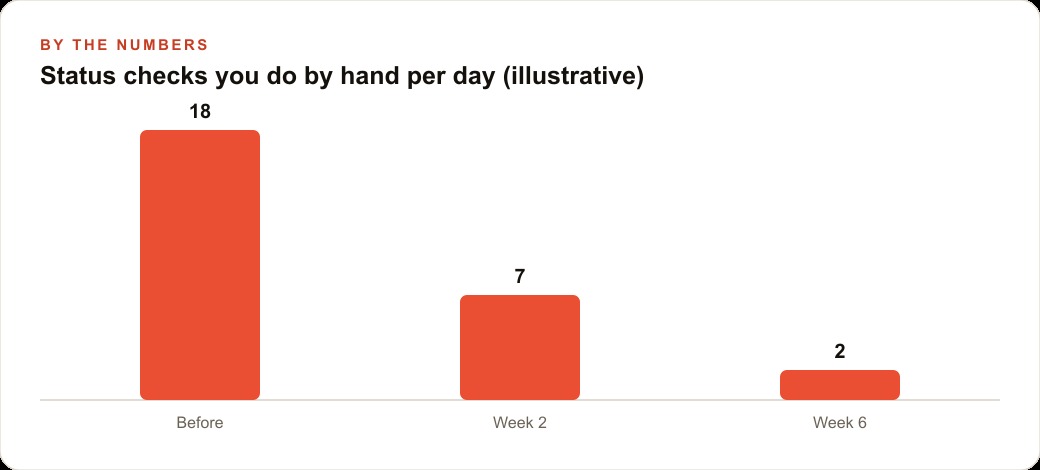
An HVAC dispatcher during a heat wave: eighteen checks down to two
Let me make the whole playbook concrete with one worked example from a service business with urgent monitoring needs.
Picture an HVAC company during the hottest week of summer. Emergency air conditioning calls are flooding in, and every unassigned lead sitting in the inbox for more than twenty minutes is a job that goes to a faster competitor. The dispatcher is trying to monitor the lead inbox and the booking board while simultaneously handling the calls already coming in and coordinating techs who are already deployed on jobs.
Before this feature, the dispatcher was making roughly eighteen manual checks of the lead inbox during a nine-hour shift, scanning for same-day emergency calls that needed immediate tech assignment. Each check takes about two minutes to open the inbox, scan for new items, and confirm whether anything was urgent. Eighteen checks at two minutes each is thirty-six minutes of the shift spent on pure monitoring, not dispatching or customer service. The majority of those checks find nothing new, because the inbox does not update on a predictable twenty-minute cadence.
I would set up the monitoring session at the start of the shift by briefly noting the current tech roster and the state of the job board in context. Then I would create two loops. The first is a recurring loop at a twenty-minute interval, with a prompt that checks the lead inbox for any same-day AC emergency submitted since the last check, returns a single no-change line if there is none, and returns the customer name, callback number, job type, and submission timestamp if there is one. The second is a one-time reminder at four in the afternoon to confirm the first scheduled appointments for the next morning before the shift ends.
The dispatcher now has their attention back. The loop fires quietly every twenty minutes and stays silent when there is nothing urgent. When an emergency call arrives, the session surfaces it immediately with everything needed to assign a tech: no tab-switching, no inbox-scanning. The four o'clock reminder fires on its own regardless of how busy the afternoon became, so next-day scheduling gets confirmed before the shift ends.
The numbers are clear. Eighteen manual checks at two minutes each is thirty-six minutes of monitoring per shift. If the loop handles sixteen of those checks, roughly thirty-two minutes of focused dispatcher capacity returns every day. During a heat wave where each correctly assigned emergency job represents several hundred dollars in revenue, that time goes directly into handling the jobs the loop identified rather than hunting for them manually. Two checks remain deliberate and manual: the morning review that sets the day's context in the session, and a brief end-of-day reconciliation. The loop handles everything in between.
Graduating a loop to a scheduled task when the sprint becomes permanent
A loop is the right tool for a finite stretch of active monitoring. A heat-wave week, a product launch, a deadline-driven project, a three-day push before a client presentation. It is not the right tool for a daily recurring task that needs to run indefinitely, survive machine restarts, and fire on a precise schedule whether or not a Claude Code session is open.
When a monitoring pattern proves its value during a sprint and you find yourself recreating the same loop prompt at the start of every new session, that is the signal to graduate it. A proper scheduled task lives outside the session on disk, runs on the machine or server via a system scheduler, and has no dependency on a live Claude Code session being active. The loop was the prototype environment, a fast way to test whether this monitoring is worth doing at all. The scheduled task is the production version.
I treat the three-day expiry as a natural review checkpoint. When a loop expires, the question is not automatically whether to recreate it. The question is whether this monitoring pattern is important enough to become a permanent part of daily operations. If yes, build the scheduled task and remove the dependency on a live session. If no, let the expiry stand and redirect that attention to something more pressing. This cycle, loop proves value during a sprint, loop expires, scheduled task takes over, is a healthier automation discipline than accumulating indefinitely running jobs that nobody is actively monitoring.
The operating sequence, from first loop to reliable routine
The sequence that works: identify the one monitoring task that costs the most unfocused attention during the workday. Write a loop prompt that returns a single-sentence no-change response and a structured alert when the condition of interest is detected. Set the interval to match the realistic update speed of the information, not anxiety about missing something. Run the loop in a dedicated session on a machine that stays active through the workday. At the three-day mark, decide whether the task earned a permanent scheduled job or whether the sprint is over and the loop can retire.
Start with one loop. One is enough to feel the shift in working attention. The moment you stop reaching for the inbox to check whether something changed, because you know the loop will surface it when it does, you have understood the actual value. The feature is not about automating decisions. It is about returning attention from habitual checking to focused execution, and that shift arrives faster than most people expect.
The setup is fast. Update Claude Code to the latest version, open a session, and describe what you want in plain language. The assistant creates the cron job and confirms it. Check what is running with cron list, remove a job with cron delete, and adjust the interval or the prompt if the first version does not match what you needed. The first useful loop is running within minutes. The question is which check in your day you want to hand off first.
That is exactly what we do at AI DOERS. Book a private 30-minute call with Madhuranjan Kumar and we will map the fastest path to it for your specific business.
Book your call →
Madhuranjan Kumar
Madhuranjan Kumar brings 20 years of performance-marketing experience and has managed over $200 million in Facebook ad spend for brands across the United States and beyond. His expertise spans the full modern marketing stack: Meta, Google Ads, TikTok, email automation, CRM, and the websites that hold it together. At AI DOERS he turns that track record into lead-generation systems for businesses across every industry.