
Claude Code Now Runs From iMessage: Texting Your AI Agent From Anywhere
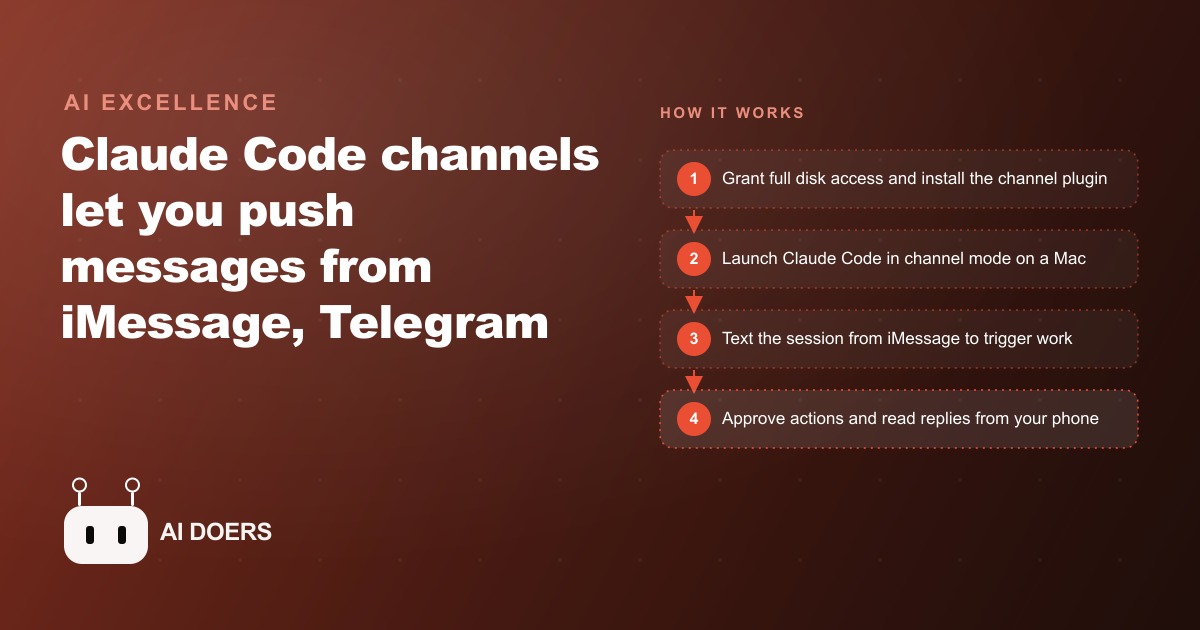
Claude Code channels push messages from iMessage, Telegram or Discord into a running session, so you can trigger real work and approve actions straight from your phone.

The most expensive constraint in AI-assisted work has never been model quality or token cost. It has been geography: you need to be at your desk, in front of your terminal, for any of it to work.
Claude Code channels dissolve that constraint entirely, and the implications for how small businesses use AI assistance are larger than the feature description suggests. The feature itself sounds modest when you read the release notes. You can push messages from iMessage, Telegram, or Discord into a running Claude Code session. You text from your phone and it lands in the terminal as if you typed it locally. Claude uses your full setup, your skills, your project files, your API keys, your context, everything. But what that means in practice is that an AI agent with full context about your business can now be steered from anywhere you have a phone signal, which is to say, everywhere.
The desk dependency was the real constraint all along
Think about what running an AI agent on a complex task actually requires today. You need a computer with the project files loaded. You need the agent running in an active terminal session. You need to be physically present to read updates, correct wrong turns, and approve consequential actions before they happen. The agent might be doing real work autonomously for minutes or hours at a stretch, but the moment it hits something that requires human judgment, it stops and waits. And it will keep waiting until you are back at the keyboard.
This creates a specific kind of bottleneck that everyone who has used Claude Code for more than a few days has encountered. You start a long task before leaving for a meeting. The agent runs into an ambiguity twenty minutes in and surfaces a question. You are not there. The session sits idle for two hours. You come back, answer the question in ten seconds, and the agent finishes the remaining work in fifteen minutes. The actual labor took fifteen minutes. The calendar took two hours. That ratio is not a productivity win.
Channels invert this. When your Claude Code session is connected to a channel, the agent can surface that question as a message on your phone. You read it while waiting for the elevator, type "yes, use the existing template," and the session continues. You did not need to be at your desk. The context was preserved in the running session the entire time. The only thing that was missing was your approval, and now your approval is a text message.
The technical requirement for always-on availability is important to understand clearly. A channel is an MCP server that pushes events into a running session. For that session to receive messages from your phone while you are away from your desk, the session must stay alive on a machine that is always on. A Mac mini in your office or a macOS VPS handles this. The session runs inside tmux so it persists through network interruptions and stays accessible when you reconnect. This is not a cloud service that manages the infrastructure for you. You own the running environment. That has implications for the auto repair shop owner I want to talk about in a moment, and for anyone else running a small operation where the owner is also the only technical person.
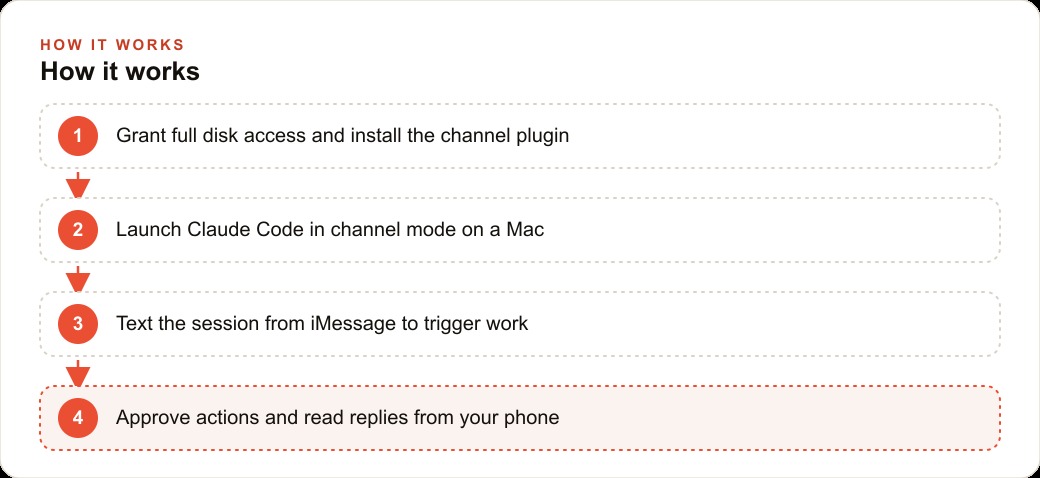
A text to your terminal: how the channel actually works
The mechanics are worth understanding because they are simpler than the name suggests. An MCP server sits between your messaging app and your Claude Code session. When you send a message from your phone to the iMessage address or Telegram bot that is connected to the server, the server pushes that message into the terminal as if you had typed it yourself. From Claude's perspective, it is just another input. From your perspective, you are texting a colleague who happens to live in your terminal.
The session uses your full project context. If Claude has been working inside your client folder with your API credentials loaded and your project skills active, it continues working with all of that context after you send a text from your phone. You are not starting a fresh conversation with a context-free Claude. You are steering an active session that knows everything about what it has been doing and why.
The practical workflow this enables is genuinely different from what most people have built so far with AI agents. In one run, an agent using a channel scraped 511 comments across six videos and surfaced the top themes as a structured summary, all triggered and monitored from a phone. The human was not at a desk for most of it. They received a notification when the task was complete, reviewed the summary on their phone, and sent a follow-up instruction. The agent continued. The entire exchange happened across a few text messages spread over an afternoon.
You can also allow other phone numbers or Apple IDs to message the session. This means a small team can share access to a running agent without everyone needing a terminal open. A manager can trigger a report. A team member can send a file to process. A client can, if you configure it this way, approve something directly. The boundaries are yours to define. The channel simply makes the session accessible to whoever you allow.
The setup requires macOS, which is why a Mac mini or a macOS VPS is the right infrastructure for teams that want this to be always on. iMessage specifically requires the Mac Messages app and an Apple ID. Telegram and Discord channels work cross-platform. The right choice depends on what your team already uses. If your team runs on iMessage, the iMessage channel is the path of least friction. If you have a Discord server for internal communication, the Discord channel is probably more practical.
It is also worth distinguishing this from two things that sound similar but work differently. Message-based dispatch, where you send Claude a task and it runs in isolation, is one-shot delegation. The agent does not maintain a continuous session, and there is no back-and-forth. Event-based reaction, where a system event triggers an agent action automatically without a human in the loop, is automation. Channels are neither of those. Channels are remote control of an active session that maintains full context and can ask you questions as it encounters decisions that need human judgment. It is closer to co-piloting with a tool in your hand than to dispatching work to an autonomous system.
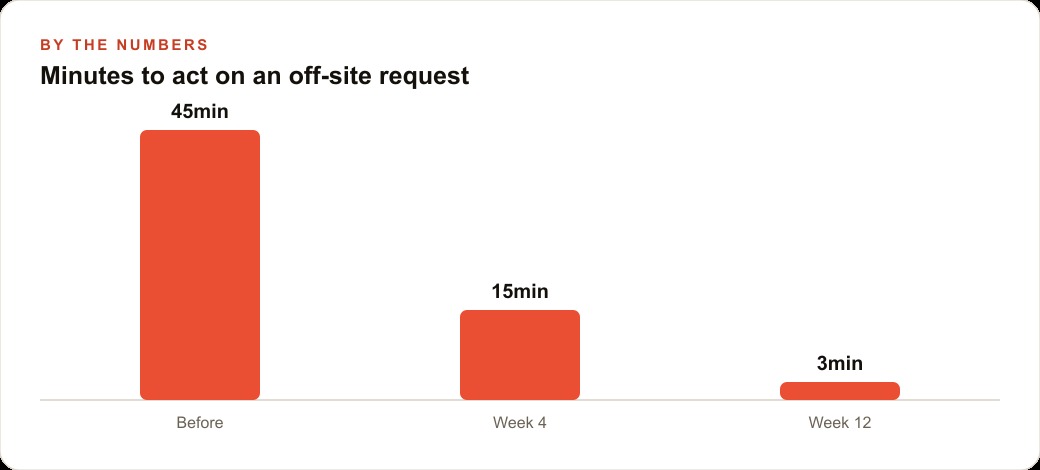
Approval from the floor: why the auto repair shop example matters
Here is the scenario that clarified the implications for me. The owner of a small auto repair shop is under a car on a lift in the service bay. In the back office, a Mac mini is running a Claude Code session that has been configured with the shop's scheduling system, parts database, and supplier contact information. A customer's car is taking longer than expected. The agent notices the delay, checks the parts inventory, and identifies that a specific part needs to be ordered to finish the job today.
Instead of waiting for the owner to come in from the bay, the agent sends a message to the owner's phone: the job is running two hours over, here is the part that needs ordering, supplier A has it for $47 with same-day delivery, supplier B has it for $39 with next-day delivery, which do you want? The owner reads the message between steps on the lift, types "go with supplier A, bill it to the customer," and the agent places the order and updates the job estimate. The owner is back under the car in forty-five seconds.
This example matters because it is not about a software company or a digital agency. It is about a physical business where the owner's time is split between technical work and business decisions, and where neither can wait for the other. The agent does not replace the owner's judgment. It brings the decision to the owner at the moment the owner can answer it, rather than waiting until the owner is physically back at a desk. That is a different relationship between a business owner and an AI tool than anything that has existed before.
The same logic applies to any small business where the owner moves between locations, meetings, or hands-on work and cannot be tethered to a computer. A CRM and website stack running on an agent that can surface decisions over iMessage is genuinely more useful to a mobile business owner than the same agent requiring desk presence. A campaign manager reviewing Facebook and Instagram ad campaigns from a client meeting because the agent surfaced a budget question to their phone is more responsive than one who only checks in when back at a laptop.
The deeper value of the channel feature is that it matches how small business owners actually work. They are not at desks all day. They are in meetings, on job sites, with clients, managing operations in person. The AI agents we have built so far have been optimized for desk workers who can maintain continuous attention on a terminal. Channels make AI agents useful for the much larger population of people who cannot afford to be tethered to a screen. That is not a niche use case. That is most of the businesses that could benefit most from AI assistance.
There is one important design principle worth internalizing before you set this up. The approval-from-the-phone workflow only works if the agent is asking clear, binary questions that can be answered in a text message. "Should I proceed?" is not a useful question over iMessage. "The parts order from supplier A will cost $47 and ship today; do you want to confirm?" is a question you can answer in two words. Train the agent to format its approval requests as complete decision summaries with a clear yes/no action, and the mobile workflow becomes genuinely frictionless.
The design of the approval request also determines how much context you need to hold in your head when you receive it. If the agent sends you a message that requires you to remember what it was working on, the mobile experience breaks down. The best approval messages are self-contained: they state the context, the specific decision, and the options available, in three sentences or fewer. You should be able to read one while waiting for a traffic light and know exactly what you are approving.
Security is the other dimension worth planning for before you deploy. A running Claude Code session that responds to iMessage has access to everything that session has access to: your project files, your API credentials, your client data. Allowing additional phone numbers to message the session means allowing those numbers to trigger actions using your credentials. Treat access to the session the same way you would treat access to your laptop. Be deliberate about who has it, audit the list periodically, and revoke access immediately when someone leaves the team or the project ends.
There is also a compounding benefit to the always-on session model that is worth naming. Because the session maintains context across multiple interactions, you can build a running mental model of a project over days or weeks through text messages rather than having to reload context every time you sit down at a terminal. The owner of the repair shop does not need to re-explain the project when they text in at 2pm. The session already knows what was discussed at 9am. Over a long project, this context continuity is often more valuable than any individual automation the session enables.
The physical constraint of needing to be at your desk is something we all accepted as a fixed cost of using AI tools, because that is how software has always worked. Channels are a reminder that the constraints we accept as fixed are often just the constraints that nobody has removed yet. The desk dependency is now gone. The only question is what you do with the time and attention you get back.
That is exactly what we do at AI DOERS. Book a private 30-minute call with Madhuranjan Kumar and we will map the fastest path to it for your specific business.
Book your call →
Madhuranjan Kumar
Madhuranjan Kumar brings 20 years of performance-marketing experience and has managed over $200 million in Facebook ad spend for brands across the United States and beyond. His expertise spans the full modern marketing stack: Meta, Google Ads, TikTok, email automation, CRM, and the websites that hold it together. At AI DOERS he turns that track record into lead-generation systems for businesses across every industry.