
Claude Code for Beginners: Build and Deploy Your First Automation
Claude Code lets a non-coder describe a task in plain language and have the AI build, test, and deploy a working automation. The key is a clear project setup, a planning step, and a simple workflows-and-tools structure.

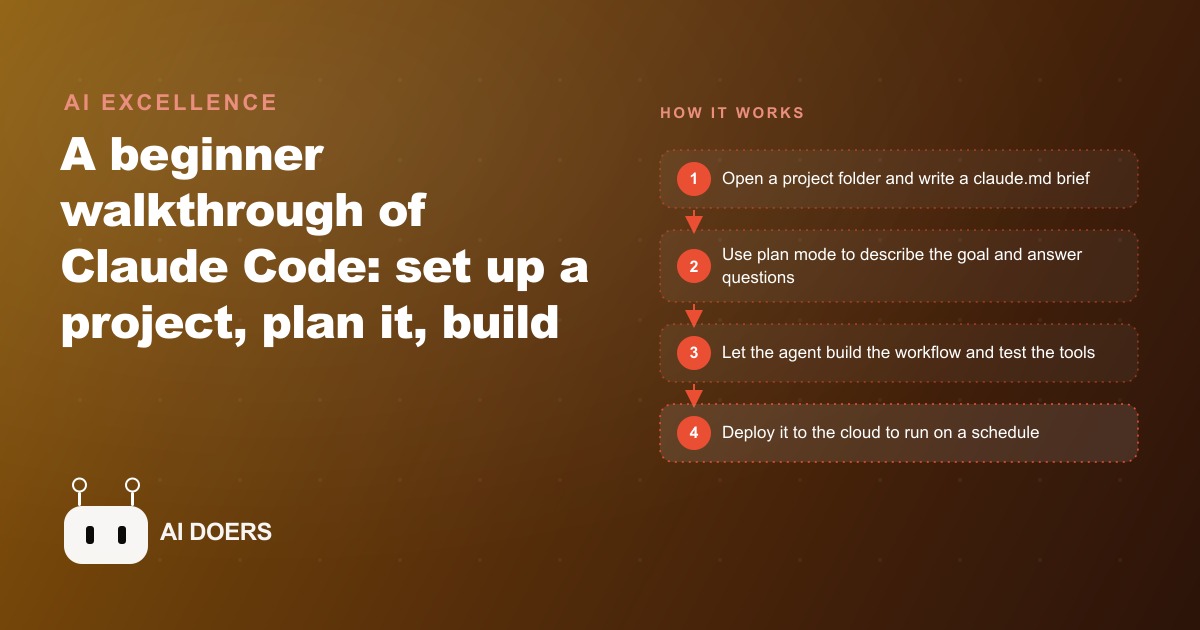
You can build and deploy a real, scheduled automation with Claude Code without ever learning to write code, and the whole thing rests on a handful of ideas that a beginner can absorb in an afternoon. I am Madhuranjan Kumar, and the way I explain Claude Code to business owners is simple: it turns hours of manual work into minutes, and it does the typing, the testing, and the fixing for you while you brief it like a capable assistant. Below are the seven things you actually need to understand to go from a blank folder to a working automation that runs on its own every Monday morning.
1. It runs inside a free editor and you talk to it in plain English
Claude Code is an AI coding assistant that lives inside Visual Studio Code, a free editor you download once. You sign into it with a paid Claude plan, and from there you interact by describing what you want in ordinary language. That is the whole interface. You do not read code, you do not write code, you brief the agent the way you would brief a new hire, and it produces working software.
For a business owner this is the unlock. Tasks that used to require hiring a developer, like pulling data from an app, cleaning it up, and emailing a report, can now be built by anyone who can clearly say what they want. The barrier was never the idea. It was the translation from idea to code, and that translation is exactly what the agent handles.
2. Every project starts with a claude.md brief
The first thing to create in any new project is a claude.md file. Think of it as the project's system prompt, or a one-page brief you hand a contractor before they start. Without it, the agent is generic and knows nothing about your goal, your tools, or where things live. With it, every request is grounded in your specific context.
This one habit separates people who get clean results from people who fight the tool. A good claude.md names what you are building, which apps and files matter, and where things are stored. Skipping it is like handing a task to an assistant who has never heard of your company and expecting them to guess correctly.
3. Everything splits into workflows, agents, and tools
The mental model that makes Claude Code reliable is a clean three-part split. A workflow is a plain-language set of instructions, essentially a standard operating procedure. A tool is a small script that takes one real action, such as sending an email or pulling data from an app. The agent is Claude Code itself, which reads the workflow and runs the tools in the right order.
Why this matters: the thinking stays with the AI while the actual actions run as steady, repeatable code. That separation is what keeps the system dependable instead of flaky. The agent decides what to do, the tools do it the same way every time, and the workflow ties them together in a sequence you can read and understand even as a non-coder.
4. Plan mode makes the agent ask the questions you forgot
Before building anything real, you switch on plan mode. Plan mode makes the agent think harder and ask clarifying questions you may not have considered, like how often a report should run, where it should be delivered, or what to do when data is missing. A few minutes of planning up front produces a far better result on the first try.
This is the step beginners most often skip and most regret skipping. Jumping straight to building means the agent fills gaps with assumptions, and those assumptions surface as rework later. Letting it plan first turns a vague idea into a clear spec that both of you agree on before a single line is written.
5. Secrets live in a separate file, always
There is one safety habit that is not optional: API keys never go in the workflow or the tool code. They live in a separate environment file, kept out of the main project files, so nothing leaks if the project is ever shared, backed up, or pushed online.
For a business this is the difference between a convenience and a liability. The keys are what let your automation reach into your email, your spreadsheet, or your payment tool, so treating them carelessly is like taping your office keys to the front door. Keep them in the environment file, and a shared project stays safe. This is also the habit that keeps your CRM and website stack secure when an automation connects into it, because the credentials that touch your customer data never sit in plain sight.
6. MCP servers and skills are how it reaches your real apps
Two features give Claude Code real power beyond writing scripts. MCP servers connect the agent to outside apps like Gmail, Google Calendar, or Google Sheets with a single connection, instead of wiring up each action by hand. Skills are reusable instruction sets that the agent loads only when a specific task needs them, which keeps it fast and focused.
Together these turn the agent from a code writer into an operator that touches the tools you already run your business on. A workflow can read your calendar, pull rows from a sheet, and send a message through your inbox, all through connections you set up once. The same plumbing means an automation can feed leads into your marketing, so a form fill can trigger the follow-up that supports your Facebook and Instagram ad campaigns instead of sitting unread.
7. It is self-healing and it deploys on a schedule
The last two ideas are what make this durable. Claude Code is self-healing: when a tool fails, the agent reads the error, researches a fix, retries, and updates the workflow so the same problem does not recur. Your automation gets more reliable over time rather than breaking and staying broken. And once it works, you deploy it to a cloud host so it runs on its own, for example every Monday at six in the morning, without anyone sitting there.
That combination, self-repair plus scheduled deployment, is what turns a one-time script into a standing member of your team. It shows up on time, fixes its own small failures, and delivers without supervision.
A worked example: a plumbing company's Friday briefing
Let me tie the seven ideas together with one concrete build. Say the owner of a plumbing company wants a weekly report that tracks new service requests, average response time, and which jobs are still waiting on a follow-up call. This is the illustrative shape of how the pieces fit.
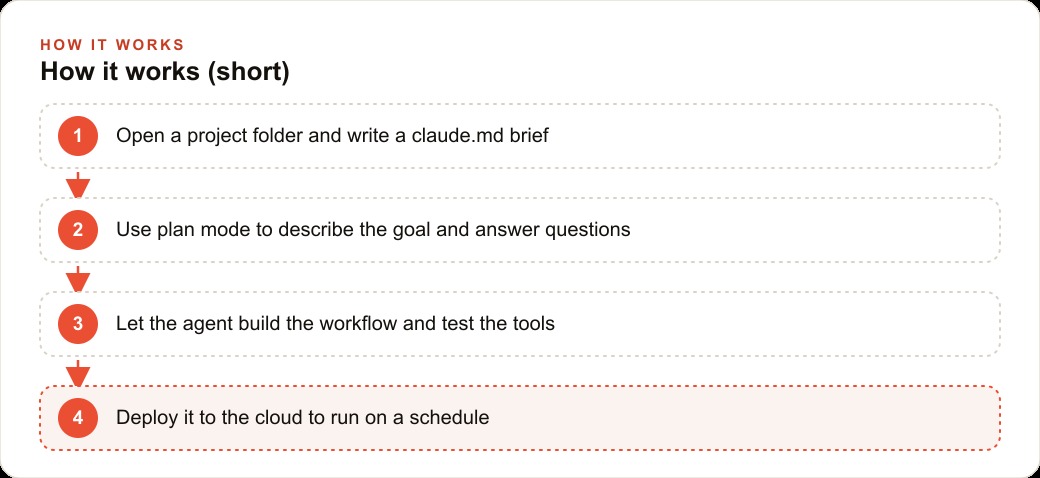
I start a project and write a short claude.md brief that explains the goal and names the tools. I switch to plan mode and describe everything, and the agent asks the questions I forgot, like which spreadsheet holds the job log and which inbox the report should land in. Then it builds the workflow: one tool pulls the week's jobs from the booking sheet, another tallies the response times, another formats a clean summary, and a final one emails it to the owner every Friday at seven in the morning. During testing a step fails because an API limit is hit, and the agent spots the error, finds the batch method, and patches the workflow so it never trips again. Before going live I run a quick security review to confirm no keys are exposed, then deploy it to a cloud host.
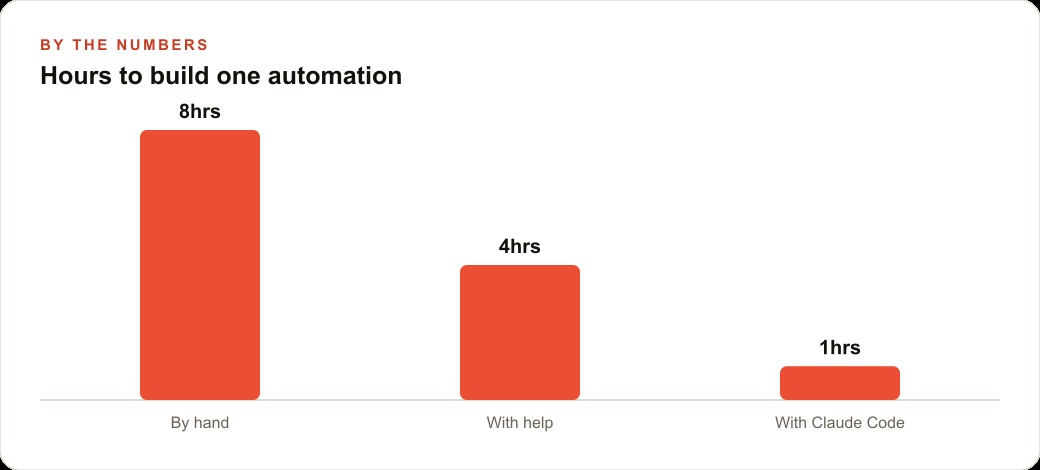
Building the same thing by hand might take a full day of a developer's time, roughly eight hours. With some help it might be four. With Claude Code guiding the build, it is closer to one afternoon. Those numbers are illustrative, but the pattern is real: the result is a hands-off weekly briefing the owner reads with morning coffee, and the same claude.md context can later feed content for SEO and organic search because the data you are already collecting becomes the raw material for pages that answer real customer questions.
Why the workflow-and-tools split is the part that lasts
Of everything above, the idea most worth internalizing is the separation between workflows and tools, because it is what makes an AI automation trustworthy enough to run your business on. When people first try to automate with AI, they often ask the model to do the whole job in one shot: read the data, decide what to do, and take the action, all in a single freewheeling request. That works in a demo and fails in production, because the model makes a slightly different choice each time and you can never fully predict what it will do.
The workflow-and-tools structure fixes this by putting the unpredictable part and the reliable part in different boxes. The workflow, written in plain language, is the judgment: what to check, in what order, and what to do about it. The tools are small scripts that each take exactly one concrete action the same way every time, sending an email, reading a row, formatting a number. The agent reads the workflow and calls the tools, but the tools themselves are steady and repeatable. So the creativity lives where you want it, in the reasoning, and the actions stay boringly consistent, which is exactly what you want when real customer data or real money is involved. Once you see automation this way, you stop fearing that the AI will do something wild, because the only things it can actually do are the specific tools you gave it.
The habits that separate a reliable build from a fragile one
A beginner can follow all seven ideas and still end up with something flaky if they skip the habits that surround them. The first is treating the claude.md file as a living document rather than a one-time note. As you learn what your automation needs, you add to it, and every future request gets sharper because the context is richer. The second is reading what the agent does at each step instead of clicking through blindly. You do not need to understand the code, but watching the agent explain its plan teaches you how it thinks and lets you catch a wrong assumption before it becomes a wrong result.
The third habit is testing on real, messy inputs before trusting anything on a schedule. The plumbing report that works perfectly on a clean sample week will meet a week with a blank cell, a duplicate job, or an API that briefly refuses to answer, and the self-healing behavior only helps if you have actually run it against those rough edges. The fourth is running that security review every single time before something goes public, confirming no keys are exposed and no sensitive data leaks. None of these habits are technical in the coding sense. They are the operational discipline of an owner who wants a tool that keeps working on the Monday mornings when nobody is watching, and they are the difference between an automation you rely on and one you quietly stop trusting after it embarrasses you once.
Which businesses this fits and how to start
Almost any small business that repeats the same digital task can use this. Plumbers, dentists, salons, real estate offices, accounting firms, and online stores all have chores like copying data between apps, building a report, or sending follow-up emails that can be turned into an automation. To start, install VS Code, add the Claude Code extension, sign in, and open a folder as your project. Write the claude.md first, always build in plan mode, keep keys in a separate environment file, connect apps through MCP servers when you need them, and read what the agent does at each step so you learn how it thinks. When you are happy, push it to a cloud host and run a security check before it goes public.
You can absolutely learn this and build your own automations. If you would rather skip the learning curve and have a polished, reliable system built, deployed, and handed over, you can bring in an expert and simply review the finished result.
That is exactly what we do at AI DOERS. Book a private 30-minute call with Madhuranjan Kumar and we will map the fastest path to it for your specific business.
Book your call →
Madhuranjan Kumar
Madhuranjan Kumar brings 20 years of performance-marketing experience and has managed over $200 million in Facebook ad spend for brands across the United States and beyond. His expertise spans the full modern marketing stack: Meta, Google Ads, TikTok, email automation, CRM, and the websites that hold it together. At AI DOERS he turns that track record into lead-generation systems for businesses across every industry.