
Claude Can Now Import Your Memories From ChatGPT and Gemini
Claude's new memory import brings your history from other chatbots into one place, removing the main reason people never switched. Here is how a real estate team could use it.

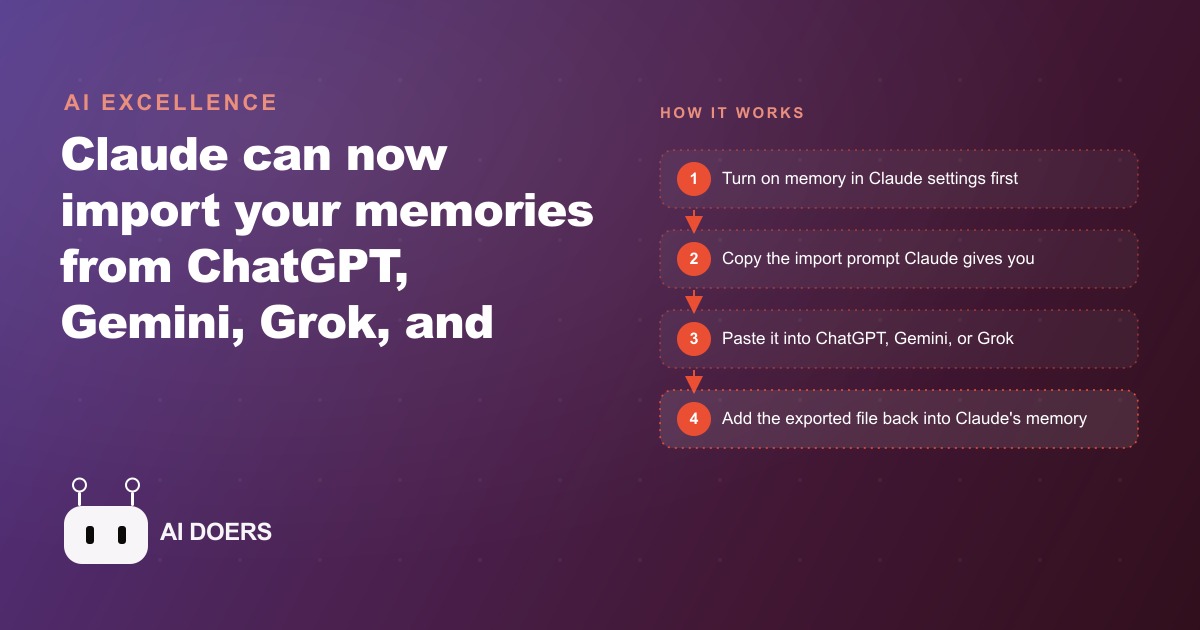
The most common reason people stayed on ChatGPT through 2023 and into 2024 was not that the model was better for their specific work. It was that three years of context lived there, and starting over on a different platform meant losing all of it. Claude's memory import removes that barrier entirely, and the implications run deeper than most coverage of the feature has explored.
Why Three Years of Accumulated Context Was the Real Switching Cost
Context accumulates gradually and invisibly. Every time you correct a chatbot's tone, describe how you prefer information structured, explain a client situation, or note that a particular approach does not work for your writing, the AI learns something about you that makes the next interaction marginally better. Over months, those corrections and descriptions compound into something genuinely useful: an assistant that does not need re-briefing before every session, that knows your industry vocabulary, that understands your role and the constraints you work within.
The problem is that this accumulated context belonged to the platform, not to you. If another tool became clearly better for a specific type of work you care about, the switching cost was not a monthly subscription fee. It was starting over from zero, rebuilding months of context through hundreds of small corrections, and accepting a period where the new tool performed noticeably worse than the one you already had trained to your needs. For most people, that invisible cost was enough to keep them in place even when they knew a different tool might serve them better on particular tasks.
This is the problem Claude's memory import solves. The context you built up is now transferable. It belongs to you, not to the application that stored it.
The Export Prompt That Moves Everything
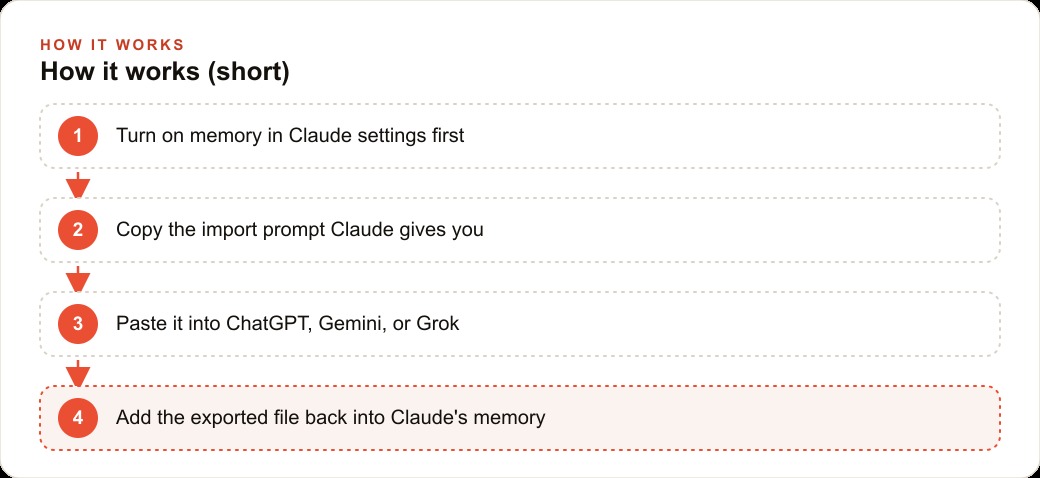
The import works through a structured export that you run inside whatever chatbot currently holds your history. The sequence has a specific order, and skipping the first step breaks everything downstream. Before importing anything, go into Claude's settings, open the capabilities section, and turn on every memory-related option including the setting that lets Claude reference past chats and generate new memories from your conversations. If memory is off when you run the import, the context transfers but has nowhere to land and nothing gets retained.
With memory active, the flow runs like this. Press Start Import inside Claude and it hands you a specific prompt to copy. Take that prompt into ChatGPT, Google Gemini, Grok, or Microsoft Copilot. The chatbot receiving that prompt generates a structured export file organized into named sections: reply instructions, identity information, career history, active projects, and personal preferences. Copy that file and paste it back into Claude, then confirm it should be added to memory. Claude updates immediately.
If you have meaningful history in more than one platform, run the same import prompt in each one. Claude merges the context rather than overwriting it, so your ChatGPT history and your Gemini history can both contribute to the shared memory at the same time. The result is an assistant that holds context from every platform you have used, consolidated in one place.
After the import, Claude displays all stored context with an edit icon next to each item. A simple prompt asking Claude to update or remove a specific item is enough to change what it holds. That maintenance step matters more than most users expect when they first set up memory, for reasons covered in the next section.
Your Context Now Belongs to You, Not the App
The more significant shift that memory import enables is not convenience. It is ownership. Before this feature, the accumulated context you built inside an AI tool was a form of lock-in that felt invisible because it accumulated slowly. You did not notice the switching cost until the moment you tried to switch.
Claude's approach makes the flow bidirectional. You can import into Claude, and you can also export out of it. Asking Claude to write out its stored memories exactly as they appear produces a structured file you can paste into any other chatbot as a conversation starter. That means you are never trapped on any single platform. The context is portable, which changes the relationship between user and tool from dependency to choice.
This matters for teams as much as it matters for individuals. A brokerage that standardizes on Claude as its team assistant can import the accumulated context from wherever each agent previously built their AI habits and start from a shared baseline. The new hire who joins the team six months later can import that same shared context and have a productive assistant from day one rather than spending weeks teaching it how the brokerage works.
The same logic applies to any business that manages consistent client communication, specific industry vocabulary, or a particular creative style. A team that has spent a year shaping an AI assistant to their voice and preferences should not have to rebuild that work every time a platform releases a better feature. Memory portability means they do not have to.
The Quiet Problem: Memory That Drifts
Memory import solves the switching cost problem, but it introduces a different challenge that does not get discussed as often. Memory that is never maintained drifts, and drifting memory causes the assistant to produce subtly wrong outputs in ways that can be hard to identify.
Drift happens when the stored context no longer accurately reflects the current situation. A project listed in memory as active that finished six months ago. A client name that changed. A role or title that no longer applies. A preference for a particular writing format that you shifted away from after trying something different. The assistant does not know these things have changed unless you tell it, and it keeps applying outdated context to new work.
The result is not dramatic failures. It is small errors that accumulate: an email drafted with a slightly wrong tone for the current client relationship, a summary that uses a former company name, a recommendation shaped by a preference you no longer hold. These errors are easy to miss in review and easy to attribute to the model rather than to stale memory.
The fix is simple but requires discipline. Every few weeks, open the memory view in Claude and read through what it holds. A short session of prompt-based corrections, telling Claude to remove outdated items and update changed details, keeps the context accurate and the outputs reliably good. The pencil icon on each stored memory item makes individual corrections quick. Treating this as a routine like clearing an inbox, rather than an occasional cleanup, is what keeps memory genuinely useful over time.
The other setting worth checking immediately after import is the model training option. Under privacy settings, there is an option that allows conversations to contribute to model training. It is on by default and it is not grayed out even on paid plans. If you import work context, client information, or project details into memory, you probably want to disable that setting before any of that content appears in a new conversation.
Projects Are Portable; Gems Are Not
The memory import handles personal context well. Saved workspaces, meaning the instruction sets and file libraries tied to specific recurring workflows, require a separate approach depending on which platform they came from.
Claude Projects hold their own instructions, their own stored files, and their own memory separate from the main account memory. The equivalent in ChatGPT is a Project with custom instructions and uploaded knowledge files. Both are portable in the sense that you can copy the instructions and re-upload the files when rebuilding in a new location.
Google Gemini Gems are different. Gems do not export. The system instructions that power a Gem, the specific behavioral rules and persona configurations that make it useful for a particular workflow, cannot be pulled out in a structured way through the same import prompt. The workaround is manual: open each Gem, read its system instructions, copy them, and paste them into a new Claude Project along with any files the Gem referenced. It takes more time than a one-step import but it is the complete solution.
For a real estate team that built a Gem configured to draft listings in a specific style for a specific market, the manual reconstruction step is worth doing once because the output quality from a properly configured Claude Project is meaningfully higher than starting each listing draft from a blank prompt. The team that rebuilds their Gems as Claude Projects and imports the shared brokerage context into each agent's account has a much more capable assistant than the team that imported memory but left their saved configurations behind.
Context covering the team's approach to SEO and organic search for listing pages, the neighborhood keyword strategies that have worked, and which content formats produce the most inquiries from buyers can all live in the project's instructions and get applied automatically to every listing description the assistant produces.
The Desktop Companion That Goes Beyond the Chat Window
Memory import is the most discussed update in this release, but the desktop companion called Cowork extends Claude's reach in a direction that changes the day-to-day workflow more practically for most users.
Cowork is a desktop application that can read, analyze, and create files on your computer. It is paired with a Chrome extension that takes actions inside web pages and lives directly inside Excel and PowerPoint. Both start at the paid plan tier. The combination means Claude can now work on the actual files and tools your team uses, not just in a chat window.
For a real estate team, this is where the imported memory pays off across more of the working day. The assistant that already knows the brokerage's voice and the market's vocabulary can now apply that context inside the spreadsheet where the team tracks listing performance, inside the PowerPoint where the quarterly market update gets built, and inside the browser where MLS listings, comparable sales data, and client communication all happen.
The memory that was transferred in covers not just personal preferences but the operational context of how the brokerage runs. A team member who manages the brokerage's Facebook and Instagram ad campaigns for new listings can have that campaign context, the audience targeting that works, the copy styles that generate inquiry calls, held in shared memory and applied by the assistant when drafting any ad creative or audience brief.
What a Real Estate Team Looks Like After Import
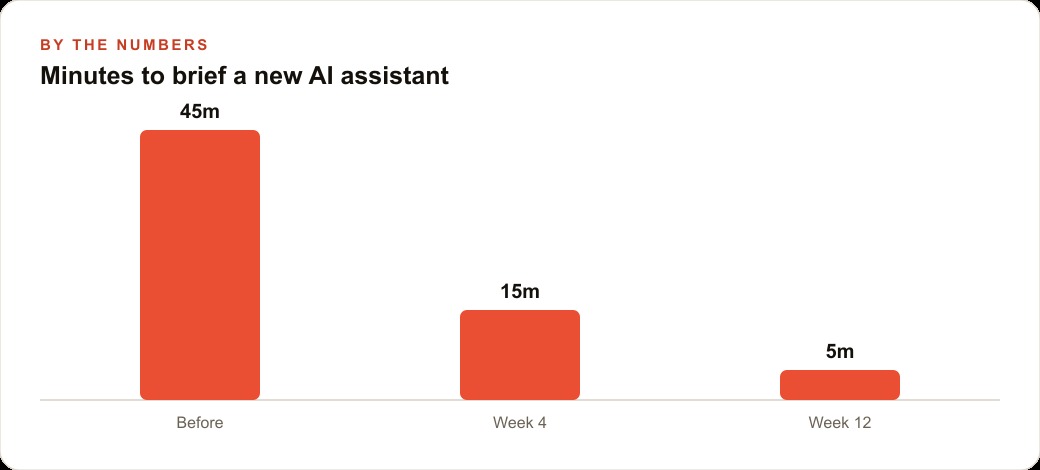
For a real estate team, a realistic worked example ties together everything above. The lead agent has spent a year teaching one chatbot to draft listing descriptions in the brokerage's specific voice, with the right balance of warmth and precision for their market segment. The descriptions reference neighborhood character accurately, use price anchoring language the market responds to, and hit a specific length that works across the MLS and the brokerage's website listings. A new agent joining the team gets a blank tool and spends the first two to three weeks producing drafts that need heavy editing to match the brokerage's standard.
After the lead agent exports their accumulated context and the team imports it, each agent's assistant starts from the same baseline. A listing description that used to take forty-five minutes between drafting and revision takes around fifteen minutes. Across twenty listings per month per agent, that is ten hours of capacity recovered per agent per month without adding any staff or changing any tool subscription.
The team's CRM and website stack context, covering which follow-up sequences work for different buyer profiles, what the conversion rate looks like from first inquiry to showing, and how the team manages client communication at each stage, can be added to the shared project instructions and applied by the assistant whenever a team member asks for help with client communication.
When the brokerage's voice evolves or a new market segment opens, one update to the shared memory and a re-export for the team to import keeps everyone current. The knowledge management that used to happen informally, through senior agents coaching junior ones and hoping the style guidance stuck, becomes a system that maintains itself.
Madhuranjan Kumar covers this kind of AI workflow setup for teams in detail during strategy sessions. The memory import is a twenty-minute setup that pays off immediately. The project configuration and shared context structure is a couple of hours that pays off across every piece of work the team produces after it.
That is exactly what we do at AI DOERS. Book a private 30-minute call with Madhuranjan Kumar and we will map the fastest path to it for your specific business.
Book your call →
Madhuranjan Kumar
Madhuranjan Kumar brings 20 years of performance-marketing experience and has managed over $200 million in Facebook ad spend for brands across the United States and beyond. His expertise spans the full modern marketing stack: Meta, Google Ads, TikTok, email automation, CRM, and the websites that hold it together. At AI DOERS he turns that track record into lead-generation systems for businesses across every industry.