
Claude Can Now Control Your Computer. Here Is Everything You Need To Know.
Claude can now look at your Mac, move the cursor, click, type, and operate apps on its own, and with Dispatch you can fire off a task from your phone while you are away. Here is what it does, where it shines, and where it still falls short.

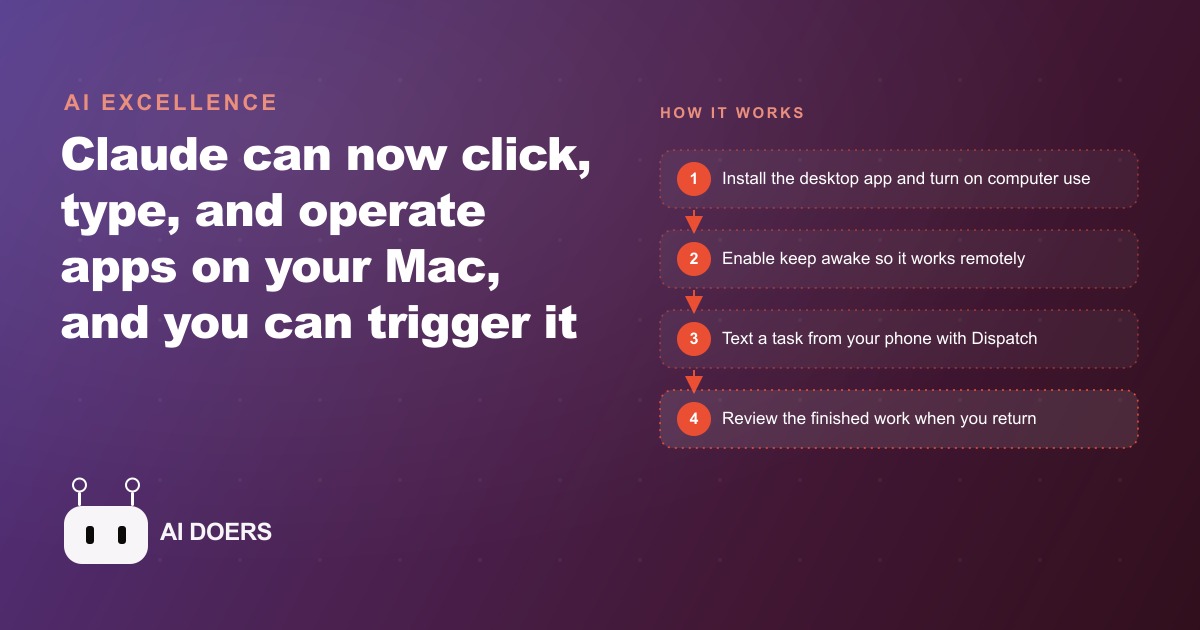
Claude can now look at your Mac screen, click buttons, type into fields, open applications, and complete multi-step tasks on its own while you text assignments from your phone: that is the feature, and real-world tests show exactly which tasks it handles cleanly and which ones still fall short.
6 Things Claude Computer Use Actually Does Well (and 2 It Still Gets Wrong)
1. Finding and Converting Buried Documents Into Clean PDFs
This is the strongest use case in real testing. When given a precise file name and an instruction like "find the file named 2026-05-15-transcript.txt in the Dropbox Research folder, summarize it into five key points, and save the result as a one-page PDF to the Desktop," the task completes cleanly from a single prompt. In one demonstration, Claude searched a full computer including connected cloud storage, located a 1,700-word transcript buried in a nested folder, summarized it accurately, and produced a formatted one-page PDF on the Desktop without any intervention. The key factor is specificity: give Claude an exact file name and it navigates directly. Ask it to find "last month's research notes" and it searches broadly, sometimes retrieving the wrong file. The reliability gap between precise and vague instructions is larger than most people expect on first use. For a solo operator who regularly needs to convert raw notes into client-ready documents, this task type works well enough today to be a genuine part of a regular workflow.
2. Drafting Routine Outbound Emails and Invoices From Saved Data
When the source data exists as a text file or note on the computer, Claude can read it, extract the relevant information, open a drafting tool or email client, and produce a ready-to-review draft. In practice this works best for recurring output types with a consistent structure: follow-up emails after a scheduled appointment, invoice drafts from a job notes file, or monthly summary emails generated from weekly log entries. The output is not always publication-ready on the first attempt. Claude occasionally formats a date incorrectly or pulls a figure from the wrong section of a notes file. But the draft is close enough that review takes two to three minutes rather than the twenty to thirty minutes the task would take from scratch. For a solo contractor who sends eight to twelve standard follow-ups and invoices per week, this consolidates several hours of administrative writing into an overnight task triggered from a phone message before leaving the job site.
3. Website Analysis and Code Redesign Through Claude Code
This produced the most impressive result in all tested demos. Given a URL and an instruction to analyze the site and produce a redesigned version, Claude visited the site, read the structure and styling, and wrote over two thousand lines of structured, animated HTML and CSS for a polished interactive redesign. The output required minimal editing before it could serve as a working prototype. This task worked substantially better than the application-focused tasks because it stays inside a controlled environment, the browser and the text editor, where Claude can navigate predictably. The capability is relevant not just for web developers. Any business that manages a website and wants to test a layout change, a new landing page structure, or a redesigned section can use this to produce a working prototype in an hour rather than paying for a designer's time or waiting for a developer sprint.
4. Importing Media Files Into Desktop Applications
This works, with caveats. In testing, Claude opened Adobe Premiere, created a new project file, located a video clip on the Desktop, and imported it to the timeline. The task completed successfully but took close to ten minutes and required clearing two system-level permission prompts that appeared during the first run on a new machine. After those permissions were granted, the workflow ran more cleanly on subsequent attempts. The practical conclusion is that this task category works for routine imports with well-named, correctly located files, but not for speed-critical editing workflows where delays and occasional permission interruptions would be disruptive. It is most useful for the initial setup steps of a project, creating the file, organizing assets, and importing the source material, so the human editor can take over for the creative work.
5. Organizing and Renaming Batches of Files According to a Pattern
When given a folder and a clear naming convention, Claude can rename files in bulk, sort them into subfolders, and produce an organized structure that would take a human thirty to forty minutes to work through manually. The instruction needs to be specific about the naming pattern: date-first ISO format, client name prefix, project code suffix, whatever the convention is. Claude applies it consistently across the entire batch. For businesses that receive large numbers of documents from clients, contractors, or vendors with inconsistent naming, this single task type alone can justify the subscription for some users. The results are reliable when the destination folder and the naming rules are clearly stated. When the instructions are ambiguous, Claude makes naming decisions that may or may not match what the user intended, so a brief review of the result is always worth the two minutes it takes.
6. Background Tasks Triggered From Your Phone While You're Away
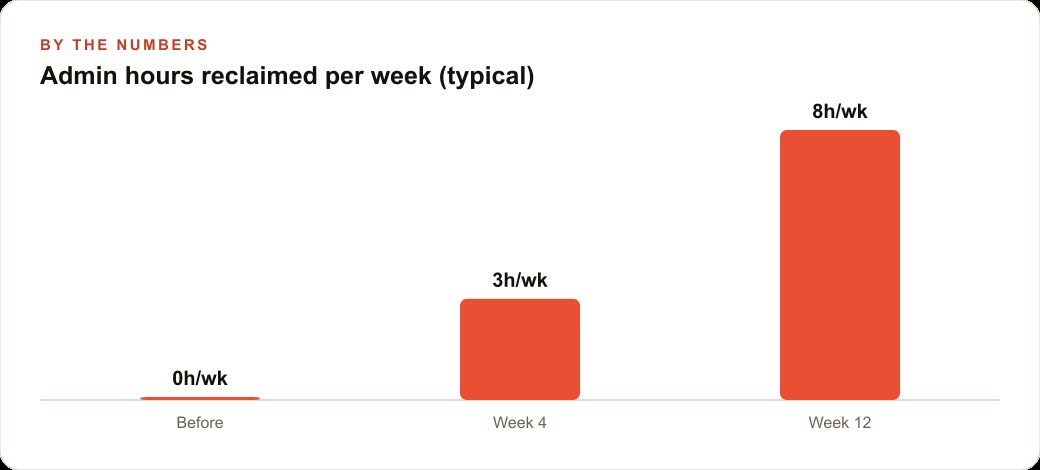
This is the use case that makes the entire feature worth setting up, and it is the one that real users are likely to find most valuable over time. You text a task from the Claude mobile app, Claude works on your desktop while you are away, and you review the result when you return. Speed does not matter because you are not watching the screen. The Dispatch feature that enables this requires three settings to be active in the Claude desktop app: keep computer awake, allow browser use, and computer use. All three must be on or the remote task arrives at a sleeping machine and produces nothing. When the setup is correct, the practical pattern is to text a batch of tasks before leaving the office or heading to bed, and come back to completed work. A solo contractor who does this consistently can realistically recover two hours of weekly admin time that currently runs in the evenings. At thirty dollars per hour in comparable outside-service cost, that is sixty dollars per week, or over three thousand dollars per year, against a monthly subscription cost well under that. The value is not in the speed of any single task. It is in the accumulation of tasks completed during hours that would otherwise have no available human attention.
7. Real-Time Data Entry and Fast Dashboard Work (What It Still Gets Wrong)
Claude computer use is slow by design. It takes deliberate, methodical steps, observing the screen between each action, which makes it fundamentally unsuitable for any task where pace matters. Rapid form filling, live dashboard monitoring, quick data entry into a fast-loading interface, or any workflow where the interface changes state faster than Claude can observe and respond will produce errors, missed fields, and frustration. Tests on speed-dependent tasks consistently produced results that were either incomplete or incorrect because the interface had moved on before Claude acted. This is not a bug that updates will quickly fix. It is a structural feature of how the system works: observe, decide, act, observe again. That loop is deliberate, not fast. Matching computer use to tasks that naturally belong in the background is the only approach that produces reliable results.
8. Speed-Critical Tasks That Need a Human in the Chair (What Else It Gets Wrong)
Anything requiring real-time judgment about what to do next based on rapidly changing information still needs a human present. Video editing decisions, live customer service responses, adjusting a presentation while presenting it, or navigating a sequence where each step depends on the outcome of the previous one in real time are outside what this feature reliably handles at this stage. The limitation is not intelligence. It is latency and the sequential nature of the observe-decide-act loop. Claude also still occasionally misreads a screen state, clicks on the wrong element, or gets stuck waiting for a prompt to appear that the interface is not going to show. First-run tasks on unfamiliar applications almost always surface at least one of these moments. The practical mitigation is to review overnight results before assuming a task completed correctly, and to build a light verification step into any workflow that matters. Computer use today is early-stage, genuinely useful for the right tasks, and genuinely unreliable for the wrong ones.
Getting Started Without Wasting the First Week
The most common reason a first experience with Claude computer use is frustrating rather than useful is not a configuration problem. It is a task-selection problem. The operator assigns a task that requires speed, real-time judgment, or rapid interaction with a changing interface, gets poor results, and concludes the feature does not work. The feature works well for the tasks it is designed for. The design is deliberate, background-task, observe-decide-act, slow and methodical, and the task selection has to match.
Before the first run, spend fifteen minutes making a list of the computer tasks that currently pile up on evenings and weekends. Not the tasks you do between calls during the day when you are at the keyboard anyway. The tasks that belong to off-hours: the invoice set for the week, the file organization after a project closes, the document conversion from raw notes to a formatted client summary, the email drafts for the twelve follow-ups you did not get to. Those tasks share a common property: they have a clear output, they are not time-critical, and the person who normally does them is the person who will be away from the desk when the agent runs.
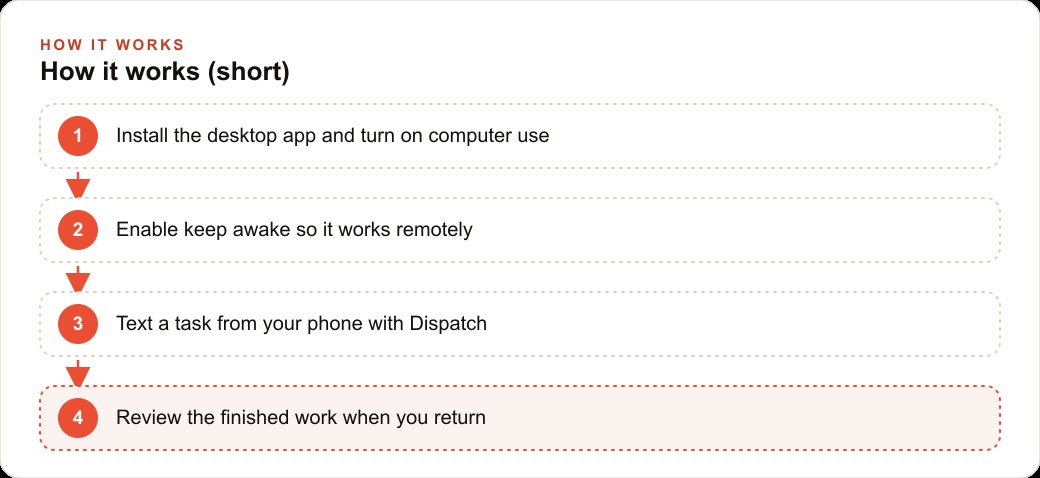
Pick one of those tasks for the first run. Write the instruction with a precise file name and a specific output format. Enable the three required settings: keep computer awake, computer use, and Dispatch. Send the instruction from your phone before you go to sleep. Check the result in the morning, note what worked and what needed adjusting, and refine the instruction for next time. After three to five runs on the same task type, the instruction is calibrated and the result is reliable enough to trust without reviewing every output in detail. Then pick the next task and repeat the process.
The setup for computer use on a new machine typically surfaces one or two system-level permission prompts on the first run that require a human to approve them manually. This is normal and does not mean the feature failed. After those permissions are cleared, subsequent runs on the same machine proceed without those interruptions. Planning the first run as a calibration exercise rather than a production handoff, something where you expect to make one adjustment rather than expecting a finished result, removes the frustration from the setup process and makes it much more likely that the feature becomes a permanent part of the workflow rather than something tried once and abandoned.
The feature will mature over the next several release cycles. Tasks that currently require workarounds and careful instruction-writing will become more straightforward. The underlying pattern of tasks that belong in a background-overnight workflow will not change, but the reliability of the execution will increase and the range of task types that work well will expand. Starting now, with appropriate task selection and realistic expectations, builds the habit and the workflow vocabulary that makes it easier to absorb new capabilities as they arrive without having to rethink the system from scratch.
For operators who invest the setup time, the clearest signal that the feature has become genuinely useful is when you stop thinking of it as a technology you are testing and start treating it as a reliable part of the workflow you plan your week around. That shift happens somewhere between the fifth and tenth successful overnight run, when the results have been consistent enough across enough different task types that you trust them without needing to examine every output with the same scrutiny you applied on day one. Getting there requires the right task selection from the start and a willingness to treat the first few runs as calibration rather than production. The payoff is a portion of your weekly admin load that runs on its own schedule and never needs you to be at the desk to get done.
That is exactly what we do at AI DOERS. Book a private 30-minute call with Madhuranjan Kumar and we will map the fastest path to it for your specific business.
Book your call →
Madhuranjan Kumar
Madhuranjan Kumar brings 20 years of performance-marketing experience and has managed over $200 million in Facebook ad spend for brands across the United States and beyond. His expertise spans the full modern marketing stack: Meta, Google Ads, TikTok, email automation, CRM, and the websites that hold it together. At AI DOERS he turns that track record into lead-generation systems for businesses across every industry.