
ChatGPT Projects Sharing Lets Property Managers Give Every Owner a Private AI Trained on Their Portfolio
A quiet but major update to ChatGPT Projects adds invite-only and public sharing, turning each project into a shareable AI workspace that any business handling multiple clients can deploy immediately.

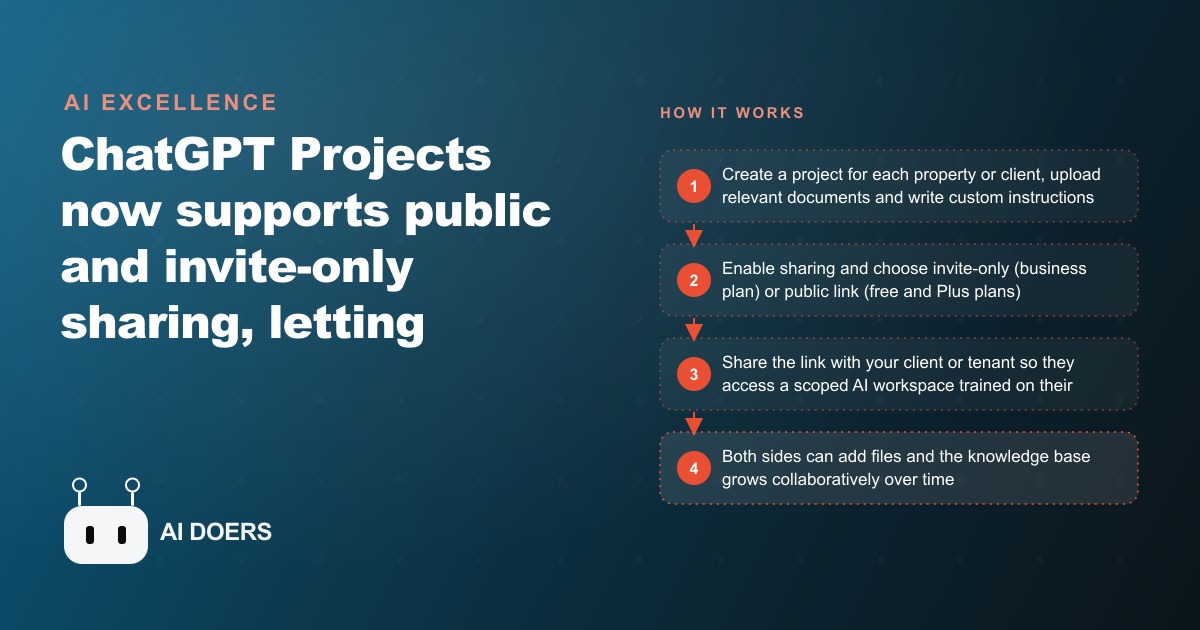
For years, the most useful AI workspaces built inside ChatGPT were also the most isolated. You could configure a ChatGPT Project with precise custom instructions, upload a client's documents to the knowledge base, and produce a genuinely helpful AI assistant trained on their specific context. But you could not give it to the client. The moment sharing was needed, the options ran out.
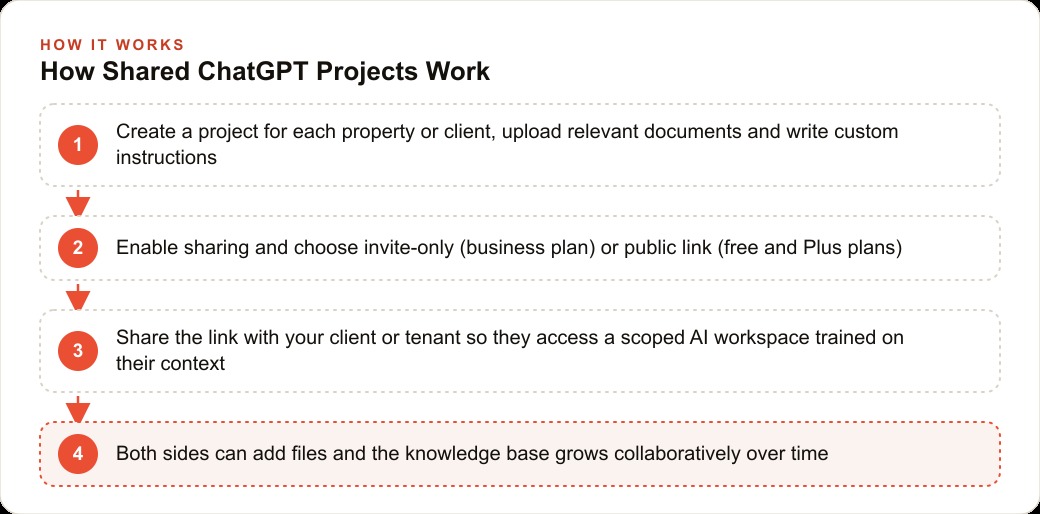
The sharing update to ChatGPT Projects changes that in a specific and consequential way. Projects can now be distributed via an invite link or a public URL, which turns what was a personal organization tool into something that can be handed to a client, a tenant, a team member, or a property owner. The operational implication for any service business managing multiple client relationships is larger than the feature description suggests.
I am Madhuranjan Kumar. Here is what the update actually does, how the technical pieces fit together, and what a property management implementation looks like when the full system is running.
What the sharing toggle actually unlocks that Projects could not offer before
Before sharing existed, a ChatGPT Project was a walled workspace visible only to the account that created it. The custom instructions you wrote, the files you uploaded, and the conversation history inside the project all stayed within your account. You could describe what the project could do to a client. You could paste excerpts from conversations. But the client could not interact with the trained workspace directly, and every question they asked still required a human to relay the query, find the answer, and communicate it back.
Sharing means a client can now open the same workspace you built, type a question in plain language, and receive an answer drawn from the documents and instructions you configured. They do not need to be present during the build, they do not need to understand how Projects work, and they do not need to upload anything themselves. The project you configured becomes a self-service tool they access through a link. You build it once; they use it whenever a question comes up.
For a service business that manages documented information on behalf of clients, this changes the delivery model in a straightforward way. The staff time previously spent answering client questions about documented policies, lease terms, scheduled maintenance, or regulatory requirements can redirect toward the judgment work that actually requires a human. The client gets faster answers. The team gets back the hours spent on retrieval and communication of information that was already written down somewhere.
Custom instructions are the intelligence layer, not the underlying model
The quality of a shared ChatGPT project depends almost entirely on the custom instructions, not on which version of the model handles the responses. Custom instructions are a block of text in the project settings that tell the model how to behave within this specific context. They define the types of questions to expect, the tone to use in responses, which documents in the knowledge base are authoritative for which query types, what to do when a question falls outside the available information, and how to handle topics that require escalation to a human.
This distinction matters practically because a shared project without specific custom instructions produces generic AI responses. The model will still answer questions, but it will pull from its general training data rather than from your uploaded files, and it will not know to defer sensitive questions to a staff member rather than providing an improvised answer. A well-configured project with specific custom instructions behaves like a knowledgeable assistant for your exact context rather than a general-purpose chatbot.
Writing effective custom instructions takes thirty to forty-five focused minutes for a specific context. That time is a one-time investment that benefits every future user of the shared project. For a property management firm, instructions for a building project might specify the property's name and address, the categories of questions tenants versus owners typically ask, how to handle maintenance requests versus lease questions, and the exact escalation path when a question requires a human response. Those instructions run in the background of every conversation without the end user ever seeing them.
The compounding effect is significant. A project with poorly written custom instructions becomes less useful the more people use it because users encounter wrong or irrelevant answers and stop trusting the tool. A project with precise instructions becomes more useful as more questions are asked, because the instruction layer handles edge cases consistently and the team learns which question types the project handles best. The investment in writing good instructions pays out over the lifetime of the project, not just on the day it is built.
The two access tiers and what each one exposes
Sharing currently works in two modes, and the choice between them has real privacy and security implications that need to be considered before any content is added to the knowledge base.
Public link sharing is available on free and Plus plans. It generates a URL that anyone who receives it can use to access the project and have conversations within it. The link can be revoked at any time, but while it is active, there is no authentication requirement. Anyone with the URL can interact with the knowledge base. Files uploaded to the project can be queried through conversations, but the raw documents themselves are not directly downloadable by public link users. Multiple people using a public link project all contribute to the shared conversation history within that project.
Invite-only sharing is a business plan feature. It allows the project owner to specify which email addresses can access the project, control whether those users can view existing chat history or contribute their own conversations, and determine whether they can edit the knowledge base or the custom instructions. A property owner invited to their building's specific project sees only that project; they have no visibility into other clients' projects. The invite-only model is the appropriate choice for any use case involving personal tenant information, individual financial records, or any data that should not be accessible to someone who happens to receive a forwarded link.
The practical decision rule is straightforward. Public link projects are appropriate for general FAQ content, building policies, and non-sensitive operational information. Any project containing specific lease terms, individual tenant details, maintenance cost history with specific figures, or owner financial summaries requires invite-only access and a business plan. The tier decision should be made before content is added, not after.
How collaborative editing turns a single project into a shared knowledge base
On the business plan, shared projects allow multiple team members to add documents, update custom instructions, and build on the same knowledge base together. A leasing manager adds the most recent lease template when it is updated. A maintenance coordinator adds the current vendor contacts and service protocols after a contractor change. An accountant adds the updated budget actuals at the end of each quarter. Each contribution improves the accuracy of answers the project provides to anyone who has access.
This compounds over time in a way that single-user projects cannot. A project maintained by one person reflects what that person remembers to update. A project maintained by a team reflects the collective institutional knowledge of everyone who works with that property, updated as circumstances change. For a property management firm, the cumulative effect over twelve months is a knowledge base that covers the questions clients actually ask far more comprehensively than any individual could have anticipated when the project was first created.
Collaborative editing also creates an internal reference for the team itself. When a staff member has a question about a specific building policy or a clause in the lease, they can query the shared project rather than asking a colleague who may or may not recall the correct answer. The project becomes a reliable single source of truth for both the team and the client. That dual use, internal reference alongside client-facing self-service, is what makes the investment in building a well-structured project worthwhile for a firm managing a multi-property portfolio.
For firms that already use a CRM and website stack to track lease renewals and maintenance tickets, the documents that live in that system can feed the project knowledge base as they update. Connecting those sources means the shared project draws on current information rather than relying on documents the team remembers to upload manually after each change.
Forty units, six buildings, one implementation
Here is what the implementation looks like for a property management firm handling forty residential units across six buildings.
The structure is one project per building rather than one per unit. Building-level projects cover everything relevant to that specific property without creating the overhead of managing forty separate project configurations. Within each building project, the knowledge base holds the lease template for that building, the house rules and move-in checklist, the current maintenance vendor contacts, the tenant roster with unit numbers and lease end dates, the previous twelve months of maintenance requests and their outcomes, and any HOA or regulatory requirements specific to that address.
Two versions of custom instructions serve two different audiences. A tenant-facing project for each building covers lease terms, maintenance request procedures, guest policies, move-out requirements, and emergency contact information. A separate owner-facing project covers current occupancy, upcoming lease renewals, maintenance spending summaries, and rent collection status. The same building is represented in two separate projects because the information needs and the appropriate tone for a tenant asking about their guest parking policy are different from those of an owner asking about quarterly maintenance expenses.
Property owners are invited into their building's owner project via invite-only link on the business plan. They can now query their asset at any time without a call to the office. How many units are currently occupied? When does the lease in unit seven expire? What maintenance work ran this quarter and what did it cost? They type the question and receive the answer from documented records, not from a staff member who has to look it up and follow up by phone.
Tenant access to the tenant project is distributed via public link included in the move-in welcome packet. When a tenant wants to know whether overnight guests can park in the building lot or what the subletting policy is, they open the project link and ask. The question that would have become a call to the office or an unanswered email gets resolved in under a minute.
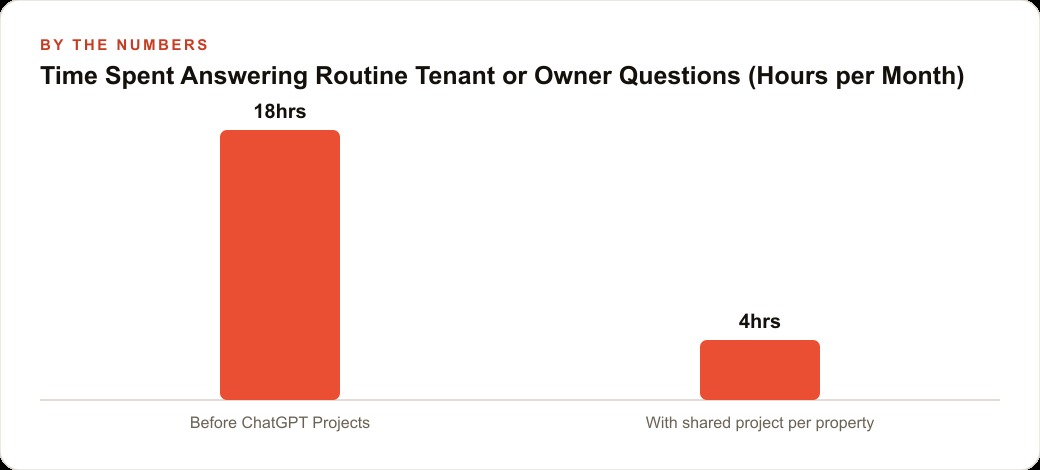
The time impact across forty units adds up quickly. A property management team of this size typically spends fifteen to twenty hours per month answering routine questions that are already documented in existing files. If shared projects handle half of those queries, the recovered hours represent either capacity for additional units under management or faster response on the questions that genuinely require a person to make a judgment call. For firms where SEO and content strategy drives inbound property owner inquiries, the operational efficiency the shared project system provides is what lets a growing team absorb new business without proportional headcount additions.
The entry point is a ChatGPT Plus plan at twenty dollars per month, which enables public link sharing. The Teams plan adds invite-only access, Company Knowledge connections to Dropbox and Google Drive, and higher usage limits. For a property management firm with multiple staff members maintaining a portfolio, the Teams plan investment typically returns its cost within the first month of reduced routine inquiry handling.
Building the first project for one property, getting the custom instructions right, testing it with real questions, and then duplicating the structure for each additional building takes a focused afternoon to set up and then scales without additional design work. The custom instructions from the first project become the template for all subsequent ones, with only the property-specific details changed. The time spent getting the first project right returns value on every project that follows it.
That is exactly what we do at AI DOERS. Book a private 30-minute call with Madhuranjan Kumar and we will map the fastest path to it for your specific business.
Book your call →
Madhuranjan Kumar
Madhuranjan Kumar brings 20 years of performance-marketing experience and has managed over $200 million in Facebook ad spend for brands across the United States and beyond. His expertise spans the full modern marketing stack: Meta, Google Ads, TikTok, email automation, CRM, and the websites that hold it together. At AI DOERS he turns that track record into lead-generation systems for businesses across every industry.